[PSX/PC] General editor - Hades Workshop (0.50b)

  • Thread starter Thread starter Tirlititi
  • Start date Start date
Status
Not open for further replies.
Hey tirlititi,

I just realised I haven't bothered you with detailed questions for a while, so here I go again, lol!

Anyway, I've been playing around with DnSpy again and I tried altering the damage calculation formulas for Frog Drop, Thievery, and Dragon Crest to also factor in the target's defense. Here's my code:

Code: [Select]
Code:
 case 66:  {   CALC_VAR calc_VAR37 = calc_VAR;   calc_VAR37.tg_flags |= 1;   calc_VAR.df_pow = (short)target.defence.p_def;   if (ff.frog_no - calc_VAR.df_pow / 2 > 0)   {    if (calc_VAR.at_num < 1)    {     calc_VAR.at_num = 1;    }   int num22;   if (ff.frog_no != 0)   {    if ((num22 = (short)(caster.level * (ff.frog_no - calc_VAR.df_pow / 2))) > 9999)    {     num22 = 9999;    }    else    {     num22 = (short)(caster.level * (ff.frog_no - calc_VAR.df_pow / 2));    }   }   else   {    num22 = 1;   }   calc_VAR.tg_hp = (short)num22;   }   break;  }  case 67:  {   CALC_VAR calc_VAR38 = calc_VAR;   calc_VAR38.tg_flags |= 1;   calc_VAR.df_pow = (short)target.defence.p_def;   if (ff.steal_no - calc_VAR.df_pow > 0)   {    if (calc_VAR.at_num < 1)    {     calc_VAR.at_num = 1;    }    int num23;   if ((num23 = (ff.steal_no - calc_VAR.df_pow) * (short)caster.elem.dex / 2) > 9999)   {    num23 = 9999;   }   else   {    num23 = (short)((ff.steal_no - calc_VAR.df_pow) * (short)caster.elem.dex / 2);   }   calc_VAR.tg_hp = (short)num23;   }   break;  }  case 68:  {   CALC_VAR calc_VAR39 = calc_VAR;   calc_VAR39.tg_flags |= 1;   calc_VAR.df_pow = (short)target.defence.p_def;   if (ff.dragon_no - calc_VAR.df_pow > 0)   {    if (calc_VAR.at_num < 1)    {     calc_VAR.at_num = 1;    }    int num24;   if ((num24 = (ff.dragon_no - calc_VAR.df_pow) * ff.dragon_no) > 9999)   {    num24 = 9999;   }   else   {    num24 = (short)((ff.dragon_no - calc_VAR.df_pow) * ff.dragon_no);   }   calc_VAR.tg_hp = (short)num24;   }   break;
It's working fine so far except for one thing: When the enemy's defense is higher than the Number of steals/dragons/frogs, I experience some sort of 'damage underflow bug' and start dealing really wierd 10-digit damage numbers (or was it 12 digits? Don't remember.). Do you by chance know how to avoid this? If the enemy's defense is higher, I'd like the damage to be 0. I've copied the basic outline of the script from other attacks that deal 0 damage when the enemy's defense is too high, like Lancer, Drain or Osmose, and then merely adjusted the parameters accordingly to match my formulas. But I must be missing something important.

Edit: Nevermind, I figured it out! The code I posted turned out to be fine after all, but in my file I had an older version of the code, probably due to not saving properly last time.
 
Last edited:
Hello everyone. Sorry for answering so late: I am off modding nowadays and had some tough work on top of that.

@eugene9: No, it's not really possible because the bones of each model are not linked the same as the bones of the other models.
With my debugging tests, it was possible to edit the animations using the Unity Assets Viewer (in the "Tools" menu). Modifying the animations may be the only model-editing feature that actually works (it bugs when you export/reimport meshes most of the time). So you should untick the option "Import Meshes/Materials" if you try it.
There are several proprietary tools allowing to make animations more or less easily. I guess that more free tools for that will be available eventually.

@Kefka: I don't know if you did it already, but you can add a "Stona-kill" like this:
Code: [Select]
Code:
case 12:    if (FF9StateSystem.Battle.FF9Battle.add_status[(int)cALC_VAR.cmd.aa.AddNo]==2147483649u && btl_util.CheckEnemyCategory(target, CATEGORY_STONE))    {        if (btl_calc.CalcSub_12A(cALC_VAR)) // CheckPetrifyDeathMiss        {            btl_calc.SetEnforceHP0(target);            UIManager.Battle.SetBattleFollowMessage(25, new object[0]); // "Became too soft to live."        }    } else {        btl_calc.CalcSub_302(cALC_VAR); // DoRemoveSpellStatus    }
With this, spells that cure exactly the statuses Petrify and Gradual Petrify will also kill stone enemies. Esuna will not.

For the duration of statuses, it's in the method "btl_stat::AlterStatus". Near the end of the method, you have this block:
Code: [Select]
Code:
if ((status & 4026466304u) != 0u){ short num6; if ((status & 2601713664u) != 0u) {  num6 = (short)(60 - btl.elem.wpr << 3); } else if ((status & 619446272u) != 0u) {  num6 = (short)(btl.elem.wpr << 3); } else {  num6 = (short)(60 - btl.elem.wpr << 2); } btl.stat.cnt.conti[(int)((UIntPtr)(num - 16u))] = (short)(status_data[(int)((UIntPtr)num)].conti_cnt * (ushort)num6);}
That's the formulae to change for the duration. The first formula is for negative statuses, the second is for good ones and the last is the default (I think it's used for Berserk only). You can of course split the internal "if" blocks to have a formula specific to each status.

Congrats for modifying the damage formula of these other spells :)

@lyokoffx: I don't know :/
You should have files in those folders. Maybe you are using an ISO that ffix_img_extr.exe doesn't recognize... no idea.
Also, for the sound conversion, I don't know either (but that, I said it the very first time you asked for sounds).

@WhiteMirage: Here is the right way to proceed:
1) Start with a fresh vanilla FFIX.
2) Open the game files with HW.
3) Open the mod file "AlternateFantasy_v4.5.hws". In case you don't have it, it's here (since the last update, it's not packed together with the mod itself anymore).
4) Do all the modifications you want in HW.
5) Save the mod (both as .hws and as Steam files), copy/paste the Steam files in the FFIX folder.
6) Whenever you want to add other modifications, start again from a fresh vanilla FFIX and import your .hws instead. That's why I recommend to copy/paste FFIX's folder when modding, having a vanilla version that you open with HW and a modded version that you play with (and open with the Unity Assets Viewer).

I tried to make things work without bug when you proceed like you did, but apparently I failed to do so.

Also, you may want to have a look to the Readme.txt of the AF mod files because I also (slightly) mod the game with dnSpy.
 
Thank you for your support

1- I have the files without extension as in the screane in these folders
and I have the "converter.exe" that works anymore it says an appcrach message and in the error it is marked a msvcrt.dll

is there a solution to this problem
hat is this tool for ?

2- is there any spell templates in the image ff9.img

2- and what a tool to see his models and especially thé wall m'est ?

et merci d'avance
 
Last edited:
1- You can download msvcrt.dll on the internet ; it's a standard .dll. Put it in the directory of "converter.exe".
I don't remember what are Zidane_2's tools for individually.

2- There is no spell template. The spells are stored as raw data that HW can read and export as .hws files. Don't expect to find excel files inside PSX discs, if that is what you are asking.

2 bis- You can use FF9 Reverse made by tasior2 to see most of the 3D models of the PSX version.
 
Thank you for your support

1- I downloaded several msvcrt.dll on the net and copied them in the same directory but with the same error

is there a solution ?

2- thank you very much for "FF9 Reverse" and for your franchise for spell models

And thank you in advance
 
Last edited:
im trying to add this to a boss on disc 3 and getting this error code - " - Not enough space : data is 32 bytes too heavy"

    while ( VAR_LocUInt8_80 > 0 ) {
        if ( #( SV_FunctionEnemy[HP] <=$ 10000 ) ) {
            set VAR_LocUInt8_80--
            set SV_FunctionEnemy[HP] =$ FirstOf(SV_FunctionEnemy[MAX_HP])
        }
        Wait( 1 )
    }
 
Last edited:
@lyokoffx: Are you sure that you downloaded the good DLL? There are several DLLs with nearly the same name.
What's your error?

@resinate: That's because of the PSX space limitations :/
You need to compress the code a bit in order to regain those 32 bytes. Which enemy is your boss based on?
Most of the time, in the ATB function, there are lines like this:
Code: [Select]
Code:
set #( SV_Target = ... )
You can turn them to this to gain a little space:
Code: [Select]
Code:
set SV_Target = ...
Other space optimisations depend on the code, that's why I ask what is the base enemy.
 
@Kefka: I don't know if you did it already, but you can add a "Stona-kill" like this:
Code: [Select]
Code:
case 12:    if (FF9StateSystem.Battle.FF9Battle.add_status[(int)cALC_VAR.cmd.aa.AddNo]==2147483649u && btl_util.CheckEnemyCategory(target, CATEGORY_STONE))    {        if (btl_calc.CalcSub_12A(cALC_VAR)) // CheckPetrifyDeathMiss        {            btl_calc.SetEnforceHP0(target);            UIManager.Battle.SetBattleFollowMessage(25, new object[0]); // "Became too soft to live."        }    } else {        btl_calc.CalcSub_302(cALC_VAR); // DoRemoveSpellStatus    }
With this, spells that cure exactly the statuses Petrify and Gradual Petrify will also kill stone enemies. Esuna will not.

For the duration of statuses, it's in the method "btl_stat::AlterStatus". Near the end of the method, you have this block:
Code: [Select]
Code:
if ((status & 4026466304u) != 0u){ short num6; if ((status & 2601713664u) != 0u) {  num6 = (short)(60 - btl.elem.wpr << 3); } else if ((status & 619446272u) != 0u) {  num6 = (short)(btl.elem.wpr << 3); } else {  num6 = (short)(60 - btl.elem.wpr << 2); } btl.stat.cnt.conti[(int)((UIntPtr)(num - 16u))] = (short)(status_data[(int)((UIntPtr)num)].conti_cnt * (ushort)num6);}
That's the formulae to change for the duration. The first formula is for negative statuses, the second is for good ones and the last is the default (I think it's used for Berserk only). You can of course split the internal "if" blocks to have a formula specific to each status.

Congrats for modifying the damage formula of these other spells :)
Thanks for the reply, tirlititi! Your suggestion for the Stona spell works like a charm! I didn't know that it was possible to add checks for which statuses are cured exactly, so I hesitated about altering the Cure Status formula for fear of screwing up other status curing spells like Esuna or Antidote.

But concerning the status duration formulas, I still got a few questions:

1) Why does Berserk have a separate duration formula? For all I know, Berserk is a permanent status, isn't it?

2) About the last line from that code you posted:

Code: [Select]
Code:
btl.stat.cnt.conti[(int)((UIntPtr)(num - 16u))] = (short)(status_data[(int)((UIntPtr)num)].conti_cnt * (ushort)num6);
At first I wasn't sure how to read this exactly, but then I found an older post from you from last year when we were first talking about this topic (it was on page 40 of this thread). There you posted the following (back then we didn't have DnSpy so I tried to do it via Hades Workshop's Cil code instead):

However, for the durations of the statuses, they are in 2 spots and it is not possible to edit either of them :/
- In "btl_stat::AlterStatus", a page before the end, there are 3 similar formulas "Duration = (60 - spirit) << 3" (for bad statuses and jump), "Duration = spirit << 3" for good ones and "Duration = spirit << 2" by default (it doesn't seem to be used). You can't edit this method because it's too big and CIL editing tends to bug with big methods.
- In FF9BattleDB (.ctor), there is the setup of "STAT_DATA", a class for status informations, including a multiplier used after the formulas I gave above. You can't modify the method because it's too big and anyway it is one of the few methods that are specially handled by HW and modified by other means.
I've looked into this FF9BattleDB::status_data with DnSpy, and there's a list of 32 statuses. Unfortunately they aren't labeled, so I don't know for sure which order they are in, but I noticed that the third byte is 0 for the first 16 statuses, and then has a value for the following 16 statuses. Not sure about the other bytes, but I'm guessing that this third byte is that multiplier you were referring to, and that would mean that the first 16 statuses in that list are the permanent status effects and the following 16 statuses are the temporary ones, right?

So the complete formula for calculating status duration should be:

Status-specific multiplier * that "num6" value from above (the one that uses the Spirit stat)

And that is the number of frames (or "ticks") that have to pass before the status wears off.

Are my assumptions correct so far? I've already playtested a bit and successfully increased the duration of both positive and negative statuses, now it's only a matter of finding a fair balance for each.

3) Onto my last question: it bugged me a bit when I re-read in your older post that Jump was also a "status effect", that might be a bit annoying. I wanted to increase the usefulness of spells like Protect and Shell, but I don't want jumping to take forever so I'd like to lower the multiplier of that one. You don't happen to know which of these statuses in the list in FF9BattleDB::status_data refers to the Jump status, do you? I guess I could find out through trial and error, though. Anyway, many thanks for guiding me so far, you've been a great help!
 
1) You are right, Berserk is permanent, my bad. It's not that it would have had a "special treatment", it's more that there is a duration formula for bad statuses, another one for good statuses and a default formula (that is never used then, if I'm not mistaken).

2) Yes exactly. I thought that this status-specific multiplier was the same for all the statuses, I remembered wrongly.
The order of the statuses in that list is the same as the order in HW when it's displayed in rows of 4 statuses (so starting with Petrify, Venom, Virus, Silence, Darkness...).
The different numbers there are "byte priority, byte opr_cnt, ushort conti_cnt, uint clear, uint invalid" (the class is defined in FF9/STAT_DATA). "opr_cnt" defines the rate of occurence for Regen/Poison/Venom, "clear" is a byte-list of statuses that are removed when the status in inflicted and "invalid" is another byte-list of statuses that can't be inflicted afterward (it is used to prevent a permanent status to be inflicted twice for instance).
"priority" seems unused.

Below that status setup, you can see the definition of "add_status" which corresponds to the Status Sets inside HW.

3) Jump is the second to last status (the 31th) so it's the line "new STAT_DATA(0, 0, 10, 0u, 3221225471u),".
It's integer ID is 2^30 = 1073741824u.
 
Hello Tirlititi! It's a long time I don't write something here, and I'm so happy to join again with...a new problem to solve  :evil:

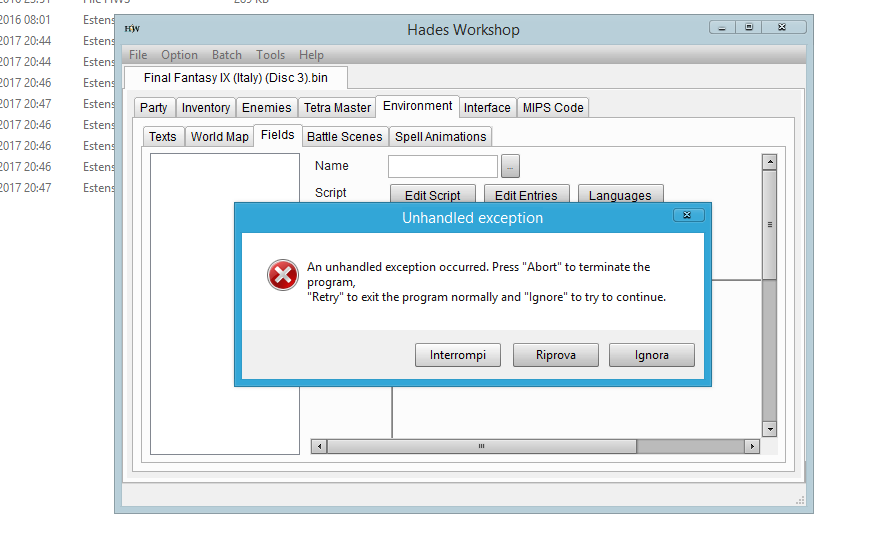
Sooo, I decided to try to apply the "Blank Mod" also on the PSX file. So I started with a new clean project, but for some reason I really don't know why everytime I try to check the Fields the program gave me this error

T1f3oyo.png

The .bin file is the Italian version of the game. The rest (Enemies, Party, Inventory, Battle Scenes, World Map etc) work perfectly, but the Field not.. and it's the same for all the discs...so..why?

Thank you again so much for all the kind help
 
Last edited:
I think that the loading of fields is bugged for the PSX version. If I recall correctly, it loads without crashing the fields of the japanese discs but completly scramble the field names.

I have no other solution than to try with older versions of HW and find one before that bug appeared, sorry.
 
Thank you for your support

here is my mistake


all I have to download the .dll is wearing this no


and thank you in advance
 
Last edited:
I think that the loading of fields is bugged for the PSX version. If I recall correctly, it loads without crashing the fields of the japanese discs but completly scramble the field names.

I have no other solution than to try with older versions of HW and find one before that bug appeared, sorry.
Don't worry! I solved with the .38 version! Thanks a bunch!
 
I know that it's not exactly related to HWS, but also it is.  ;)

Everyone knows where can I find some ready saved data for PSX (Emulator)? It's useful to me for testing without begin from the start..!  :|


Nevermind! I found everything I need  ;D
 
Last edited:
Ah, no idea then, lyokoffx, sorry...
That's a strange error. I guess it is because of a version compatibility... maybe try to run the converter as administrator or with Windows XP compatibility? There should be these options somewhere if you right-click on it.
 
I don't know if everyone asked of this before but...what about if I want to transport the character on a different Field?

I explain better... I want that in the "Evil Forest" when Zidane is going to rescue Garnet, in the end of Field 254 and the start of 256, the Field "teleports" somehow, in another part... in this case at the start of the evil Forest (250), where Blank is looking for Zidane... when he'll goes through the Fountain (after a kind of cutscene i guess) everything will be back on Zidane and his friends on the Field 256.

I don't know alot about Variables..I've seen that I have to work on Region1_Range.. but I really don't know what to do exactly without mess everything..can I have a hint?

I hope this question is clear enough  :-[
 
Last edited:
Thank you for your support

1-

maybe try to run the converter as administrator or with Windows XP compatibility? There should be these options somewhere if you right-click on it.
unfortunately I already tried the administrator mode and the same problem and also the VirtualBox virtual machine with Windows 10 and Windows 8.1
I do not know why

2-I wonder if I can start using HW

or I have to find tutorial

what is the programming language used on this program

which is less tiring to produce code unity3d or HW

My project is to produce a sequel to ff9 is this HW is Qualified for my project


and thank you for everything and thank you
 
Last edited:
@ToraCarol: Making a cutscene is never quite easy but it is possible.
It indeed begins in a "Region" function of the field 254 (Swamp). There are two regions: one going forward to field 256 (Trail) and one going back to field 253 (Spring). You want to make it so that the first time that one gets to 256, a cutscene occurs. You may do it like that in general:
Code: [Select]
Code:
// A variable that is not used ; I think that you can take 60000 and the followings for booleans (it corresponds to 7500 for the other types of variable)if ( !VARL_GenBool_XXX ) {    set VARL_GenBool_XXX = 1    // Do whatever you want as a one-time event} else {    // Do whatever you want to be the default (in this case, going to field 256 normally)}
You can see that there is already a code like this in the function "Region1_Range" because there's already a one-time cinematic playing when you go there for the first time. You can simply use it and change the destination field of the first case to 250 instead of 256, so you get there after the cinematic showing the Plant Brain.
There is a variable, "General_FieldEntrance" that can be used to comunicate simply between fields. Most of the time, it is used to say "where should the player appears on the field". You may also use it to say that you are not entering the field 250 normally but as a cutscene.

So change that variable to something unused ("set General_FieldEntrance = 10" for instance) and code what it should trigger inside the code of the field 250.

First, in the function "Main_Init", you want to prevent Zidane from appearing. So for these lines:
Code: [Select]
Code:
    if ( ( General_ScenarioCounter == 2010 ) && ( !VARL_GenBool_2432 ) ) {        set VAR_GlobUInt8_30 = 1        InitObject( 10, 0 )        InitObject( 7, 0 )        InitCode( 6, 0 )        InitRegion( 8, 0 )        InitRegion( 9, 0 )        set VARL_GenBool_2432 = 1    } else {        set VAR_GlobUInt8_30 = 0        InitObject( 10, 0 )        InitRegion( 8, 0 )        InitRegion( 9, 0 )    }
Put a condition for initializing Zidane (and, while we are at it, the exiting regions):
Code: [Select]
Code:
    } else {        set VAR_GlobUInt8_30 = 0        if ( General_FieldEntrance != 10 ) {            InitObject( 10, 0 )            InitRegion( 8, 0 )            InitRegion( 9, 0 )        } else {            // Init the object corresponding to Blank, like "InitObject( 17, 0 )"        }    }
So you need to create a new entry that is linked to Blank's 3D model. You are very lucky there because I think that Blank is one of the few models that can be accessed in any field in the PSX version (you won't be able to use a lot of animations though). The Steam version is incredibly better for that, but it's still possible...
So, right-click on the function list and add a new function. You can use the entry 17 that is reserved for the 8th player character normally (it is the slot used by Blank before Amarant joins; it doesn't have a lot of importance here anyway). Use a function of type "0" (for initialization) and put a code like this inside:
Code: [Select]
Code:
    SetModel( 5467, 87 )    CreateObject( POSITION_X, POSITION_Y )    TurnInstant( ANGLE )    SetStandAnimation( 462 )    SetWalkAnimation( 5225 )    SetRunAnimation( 5222 )    SetLeftAnimation( 5223 )    SetRightAnimation( 5224 )    SetObjectLogicalSize( 20, 20, 30 )    SetAnimationStandSpeed( 14, 16, 18, 20 )    SetHeadAngle( 96, 61 )    return
Then add a "Loop" function for him (add function of type "1") and code a cutscene there...
At the end of the cutscene (either in that field or in another), you should put the following lines to give the control back to Zidane in the field 256:
Code: [Select]
Code:
set General_FieldEntrance = 27Field( 256 )
Check this tutorial for a detailed example of how you can do cutscenes.

You can see that, up to there, you didn't need to declare or use any new variable. You can do a lot with just the variables that are already used by the game, especially when you want to do standard things like moving to another field for a cutscene. Eventually though, you need to use new variables in most cases. Here is how to declare local and global variables. You can use general variables without declaring them but you should be sure to use one that the game doesn't use already (as said, the variables with an ID higher than 7500 should be fine).

@lyokoffx: I don't really understand what you say...
Hades Workshop is coded in C++ and the source code is available here.
I can't say if HW is "qualified" to create a sequel to FF9 because I don't know what you are thinking of... It depends of how different the game would be.
 
Thank you for your support

so where should I find the tutorial in these sites to get good started

During my game changes, do I have to type C ++?

And thank you in advance
 
I don't know, I mostly learned programing at school and as an autodidact.
C++ is kind of a difficult and tedious language but also reliable and very widespread. I am not sure if it would be the best choice for starting a game nowadays. But again, I am not quite sure of what you want to do.

You can send me a PM in french if that helps to say things more clearly.
 
Status
Not open for further replies.
Back
Top