[PSX/PC] General editor - Hades Workshop (0.50b)

  • Thread starter Thread starter Tirlititi
  • Start date Start date
Status
Not open for further replies.
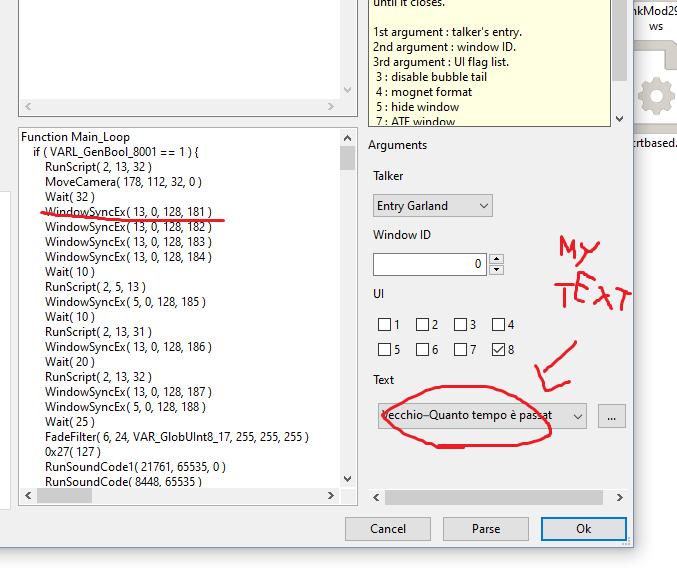
Looks like a script called text that doesn't exist!.
Thank you for the reply Incinerator..so how can I solve this missing? What did I or didn't I do? I've tried some things but looks like i really don't know how to come through this  :(
 
Thank you for the reply Incinerator..so how can I solve this missing? What did I or didn't I do? I've tried some things but looks like i really don't know how to come through this  :(
I'm a such a turtle!
Is you text added in right text block for this field (iirc Text Panel -> Alexander)
 
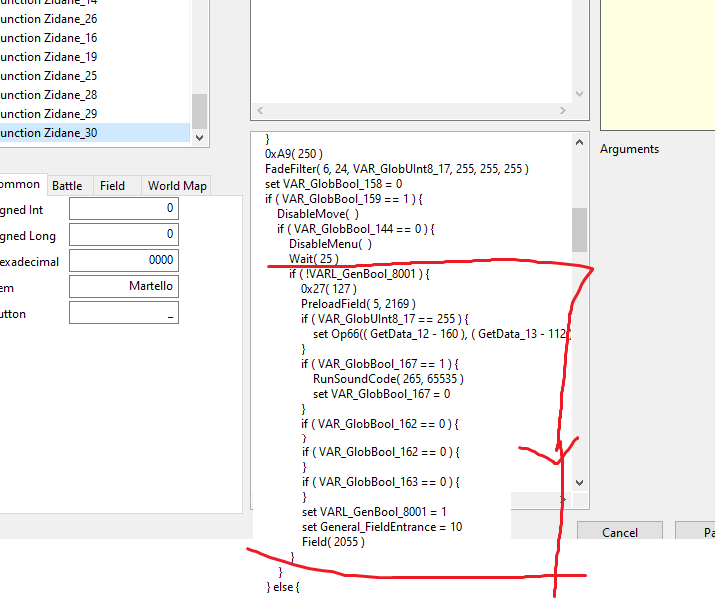
I took Eiko on Lv1 editing Field scripts at Conde Petie Mountain Path in the function "Main_Loop" (Marcus' level was 21)
Hi Vivigix (or anyone else),
Realize this is old but,
I was wondering if what your wrote here is specific to the PSX version? Recently decided to add it to my game, but the code seems to be different for steam (although similar). Would appreciate any advice you'd have for achieving this on the steam version (also for the other characters).

In Hades workshop, for Eiko the code is:

Code: [Select]
Code:
Function Main_Loop    if ( General_FieldEntrance == 65535 ) {        set Setting_PartyReserve = 103        SetPartyReserve( Setting_PartyReserve )        if ( IsInParty(5) ) {            RemoveParty( 5 )            set VARL_GenUInt8_303 = 0            set VAR_GenInt8_60 = ( VAR_GenInt8_61 = ( VAR_GenInt8_62 = ( VAR_GenInt8_63 = ( VAR_GlobInt16_8 = ( VAR_GlobInt16_10 = ( VAR_GlobInt16_12 = ( VAR_GlobInt16_14 = 65535 ) ) ) ) ) ) )            set VAR_GlobInt16_14 = 0            while ( VAR_GlobInt16_14 <= 11 ) {                if ( IsInParty(VAR_GlobInt16_14) ) {
EDIT: Actually, you know what I figured this out I think. You only need to change 1 number in each. I’m going to release this as a hws for anyone else who needs help. Thanks for the info!
 
Last edited:
Sorry for not answering. I am working back a bit on HW in view of releasing a new version. I'll mainly try to fix compatibility issues (Albeoris's Memoria, Moguri Mod, Audio fix and other DLL editing mods...). I'll use the occasion to fix a couple of bugs too.

Thanks a bunch DavidBest1996 for telling me about that one; it's fixed and the next version will be working better on PSX files again.

Good job so far TheHobgoblin ^^
You can see examples of NPC scripts here, there and there. The important steps are: add an NPC entry (or use one of the free "player" entries that are after all the others and usually have no functions at first), add an "Init" and a "SpeakBTN" function, setup the model+position in the "Init" and use "SetPartyReserve( xxx )" and "Party( 4, 0 )" in the "SpeakBTN".
 
Last edited:
I'm a such a turtle!
Is you text added in right text block for this field (iirc Text Panel -> Alexander)
In my case (Invincible-Garland) the text is on "Alexandria (Night)". I simply added new dialogs next the other ones for Garland,Kuja etc.. and in the script it let me ready the Dialog Window


8pW1bje.png


What I don't get,so, is why it give me this kind of error...

It's a scene added after the "Hilda Garde I" talk with Zorn and Thorn, I simply added a new Variable and a general field entrance... like the other scene on Lindblum that work perfectly..kinda strange..idk.


rWahVZt.png


And not worries Tirlititi you're doing such an amazing and huge of work so it's ok to not have time for everything anyway  ;D
 
Last edited:
You're welcome, Tirlititi, on the contrary, thanks to you to fix that :)... I seriously thought to be dumb not figuring out why not working.
I look forward to download the newer version, thanks for your great job in this, I hope that my problem doesn't slow down too much your working  :D (again sorry for bad english)
 
Update to v0.41:
- Added a Randomizer tool, including the slightly modified features of Meteor On FFIX (which was only working on the PSX US version) and a way to randomize the enemies' spells (unfairness is guaranteed),
- Added more flexibility and compatibility with other mods or modding tools:
--- You should now be able to open and append changes to Assembly-CSharp.dll mods created by other means (Sound Fix, dnSpy-edited DLL, etc...) as long as they don't change the structure of some key things (the datas read by Hades Workshop, such as the spells (AA_DATA)...),
--- Since Albeoris's Memoria change the structure of these key things, you still can't open the Memoria-modded DLL; however, you can now generate .csv files that are suitable to Memoria for most of the modifications. There's a couple of modifications that requires a bit of dnSpy hacking to complete the merging of the mod though: the Magic Sword requirement spells and the Battles' battleground changes (both of them are not editable yet using only Memoria),
--- You may directly generate the assets instead of the full-fledged archive files; this way, assets can be imported into archives modded in different manners and easily merge mods as long as they don't change the same assets (but do change the same archives),
--- Fixed different bugs with the PSX versions of the game; Hades Workshop should fully work on them again (also, the Randomizer works on the PSX version, minus the possibility to have non-updated spell names or descriptions due to the lack of space),
- Fixed a few other bugs (the one pointed by DavidBest1996, the very large numbers bugging in the Script editor, a "switch case + do-while loop" decompilation error...) and improved a few things.

I am still on a break with FF9 modding. I will surely just update my mod Alternate Fantasy to have compatibility with other mods, but then I'll return to not making things.

Note that Gael-Honorez-sb added CMake files to generate Hades Workshop projects using CMake on GitHub. I always have troubles with CMake (but with Visual Studio as well anyway) but it will surely ease the work of people trying to use the tool's source code. Let him be thanked for that.


@ToraCarol: Maybe it has something to do with the dialog itself? What text opcodes are you using?
 
Last edited:
Excellent update @Tirlititi!  8)
Everyone on compiled CSharp works well with edited one (using dnspy). Did a brief test changing an spell animation and generated CSharp caused no crash!.
 
Hold everything!
I found a bug when loading HWS files containing Spell Animations. It corrupts the saves done after that.

If you loaded HWS files containing Spell Animations and then saved HWS again with the version 0.41, you must do that, using the version 0.41b:
- Open the HWS with your latest changes (saved with v0.41) without the Spell Animations (it should crash anyway if you load them),
- Open a previous HWS with Spell Animations changes (saved with <= v040b) if you have a backup or do the Spell Animations changes again.
- Save as HWS; that's fine.

If you don't have a backup, you can also send me your (corrupted) HWS file and I will fix it.

Sorry for the troubles...
 
Last edited:
Hold everything!
I found a bug when loading HWS files containing Spell Animations. It corrupts the saves done after that.

If you loaded HWS files containing Spell Animations and then saved HWS again with the version 0.41, you must do that, using the version 0.41b:
- Open the HWS with your latest changes (saved with v0.41) without the Spell Animations (it should crash anyway if you load them),
- Open a previous HWS with Spell Animations changes (saved with <= v040b) if you have a backup or do the Spell Animations changes again.
- Save as HWS; that's fine.

If you don't have a backup, you can also send me your (corrupted) HWS file and I will fix it.

Sorry for the troubles...
Good to know warning;
Luckily for me, I didn't use .hws file from v040b!  8-) I literally went this whole test ride without saving .hws. How risky!
 
Hi Tirlititi,

Thanks for your tool, I am having heaps of fun with it.

In regards to ongoing modding using the tool, I have made some mods I liked, saved the binary file. If I then later want to mod the disc further, is it safe to use Hades Workshop to open the disc, further mod, and save again? Is there harm in doing so?

I noticed you have said not to use the ppf on previously modified binaries. So if you saved the binary, then tried to mod it with a ppf on the modded binary, bugs can occur? When first playing with the tool, I noticed data corruption of a sort doing that, soft locks and such. I guess what I am asking, if I want to continually mod a binary file is simply overwriting it with Hades workshop safe vs ppf which is not?

Thanks.

btw, I used info in this thread from pesmerga and vivigix to make hws files for all party members join the party at lvl 1, (blank, freya, quina, amarant, and eiko), and to remove the time requirement for the excalibur II. i had trouble figuring it out at first, so i thought id upload for posterity and for anyone else. Feel free to use them as you see fit. https://www.mediafire.com/file/m9l71byhuwcf27o/LVL_1_and_EXII_scripts.7z/file
 
Last edited:
For the PSX version, it is always safe to open a non-modded version of the game, save mods as .hws and then overwrite binary files.

Here is how it works:
- Save Mod (.hws files) registers the modifications done with the tool since you opened the .bin file; it doesn't know anything about previous modifications you could have done before.
- Export as PPF does a comparison between the file on your hard drive and the modifications done with the tool since you opened the .bin file; it produces a patch that is only good for the file you had on your hard drive at the time you created it (hence the need to use that on non-modded versions).
- Overwrite binary files changes the file on your hard drive but also resets the modification track (if I remember correctly... it may not be the case anymore), that's why it should be used after saving a .hws, or else you'll lost the capability to update your mod after closing the tool.

Also, .hws files can be used to move your mod from a disc to another (instead of repeating the same modifications 4 times).

There can be bugs when opening a modded PSX game file and even if there is no bug by chance, the tool has no way to remember what were the modifications you did on a file before, so it won't mark some parts as modified (for exporting PPF for instance) even though they are not the vanilla (non-modded) datas anymore.
 
Greetings, I'm new member here.
I have looked up some tools for FF IX and found this gem to make the game harder.
My problem is understanding the script, which I didn't know how to find the code reference, i.e the meaning of
VAR_LocInt24_9 means ????, and something like that.

I am now in the editing script of Necron attack pattern.
I just looked at https://finalfantasy.fandom.com/wiki/Necron_(boss) which there show some sort of Ai Script.
Have compared the script between HadesWorkshop script and ff fandom wiki script shown but still I have difficulties to understand it because some code were different i.e:

- On Hades Workshop
Code: [Select]
Code:
set VAR_LocInt8_29 = VAR_LocUInt8_28        while ( VAR_LocInt8_29 >= 0 ) {            switch 8 ( VAR_LocInt24_24 ) from 0 {            case +0:                set #( SV_Target = RandomInTeam(( ( NotMatching(SV_PlayerTeam[STATUS_CURRENT_A], 257) & NotMatching(SV_PlayerTeam[STATUS_CURRENT_B], 64) ) & ( ~( Matching(SV_PlayerTeam[STATUS_CURRENT_B], 32) | Matching(SV_PlayerTeam[STATUS_AUTO_B], 32) ) ) )) )                break
- FF fandom wiki
Code: [Select]
Code:
if ( dummyindex == 1 )      if ( ( #NotMatching(SV_PlayerTeam[STATUS_CURRENT], PETRIFY | VENOM | DEATH | STOP | LOW_HP) < 4 ) && ( targetamount != 0 ) )         set SV_FunctionEnemy[PREVENT_ATTACK] = 1   elseif ( dummyindex == 2 )
I don't understand how to relate these. What is 257, what is 64, can i put random number like 200 or 120 as I like, and why < 4, why >=0, etc .


If someone could raw translate this Necron script (what is "VAR_LocUInt8_1", or "VAR_LocUInt16_4", or "SV_PlayerTeam[STATUS_CURRENT_B], 32", etc means) :
Code: [Select]
Code:
Function Dummy_ATB    switch 3 ( VAR_LocUInt8_1 ) from 1 {    case +0:        if ( VAR_LocUInt8_8 ) {            set #( VAR_LocUInt16_4 = RandomInTeam(( ( NotMatching(SV_PlayerTeam[STATUS_CURRENT_A], 257) & NotMatching(SV_PlayerTeam[STATUS_CURRENT_B], 64) ) & ( ~( Matching(SV_PlayerTeam[STATUS_CURRENT_B], 32) | Matching(SV_PlayerTeam[STATUS_AUTO_B], 32) ) ) )) )        } else {            set #( VAR_LocUInt16_4 = 1 )        }        set VAR_LocInt24_24 = ( VAR_LocInt24_21 & 7 )        set VAR_LocInt24_33 = GetRandom        set VAR_LocInt24_36 = 128        set VAR_LocInt8_29 = ( VAR_LocUInt8_28 - 1 )        while ( VAR_LocInt8_29 >= 0 ) {            if ( VAR_LocInt24_33 > VAR_LocInt24_36 ) {                break            }            set VAR_LocInt24_36 >>= 1            set VAR_LocInt8_29--        }        if ( VAR_LocInt8_29 == 65535 ) {            set VAR_LocInt8_29 = ( VAR_LocUInt8_28 - 1 )        }        if ( VAR_LocInt8_29 == ( VAR_LocUInt8_28 - 1 ) ) {            set VAR_LocInt24_21 = ( ( VAR_LocInt24_21 >> 3 ) & 2097151L )            set VAR_LocInt24_21 |= ( VAR_LocInt24_24 << ( VAR_LocInt8_29 * 3 ) )        } else {            if ( VAR_LocInt8_29 ) {                set VAR_LocInt24_30 = ( VAR_LocInt24_24 << ( VAR_LocInt8_29 * 3 ) )                set VAR_LocInt24_33 = ( ( 1 << ( ( VAR_LocInt8_29 + 1 ) * 3 ) ) - 1 )                set VAR_LocInt24_36 = ( ( VAR_LocInt24_33 & VAR_LocInt24_21 ) >> 3 )                set VAR_LocInt24_36 |= VAR_LocInt24_30                set VAR_LocInt24_33 ^= 16777215L                set VAR_LocInt24_21 &= VAR_LocInt24_33                set VAR_LocInt24_21 |= VAR_LocInt24_36            }        }        set VAR_LocInt8_29 = VAR_LocUInt8_28        while ( VAR_LocInt8_29 >= 0 ) {            switch 8 ( VAR_LocInt24_24 ) from 0 {            case +0:                set #( SV_Target = RandomInTeam(( ( NotMatching(SV_PlayerTeam[STATUS_CURRENT_A], 257) & NotMatching(SV_PlayerTeam[STATUS_CURRENT_B], 64) ) & ( ~( Matching(SV_PlayerTeam[STATUS_CURRENT_B], 32) | Matching(SV_PlayerTeam[STATUS_AUTO_B], 32) ) ) )) )                break            case +1:                set #( SV_Target = RandomInTeam(( ( NotMatching(SV_PlayerTeam[STATUS_CURRENT_A], 257) & NotMatching(SV_PlayerTeam[STATUS_CURRENT_B], 64) ) & ( ~( Matching(SV_PlayerTeam[STATUS_CURRENT_B], 32) | Matching(SV_PlayerTeam[STATUS_AUTO_B], 32) ) ) )) )                break            case +2:                set #( SV_Target = SV_PlayerTeam )                break            case +3:                set #( SV_Target = VAR_LocUInt16_4 )                break            case +4:                set #( SV_Target = VAR_LocUInt16_4 )                break            case +5:                set #( SV_Target = RandomInTeam(( ( NotMatching(SV_PlayerTeam[STATUS_CURRENT_A], 257) & NotMatching(SV_PlayerTeam[STATUS_CURRENT_B], 64) ) & ( ~( Matching(SV_PlayerTeam[STATUS_CURRENT_B], 32) | Matching(SV_PlayerTeam[STATUS_AUTO_B], 32) ) ) )) )                break            case +6:                set #( SV_Target = RandomInTeam(( ( NotMatching(SV_PlayerTeam[STATUS_CURRENT_A], 257) & NotMatching(SV_PlayerTeam[STATUS_CURRENT_B], 64) ) & ( ~( Matching(SV_PlayerTeam[STATUS_CURRENT_B], 32) | Matching(SV_PlayerTeam[STATUS_AUTO_B], 32) ) ) )) )                break            case +7:                set #( SV_Target = SV_FunctionEnemy )            }            if ( VAR_LocInt24_24 >= 4 ) {                set VAR_LocInt24_33 = ( ( VAR_LocInt24_18 >> ( ( VAR_LocInt24_24 - 4 ) * 6 ) ) & 63 )            } else {                set VAR_LocInt24_33 = ( ( VAR_LocInt24_15 >> ( VAR_LocInt24_24 * 6 ) ) & 63 )            }            set VAR_LocInt24_30 = ( #SV_Target )            set VAR_LocInt24_36 = FirstOf(SV_FunctionEnemy[MP])            if ( VAR_LocInt24_30 && ( VAR_LocInt24_33 <= VAR_LocInt24_36 ) ) {                break            }            if ( VAR_LocInt8_29 <= 0 ) {                break            }            set VAR_LocInt24_24 = ( VAR_LocInt24_21 & 7 )            set VAR_LocInt24_21 = ( ( VAR_LocInt24_21 >> 3 ) & 2097151L )            set VAR_LocInt24_21 |= ( VAR_LocInt24_24 << ( ( VAR_LocUInt8_28 - 1 ) * 3 ) )            set VAR_LocInt8_29--        }        if ( VAR_LocInt24_24 >= 4 ) {            set VAR_LocUInt8_27 = ( ( VAR_LocInt24_12 >> ( ( VAR_LocInt24_24 - 4 ) * 6 ) ) & 63 )        } else {            set VAR_LocUInt8_27 = ( ( VAR_LocInt24_9 >> ( VAR_LocInt24_24 * 6 ) ) & 63 )        }        if ( VAR_LocUInt8_27 == 9 ) {            set VAR_LocUInt8_8 = 1        }        break    case +1:        set VAR_LocInt24_24 = ( VAR_LocInt24_21 & 7 )        set VAR_LocInt24_33 = GetRandom        set VAR_LocInt24_36 = 128        set VAR_LocInt8_29 = ( VAR_LocUInt8_28 - 1 )        while ( VAR_LocInt8_29 >= 0 ) {            if ( VAR_LocInt24_33 > VAR_LocInt24_36 ) {                break            }            set VAR_LocInt24_36 >>= 1            set VAR_LocInt8_29--        }        if ( VAR_LocInt8_29 == 65535 ) {            set VAR_LocInt8_29 = ( VAR_LocUInt8_28 - 1 )        }        if ( VAR_LocInt8_29 == ( VAR_LocUInt8_28 - 1 ) ) {            set VAR_LocInt24_21 = ( ( VAR_LocInt24_21 >> 3 ) & 2097151L )            set VAR_LocInt24_21 |= ( VAR_LocInt24_24 << ( VAR_LocInt8_29 * 3 ) )        } else {            if ( VAR_LocInt8_29 ) {                set VAR_LocInt24_30 = ( VAR_LocInt24_24 << ( VAR_LocInt8_29 * 3 ) )                set VAR_LocInt24_33 = ( ( 1 << ( ( VAR_LocInt8_29 + 1 ) * 3 ) ) - 1 )                set VAR_LocInt24_36 = ( ( VAR_LocInt24_33 & VAR_LocInt24_21 ) >> 3 )                set VAR_LocInt24_36 |= VAR_LocInt24_30                set VAR_LocInt24_33 ^= 16777215L                set VAR_LocInt24_21 &= VAR_LocInt24_33                set VAR_LocInt24_21 |= VAR_LocInt24_36            }        }        set VAR_LocInt8_29 = VAR_LocUInt8_28        while ( VAR_LocInt8_29 >= 0 ) {            switch 8 ( VAR_LocInt24_24 ) from 0 {            case +0:                set #( SV_Target = SV_PlayerTeam )                break            case +1:                set #( SV_Target = SV_PlayerTeam )                break            case +2:                set #( SV_Target = SV_PlayerTeam )                break            case +3:                set #( SV_Target = SV_FunctionEnemy )                break            case +4:                set #( SV_Target = SV_FunctionEnemy )                break            case +5:                set #( SV_Target = SV_FunctionEnemy )                break            case +6:                set #( SV_Target = SV_FunctionEnemy )                break            case +7:                set #( SV_Target = SV_FunctionEnemy )            }            if ( VAR_LocInt24_24 >= 4 ) {                set VAR_LocInt24_33 = ( ( VAR_LocInt24_18 >> ( ( VAR_LocInt24_24 - 4 ) * 6 ) ) & 63 )            } else {                set VAR_LocInt24_33 = ( ( VAR_LocInt24_15 >> ( VAR_LocInt24_24 * 6 ) ) & 63 )            }            set VAR_LocInt24_30 = ( #SV_Target )            set VAR_LocInt24_36 = FirstOf(SV_FunctionEnemy[MP])            if ( VAR_LocInt24_30 && ( VAR_LocInt24_33 <= VAR_LocInt24_36 ) ) {                break            }            if ( VAR_LocInt8_29 <= 0 ) {                break            }            set VAR_LocInt24_24 = ( VAR_LocInt24_21 & 7 )            set VAR_LocInt24_21 = ( ( VAR_LocInt24_21 >> 3 ) & 2097151L )            set VAR_LocInt24_21 |= ( VAR_LocInt24_24 << ( ( VAR_LocUInt8_28 - 1 ) * 3 ) )            set VAR_LocInt8_29--        }        if ( VAR_LocInt24_24 >= 4 ) {            set VAR_LocUInt8_27 = ( ( VAR_LocInt24_12 >> ( ( VAR_LocInt24_24 - 4 ) * 6 ) ) & 63 )        } else {            set VAR_LocUInt8_27 = ( ( VAR_LocInt24_9 >> ( VAR_LocInt24_24 * 6 ) ) & 63 )        }        set #( VAR_LocUInt16_6 = RandomInTeam(( ( NotMatching(SV_PlayerTeam[STATUS_CURRENT_A], 257) & NotMatching(SV_PlayerTeam[STATUS_CURRENT_B], 64) ) & ( ~( Matching(SV_PlayerTeam[STATUS_CURRENT_B], 32) | Matching(SV_PlayerTeam[STATUS_AUTO_B], 32) ) ) )) )        if ( !( #( NotMatching(SV_PlayerTeam[STATUS_CURRENT_A], 4355) & VAR_LocUInt16_6 ) ) ) {            set #( SV_Target = 1 )        }        break    case +2:        set #( VAR_LocUInt16_2 = 0 )        if ( ( FirstOf(VAR_GlobUInt16_24[HP]) - 10000 ) < ( ( FirstOf(VAR_GlobUInt16_24[MAX_HP]) - 10000 ) >> 1 ) ) {            set #( VAR_LocUInt16_2 = VAR_GlobUInt16_24 )        } else {            set #( VAR_LocUInt16_2 = 1 )        }        set VAR_LocInt24_24 = ( VAR_LocInt24_21 & 7 )        set VAR_LocInt24_33 = GetRandom        set VAR_LocInt24_36 = 128        set VAR_LocInt8_29 = ( VAR_LocUInt8_28 - 1 )        while ( VAR_LocInt8_29 >= 0 ) {            if ( VAR_LocInt24_33 > VAR_LocInt24_36 ) {                break            }            set VAR_LocInt24_36 >>= 1            set VAR_LocInt8_29--        }        if ( VAR_LocInt8_29 == 65535 ) {            set VAR_LocInt8_29 = ( VAR_LocUInt8_28 - 1 )        }        if ( VAR_LocInt8_29 == ( VAR_LocUInt8_28 - 1 ) ) {            set VAR_LocInt24_21 = ( ( VAR_LocInt24_21 >> 3 ) & 2097151L )            set VAR_LocInt24_21 |= ( VAR_LocInt24_24 << ( VAR_LocInt8_29 * 3 ) )        } else {            if ( VAR_LocInt8_29 ) {                set VAR_LocInt24_30 = ( VAR_LocInt24_24 << ( VAR_LocInt8_29 * 3 ) )                set VAR_LocInt24_33 = ( ( 1 << ( ( VAR_LocInt8_29 + 1 ) * 3 ) ) - 1 )                set VAR_LocInt24_36 = ( ( VAR_LocInt24_33 & VAR_LocInt24_21 ) >> 3 )                set VAR_LocInt24_36 |= VAR_LocInt24_30                set VAR_LocInt24_33 ^= 16777215L                set VAR_LocInt24_21 &= VAR_LocInt24_33                set VAR_LocInt24_21 |= VAR_LocInt24_36            }        }        set VAR_LocInt8_29 = VAR_LocUInt8_28        while ( VAR_LocInt8_29 >= 0 ) {            switch 8 ( VAR_LocInt24_24 ) from 0 {            case +0:                set #( SV_Target = VAR_LocUInt16_2 )                break            case +1:                set #( SV_Target = RandomInTeam(( ( NotMatching(SV_EnemyTeam[STATUS_CURRENT_A], 257) & NotMatching(SV_EnemyTeam[STATUS_CURRENT_B], 64) ) & ( ~Matching(SV_EnemyTeam[STATUS_CURRENT_A], 4194304L) ) )) )                break            case +2:                set #( SV_Target = RandomInTeam(( ( NotMatching(SV_EnemyTeam[STATUS_CURRENT_A], 257) & NotMatching(SV_EnemyTeam[STATUS_CURRENT_B], 64) ) & ( ~Matching(SV_EnemyTeam[STATUS_CURRENT_A], 8388608L) ) )) )                break            case +3:                set #( SV_Target = SV_FunctionEnemy )                break            case +4:                set #( SV_Target = SV_FunctionEnemy )                break            case +5:                set #( SV_Target = SV_FunctionEnemy )                break            case +6:                set #( SV_Target = SV_FunctionEnemy )                break            case +7:                set #( SV_Target = SV_FunctionEnemy )            }            if ( VAR_LocInt24_24 >= 4 ) {                set VAR_LocInt24_33 = ( ( VAR_LocInt24_18 >> ( ( VAR_LocInt24_24 - 4 ) * 6 ) ) & 63 )            } else {                set VAR_LocInt24_33 = ( ( VAR_LocInt24_15 >> ( VAR_LocInt24_24 * 6 ) ) & 63 )            }            set VAR_LocInt24_30 = ( #SV_Target )            set VAR_LocInt24_36 = FirstOf(SV_FunctionEnemy[MP])            if ( VAR_LocInt24_30 && ( VAR_LocInt24_33 <= VAR_LocInt24_36 ) ) {                break            }            if ( VAR_LocInt8_29 <= 0 ) {                break            }            set VAR_LocInt24_24 = ( VAR_LocInt24_21 & 7 )            set VAR_LocInt24_21 = ( ( VAR_LocInt24_21 >> 3 ) & 2097151L )            set VAR_LocInt24_21 |= ( VAR_LocInt24_24 << ( ( VAR_LocUInt8_28 - 1 ) * 3 ) )            set VAR_LocInt8_29--        }        if ( VAR_LocInt24_24 >= 4 ) {            set VAR_LocUInt8_27 = ( ( VAR_LocInt24_12 >> ( ( VAR_LocInt24_24 - 4 ) * 6 ) ) & 63 )        } else {            set VAR_LocUInt8_27 = ( ( VAR_LocInt24_9 >> ( VAR_LocInt24_24 * 6 ) ) & 63 )        }    }    switch 9 ( VAR_LocUInt8_27 ) from 7 {    case +0:        if ( #( SV_FunctionEnemy[MP] <$ 46 ) ) {            set VAR_LocUInt8_27 = 16        }        break    case +1:        if ( #( SV_FunctionEnemy[MP] <$ 36 ) ) {            set VAR_LocUInt8_27 = 16        }        break    case +2:        if ( #( SV_FunctionEnemy[MP] <$ 40 ) ) {            set VAR_LocUInt8_27 = 16        }        break    case +3:        if ( #( SV_FunctionEnemy[MP] <$ 24 ) ) {            set VAR_LocUInt8_27 = 16        }        break    case +4:        if ( #( SV_FunctionEnemy[MP] <$ 24 ) ) {            set VAR_LocUInt8_27 = 16        }        break    case +5:        if ( #( SV_FunctionEnemy[MP] <$ 24 ) ) {            set VAR_LocUInt8_27 = 16        }        break    case +6:        if ( #( SV_FunctionEnemy[MP] <$ 20 ) ) {            set VAR_LocUInt8_27 = 16        }        break    case +7:        if ( #( SV_FunctionEnemy[MP] <$ 8 ) ) {            set VAR_LocUInt8_27 = 16        }        break    case +8:        if ( #( SV_FunctionEnemy[MP] <$ 8 ) ) {            set VAR_LocUInt8_27 = 16        }        break    }    if ( SV_Target == 0 ) {        set VAR_LocUInt8_27 = 16    }    switch 3 ( VAR_LocUInt8_1 ) from 1 {    case +0:        if ( ( #( NotMatching(SV_PlayerTeam[STATUS_CURRENT_A], 4355) & ( ~Matching(SV_PlayerTeam[STATUS_CURRENT_A], 512) ) ) ) < 4 ) {            set #( SV_Target = 0 )            set VAR_LocUInt8_27 = 16        }        break    case +1:        if ( ( #( NotMatching(SV_PlayerTeam[STATUS_CURRENT_A], 4355) & ( ~Matching(SV_PlayerTeam[STATUS_CURRENT_A], 512) ) ) ) < 3 ) {            set #( SV_Target = 0 )            set VAR_LocUInt8_27 = 16        }        break    case +2:        if ( ( #( NotMatching(SV_PlayerTeam[STATUS_CURRENT_A], 4355) & ( ~Matching(SV_PlayerTeam[STATUS_CURRENT_A], 512) ) ) ) < 2 ) {            set #( SV_Target = 0 )            set VAR_LocUInt8_27 = 16        }        break    }    set VAR_LocUInt8_39 = ( #SV_Target )    Attack( VAR_LocUInt8_27 )    return

And tell me how to understand this by relate the code to 'where', maybe later I can read the rest script used on another enemies, I will be very much helped.

I have read the tips on page 1 posted by Tirlititi and still confused. I have no background of reading the code but I want to know.
I am sorry for the inconvenience.
Thank you very much.
 
I am the one who put the AI script on ffwikia. They are indeed a bit reworked there to make it more clear.

Firstly, the example you gave do not compare the same things. You are not in the same function or at the same point of the function.
Secondly, "VAR_LocInt24_9" is a variable but since it has no name inside the game's code, it is given an obtruse name by default. "Loc" specifies that it's a local variable, "Int24" specifies that it's a signed number using 24 bits (it can represent large numbers, unlike "Int8" that can represent only numbers from -128 to 127; that's binary computation stuff but it's not mandatory to understand it though it makes things easier).
You should totally use "File -> Open Mod -> LocalVariableSettings.hws" as it will give names to these variables according to their usage inside the AI scripts (the work is not done yet with the Field scripts).

Finally, I suggest to see first another AI script to understand how things are done. Necron's AI is not the simplest by a large margin (I mean, Necron's AI is simple but not the AI of his dummies who actually do most of the job).
I recommend looking at the AI script of Tantarian: you should be able to grab how things work and it also uses a feature shared with Necron, the "Stand Animation" alternative.

And don't hesitate to look around; there's a list of function codes available and ~60% of the screen is dedicated to give more information than the raw script text (in particular, the "257" that you spotted should be read as a "Status List A" value and means "Petrify | Death", Petrify or Death).
 
Thank you very much for the help, Tirlititi

I don't know if the zip compile contains the localvariable which at first I don't know what is the use of it. I have open the LocalVariableSettings.hws and the code now seems a bit clear to understand. I'm not aware of it at first, thank you anyway.

Actually, I didn't plan to rework the Necron attack pattern script, I just want Necron to use all its skills beside Grand Cross, Neutron ring, and Blue Shockwave (it felt so monotone for me and less challenging if it only attacks with those 3 skills). I'm a bit confused that when I check the skill it had, there's more than Grand Cross, which are Thundaga, Firaga, Holy, etc but it still use only those 3 skills. So I recheck again at wiki and found out Necron had script which detects whose character using Reflect then he won't ever use any reflectable magic attacks (even after I unchecked the "reflect" and "return magic").

After I follow your suggestion to learn first Tantarian script (and I find it very easy to understand), I understood a bit how to read Necron's script. So then I just have to edit the "reflecttargetcheck" to make Necron use all its skills to attack by modifying:
Code: [Select]
Code:
        set #( reflecttargetcheck = RandomInTeam(( ( NotMatching(SV_PlayerTeam[STATUS_CURRENT_A], 257) & NotMatching(SV_PlayerTeam[STATUS_CURRENT_B], 64) ) & ( ~( Matching(SV_PlayerTeam[STATUS_CURRENT_B], 32) | Matching(SV_PlayerTeam[STATUS_AUTO_B], 32) ) ) )) )        if ( !( #( NotMatching(SV_PlayerTeam[STATUS_CURRENT_A], 4355) & reflecttargetcheck ) ) ) {            set #( SV_Target = 0 )}
to

Code: [Select]
Code:
        set #( reflecttargetcheck = RandomInTeam(( ( NotMatching(SV_PlayerTeam[STATUS_CURRENT_A], 257) & NotMatching(SV_PlayerTeam[STATUS_CURRENT_B], 64) ) )) )        if ( !( #( NotMatching(SV_PlayerTeam[STATUS_CURRENT_A], 4355) & reflecttargetcheck ) ) ) {            set #( SV_Target = 1)}

assuming the SV_Target value is both 0 and 1 only (on/off), I modify it to  (assuming it will be activated even after the reflect checker detects them on 'reflect' or not). Up until now I still don't know why is there '& ( ~( Matching(SV_PlayerTeam[STATUS_CURRENT_B], 32) | Matching(SV_PlayerTeam[STATUS_AUTO_B], 32)' and don't know the meaning of 32. And because it's different than wiki (where there are no 'Matching' only the 'NotMatching'), I decided to remove them.

Problem solved. However, the multiple target magic attack only deals on 1 character. So I tried to relearn again the Tantarian's script, found out it's on the SV_Target. On Necron case it shows 1 (and my assumption is wrong, it's not the on/off value, but actually it's 'amount' value), then I edit it to 5 (just like Tantarian's 'Attack(5)' on 'default: set #( SV_Target = SV_PlayerTeam )' which I don't know the meaning of it and just try it). In my opinion, if Necron's multiple magic deals on 1 character equals to 'SV_Target = 1', and Tantarian's multiple attack deals on all 4 character, it should be equal to 'Attack(4)' (which I still don't know the meaning of 5 it has).

Then finally, all character can be damaged by modifying:
Code: [Select]
Code:
            set #( SV_Target = 1)
to

Code: [Select]
Code:
            set #( SV_Target = 5)

I agree that Necron's script case is a whole complicated one, but I do believe Ozma one will be the most complicated. Fortunately, all I want to do is minor modify.

Anyway, thank you so much for the help.
 
Last edited:
SV_Target does not work like that.

"set SV_Target = 1" -> Only the 1st player's character is targeted (usually Zidane).
"set SV_Target = 2" -> Only the 2nd player's character is targeted.
"set SV_Target = 4" -> Only the 3rd player's character is targeted.
"set SV_Target = 8" -> Only the 4th player's character is targeted.
"set SV_Target = 16" -> Only the 1st enemy is targeted.
"set SV_Target = 32" -> Only the 2nd enemy is targeted.
"set SV_Target = 64" -> Only the 3rd enemy is targeted.
"set SV_Target = 128" -> Only the 4th enemy is targeted.
And then, you add numbers to have multiple targets. The whole player's party is thus targeted with "set SV_Target = 15" and not 5 (if you watch more carefully, you'll see that only two characters are affected when you use 5).
However, because the number of characters/enemies may vary, it is very unusual to use the numbers directly; oftentimes, "SV_PlayerTeam" or "SV_EnemyTeam" are used instead of "15" or "240" respectively. The "NotMatching" or "Matching" rules out characters not matching some conditions (the "32" means "Reflect": again, select that number and see how it converts to the "Status List B" which can be seen on the left of the window, inside the "Battle" panel). For single-targeted spells, a "RandomInTeam" is used.

The number used as an argument for the "Attack" corresponds to the attack in the attack list. Look at what's displayed on the right.
 
SV_Target does not work like that.

"set SV_Target = 1" -> Only the 1st player's character is targeted (usually Zidane).
"set SV_Target = 2" -> Only the 2nd player's character is targeted.
"set SV_Target = 4" -> Only the 3rd player's character is targeted.
"set SV_Target = 8" -> Only the 4th player's character is targeted.
"set SV_Target = 16" -> Only the 1st enemy is targeted.
"set SV_Target = 32" -> Only the 2nd enemy is targeted.
"set SV_Target = 64" -> Only the 3rd enemy is targeted.
"set SV_Target = 128" -> Only the 4th enemy is targeted.
And then, you add numbers to have multiple targets. The whole player's party is thus targeted with "set SV_Target = 15" and not 5 (if you watch more carefully, you'll see that only two characters are affected when you use 5).
However, because the number of characters/enemies may vary, it is very unusual to use the numbers directly; oftentimes, "SV_PlayerTeam" or "SV_EnemyTeam" are used instead of "15" or "240" respectively. The "NotMatching" or "Matching" rules out characters not matching some conditions (the "32" means "Reflect": again, select that number and see how it converts to the "Status List B" which can be seen on the left of the window, inside the "Battle" panel). For single-targeted spells, a "RandomInTeam" is used.

The number used as an argument for the "Attack" corresponds to the attack in the attack list. Look at what's displayed on the right.
Hello, sorry for late replying. I have some work to do.
Strange. I find that '5' has done some damage to all of the character in the team, however this is very useful information. Now I know how to use the SV_target value properly.
Actually, I'm aware the left panel were use to define the conditions. I did some change for the treasure item by looking at it, but in this case it was very confusing at first because when I hit on some number in the script, it defines some condition even if the number does not relate to 'item' or something else.

Now I get the point of how to hit on the right number so it will define the right condition (based on your short explanation above). Much appreciate it. I will update anything later including anything confuse me. For someone who had no idea of reading script your explanation was very much helpful. Thank you.
 
SV_Target does not work like that.

"set SV_Target = 1" -> Only the 1st player's character is targeted (usually Zidane).
"set SV_Target = 2" -> Only the 2nd player's character is targeted.
"set SV_Target = 4" -> Only the 3rd player's character is targeted.
"set SV_Target = 8" -> Only the 4th player's character is targeted.
"set SV_Target = 16" -> Only the 1st enemy is targeted.
"set SV_Target = 32" -> Only the 2nd enemy is targeted.
"set SV_Target = 64" -> Only the 3rd enemy is targeted.
"set SV_Target = 128" -> Only the 4th enemy is targeted.
And then, you add numbers to have multiple targets. The whole player's party is thus targeted with "set SV_Target = 15" and not 5 (if you watch more carefully, you'll see that only two characters are affected when you use 5).
However, because the number of characters/enemies may vary, it is very unusual to use the numbers directly; oftentimes, "SV_PlayerTeam" or "SV_EnemyTeam" are used instead of "15" or "240" respectively. The "NotMatching" or "Matching" rules out characters not matching some conditions (the "32" means "Reflect": again, select that number and see how it converts to the "Status List B" which can be seen on the left of the window, inside the "Battle" panel). For single-targeted spells, a "RandomInTeam" is used.

The number used as an argument for the "Attack" corresponds to the attack in the attack list. Look at what's displayed on the right.
I'm glad you showed that, because I've beaconed to have the enemy target a specific character!.
 
Hello, Tirlititi.
I have some problem with HW, but this is not the code thing probelm like I have posted before.

First, When I tried to 'Open Mod' my .hws save file (compiled completely from Spells to Fields) to the original clean game, it suddenly force close the Hades Workshop.
I try to find the cause by opening the hws once again and checking 1 by 1 category (from Spells, Items, then Enemies, etc) and once it open on the 'World Maps', HW closed itself with no loading bar at all (the loading bar with 'n/n' text)
I have unchecked 'including text' and 'including locals', and checked the text only, checked the locals only, still force closed.
So then the problems found while I open Mod the 'World Maps' only.

My FF IX game is clean with no mod except HW mods only.

Notes: In 'World Maps', I have some modified only on the 'Battle Spots' tab, to change what enemy should show on the specific places. And also I find that the 'battle spots' tab is actually loaded incorrectly at first opened the HW (e.g. on Battle Spot 1, Normal, Mist Continent, Grassland (Day), etc. the enemy selection shown a bit mess), but after I maximize the HW window, it loaded correctly. And it always like that whenever I open the HW and load the game.

Second, I want to combine the mods with Moguri Mod. However, after I successfully patched the Moguri Mod, and wanted to 'open Mod' my .hws to get my HW mods back after the Moguri patch by opening the FF9Launcher.exe file, it takes very long to load the HW data. I assume the HW won't work on the patched with any mods FFIX Launcher. So I decided to reinstall the game, and open mod my .hws on it, then the first problem above appeared.
I have downloaded the latest 0.41b HW.
 
First: that's absolutly impossible.
If the loading bar is not showing for the World Maps, it means that HW has bugs while loading the WM datas from the game. As long as the datas required are not loaded, the .hws file is barely checked (it's only checked to see the available sections, which works fine since you see them before confirming).
So either the loading bar shows up, or you have a file modded without you knowing it (most probable). The WM datas are mainly in the p0data3.bin archive.

Second: You should be able to open HW on the Moguri Mod except for the DLL changes.
In order to do that, you need a folder with:
1) A "FF9_Launcher.exe", whichever one (even a dummy file of 0kb would work as long as it's correctly named),
2) The archive files of the Moguri Mod (all the p0dataX.bin, the "mainData", "resources.assets" and all the "sharedassetsX.assets", the "levelX" shouldn't be needed except if you want to use the Unity Assets Viewer tool),
3) The "Assembly-CSharp.dll" of the normal game, unmodded (at least not modded by Memoria or the Moguri Mod).

Put all these files in sub-folders mimicking the directory of the game, select the "FF9_Launcher.exe" with HW and it should be alright.
When saving, choose the options "Spreadsheets" + "Unity Archives": the archives of Moguri should be generated correctly and there will be .csv files that can be read by Memoria.
The p0dataX.bin should go in the Moguri Mod's folder (that's where the modded archives are), something like "C:\Program Files\Moguri Mod\StreamingAssets".
The .csv files should also go in a Moguri Mod's subfolder, like "C:\Program Files\Moguri Mod\StreamingAssets\Data\Battle\Actions.csv".
The resources/sharedassets should go in the Steam's file folder, as usual.

I hope that it helps. Tell me if I'm wrong somewhere ^^'
 
Status
Not open for further replies.
Back
Top