[PSX/PC] Rinoa's Toolset - BS, WMSET, WMX, GF, RAIL, TIM, TEX, FMV, wm2field...

  • Thread starter Thread starter makipl
  • Start date Start date
Status
Not open for further replies.
So if I understand well, it will be possible to edit the encounters by sections ? I think about the great forest of Timber. Encounters are all the same in each part of the forest. That would be interesting if I could make a special encounter for one part of the forest. For example.
 
1.1.2.1 UPDATE + HOTFIX b
-New features-
-Added ground type to World map encounter editor

-Stability fixes-
-Program automatically unpacks and handles files paths
-Fixed Encounter data mismatch on regions based on Section1 parsing
-Fixed 1.1.2.1 release bug


So if I understand well, it will be possible to edit the encounters by sections ? I think about the great forest of Timber. Encounters are all the same in each part of the forest. That would be interesting if I could make a special encounter for one part of the forest. For example.
Ufortnuately not. Game detects where are you based on ground you're walking. If you wish to do the things you wrote, you'd need to edit world map and change portion of forest to another 'ground type', then add new section1 entry with region id and new forest id + multiplier for section4 and then add eight section4 encounters for this forest portion. It sounds difficult, but still possible (with world map editor coming soon by Halfer).
 
Last edited:
Hum Maki... the encounter editor doesn't seem to work. When I try to change something, I always have that whatever I do:

1477537611-capture.png


 :|
 
I don't know if its related but I've got a quick question to mod my own game.
The paste "textures\st\start00" has the "start00_13.png" which is the title screen.
Anyone knows the directory to change the black n' white intro texture?
I really wanted to make my own through PhotoShop.
 
I don't know if its related but I've got a quick question to mod my own game.
The paste "textures\st\start00" has the "start00_13.png" which is the title screen.
Anyone knows the directory to change the black n' white intro texture?
I really wanted to make my own through PhotoShop.
main.fs/loop01.lzs up to loop14.lzs
The image is LZSS compressed. As far as Rinoa's Toolset can unpack LZSS and display raw images it can't recompress it back to LZSS.
Use a software by Myst6re to do this:
https://www.ff7catalog.com/posts/204976/

Quick look at the overture loop image:
It has header- (8 bytes)
int UNKNOWN
ushort width
ushort height
IMAGEDATA (RGBA) R-5 G-5 B-5 A-1 (maybe ARGB?)

TextureFinder example:
rxample.jpg


Anyway: From your path it looks like this is from Tonberry dump. Look for "loop" or "name" names.
 
Last edited:
I don't know if its related but I've got a quick question to mod my own game.
The paste "textures\st\start00" has the "start00_13.png" which is the title screen.
Anyone knows the directory to change the black n' white intro texture?
I really wanted to make my own through PhotoShop.
You are trying to edit the Tonberry images.  I'm currently working on re-creating the intro images myself (just a quick upscale), but I have to piece the images together from 6 separate images, upscale, and then cut them back into the six images to get the upscale to work correctly.  So far, I have recreated half of the intro images, and will get on adding the rest.  This will probably be an addition to SeeDReborn, but I might release it as a standalone mod, so people can have easier access to modding their own images.

To do this process on your own, you must:
a.  change the 'debug0' folder name to 'debug' in /tonberry (this will dump the textures into the '/nomatch' folder within '/debug')
[i believe you can also just enable debug mode within the prefs.txt file, but not 100% sure]
b.  play the entire game intro sequence
c.  exit the game (or alt-tab)
d.  rename the debug folder back to debug0  (to make sure you're not dumping textures anymore)
e.  find the bitmaps for the images in tonberry/debug0/nomatch - there should be 6 different 256x256 bitmaps for each title image.
f.  rename the bitmaps something like 'intro_img1_13, intro_img1_14, intro_img1_15, etc.'
(For each different group of six images, you should have a different naming convention. I currently use 'intro_images_sq_13, etc.' for the squall image, 'intro_images_qt_13, etc.' for the quistis, etc.  This way, as I'm organizing the folders, I have everything in the same 'in' base folder, and can have access to each image for modding easily)
g.  download 'berrymapper' from shunsq here:  https://www.ff7catalog.com/threads/10721/
h.  put the bitmaps in 'input' and run Berrymapper
i.  open the 'output' folder and rename the hashmap.csv file to something that represents your mod, adding the _hm suffix to the name. (currently, mine is named 'TitleScreens_hm.csv'
j.  place this new hashmap folder in 'tonberry/hashmap'
k.  upscale your images, or if you have your own, make sure your original image is 3072x2048 pixels, rgba color, and a .png
l.  slice the image into 6 1024x1024 images
j.  rename the six images the same names as your bitmaps from before (look at the original bitmaps to see how this is setup - usually the top half of the image are the first 3 textures from left to right, and the bottom half is the next 3 textures from left to right)
k.  create a 'in' folder (if that's what your naming convention starts with)
l.  within the 'in' folder, create your different folders for the different images.  Mine are 'intro_images_sq', 'intro_images_qt', 'intro_images_ze' etc.
m.  place your 6 images within each of the different folders that match the names

This should work beautifully.

I will also post this as a tonberry mod 'guide' for modders to get started with their own mods.

[note: you can also -not- name the textures individually, and instead name them something like 'introtitles_13', 'introtitles_14', etc. and just keep going like that for the entire mod.  This makes organization almost impossible, though - and it becomes very easy to mix up your textures]

 
if you don't mind, Rinoa's Toolset use for what version (steam, pc, psx) of FF8?
Before use Rinoa's Toolset, should i unpack something?
Thanks.
 
Last edited:
It highly depends on which tool you are going to use. Rinoa's toolset is a collection of tools. You can use this software for any FF version you have, but it supports unpacking only PC/Steam files. If you rip some file manually from psx, then it's going to support it.
 
DIz8sC4.png


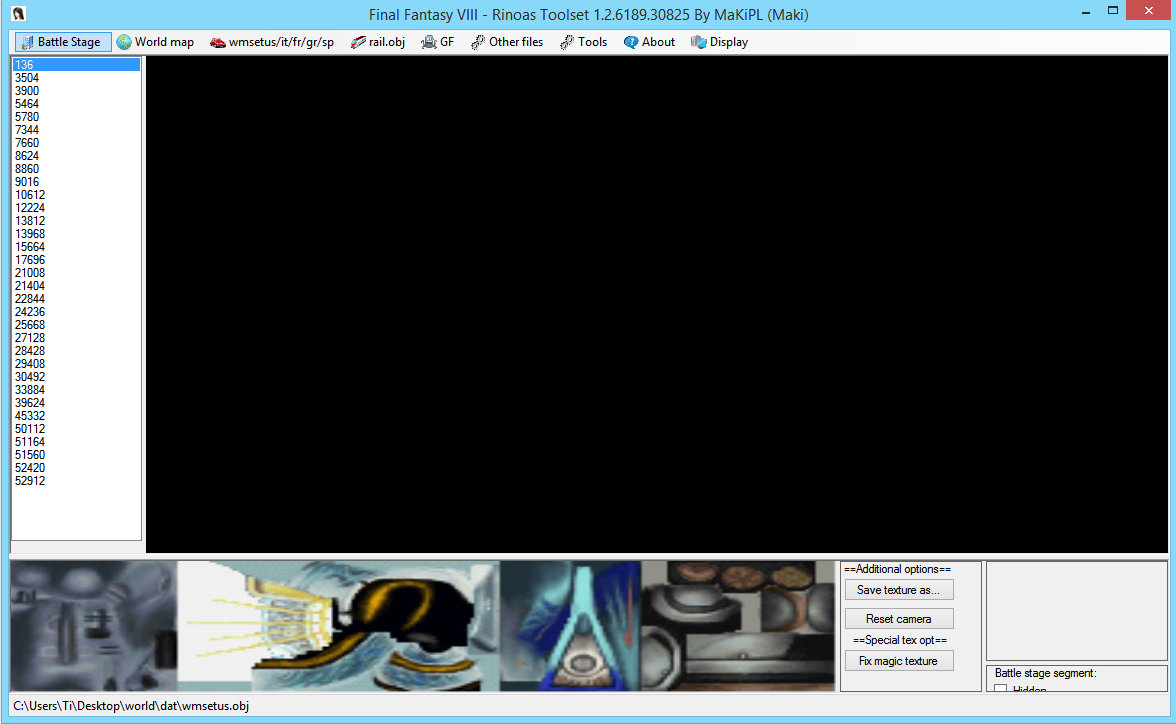
i can't see any 3d model :(
and do you know how to get animation of model?
 
I'm having exactly the same issue.  No model appears in the previewer for me of balamb G... just a floating triangle in a sea of blackness.  I was still able to export the two separate .obj's that make up balamb and impor them into Quixel for some texture work, but I was wondering - Do you have documentation as to what files to grab, etc.?  I found Balamb garden and other vehicles, but all I really want is the original GF's ripped to .obj with UV's so that I can put the models into Quixel and use DDO to re-create the textures.  I'd also really like to do this to the character models, seeing as the magochocobo and other character swaps seem to have alignment issues.

I believe that ALL of the NPC models (and most likely enemies and bosses) all have a UV coding error, where the UV's don't line up properly.  Not sure if this was on original PSX or not, but I doubt it.  This may have been some kind of 'hackish' fix that the coders did to the PC version so that the linear filtering didn't cause weird seam glitches - OR - it's the issue inherent to DX9, where the texel information is incorrectly calculated and ends up being 2px off.  Is there a way to add the DX9 UV/Texel calculation fix to FF8's rendering shader?  I've got all of the coding resources anyone would need for that, but I have no idea how/where to inject the code because I don't do any coding at all.
 
and do you know how to get animation of model?
wmset objects are non-animated. It only animates the translation+rotation of single object via engine.

I'm having exactly the same issue.  No model appears in the previewer for me of balamb G... just a floating triangle in a sea of blackness. 
Mhm... Does battle stage previewing work? Try to hit "Reset Camera" and get to Display>Textured
I tried to test the newest release on my computer at workplace but I only have battle stage model with me


I was wondering - Do you have documentation as to what files to grab, etc.?  I found Balamb garden and other vehicles, but all I really want is the original GF's ripped to .obj with UV's so that I can put the models into Quixel and use DDO to re-create the textures.
GFs are crap as hell. Some are in EXE, some are in battle.fs, some are in magic.fs; Rinoa's toolset is capable of exporting GFs environments (Like Alexander scene) + dumping geometry manually (for Shiva icespike). For GFs itself someone from here (I forgot the name, sorry!) made a script for transforming GF header into battle DAT file. You probably know that. I don't remember if they have UVs.
Another thing: Textures for GFs are also different. Some are normal TIM, some are weird shit (Rinoa's toolset GF>Special texture format>[choose one]).
At the weekend I'll rip all GFs for you.


Quixel and use DDO to re-create the textures.
Is this really that good? I was working so far with educational license of Substance Painter 2 and that's really amazing. Have you tried it? Is Quixel better?


This may have been some kind of 'hackish' fix that the coders did to the PC version so that the linear filtering didn't cause weird seam glitches - OR - it's the issue inherent to DX9, where the texel information is incorrectly calculated and ends up being 2px off.  Is there a way to add the DX9 UV/Texel calculation fix to FF8's rendering shader?  I've got all of the coding resources anyone would need for that, but I have no idea how/where to inject the code because I don't do any coding at all.
I'm still trying to lay my hands on DX buffer and shit. I've come really close, but it's still rubbish to me. I only know OpenGL so far, yesterday I checked how to draw primitive with DirectX, maybe I could reverse it from the other side- directly from DX calls.
 
Mhm... Does battle stage previewing work? Try to hit "Reset Camera" and get to Display>Textured
I tried to test the newest release on my computer at workplace but I only have battle stage model with me
I will have to give this a try :)  A bit too busy in SpeedTree right now, but I'll check later.

GFs are crap as hell. Some are in EXE, some are in battle.fs, some are in magic.fs; Rinoa's toolset is capable of exporting GFs environments (Like Alexander scene) + dumping geometry manually (for Shiva icespike). For GFs itself someone from here (I forgot the name, sorry!) made a script for transforming GF header into battle DAT file. You probably know that. I don't remember if they have UVs.
Another thing: Textures for GFs are also different. Some are normal TIM, some are weird strawberries (Rinoa's toolset GF>Special texture format>[choose one]).
At the weekend I'll rip all GFs for you.
Oh man, if you could get those together for me, you'd be my savior! It sounds like a huge pain in the ass, so I'm glad I just donated to you :D

Is this really that good? I was working so far with educational license of Substance Painter 2 and that's really amazing. Have you tried it? Is Quixel better?
I f@cking LOVE SP2... but Quixel does a -few- things better, in my opinion, without ending up with the same exact look as everyone else.  SP2 is better for more 'cookie cutter' settings, etc. (but i'll be the first to admit that a lot of assets can use that kind of pass for ease of use).  I think Quixel and SP2 are just as powerful as each other, and in a perfect world - I would use them in conjunction.
I'm not an educator nor in school of any kind, so I don't have access to SP2 right now :(  BUT.. I'm kind of a monster in Quixel.

I'm still trying to lay my hands on DX buffer and strawberries. I've come really close, but it's still rubbish to me. I only know OpenGL so far, yesterday I checked how to draw primitive with DirectX, maybe I could reverse it from the other side- directly from DX calls.
Hm.  I know the texel fix documentation is somewhere around here... when I find it I'll PM you with the links.
 
Status
Not open for further replies.
Back
Top