[PSX/PC] Save editor - Hyne (1.11.2)

  • Thread starter Thread starter myst6re
  • Start date Start date
Status
Not open for further replies.
you need to use qt linguist to "release" the ts files or you will not have .qm files generated.
 
Right, I see what is going on now - being English this is very unusual for me - even though it was completely translated from French before, its only partially translated now, so I'm getting a partial English/French interface.

Have read the README and clearly its a little more than just make... sorry.
 
I have finally reached looking into this - the continuing failure to translate all strings, even when the English ts file is almost complete (testing the master branch).

It is some sort of encoding screwup - pretty much every string in the source that I can see with an accent or cap is not translated in the GUI (but the French characters do render properly so 'QTextCodec::setCodecForTr(QTextCodec::codecForName("UTF-8"));' is taking effect).

I have spent a few hours working on this problem, and the best I have so far is the following from an lupdate *.pro call:

================================================================================

lupdate warning: Codec for tr() 'UTF-8' disagrees with existing file's codec 'ISO-8859-1'. Expect trouble.
Updating 'hyne_en.ts'...
    Found 1660 source text(s) (0 new and 1660 already existing)
    Kept 5 obsolete entries
lupdate warning: Codec for tr() 'UTF-8' disagrees with existing file's codec 'ISO-8859-1'. Expect trouble.
Updating 'hyne_ja.ts'...
    Found 1660 source text(s) (0 new and 1660 already existing)
    Kept 4 obsolete entries

================================================================================

There are definitely some bad strings in the ts file (obvious double-width characters), and a quick check in the source shows that bad text is around - e.g. MetadataDialog.cpp in MetadataDialog::build(), the HelpWidget constructor call.

I plan on Thursday to kill off all bad characters in the ts file to see if this makes a difference.

This is a Debian Testing machine, so UTF-8 has been standard for about 12-13 years...

 
Hello JustPassingBy, I think the problem appears since the migration to Qt 5.
When I started the project, few years ago, I used the default encoding (iso-8859-something) in Qt Creator on Windows (I though it was the best one... no it was totally toughless).
But in Qt 5, UTF-8 become the standard, so I needed to convert every source files. And it works on my machine.

I will check ts file soon, maybe I missed something.
 
OK, I'll hold off on what I am doing until you've had a look. Do you want a screenshot of the semi-translated UI?
 
Yes please.

I updated the code, one file was not correctly encoded, but ts files seems correct.
Please note that I use git now, and the svn repository is not up to date.
 
Hmm, wonder why I've been looking at the svn repo then. According to the git log, you've been using git-svn, which suggests you're still using svn? Or perhaps thats how SourceForge exposes a git repo by running git-svn in the background...

Screenshot:

D72KVQc.png
 
git-svn is a tool to convert a svn repo into git.
Every commits with a git-svn annotation was a commit created in the svn repo.
 
Right, and you haven't yet committed in git on the master branch since the migration (yeah I know about git-svn, I use it with my KVIrc work).
 
Yeah I had found that previously, hence the command output I pasted originally.

However with this new git clone, doing lupdate *.pro, lrelease *.pro and then copying the .qms to the build directory, I finally have a fully translated interface! I had already reached this point yesterday, so I don't know what has meaningfully changed aside from starting afresh again.

So tomorrow I'll see if I can compare my two FFVIII saves to try to work out what bits to flip to restore Omega Weapon and Ultima Weapon again :)

Thanks
 
since your running debian have you tried to use my daily ppa version?

you can add it by editing your sources.list(see below)  then if you want you can import the keys from the ubuntu keyserver to remove the annoying can't check package signing warning.

Code: ( add to sources.list) [Select]
Code:
deb http://ppa.launchpad.net/sithlord48/ff7-daily/ubuntu trusty main deb-src http://ppa.launchpad.net/sithlord48/ff7-daily/ubuntu trusty main
hyne and others on the daily ppa are built anytime there is a code change.  so if you submit your fix as a pull request on hyne and myst merges it you will just get an update for hyne that contains your corrections :)
more info on the ppa page here
 
I think he wants to contribute to the code.
@JustPassingBy: feel free to contribute, you can fork the project on github
 
Thanks sith but myst6re is right - building from source is fine for me, I actually finished work with my Final Fantasy VIII saves a month or so ago, its just taken this long to reach this investigation task.

So, another repo again! Well, I certainly prefer github to Sourceforge so thanks, will switch to that. I managed to revive Ultima Weapon - with the HexaEdit Field tab, byte 15D (row 150 14th byte in) has been changed from 20 (in the save just after killing him) to 4 (save just before the battle, where 10 steam units are available).

I'll test this on a separate save now.

Edit: Works - currently Hyne only has the moment editor for Field data - where would be the most appropriate place to allow users to fiddle this value?

Final edit: Revived Omega Weapon too: Field data, byte 76 (row 70 7th byte in) ab -> 2b.
 
Last edited:
This temporary file is normally created in your user temp directory, but there is a bug and it is created on the current directory. On MacOSX it may causes problems. The next version will fix this issue.
Hi,

Is this problem still alive? I am wondering if it's possible to bypass this one by creating manually the temporary directory in the right place for Mac OS X?

Thanks.
 
Thanks a great tool.

Well, I am a user of Japanese, there is a trouble.
I have installed two types of PC version, one thing in English released in 2000.
http://www.ign.com/games/final-fantasy-viii/pc-11737
The second is that of Japanese released in 2014.
http://store.jp.square-enix.com/category/DL01/SEDL_1021.html

Then I will call a save data of the former [ENG] and a save data of the latter [JPN].

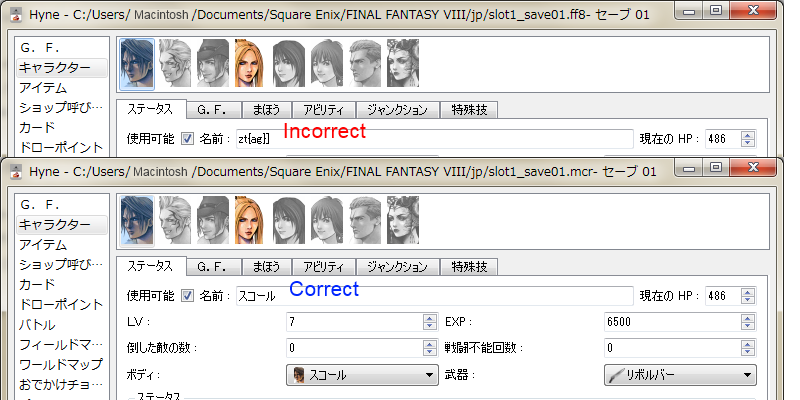
When I import a [JPN] in Hyne 1.8.2, the name of Squall, Rinoa, Angelo, and GF's is garbled.
Would you mind to improve this?

---- Supplement ---
[JPN] was stored once in the format of the PS-type (JPN), this phenomenon does not occur when I load it.
Correct Japanese is showed.
[ENG] reads is okay.
"garbled" is mistake of latin font table and jp.

So it's a phenomenon of when reading the PC-type data, but I'm not yet able to keep track of the source.
Can not be added the handling data as Japanese to reading of PC-type data ?

[JPN] will be saved under :
%UserProfile%\Documents\Square Enix\FINAL FANTASY VIII\jp
Folder name "jp" I feel that distinction about [ENG], but how about you?
 
Well, I am a user of Japanese, there is a trouble.
My post has nothing to do with Hyne, but with FF8 modding itself...
I have been meaning to ask a Japanese user this: 
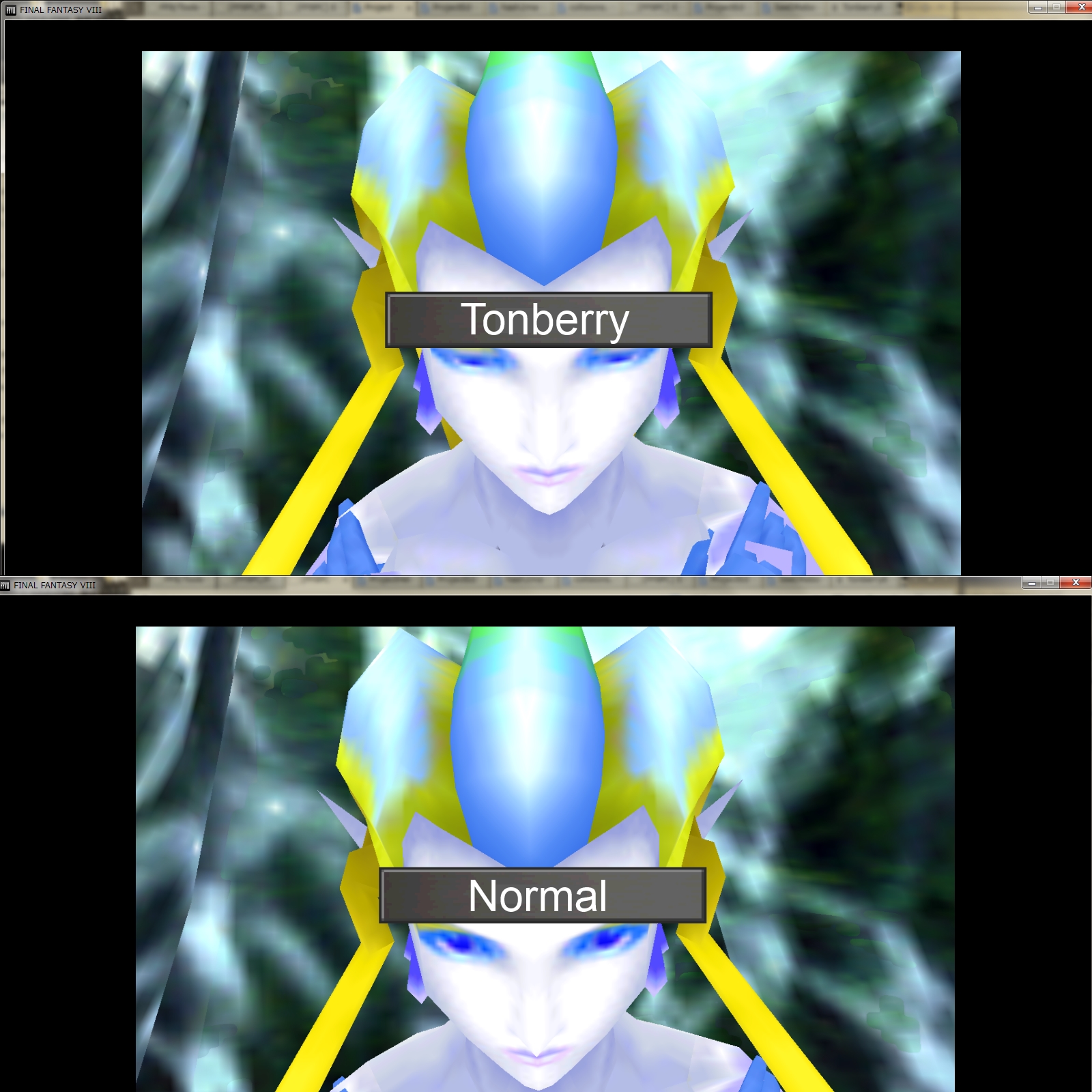
シード実習生, can you use Tonberry on the Japanese version of the game?  Would Japanese users like the upscaled Triple Triad, Text/Icons, enemies, worldmap, and characters?  I would love to make Japanese versions of these mods!
 
For MAC OS X I found a solution for the moment,

Just Run the Application directly via the command line.
./Hyne.app/Contents/MacOS/Hyne

And It will works.
 
myst6re
Thanks reply.
Because My poor English may fails to explain the problem correctly,
I uploaded some pictures.
cwpwGWe.png

"Incorrect" shows now status.
"Correct" shows what saved once in the format of the PS-type (JPN).

The name entry is "zt{ag}]", not "スコール".
By font table, "ス" of Japanese goes same point "z" of latin, and others so.
So, Reading data is not missed, but it's not Japanese font table.


Mcindus
What you are saying Tonberry makes the accuracy of textures better, no?
FF8 released in 2014 in Japanese is same one released in 2013 at Steam.
http://store.steampowered.com/app/39150/
So, it will not be result like you expected.
YWcDgrX.jpg

I did:
1. Unzipped TonberryEnhanced2.02.zip to "C:\Program Files (x86)\SquareEnix\FINAL FANTASY VIII\".
2. Put ProjectEden_hm.csv, ProjectHellfire_hm.csv, SeeDReborn_hm.csv to "tonberry\hashmap".
 
Last edited:
Status
Not open for further replies.
Back
Top