[PSX/PC] World map conversion tool - wmx2obj (2015-11-17)

  • Thread starter Thread starter Blue
  • Start date Start date
Status
Not open for further replies.
Can you post a larger scale image of the above, can't identify the beach. Never mind, found it, I've problems with reading  :-X

The textures not being seamless is probably my calculation error since it's not perfect yet because of the hex values, I'll try to search an answer for it.

About normals. I documented in reverse engineer forums that wmx.obj contains some sort of shadowing values. Well I now know that they are normals and probably used for Gourard shading which PSX GPU can utilize (look it up if interested). For the next version I'll include normals too so the shading is not a problem after it. Though before I put normals in use I want to improve to current algorithm for texture vertexes because right now it's taking too much memory as you can see from the file size. After optimizing the algorithm I would say the file size will drop about 1/4 or 1/3

I had to check the seam thing and it appears in FF8 also:
f8427cc171b70817cdf655c0c41fb64e.png
945347a822d3feca5d8f530aff39edc3.png


Sorry for the first picture but I hope you can see it, my FF8 uses 128x128 textures since it's the older release. However these kind of problems occurs all over the map because of the developers. Also the odd stretches like in the kaspar01's picture are misplaced UV's by developers. There's probably nothing that can be done automatically to these unless all the UV's are re-generated.

However it looks better in game because of the renderer which makes it look more seamless, although the problem exists there even if it's harder to notice.
 
Last edited:
About normals. I documented in reverse engineer forums that wmx.obj contains some sort of shadowing values. Well I now know that they are normals and probably used for Gourard shading which PSX GPU can utilize (look it up if interested). For the next version I'll include normals too so the shading is not a problem after it. Though before I put normals in use I want to improve to current algorithm for texture vertexes because right now it's taking too much memory as you can see from the file size. After optimizing the algorithm I would say the file size will drop about 1/4 or 1/3

I had to check the seam thing and it appears in FF8 also

Sorry for the first picture but I hope you can see it, my FF8 uses 128x128 textures since it's the older release. However these kind of problems occurs all over the map because of the developers. Also the odd stretches like in the kaspar01's picture are misplaced UV's by developers. There's probably nothing that can be done automatically to these unless all the UV's are re-generated.

However it looks better in game because of the renderer which makes it look more seamless, although the problem exists there even if it's harder to notice.
Yep it looks better since it render pixels as they are I guess..

Anyway for the idea I gave you about the switcher I wrote a list that you could use for the switch funcion:

Code: [Select]
Code:
Interchangeables zones:Eshtar 374 to 381  <==>  769 to 776406 to 413  <==>  777 to 784438 to 445  <==>  785 to 792470 to 477  <==>  793 to 800502 to 509  <==>  801 to 808534 to 541  <==>  809 to 816566 to 573  <==>  817 to 824Trabia Garden150 to 151  <==>  825 to 826Galbadia Garden268  <==>  827Balamb Garden275 to 276  <==>  828 to 829Missile Base328  <==>  830Trabia Crater215 to 216  <==>  831 to 832247 to 248  <==>  833 to 834Desert Prison362  <==>  835
The list is not yet confirmed (I'll test it tomorrow..it's 3 A.M. here XD) Edit2 : Checked the list and it looks to be all correct


Edit:

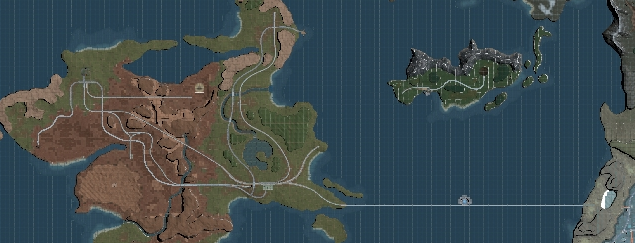
@halkun this should be what you asked for: http://s16.postimg.org/m6kmcyl1h/Full_Map_HD.jpg
 
Last edited:
Code: [Select]
Code:
public void exportFile(File file) throws IOException {    PrintWriter printWriter = new PrintWriter(file);    printWriter.println("# Converted to Wavefront .obj with wmx2obj");    printWriter.println("# wmx2obj \u00A9 2015 Aleksanteri Hirvonen");    printWriter.println(); for (Segment segment : segments) {  printWriter.println("g " + segment.getID());  writeVertices(segment,printWriter);  writeFaces(segment,printWriter); }    printWriter.close();}private void writeVertices(Segment segment,PrintWriter printWriter) {    // take the coordinate values of each vertex instance    // and write to file    printWriter.println("# List of geometric vertices");            for (Block block : segment.getBlocks()) {        for (Vertex vertex : block.getVertices()) {            printWriter.println(                    "v "                     + vertex.getCoordinate(Vertex.X) + " "                    + -vertex.getCoordinate(Vertex.Y) + " "                    + -vertex.getCoordinate(Vertex.Z)            );        }    }    printWriter.println();}private void writeFaces(Segment segment,PrintWriter printWriter) {    // take the vertex index values of each face instance    // and write to file    printWriter.println("# Polygonal face elements");    for (Block block : segment.getBlocks()) {        for (Face face : block.getFaces()) {            printWriter.print("f ");            for (Integer vertexIndex : face.getVertexIndices()) {                printWriter.print(vertexIndex + " ");            }            printWriter.println();        }    }}
I added this code for exporting  each segment as a separate wavefront part hope it would please someone.
not sure about javascript and how I am passing the segments as I converted my code from C++
 
I added this code for exporting  each segment as a separate wavefront part hope it would please someone.
not sure about javascript and how I am passing the segments as I converted my code from C++
This is really good indeed.
Since they're separate chunk it makes perfectly sense  (and will be handy for editing/modding) :)

Not sure it can be done but.. naming the chunk whith the segment number could be useful too (it's been quite frustrating calculate the number for interchangeable parts)
 
Last edited:
I'll make that happen in new version. However would you really prefer if each segment was separate .obj file? I mean isn't it frustrating to import each file? If not then I can make a setting to change these properties so you can choose if you want it stitched or separated.
 
My code already names the segments in the obj file with corresponding integer id,so that 3ds max will import them as seperate mesh parts.
regarding saving an area to separate .obj files, it probably isn't a good idea, already with segments alone they make about 1 part per area, meaning a total number of 835 .obj files.

Also I think we should do

Code: [Select]
Code:
iterate segments { Segment seg = segmentiterator; write("g "+seg.getID()) iterate  blocks(j, seg.getBlocks()) {               Blocks b = blockiterator;                writeVertices(b, printWriter);                writeTextures(b, printWriter);                writeFaces(b, printWriter);
to save some processing time removing uneeded for loops, I noticed atleast for me that the textured version takes FOREVER to finish, reducing the amount of loops would probably help alot.
 
Last edited:
I'll make that happen in new version. However would you really prefer if each segment was separate .obj file? I mean isn't it frustrating to import each file? If not then I can make a setting to change these properties so you can choose if you want it stitched or separated.
As Zervox said that's not making 1 file for each part but make 1 file containing multiple mesh.

Actually having separated file could be a third option so that we have a choice:

-1 file 1 mesh (current)
-1 file multiple mesh (Zervox's one)
-multiple files

My code already names the segments in the obj file with corresponding integer id,so that 3ds max will import them as seperate mesh parts.
Very nice!
I'd like to test it as soon as possible.
 
As Zervox said that's not making 1 file for each part but make 1 file containing multiple mesh.

Actually having separated file could be a third option so that we have a choice:

-1 file 1 mesh (current)
-1 file multiple mesh (Zervox's one)
-multiple files

Very nice!
I'd like to test it as soon as possible.
Yeah that's wiser, I'll make that an option.

to save some processing time removing uneeded for loops, I noticed atleast for me that the textured version takes FOREVER to finish, reducing the amount of loops would probably help alot.
Yeah it is taking time to finish right now because it's not really optimized yet, right now it just writes every texture indices to the file which isn't really optimal. However I'll optimize it to only write specific indices only once and make the faces to refer those which will speed up the exporting process and also reduces the lag seen in 3d editing programs.
 
Ok so, tested doing blocks outside then it occured to me the way it is built that obviously you can't preloop blocks because a segment has multiple blocks which needs to be written in correct order else the retriangulate of 3ds max will destroy 90% of the vertices. but doing the segment then passing the looped segment into the write functions still works which would cut down the loops from 2 505 to 835 for the outer segment loop alone also it would reduce the complexity of the code allowing compiled code to execute better.

the texture indices would also help alot in this regard, another thing I found atleast when did the wavefront in C++ as the java version used to much time for impatient me to see, is that materials are written multiple times even within the same segment, so some sort of lookup regarding material type to make each block sort printed faces by material so that instead of

Code: [Select]
Code:
usemtl 9f 390519//1550113 390518//1550114 390524//1550115 usemtl 1f 390517//1550116 390530//1550117 390499//1550118 f 390491//1550119 390517//1550120 390492//1550121 usemtl 9f 390523//1550122 390512//1550123 390519//1550124 usemtl 8f 390516//1550125 390512//1550126 390523//1550127 usemtl 9f 390521//1550128 390522//1550129 390517//1550130 f 390520//1550131 390521//1550132 390491//1550133 f 390497//1550134 390495//1550135 390521//1550136 f 390506//1550137 390497//1550138 390520//1550139 f 390518//1550140 390520//1550141 390490//1550142 f 390512//1550143 390506//1550144 390518//1550145 usemtl 0f 390517//1550146 390529//1550147 390532//1550148 usemtl 8f 390515//1550149 390511//1550150 390516//1550151 f 390514//1550152 390510//1550153 390515//1550154 f 390514//1550155 390508//1550156 390509//1550157 f 390505//1550158 390511//1550159 390510//1550160 f 390503//1550161 390510//1550162 390509//1550163 f 390508//1550164 390503//1550165 390509//1550166 f 390496//1550167 390505//1550168 390503//1550169 usemtl waterf 390502//1550170 390498//1550171 390501//1550172 usemtl 9f 390490//1550173 390491//1550174 390493//1550175
it would be

Code: [Select]
Code:
usemtl 0f 390517//1550146 390529//1550147 390532//1550148 usemtl 1f 390517//1550116 390530//1550117 390499//1550118 f 390491//1550119 390517//1550120 390492//1550121 usemtl 8f 390516//1550125 390512//1550126 390523//1550127 f 390515//1550149 390511//1550150 390516//1550151 f 390514//1550152 390510//1550153 390515//1550154 f 390514//1550155 390508//1550156 390509//1550157 f 390505//1550158 390511//1550159 390510//1550160 f 390503//1550161 390510//1550162 390509//1550163 f 390508//1550164 390503//1550165 390509//1550166 f 390496//1550167 390505//1550168 390503//1550169 usemtl 9f 390519//1550113 390518//1550114 390524//1550115 f 390523//1550122 390512//1550123 390519//1550124 f 390521//1550128 390522//1550129 390517//1550130 f 390520//1550131 390521//1550132 390491//1550133 f 390497//1550134 390495//1550135 390521//1550136 f 390506//1550137 390497//1550138 390520//1550139 f 390518//1550140 390520//1550141 390490//1550142 f 390512//1550143 390506//1550144 390518//1550145 f 390490//1550173 390491//1550174 390493//1550175 usemtl waterf 390502//1550170 390498//1550171 390501//1550172
Hope I am not butting in on too much for you Halfer. ;)
 
Last edited:
No no, that's really good that you point these things out :D! Hadn't really thought about that material thing yet but yes, that sounds like the most optimal way to do it, thanks for the tip! :)

Ok so, tested doing blocks outside then it occured to me the way it is built that obviously you can't preloop blocks because a segment has multiple blocks which needs to be written in correct order else the retriangulate of 3ds max will destroy 90% of the vertices. but doing the segment then passing the looped segment into the write functions still works which would cut down the loops from 2 505 to 835 for the outer segment loop alone also it would reduce the complexity of the code allowing compiled code to execute better.
Can you open this up a bit? I have troubles understanding what you are meaning with this.
 
Ah, yeah, I expected it would probably be hard to follow due to crappy writing on my part.
Rewrite:

I first suggested doing
Code: [Select]
Code:
for loop (segments){    WriteVertices(segments[i],PrintWriter);    WriteTextures(segments[i],PrintWriter);    WriteFaces(segments[i],PrintWriter);}
doing a loop over segments only once is 835 iterations max, as the range of world chunks is a total of 835 due to the interchangable parts.
the  way it done now is
Code: [Select]
Code:
WriteVertices(PrintWriter);WriteTextures(PrintWriter);WriteFaces(PrintWriter);
Which loops segments 3 times over(one for each function call), so a total of 2505 loops, since these are seperate, each loop inside a loop adds complexity,
so being able to reduce amount of loops from 3 to 1 on first stage would reduce conversion rate noticably due to code complexity reduction(compiler wise).

I later suggested doing
Code: [Select]
Code:
for loop (segments){   for loop(blocks)    WriteVertices(blocks[j],PrintWriter);    WriteTextures(blocks[j],PrintWriter);    WriteFaces(blocks[j],PrintWriter);}
Which didn't work as I wanted it to as it would make 3ds max tear the model to pieces(mangled mesh) on import, because the indices etc didn't match the segment.
 
Last edited:
Thanks for this tip! That sure will release a lot of load during exporting. I will rearrange the code that way since I have to do some parts again after all.
 
Also found in the block structure
Code: [Select]
Code:
 public void generateFaces(byte[] data, int vertexIndexOffset) {        // initialize face instances        for (int face = 0; face < faceCount; face++) {            addFace(new Face(face));        }                // find vertex indices of the face instances        for (Face face : faces) {            face.findVertexIndices(                    data,                     offset + face.getId() * FACE_BYTES,                    vertexIndexOffset            );        }    }        public void generateVertices(byte[] data, int segmentX, int segmentZ) {        // initialize vertex instances        for (int vertex = 0; vertex < vertexCount; vertex++) {            addVertex(new Vertex(vertex));        }                // find vertex coordinates of the vertex instances        for (Vertex vertex : vertices) {            vertex.findCoordinates(                    data,                     offset + faceCount * FACE_BYTES                             + vertex.getId() * VERTEX_BYTES,                    offsetX,                    offsetZ,                    segmentX,                    segmentZ            );        }    }
in C++ containers similar to ArrayList in java allows
Code: [Select]
Code:
 public void generateFaces(byte[] data, int vertexIndexOffset) {        // find vertex indices of the face instances        for (int face = 0; face < faceCount; face++) {            Face ref=faces.add(new Face(face));            ref.findVertexIndices(                    data,                     offset + ref.getId() * FACE_BYTES,                    vertexIndexOffset            );        }    }        public void generateVertices(byte[] data, int segmentX, int segmentZ) {        // initialize vertex instances        // find vertex coordinates of the vertex instances        for (Vertex vertex : vertices) {             Vertex ref=vertices.add(new Vertex(vertex));            ref.findCoordinates(                    data,                     offset + faceCount * FACE_BYTES                             + ref.getId() * VERTEX_BYTES,                    offsetX,                    offsetZ,                    segmentX,                    segmentZ            );        }    }
Is something like this not possible in Java?
if it is, it would save alot of additional loop complexity.
it would still be possible to just access it straight after inserting it(as add(object) is put into the end) by doing
Code: [Select]
Code:
Face ref=faces.get(face);
I'd still say the addVertex and addFace amongst other functions
does not need their
Code: [Select]
Code:
public void addFace(Face face) {        if (faces.size() < faceCount) {            faces.add(face);        }    }        public void addVertex(Vertex vertex) {        if (vertices.size() < vertexCount) {            vertices.add(vertex);        }    }
ArrayList size checks, as the faceCount and vertexCount loop is always the same, meaning these branching if statements are just wasting CPU cycles.
 
For Faces I noticed it really only ever uses one texturePage in the current code(if this is correct)
we should make
Code: [Select]
Code:
ArrayList<String> texturepages;
Code: [Select]
Code:
String texturepage;
and do
Code: [Select]
Code:
String getPage(){return texturepage;}
replace all
Code: [Select]
Code:
texturepages.add("***");
with
Code: [Select]
Code:
texturepage="***";
Then do a custom compare( I don't know java enough for this)
Code: [Select]
Code:
CustomComparator {    public boolean compare(Face a, Face b) {        return a.texturepage.before(b.texturepage);    }}
Then we can after the loop in GenerateFaces do
Code: [Select]
Code:
faces.sort(CustomComparator);
 
Well it does use 18 texture pages right now but the way the code adds them to ArrayList is that even if the next texture page is the same as last one it adds it to the ArrayList. To minimize the memory usage it should be done that it only adds the next texture page when the value changes. I think this is what you mean right?

Oh and the heightmap looks cool :P
 
From what I saw in Blocks generate faces
Code: [Select]
Code:
void findTexturePage(byte data[], int offset, int faceIndexOffset, int textureIndexOffset)
is only called once
and all the if checks in findTexturePage are checked at once, meaning if one succeds the others won't get added so it is technically only one texture page in Face class active as texturepages always returns 1 in size to me.
Also due to
Code: [Select]
Code:
public String getPage()    {        return (String)texturepages.get(texturepages.size() - 1);    }
it still just sends the last created one, which means all other data stored in faces are of no use. or is this just for debugging code and that code will be changed?

at write out I just did in C++ that all the Texture indices that are equal got written out together once per block, this reduced the total size of the file from 80MB to 38.6MB which is quite some savings, it did however add a bit of processing time.

also a change I'd like to suggest is moving findTextureIndices to Block.
considering TextureCoords is only x and y , this way you can get away with Dbl x and Dbl y on textures. although it would write out 3xtextures per fetch, it is however alot easier for writing a code sort for texture coordinates. eg

in Texture
Code: [Select]
Code:
public class Texture{    public Texture(int id,double X,double Y)    {        this.id = id;        this.X=X;        this.Y=Y;    }    public int getId()    {        return id;    }    public double getX()    {        return X;    }   public double getY()    {        return Y;    }    public int getPage()    {        return ((Integer)texturepages.get(texturepages.size() - 1)).intValue();    }    public void print()    {        System.out.print(texturepages);    }    public static final int COORDINATE_BYTES = 1;    public static final int p = 0;    private final int id;    private double X;    private double Y;    private final ArrayList texturepages = new ArrayList();}
in Block
Code: [Select]
Code:
public void findTextureIndices(byte data[], int offset)    {        textures.add(new Texture(textures.size(),(data[offset + 6] & 0xff) + 0.5D) / 256D,(data[offset + 7] & 0xff) + 0.5D) / 256D)        textures.add(new Texture(textures.size(),(data[offset + 8] & 0xff) + 0.5D) / 256D,(data[offset + 9] & 0xff) + 0.5D) / 256D)        textures.add(new Texture(textures.size(),(data[offset + 10] & 0xff) + 0.5D) / 256D,(data[offset + 11] & 0xff) + 0.5D) / 256D)    } public void generateTextures(byte data[], int faceIndexOffset, int textureIndexOffset)    {        for(int texture = 0; texture < faceCount; texture++) findTextureIndices(data, offset + texture * 16))    }

by the way if you are wondering how I got your code changes is because I was too lazy to ask for source and decompiled your code, sorry about that. ;)


also, don't know where I read it, but someone somewhere said there was a limitation to how many faces or vertices can be on each terrain chunk, which I can't really see, a pure water tile uses 512 faces, 400 vertices, but the chunk with balamb town for example uses 790 vertices and 1156 faces, which suggests to me that it should be possible to put more detail onto the FF8 world.

 
Last edited:
..by the way if you are wondering how I got your code changes is because I was too lazy to ask for source and decompiled your code, sorry about that. ;)
Yeah.. like many others here do what they do for the same reason.. because they are too lazy to ask Square for source code  :-D :-D :-D
 
Yeah.. like many others here do what they do for the same reason.. because they are too lazy to ask Square for source code  :-D :-D :-D
Hah! Made me chuckle.  ;D
 
Status
Not open for further replies.
Back
Top