Re: [FF8PC-Steam] FF8 Co...

  • Thread starter Thread starter Mcindus
  • Start date Start date
Status
Not open for further replies.
I don't know how but finally joytokey works well ^^ thx for your help !

 
Thanks for the mod! I think I screwed something up and now I don't know how to fix it. Any help would be greatly appreciated.
Does anyone know how to help with this? I'm trying to get PS4 button prompts and it looks like I'm getting keyboard prompts (X,C,S,V) instead.


https://imgur.com/a/CrQHrfS


Thanks again!
PS I have the lunatic pandora pack and it works great. I just need the button prompts and I'll be good to go.
 
Last edited:
I'm having some difficulty getting the Xbox 360 wireless controller buttons to show up in game, can you help?

I'm using the English Steam version of the game.

I have steam installed to my D:\ Drive, NOT my C:\ (OS) Drive, if this matters?

I payed for the Lunatic Pandora mods through the website.

I installed a clean/fresh version of FFVIII through Stream to D:\Program Files\Steam\steamapps\common\FINAL FANTASY VIII

I installed Lunatic Pandora mod to the following location: D:\Program Files\Steam\steamapps\common\FINAL FANTASY VIII

I can successfully launch the game in Administrator using FF8_Ultra_Launcher and I don't receive any errors so I assume its all good?

The Xbox 360 wireless controller works in game, however the button icons are mapped/displaying B1, B2 etc

I'm a little confused, I have downloaded FF8_ControllerButtons_v2.0 and copied over both:

sysfld00_17
sysfld01_17

And I'm still unable to see the button icons, I have screenshots of my folders attached.

Any help is appreciated.

https://imgur.com/6okDQ56
https://imgur.com/CuDGNCA
https://imgur.com/zvsE9sb
https://imgur.com/LLEmExN
https://imgur.com/nIiVOwA
 
I'm having some difficulty getting the Xbox 360 wireless controller buttons to show up in game, can you help?

I'm using the English Steam version of the game.

I have steam installed to my D:\ Drive, NOT my C:\ (OS) Drive, if this matters?

I payed for the Lunatic Pandora mods through the website.

I installed a clean/fresh version of FFVIII through Stream to D:\Program Files\Steam\steamapps\common\FINAL FANTASY VIII

I installed Lunatic Pandora mod to the following location: D:\Program Files\Steam\steamapps\common\FINAL FANTASY VIII

I can successfully launch the game in Administrator using FF8_Ultra_Launcher and I don't receive any errors so I assume its all good?

The Xbox 360 wireless controller works in game, however the button icons are mapped/displaying B1, B2 etc

I'm a little confused, I have downloaded FF8_ControllerButtons_v2.0 and copied over both:

sysfld00_17
sysfld01_17

And I'm still unable to see the button icons, I have screenshots of my folders attached.

Any help is appreciated.

https://imgur.com/6okDQ56
https://imgur.com/CuDGNCA
https://imgur.com/zvsE9sb
https://imgur.com/LLEmExN
https://imgur.com/nIiVOwA
move the sysfld00_17 and sysfld01_17 files UP one level... so pull them out of the xbox folder and move them into the folder with the same name, one level up the file hierarchy.  you will need to copy over the ones that are in the /sysfld00 and /sysfld01 folders with those.
 
Thanks for the mod! I think I screwed something up and now I don't know how to fix it. Any help would be greatly appreciated.
Does anyone know how to help with this? I'm trying to get PS4 button prompts and it looks like I'm getting keyboard prompts (X,C,S,V) instead.


https://imgur.com/a/CrQHrfS


Thanks again!
PS I have the lunatic pandora pack and it works great. I just need the button prompts and I'll be good to go.
If you're using a mapper program, you will need to use the HID folder for your layout.  If you're using a default input control setup, just use the files in the /main folder.  You may need to use HID, from what I see.
 
move the sysfld00_17 and sysfld01_17 files UP one level... so pull them out of the xbox folder and move them into the folder with the same name, one level up the file hierarchy.  you will need to copy over the ones that are in the /sysfld00 and /sysfld01 folders with those.
Brilliant! this worked thank you for the help.

On a separate note, am I expecting to much from the Lunatic Pandora mod? I don't receive any errors when its launched, however, textures don't look as good as what I've seen on YouTube using the same mod, is there anyway I can actually find out if the mods are all working?
 
Hello, Mcindus. I have a little problem. I have Antimicro tool, and so I'm using HID version of Xbox setup.
The game still shows generic button prompts, called 1, 2, 3, and so on... This until I press something.
If I press a button on my controller, then it shows the retexture with Xbox buttons. But when I release the button, generic prompts comes back.

To summarize: game shows Xbox buttons ONLY in the time I'm pressing a button on the controller.

Obviously I'm using latest Tonberry and italian version of SeeD Reborn. I also tried to use the hashmap in the archive of this mod, but without success.

EDIT: I tried Main version of your mod, and it works better. Xbox prompts are showed also if I don't press a button.
The only problem, is the infamous A+R shown together.
And it doesn't show LT and RT triggers. In the HID version, are showed as L and R stick. In the Main version, aren't showed at all.
 
Last edited:
I'm not sure what's going on with my set up but I can't get this mod to work. All my other graphics mods are fine.

I'm using a steam controller and steam link.

I actually think the mod is probably working tbh, but I can't get the game to realise I'm using a controller. So it's showing keyboard buttons.

Anyone seen this, or know how to force the game into using a controller setup instead of keyboard?

Thanks for the help!
 
Hello there!

Having this little issue with the spanish version of the game and Shunsq's FF8_Buttons. I sopposed that this is the correct topic where post about my problem.


ENGLISH SCREENSHOT (FF8_EN and Seed Reborn 3.2 English mod version working perfect)
unknown.png


SPANISH SCREENSHOT (FF8_ES and Seed Reborn 3.2 Spanish mod version issue)
unknown.png


Am I doing anything wrong?

Thanks in advance.
 
Last edited:
I'm not sure what's going on with my set up but I can't get this mod to work. All my other graphics mods are fine.

I'm using a steam controller and steam link.

I actually think the mod is probably working tbh, but I can't get the game to realise I'm using a controller. So it's showing keyboard buttons.

Anyone seen this, or know how to force the game into using a controller setup instead of keyboard?

Thanks for the help!
I'm having this issue too, no matter what I do, I just get keyboard prompts and displays instead of icons, not even B1 B2 etc etc…


tried 5 or 6 times now but it either stays at keyboard or goes nuts and uses the hand icon for everything

using ps4 controller with no other apps or mods other than steam and lunatic pandora / raw.
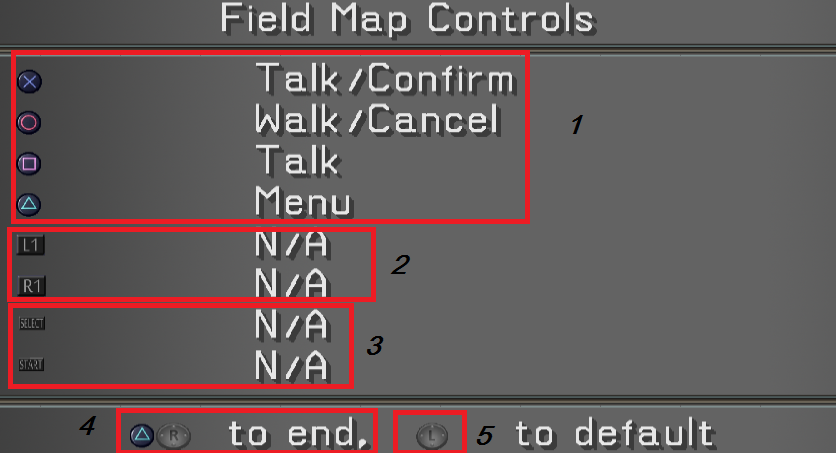
 
Hello, thank you so much for your hard work on this mod. I think I'm almost there but I have run into an issue. Instead of mapping the green text to controller icons, it instead maps all green text to the cursor. I have tested it with the gunblade cursor in seeDReborn 4 and normal cursor in earlier versions. Would you have any advice for me?

Again, thank you so much.

EDIT: I've determined that this issue occurs when I place the FF8_Buttons_EN.txt file into RaW/GLOBAL/Hext folder. I tried a different langauge (Fr) and I still got green text, but of a different font I believe. Moving the FF8_Buttons{config}.txt file does not change.
 
Last edited:
Hello Mcindus. I installed your mod with my FF8 steam version and the controller button mod doesn't work. When I installed the FF8_Buttons_Main for PS4 DS4, the game is still showing keybindings not the actual ps button. I also tried installing the Shunsq version but it shows a gunblade icon. Thank you.
 
Using Ds4 Controlller on steam, no program, this mod doens't show the icons. This show only keyboard
Hello Mcindus. I installed your mod with my FF8 steam version and the controller button mod doesn't work. When I installed the FF8_Buttons_Main for PS4 DS4, the game is still showing keybindings not the actual ps button. I also tried installing the Shunsq version but it shows a gunblade icon. Thank you.
I'm having this issue too, no matter what I do, I just get keyboard prompts and displays instead of icons, not even B1 B2 etc etc…


tried 5 or 6 times now but it either stays at keyboard or goes nuts and uses the hand icon for everything

using ps4 controller with no other apps or mods other than steam and lunatic pandora / raw.
Make sure you use a file from the 'HID' folder. That folder is for keymapper programs.  If the buttons are wrong, try another file in that folder!
Sounds like you are trying to use the 'MAIN' folder, but you are mapping your controllers...
 
Hi, i'm having some problems when I use the controller at the game, I use a ps2 controller with an adapter to PC: https://www.amazon.com/DUAL-CONTROLLER-ADAPTER-CONVERTER-80001/dp/B000SPA46M?language=en_US

Also  all the mods works great, except for controllers, I use this mod and specifically I use: FF8_Buttons_Main --> FF8_Buttons_PS_PS2 (The others doesn't work for the order). The icons dont match with the correctly configuration.

The inputs for the driver are (automatically):
Button 1 = Triangle
Button 2 = Circle
Button 3 = Cross
Button 4 = Square
Button 5 = L2
Button 6 = R2
Button 7 = L1
Button 8 = R1
Button 9 = Select
Button 10 = Start
Button 11 = L3
Button 12 = R3

This is my configuration:
4DS8YOt.png


1. It is working perfect.
3. This is supposed to be L2 and R2 Buttons, but it appears like Select and Start.
4. I know about this bug of showing two buttons but it's not the problem.
5. Select and Start icons appears like L and R (L2 and R2).
2. The problem here is for the buttons because for the actions of rotate camera L2 and R2, It appears like L1 and R1, but If I configure it correctly for the buttons it appears like Select and Start.

I hope someone could help me with this, thanks in advance.
 
I have a question, I made everything like the instructions say, even installed the buttons patch, but for some reason my controller buttons only show as PSX versions (I put the XBOX option on my game directory).
(I suppose the error occurs because I did't put the hasmap) because I confused, can I use THIS SeeDReborn hashmap and continue using the new SeeDReborn textures without errors?
 
I have try all the day but i can get this mod work i dont even see the option to conf the controller U.u
Is there a video that we can follow or im missing another program first...
 
Hello, I installed everything following the steps and after trying all the folders (HID and MAIN) I got the desired configuration where X selects, O cancels, triangle is the menu and the square is the card game. My problem is that when I press any key the assignment of the keyboard letters appears, I have always done the tests in the configuration of the command within the preferences within the game, with ALL the files the same thing happens to me, it blinks and the green letters appear at the push of a button.
Thanks for the mod, for reading the post and sorry for my English, I am using the google translator.
 
Status
Not open for further replies.
Back
Top