
Re: [FF8PC-Steam] FF8 Co...

  • Thread starter Thread starter Mcindus
  • Start date Start date
Status
Not open for further replies.
someone still here in this topic?
I've the problem with the white glove, and i know the problem is because i use an XInput controller (360 wired) with big picture using mappings who use keyboard key instead (for using the D-Pad in the menu, use the trigger buttons ecc)
if i not activate steam keymappings and i let only the game see the controller, i could only use the analog stick for movement and the triggers not work (i know, ff8 on steam not natively work with XInput's triggers) and instead for L2 R2 buttons i need to use L3 and R3 (the analog pressed buttons)
there is any solution now? the better one will be using the keyboard keys on the controller with pig picture but this mod (psx buttons) not work
 
I'm not sure what's going on with my set up but I can't get this mod to work. All my other graphics mods are fine.

I'm using a steam controller and steam link.

I actually think the mod is probably working tbh, but I can't get the game to realise I'm using a controller. So it's showing keyboard buttons.

Anyone seen this, or know how to force the game into using a controller setup instead of keyboard?

Thanks for the help!
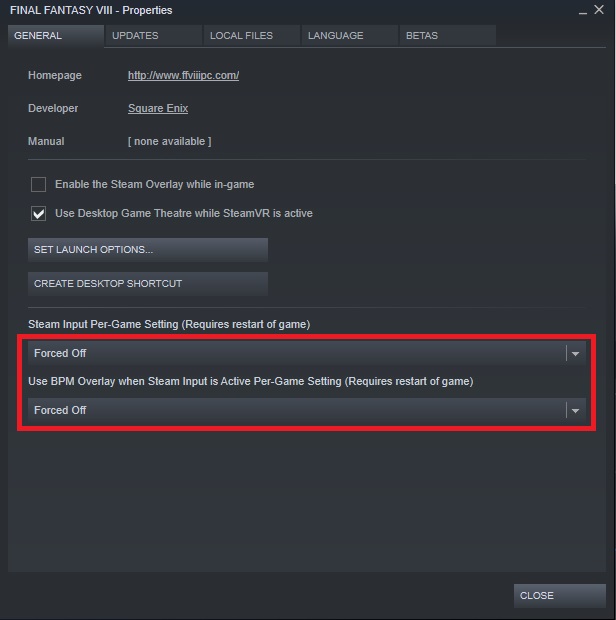
Had the same issue myself and found the cause. to solve it you need to right click Final Fantasy VIII in your steam libary and select Properties. Under General Set Steam Input Per-Game Settings to Forced Off
qE5cQAz.jpg

then i went into
FF8_ControllerButtons_v2.0\FF8_Buttons_Main\FF8_Buttons_PS4_DS4\sy\sysfld00
And Deleted sysfld00_17.png and Renamed sysfld00_17 ALT.png to sysfld00_17.png
Then Did the same for
FF8_ControllerButtons_v2.0\FF8_Buttons_Main\FF8_Buttons_PS4_DS4\sy\sysfld01
Deleted sysfld01_17.png and Renamed sysfld01_17 ALT.png to sysfld01_17.png

Copied the sy folder from FF8_ControllerButtons_v2.0\FF8_Buttons_Main\FF8_Buttons_PS4_DS4 into FINAL FANTASY VIII\textures
and it Worked

For DS4 Users it is often Beneficial to set Steam Input Per-Game Settings to Forced Off. for games that only support Xinput it needs to be on but for games with native DS4 support its often better with off (game displays DS4 button prompts with it off but X-Box prompts with it on)
 
Last edited:
Hey Mcindus, I had this up and running a while back but it seems to have gone haywire at some point.

I'm currently trying to play Callisto' Ragnarok mod with my Xbox One Controller wired via USB (I also have a PS4 controller I can use if it would be easier).
I'm fairly stupid, should I use Shunsq's mod or yours?

I thought I had it working and then I got to the Timber Owls mission and it most definitely wasnt correct lol.
 
I'm using Xpadder and I had a problem where the PSX buttons would only appear when a button on the controller is pressed - when it is released, the keyboard buttons appear again. I think this is because the game switches between detecting it as a keyboard (when a button is held down and xpadder is doing its thing) and as xinput the rest of the time (when no button is held down). Installing both the xpadder and xinput versions of this mod at the same time does not work - the buttons display all the time, but they are completely scrambled because of the conflicting inputs.

The simple and janky solution is: Do not connect your controller until AFTER you have started the game and skipped past the keyboard configuration screen by pressing X. At that point, the game stops looking for a controller and thus will only ever see keyboard inputs, which fixes everything. Janky but it works and I hope this helps someone.

I do have one question though - is there any way to make this button mod work without SeeD reborn? I really like the old PS1 fonts and would prefer to keep them, but the mod seems to stop functioning if you remove the Seed reborn hashmap.
 
I want to use the layout on the steam deck, but everything I tried led me to the conclusion that I have to change the button layout files. I cut out the button symbols and placed it on the corresponding keyboard letters. The problem with this is the size of the buttons do not fit exactly for this. So I have to change the size and it looks extremely ugly. Does anybody already did the work and can share it? Alternatively, can anybody say to me how to create the button layout files? Than I would do it myself and share it with the community.
 
Steam added a great feature called Steam Input Translation, which maps keyboard controls to button commands. For Final Fantasy VIII, this means the right stick and trigger buttons can be used as they were in the PSX version. However, this feature works by mapping keyboard inputs to the controller. As a result, in-game button prompts, like those for Zell's limit break, appear as keyboard keys (e.g., X, V) instead of controller button labels (e.g., B1, B2).

A possible workaround to make this mod compatible with Steam Input Translation would be to replace the keyboard prompts (e.g., X, V) with button icons that represent the corresponding controller buttons. This should involve a simple modification of the hashmap. I'd attempt it myself if someone could explain how the hashmap files work.
 
Hi, I have browsed through the forum chat on this page. I am unable to get this mod to work.

I just bought FF8 2013 version.

I have installed Tonberry Enhanced,
I have installed SeedReborn
I have copied the files from xbox folder in the download for this. (I am using a Xbox Controller, ones you can buy on Microsoft now)
My game is installed in drive C

However ingame, it still shows B1,B2 etc.

What am I missing? Please help
 
Hi, I have browsed through the forum chat on this page. I am unable to get this mod to work.

I just bought FF8 2013 version.

I have installed Tonberry Enhanced,
I have installed SeedReborn
I have copied the files from xbox folder in the download for this. (I am using a Xbox Controller, ones you can buy on Microsoft now)
My game is installed in drive C

However ingame, it still shows B1,B2 etc.

What am I missing? Please help
What other mod you use ? You can have a look at https://www.tsunamods.com/junction-viii/, a mod manager. You'll find button mod there. (but not compatible with tonberry, hence my question about other mod you use.
 
I followed the instructions on Tonberry, including the completed mod list is suggests.

I have also just noticed, I have no music in-game, sfx persists, but no music. not sure how long it's been like that.
 
got Junciton viii working. is there a way to add the texture files used with tonberry? as I don't  see any on junction viii. characters are nice, but backgrounds etc are old lol.
Thanks for your help.
 
Last edited:
I followed the instructions on Tonberry, including the completed mod list is suggests.

I have also just noticed, I have no music in-game, sfx persists, but no music. not sure how long it's been like that.
I had the same problem with the in-game music.
The solution was to write something in "Properties -> General -> Launch Options"

Unfortunately i deleted what I wrote there because it was not working with the Junction mod manager.
You have to search for it on the internet.
 
FIX for B and Y buttons mismatch using FF8_Buttons_HID_Xbox

After an hour or so of frustration, I tried the FF8_Buttons_HID_Xbox because I kept seeing letters instead of keyboard keys.
This worked by the B and Y buttons were the wrong way round, but the map was correct. I was hitting B on my controller by Y was the key that showed in game.
I just changed the file myself in GIMP rather than mess about anymore. Makes no sense why the B and Y keys are the wrong way round.

This replaces the FF8_Buttons_HID_Xbox and is compatible with the Steam Input for button layout "PlayStation Controls + Enhancements" for Xbox One controller and maybe Xbox 360.
The only file that has been modified is sysfld01_17.png so if you like, I've included the sy folder and just the file.

Full FF8_Buttons_HID_Xbox\sy https://drive.google.com/drive/folders/1hkWn49IMifP64FwZjxXWyXLQNVwIWFd1?usp=sharing
sysfld01_17.png only (replace existing file from FF8_Buttons_HID_Xbox\sy\sysfld01 https://drive.google.com/file/d/1rK5JRGwUU3YC-_1hQX7A3e4Tq85XajeD/view?usp=sharing

Hope this helps someone.
 
FIX for B and Y buttons mismatch using FF8_Buttons_HID_Xbox

After an hour or so of frustration, I tried the FF8_Buttons_HID_Xbox because I kept seeing letters instead of keyboard keys.
This worked by the B and Y buttons were the wrong way round, but the map was correct. I was hitting B on my controller by Y was the key that showed in game.
I just changed the file myself in GIMP rather than mess about anymore. Makes no sense why the B and Y keys are the wrong way round.

This replaces the FF8_Buttons_HID_Xbox and is compatible with the Steam Input for button layout "PlayStation Controls + Enhancements" for Xbox One controller and maybe Xbox 360.
The only file that has been modified is sysfld01_17.png so if you like, I've included the sy folder and just the file.

Full FF8_Buttons_HID_Xbox\sy https://drive.google.com/drive/folders/1hkWn49IMifP64FwZjxXWyXLQNVwIWFd1?usp=sharing
sysfld01_17.png only (replace existing file from FF8_Buttons_HID_Xbox\sy\sysfld01 https://drive.google.com/file/d/1rK5JRGwUU3YC-_1hQX7A3e4Tq85XajeD/view?usp=sharing

Hope this helps someone.
I was having the same problem with Playstation controller. The button prompts it was giving in the game were incorrect. It was saying R1 and L1 for R2 and L2. Circle and X were also swapped. Caused issues with Zell's limit break and with the train prompts. I've edited the images:

https://drive.google.com/drive/folders/1oT5sextjwHKlKYin_XPXxYYKxc5ssQEd?usp=sharing


Thanks OP for the mod and you for giving me the idea of editing the PNGs
 
Last edited:
Status
Not open for further replies.
Back
Top