Satsuki IroPng2DDS simple gui

  • Thread starter Thread starter satsuki
  • Start date Start date
Status
Not open for further replies.
New version 1.24:
-Corrected the iro's previews files (thanks kilyan for reporting)

 
Hi Satsuki,

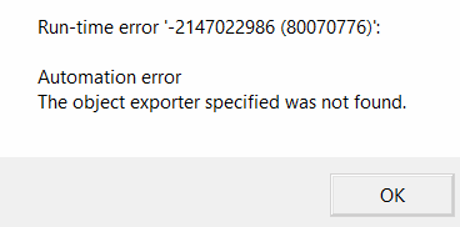
I am getting this error

bwTW40C.png


Any idea?

The full installer from another thread is working though
 
Witch windows and graphic card do you use ?
Witch option in the soft do you use ?
WItch conversion do you attemps ?
 
I am using Windows 8.1.

Been getting that error message as soon as I ran the program.
 
Yes, I am running it from desktop.

I had installed the runtime included in the runtime folder and also the link you provided. Still giving the same error message.

I can run the convert.exe included in the tools folder. Is it possible if you provide me the syntax to convert all png from a folder then output it to another folder?

I will put those commands into a batch file. Manually extract and archive iro using 7H v2.
 
First Check if the png width and height are power of 2 (will be used latter)

then use the convert.exe (imagemagick) to normalize the source png :
Code: [Select]
Code:
convert.exe -background #000000 -alpha Background "source.png" "source.normalized.png"
If w and h ARE power of 2 convert to dds with mipmap :
Code: [Select]
Code:
texconv.exe -y -f BC7_UNORM -bcmax -nologo -o "output folder" "source.normalized.png"
if w or h ARE NOT a power of 2, convert to dds without mipmap :
Code: [Select]
Code:
texconv.exe -y -m 1 -f BC7_UNORM -bcmax -nologo -o "output folder" "source.normalized.png"
 
I can't drag and drop files to the app.  I have run it as Administrator.  I've run it from my Downloads folder.  I've had to flag it as Safe to Windows Defender.  But no matter what I do, when I try to drag, the cursor turns into a little "Circle with a Slash" symbol.  I can Drag and Drop the files anywhere else.  I have tried dragging the files to the desktop THEN to the app, and nothing works.  I tried installing the runtime files, only to get a "Setup Failed" due to a version already being installed. 

EDIT:  Nevermind, turns out Running as Administrator was the cause of the issue.
 
Last edited:
New version 1.25 :
-Changed icon again to avoid A/V false positive
-Added a warning about runing it as admin disable the drag and drop
 
Any chance we might be able to drag/drop folders into this instead of just files? my field folder for ff8 has a million subfolders, etc. and it's a huge pain to drag/drop the contents of each folder into the mod.  otherwise, great tool!
 
Not ATM.
But a simple way to do it is use windows to seach for the png inside your ff8 folder, then drag and drop from the search results, working great ^^
 
for menu stuff it can massively increase iro size but will compress back down with 7zip for distribution.

Thanks for this excellent tool satsuki.

--

It seems on ninostyle model pack from nexusmods, this converts the preview images, I did see a log showing mipmap failures, and in the log it mentionedit though they were unused, but they are used, in the png iro they show up in configure box, on the dds iro they missing.
 
Last edited:
witch iro have you converted without preview and with witch iropngdds version ?
 
It looks like it is just the ninostyle battle models.and ninostyle hd field models.

There is 5 iro's in the pack and the other 3 iro's are ok.

iropngdds version is 1.25 64bits.
 
New version 1.26:
-Corrected some preview files wasn't detected and was converted to dds
 
when i tried to convert iro png file to dds iro, the output iro dds generated is only 0 kb in size, is there a way to fix it?
 
when i tried to convert iro png file to dds iro, the output iro dds generated is only 0 kb in size, is there a way to fix it?
Make sure the file name that you are converting has no spaces in it.
 
Status
Not open for further replies.
Back
Top