C
crackinglazer
Guest
Ive created this new topic to sort out the issue in this previous conversation
crackinglazer:
my mini games are running way to fast, and the frame limiters in aali's driver dont appear to be working, when I start the bike game it flashes up something like vsync appears to be forced on... and it disappears to fast to read the rest, I neglected to read the entire thread, so just point me in the right direction if I've missed the answer
Code: [Select]
Code: [Select]
Vgr:
Disable your shaders.
crackinglazer:
you do meen type no where it says "use_shaders =" in the config?
if so that didn't work
UGerstl:
Need more information for analysis.
I hope you installed the english version of FF7 with Maximum.
Which mods did you install and in which order ?
Are you using the Bootleg installer ?
Please be so kind and change your long posting as i had written to you.
Hit the Modify button of your posting
Hit the # button
Now you see this [ code ][/code ] (i have added some spaces)
Put the data of your "ff7_opengl.cfg" file between ][
Hit the # button again
Now you see this [ code ][/code ] (i have added some spaces)
Put the data of your "APP.LOG" file between ][
Hit the Preview button
Voila, looks better
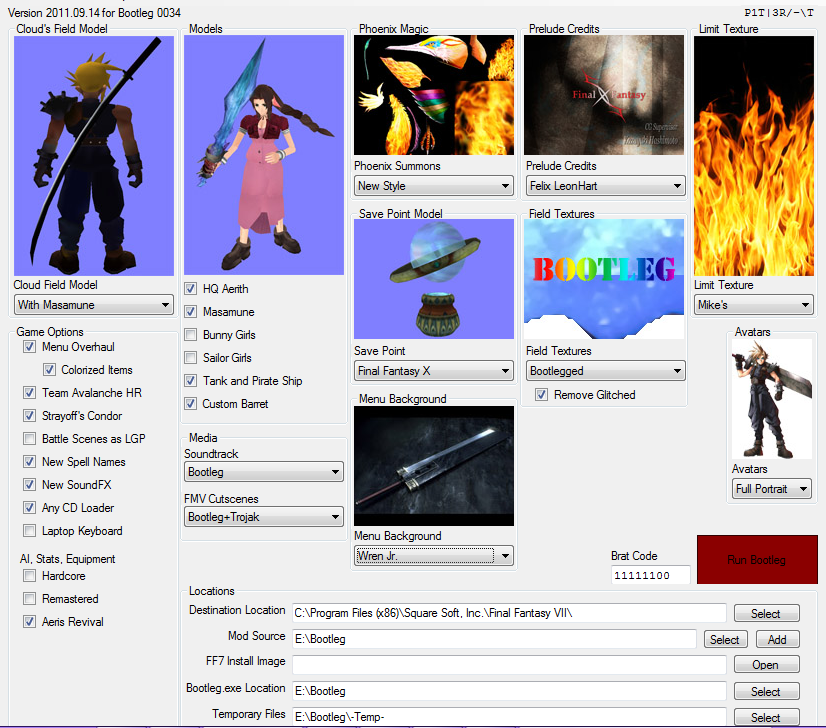
Edit: I looked at your postings, i would suggest you use the Bootleg installer
without the "Team Avalanche HR" option. Because your system could
be overloaded with this HighRes mod (especially your graphics card).
>Klick me< Bootleg installer
>Klick me< Important informations
crackinglazer:
alright I've neatened up the previous post and I'll try the bootleg installer
edit
so i should download all of those mods?
edit
which mod is suppose to fix the framelimiter?
UGerstl:
Hi crackinglazer,
thanks for clean up.
Please create a new topic in "Troubleshooting" with the following subject:
"Please help me installing FF7+Bootleg"
As soon as i see this thread, i will answer your questions and
help you installing step by step.
and then I say: here ya go
link to previous topic: https://www.ff7catalog.com/posts/144293/
crackinglazer:
my mini games are running way to fast, and the frame limiters in aali's driver dont appear to be working, when I start the bike game it flashes up something like vsync appears to be forced on... and it disappears to fast to read the rest, I neglected to read the entire thread, so just point me in the right direction if I've missed the answer
Code: [Select]
Code:
# ff7_opengl config file# use shaders, if available and supported# turn shaders off to use the OpenGL 1.1 backenduse_shaders = yes# plugins# a movie plugin is required, the music plugin is optional, but required to make FF7Music workmovie_plugin = plugins/ffmpeg_movies.fgpmusic_plugin = plugins/ff7music.fgp# vertex and fragment shadersvert_source = shaders/main.vertfrag_source = shaders/main.frag# post-processing shader, used to apply fullscreen effects# options are smartbloom.post and bloom2.post# note that shaders/smartbloom.post must be configured to proper resolution, open with notepadpost_source = shaders/smartbloom.postenable_postprocessing = no# display frames per second counter in upper right cornershow_fps = no# display some real-time debug informationshow_stats = no# set the window size (and fullscreen resolution) of FF7# 0 means use original resolution (whatever ff7.exe provides)# preserve_aspect adds black borders as needed to preserve a 4:3 aspect ratiowindow_size_x = 1024window_size_y = 768preserve_aspect = nofullscreen = yes# prevent glitches due to rounding errors by rendering in the nearest (larger, if supported)# multiple of the original resolution and up/down-scalingprevent_rounding_errors = yes# check your driver settings if this option doesn't seem to workenable_vsync = yes# limit snowboard, coaster and highway minigames to refresh rate / 2, i.e. 30fps for a 60hz display mode# vsync must be enabled and working for this to have any effectminigame_framelimiter = on# same thing, but for the battle swirlbattleswirl_framelimiter = on# replace FF7's default framelimiter timer sourceuse_new_timer = yes# use a more stable (but less accurate) timer to control FF7's framelimiter# this option has no effect unless the use_new_timer option is onuse_stable_timer = yes# allow FF7 to use linear filtering for its textures# some things look slightly better with this option on, but alot of textures just lose their detaillinear_filter = off# enable alpha blending for textures without an existing blending effectfancy_transparency = off# read files directly instead of using LGP archives# this option requires you to have all your LGP archives unpacked in direct/, with one folder for each archive# for example; if FF7 is looking for aaab.rsd in char.lgp, this option will make it open direct/char/aaab.rsd instead# this option should be used for testing only, performance will take a hitdirect_mode = off
Code:
INFO: Auto-detected version: FF7 1.02 US EnglishINFO: FFMpeg movie player plugin loadedINFO: FFMpeg version SVN-r19334, Copyright (c) 2000-2009 Fabrice Bellard, et al.INFO: FF7Music helper plugin loadedINFO: Intel Intel 945G 1.4.0 - Build 7.14.10.1409INFO: No OpenGL 2.0 support detected, shaders won't be availableINFO: Found swap_control extensionINFO: Original resolution 640x480, window size 1024x768, output resolution 1024x768, internal resolution 640x480INFO: No NPOT texture supportERROR: init_indirect failed, scaling and postprocessing will be disabledINFO: internal resolution clamped to 1024x768LOCK UNLOCK TEST MATRIX INITIALIZE INITIALIZE DD/D3D END initializing sound...creating dsound primary bufferreading audio fileloading static soundssound initializedset music volume: 127set music volume: 127Entering MAINExiting MAINSTART OF CREDITS!!!INFO: D:\ff7\movies\eidoslogo.avi; truemotion2/pcm_u8 320x240, 15.000000 FPS, duration: 10.133333, frames: 152set music volume trans: 127->0, step=60END OF CREDITS!!!Entering MAINset music volume: 127Exiting MAINSTART OF MENU SYSTEM!!!INFO: 24-bit PNG loaded (C:\Program Files\Square Soft, Inc.\Final Fantasy VII\/textures/WMRP/menu/buster_00.png); this is slow, please convert to 32-bitERROR: GL_INVALID_VALUEEND OF MENU SYSTEM!!!Entering MAINExiting MAINField StartEntering MAINExiting MAINSTART OF MENU SYSTEM!!!WM_CLOSE END OF MENU SYSTEM!!!Field QuitUNINITIALIZE DD END UNINITIALIZE DDDisable your shaders.
crackinglazer:
you do meen type no where it says "use_shaders =" in the config?
if so that didn't work
UGerstl:
Need more information for analysis.
I hope you installed the english version of FF7 with Maximum.
Which mods did you install and in which order ?
Are you using the Bootleg installer ?
Please be so kind and change your long posting as i had written to you.
Hit the Modify button of your posting
Hit the # button
Now you see this [ code ][/code ] (i have added some spaces)
Put the data of your "ff7_opengl.cfg" file between ][
Hit the # button again
Now you see this [ code ][/code ] (i have added some spaces)
Put the data of your "APP.LOG" file between ][
Hit the Preview button
Voila, looks better
Edit: I looked at your postings, i would suggest you use the Bootleg installer
without the "Team Avalanche HR" option. Because your system could
be overloaded with this HighRes mod (especially your graphics card).
>Klick me< Bootleg installer
>Klick me< Important informations
crackinglazer:
alright I've neatened up the previous post and I'll try the bootleg installer
edit
so i should download all of those mods?
edit
which mod is suppose to fix the framelimiter?
UGerstl:
Hi crackinglazer,
thanks for clean up.
Please create a new topic in "Troubleshooting" with the following subject:
"Please help me installing FF7+Bootleg"
As soon as i see this thread, i will answer your questions and
help you installing step by step.
and then I say: here ya go
link to previous topic: https://www.ff7catalog.com/posts/144293/
Last edited: