Timu Sumisu's Character Remodeling Project

  • Thread starter Thread starter Timu Sumisu
  • Start date Start date
Status
Not open for further replies.
T

Timu Sumisu

Guest
I was greatly inspired by APZ Freak's cloud model, and found it was brilliant to see how newer styles, technology, etc. could be blended with the original art style. Thus far, I have modeled up a model of cloud fairly comparable to his. That's right everybody.. eventually it'll be for release. It is heavily based on his, and is supposed to look like it. I did use the kh1 model for a good deal of reference, and i found the modeling style was fairly simple and easy to emulate... save for the bloody hair. I'm a total noob at texturing, so the next step is gonna take some time. After that i'll have to figure out how to chop it up and get it in ff7, as i've never done that before. I will be making the chibi versions as well. (I love the field chibis). Once the main cast + Sephi get done, I'd ideally like to eventually customize all the field models (wait a few years people heh) though if anyone were interested in helpin in that endeavor feel free to offer. Past that I think it'd b kool to give a similar treatment to all the battle models too, but lest i get ahead of myself and fall off a cliff, here is my model, which clocks in around 2800 tris

cloudyr6.jpg


Once it's done well.. if you want a nice buster sword to match... get APZ Freak's!

Please offer comments, criticisms, and suggestions, such as what character to do next.
 
Looks good so far (although I don't know much about modelling) ;-)

Once the main cast + Sephi get done
Yes, it would be nice to see the other characters getting a good remodelling as well :-)

I'd recommend someone like Barret or Red XIII as your next project, since they seem to get less attention, but are quite popular.
 
OK. after seeing this thread, i officially give up. my model will NEVER beat all this competition this good in a million years.

i guess if you ever need help though, just shout :D
...i'm not bad with texturing. in fact, i could send you my whole texture sheet i guess.
 
Last edited:
Nice work! Very interesting! By the way Timu Sumisu, would you be interested to join a project which will replace all the primary characters with those from kh2? I am a part of that project. So far we have now got 6 models of cloud, yuffie, sephiroth, cid, aerith and tifa. We still havent got a kh1 cloud model so we would love you to join the project. The starter of the project is now doing vincent and zack and im doing the shinra soldier. There are still 5 models which we have to do which are: caith sith, barret, red xiii, shiva, ifrit. If you are interested, i can pm you the link to that project ( its in italian but i can translate it to you, and the people there also understand english )

By the way, if you need help with texturing maybe I can give you some tips. I also ripped the models from kh2 which cloud looks totally like his in AC.

Kimera084b2008-12-1517-37-19-76.jpg
 
I saw the page in your channel of youtube,and respect the project,it look awesome

EDIT:Sorry
 
Last edited:
I'll be busy the next few days with Xmas, but should be back with a chibi cloud in a few days. NeoCloud is helping me out, and he should have a sample of my model textured pretty soon.

@NameSpoofer - Given the amount of time I have, I'll be sticking to this project. Otherwise, good luck with yours. Square uses a fairly simple system to make its characters (at least in KH). Reference Model viewer, but otherwise stick to six sided limbs, square fingers, and a lot of time for hair.

@Lorddolor - If you're refering to seeing a page about my project on youtube, then you are mistaken, as this is the only place I've announced it. If you are refering to NameSpoofer's project, this isn't the thread for that.
 
a VERY quick texturising of the body will give us this:
cloudz0r.png

I'll have more time to improve on it soon, its VERY rough right now...
 
I feel a little silly asking this, but can ff7 support alpha maps?
 
Sadly not. the ".TEX" file format changes alpha to white. however you CAN make things transparent using pcreator ;)
 
no, it has to be entire objects. HOWEVER, Pcreator Can Make a .P file out of up to FOUR seperate Models. i guess if you wanted to, you could make 3 transparent parts and a normal part.
 
Dont see how that'll rly help, you sure it cant do transparent textures? i mean things like when you cast magic use it doesnt it? like the waves that emit from you.

EDIT:

Hokay! I've got me a chibi done... doesnt take too long to modify, just a bunch of scaling. I think i'd rather have the hands as fists, but feel free to provide some input. As to the alpha issue, APZ freaks sephi looks like he has some transparency in the hair, but hard to tell, it might not be. I could make it look good without, it'll just take a few extra polies here n there for characters that may need it.
cloudandchibial9.jpg

If anyone is wondering, I'm using Blender 2.48 and the reason it looks so nice n fuzzy is that i have ambient occlusion turned on.
I'm not too familiar with how models are chopped up for ff7 (torso, legs, arms etc) as each is its own object, so if anyone could explain it, or offer a diagram er something it would be greatly appreciated. I may try n texture these. Texturing is my weakpoint, so it may do me good to practice.

In terms of whats next, I'd like to leave barret for a little bit, as to figure out what to do about his gun hand, to leave a stub or what. And red 13... I hate modeling quadrupeds. Therefor, my next character will probably be Tifa, at a good friend's request.
 
Last edited:
Very nice work there! I suggest you search the message board for how to hack into the lpg files. That'll dictate how you chop your model up. but I suggest you texture it first, texturing can take just as long or longer depending on how smart you go about it. It gets easier once you've done it enough and know what you're doing. It take a tad bit of planning, but I don't really have the time to make a tutorial.

This tutorial for model conversion is what got me going: https://www.ff7catalog.com/threads/4094/

In the battle lpg Cloud is rtaa through rtda. It'll be a bit of learning to figure out how everything should be lain out and how all the code works. But all the information you need is in this forum, just use the search function allot!

Good luck, it looks like you might beat me to the punch to release the new cloud, oh well! It's all good! But I'll still release mine anyways!

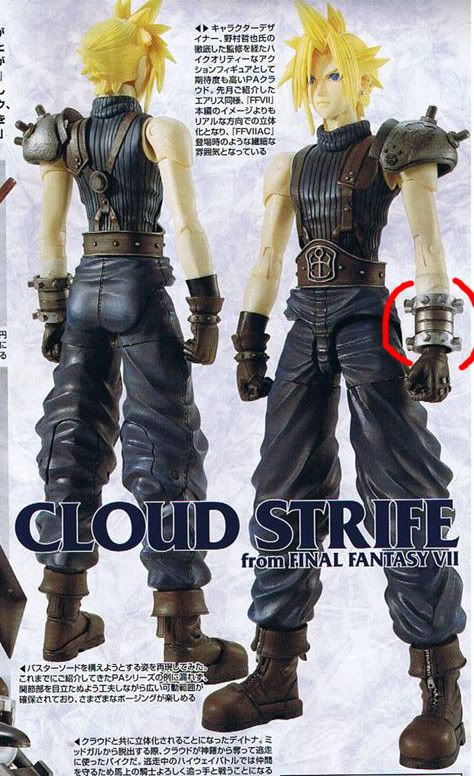
but here's my criticism! Look closely at the Left Forearm Metal Guard. Yours doesn't match the same design of the Crisis Core one I sued, or the original. In the original the middle part was straight and flush in two segments. The Crisis Core version is still in two segments but the higher segment is larger.

Yours looks like the Metal Guard in Dissidia, but not the other titles.

Hey, just letting you know, it's not a big deal, but details are my thing. Infact, it'd be cool if you designed your Cloud in the Dissidia style. That's be pretty cool!

clouddissidia.jpg


and here's the classic original design (click to enlarge):

 
Last edited:
Thanks for the tut link! I'm aware of the wrist guard, and I just prefer it like this.. the middle separation i think i saw in some hires cloud pic like on the cover of ultimania omega er someothing.. cant remmebr, but realistically it would make wrist movements easier.
 
As long as you're aware and it was deliberate. Unintentional mistakes are what bug me. :wink:
 
Before i get too far, can anyone tell me clouds field model name, and tifa's battle and field model names? the 4 digit things...
 
ru** and tfaa.hc or what ever the extension is or at least thats as far as i can remember
 
Okay, I couldn't find the link on the forum fast enough and I'm slightly bending my own way of doing things, but... DOWNLOAD THE LPG LISTINGS HERE. Go to the link and follow the instructions. There's two text files with all of the name references. Trust me, you'll get used to it the more times you edit stuff! There's some intricate rules about editing texture files with the field models, when my new model gets closer to being complete and I start putting him in the game, once I start remembering what I'm doing. I'll put up a tutorial of all of the stuff that I had to search for days/weeks?months? to figure out. It's quite allot of things to figure out and remember!
 
Status
Not open for further replies.
Back
Top