S
sl1982
Guest
i had done it a while back as a test for avalanche but we decided to stick to the normal looking ones

Do you still have them?i had done it a while back as a test for avalanche but we decided to stick to the normal looking ones
Yeah, I tried and failed.i'd be interested in seeing some avatars that make use of the alpha channel for soft transparency. You could feather the edges inward so the avatrs aren't cut-outs, but it would remove the hard edge that the stock ones have. I might give it a crack later tonight.
lee
what exactly happened? were you using the alpha channels? i haven't tried to really use them yet, so i can't comment on how well they are supported by Aali's Driver yet.Yeah, I tried and failed.
I'm going to try something with the opening movie.
Yeah that may be the problem. I'll give it another go. I'll post here if anything works.Alpha channels will work fine if you have fancy transparency turned on in the config file. If it is not on the only thing that will work in the menu's is 100% transparent. That may be your problem.

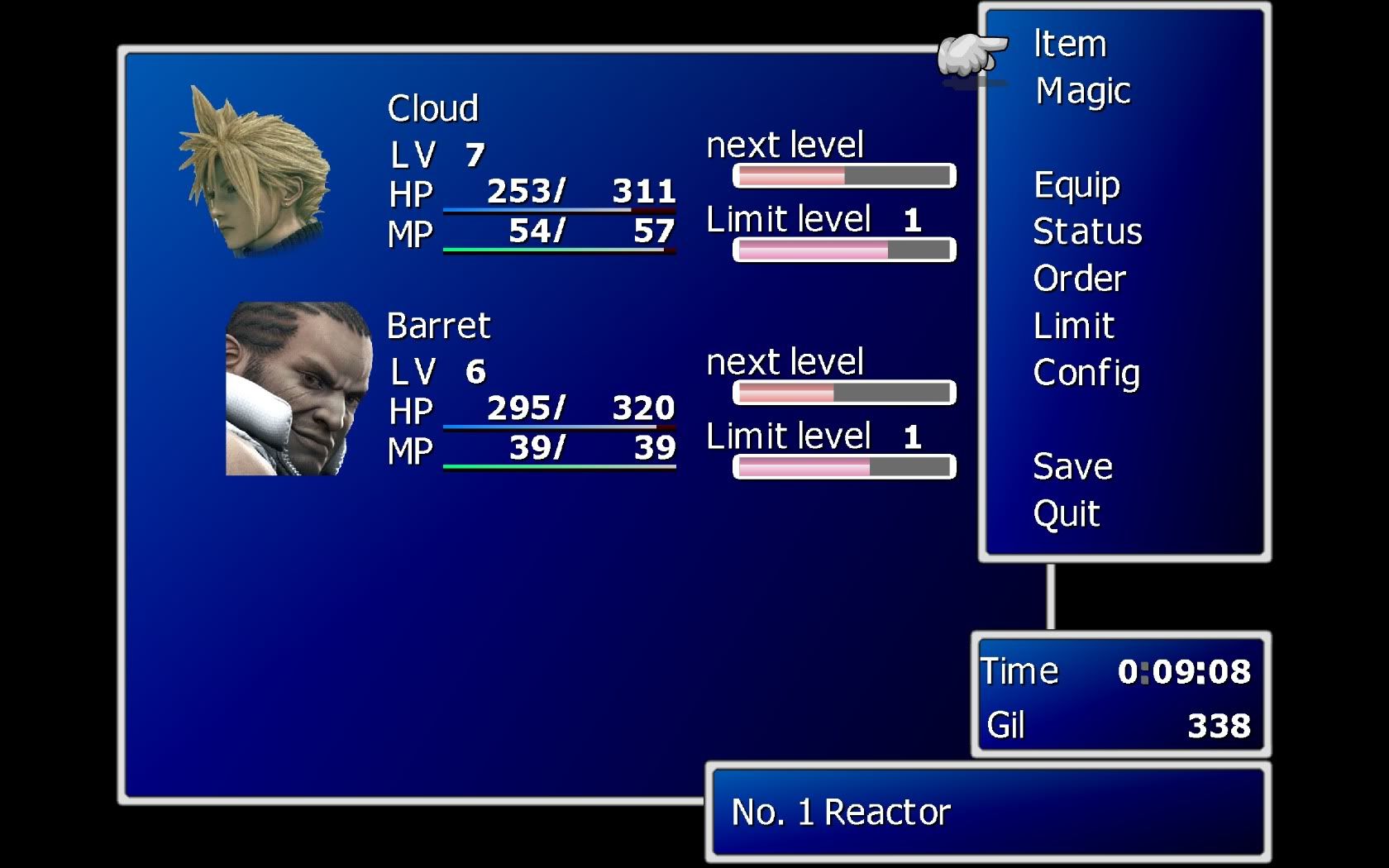
Something like this?Those pictures look weird without the blank behind it.
If they were something like this they would look better.
Gradient on the edges (rather than thick edges) and maybe different avatar pictures, though finding a "fitting" avatar image would be a bit hard.
Edit:
Guess the image will show my point better than the video:
Use the link to see it bigger:
http://img252.imageshack.us/img252/4857/farcasterstatus.jpg

Well i didn't have AC images in mind. More like "profile" pictures but those are hard to get, if not impossible.Something like this?
How the hell did you get it too look like that?Those pictures look weird without the blank behind it.
If they were something like this they would look better.
Gradient on the edges (rather than thick edges) and maybe different avatar pictures, though finding a "fitting" avatar image would be a bit hard.
Edit:
Guess the image will show my point better than the video:
Use the link to see it bigger:
http://img252.imageshack.us/img252/4857/farcasterstatus.jpg
Oh yeah I get it now lol. I just got back from the mall, I'll give it a go here in a minute.Well i didn't have AC images in mind. More like "profile" pictures but those are hard to get, if not impossible.Something like this?
And I meant a fade away in the images corners.
If you do Barret with his head you should do Cloud and all the characters with head shots too so they look right when they are seen together. Nice job BTW I can't believe it would look that good.Well i didn't have AC images in mind. More like "profile" pictures but those are hard to get, if not impossible.Something like this?
And I meant a fade away in the images corners.