Ultima espio and neocloudstrife Crisis core model project

  • Thread starter Thread starter ultima espio
  • Start date Start date
Status
Not open for further replies.
Oh, and just a short note, we decided we're gonna go proportional AND chibi. so everyone's happy :D
 
Oh, and just a short note, we decided we're gonna go proportional AND chibi. so everyone's happy :D

Wiht chibi you don't mean  to do l deformed model  as original But chibi size right?
 
SilverWings: legality is a major issue, we are just going to have to be careful  :wink:

Leighos: I totally agree with you, the KH2 Tifa head does help to suggest more of her warmth as a kind character.
But what i had in mind was something more like AC. CC Tifa has as much personality as a cardboard cutout, too bland.  :-P

NeoCloud: check your PM!

ultima espio: Sephi's shoulders dont feel right, too thin maybe?
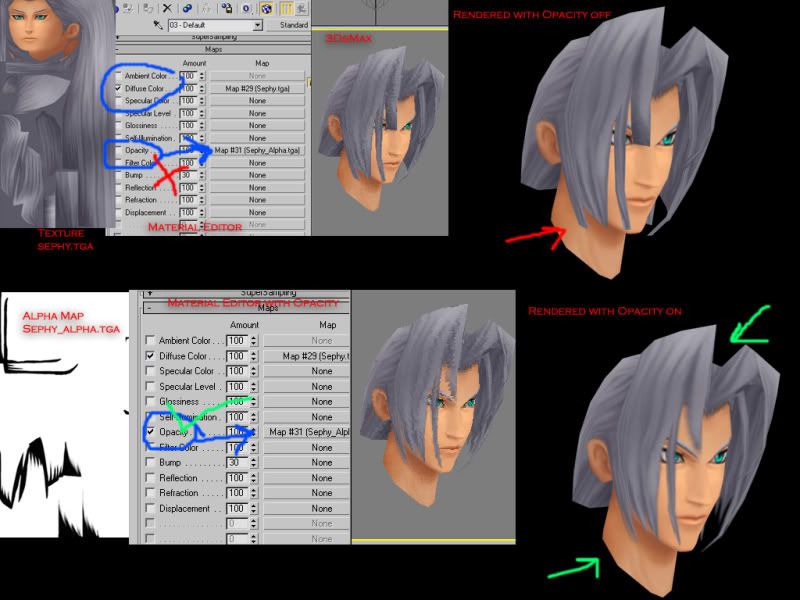
I am not sure what happened to his textures, but if i had to guess I would say that the multiple transparent poly layers of his hair are conflicting with each other at those distances.
You might have to make his hair "solid" and remove the alpha for it to work correctly.
 
Thanks koral, i scaled all of his parts the same, i think it looks weird coz his pads dont curl round to meet his body.
 
No chibi Please!!!!  :-D :-D :-D :-D :-D :-D :-D :-D :-D :-D :-D :-D :-D
Sorry, But i really dont like the look of Normal-proportion characters on the field, it kinda ruins it for me. maybe someone'll do that at a later stage, but i wont be.
Sweet ! So how long does this whole converting of a character work?
Quite a long time, since most characters require some modifying to fit into FF7 anyway.
I second that!  :-D :-D :-D :-D
 
*wants to replace savepoints with moogles*
...espio, you're online. you know the field model name for the save point?
 
*wants to replace savepoints with moogles*
...espio, you're online. you know the field model name for the save point?
Why yes i do, i think it's avfe.hrc

Aaaaaanyway

Here's Tifa in all her glory :-D

I WANT YOUR BRAINS! BRAAAAAINS!!!!

haha here's the real one:


Comments and criticism welcome  :-D
 
Last edited:
Shading! Paint some shadows on her shirt and she'll look much better!
 
Cloud's pretty much done!
Any Constructive Criticism would be great :D

Front:
CloudFront-1.png


Back:
CloudBack.png


Left:
CloudLeft.png


Right:
CloudRight.png


I do apologise for the crudity of the shading in those pictures, particularly in the hair. I have pretty much no idea how the 3dsmax renderer works at all :/

More to come soon!
 
As far as the rendering goes. 3DSMax does not figure out your Shaders for you. You have to tell it what to do in the material editor (Press M)... Alpha Channels - (The transparent parts like his hair) only works if you have a separate file that's black and white. White means it's opaque and black means it's transparent, grey is half way.

Let me demonstrate real quick.

 
wow.. this mod is amazing, i want to be a modder someday hehehe, good job to neocloudstrife and ultima espio i hope i can help to this project  :wink:
 
when the project is done you will going to release it??Â
 
Last edited:
They are intending to release it, but you will have to look carefully where and how  :wink:

apzfreak, they are probably using the PNG textures which contain alpha directly, because our exporters didn't bother splitting the alpha channel into seperate images. But Opacity should still have worked.
I wonder if it is an issue with double sided faces?


I started on my Elena Mod today, using Cissnei's body:


Ofcourse her head doesn't match, so I will be making a new one for her  :lol:
 
They are intending to release it, but you will have to look carefully where and how  :wink:

apzfreak, they are probably using the PNG textures which contain alpha directly, because our exporters didn't bother splitting the alpha channel into seperate images. But Opacity should still have worked.
I wonder if it is an issue with double sided faces?


I started on my Elena Mod today, using Cissnei's body:


Ofcourse her head doesn't match, so I will be making a new one for her  :lol:


WOW She seems Aya Brea from the first Parasite Eve
 
a little, Aya has a different hairstyle though, much longer hair.

Anyway, this is how she looks now:


I modified Cissnei's face (strangely they both really do have the same eye colour  :-P) and fleshed out the hairstyle.
Texturing it wont be easy because I am not willing to spend a ton of time to create my own texture-maps, so I will probably use Sephiroths hair texture and make it blonde
(BTW, a blonde Sephi would look pretty funny  :lol:)

I am not hijacking the thread or anything, NeoCloud and UltimaEspio are the ones will do all the importing into FF7, I am just helping out with some modelling work on the side  :wink:
 
I have started porting Cissnei's body into battle, so all it needs is the head and it will be almost complete :D
 
*wants to replace savepoints with moogles*
...espio, you're online. you know the field model name for the save point?
Why yes i do, i think it's avfe.hrc

Aaaaaanyway

Here's Tifa in all her glory :-D
cool.png

I WANT YOUR BRAINS! BRAAAAAINS!!!!

haha here's the real one:
tifa2.png

tifabehind.png


Comments and criticism welcome  :-D
Her breast should be bigger Lol
 
Her breast should be bigger Lol
Not being a pervert or anything, but he has a point. Since in Crisis Core she is much younger, and Tifa is known for having large breasts in FF7
 
apzfreak, they are probably using the PNG textures which contain alpha directly, because our exporters didn't bother splitting the alpha channel into seperate images. But Opacity should still have worked.
I wonder if it is an issue with double sided faces?
I wrote out a response but it seems it wasn't posted?

Anyways let me explain myself... again. As far as I'm aware, 3DSMax 7 and under doesn't use the alpha in the textures as alpha for rendering. There's nothing I can do to get an texture with alpha in it to render properly unless I have an opacity alpha map. The alpha map you see in my example I made myself from the raw image. It had the alpha directly in the image, so I pasted a black layer in photoshop underneath and turned the main texture except the transparency solid white.

Using alpha in the texture as rendering alpha might be a feature in some more recent 3DSMax, but not Max 7 and under.
 
Status
Not open for further replies.
Back
Top