[WIP] APZ's New Canon Cloud

  • Thread starter Thread starter apz freak
  • Start date Start date
Status
Not open for further replies.
We waited this long, we can wait a bit more. We just need it finished, if it's in 2015  :roll:

 
My base mesh with base colors before any sculpting, with additional ornaments that'll be used to bake normals.


I'm keepin the head a surprise until it's textured  ;)
 
Looking sexy. Judging by the hair spikes, it'll be a nice head :P
Hopefully you can get a good face (eyes, mouth, nose), Cloud version from TA was nice but i didnt like the face much or the colours, there was too much saturation in the hair for example  :| (imo).
 
Very nice. I would be interested in seeing if a high poly version would work in game. I know many people have the hardware to run it.
 
The real question, is could the game engine handle a model with potentially hundreds of thousands of polygons.
 
Nobody really knows until it is tried. I remember hearing something about the engine handling 32000 ish polys per object. I believe an object is for example a leg. I would imagine aali could give a better answer then I can though.
 
65535 vertices per group is the hard limit, a single .p file can have *alot* of groups though so if whichever tool you use is smart enough to create more groups when you go over the limit that wont be a problem.

Performance all depends on where and how your model is used. Reasonably high-poly models would use up alot of CPU time in worldmap and field, while in battle it would be no problem at all, for example. Semi-transparency is also really expensive in some cases and could easily slow the game to a crawl if the model is too complex.
 
I have no plans to release the high poly version. Once I finish him I'll combine the sculpting detail and ornamental polygon detail into normal maps for one combined and slightly retopo'd mesh (ex: The suspender straps will be just a raised portion of the chest mesh) I'm shooting for a final that'll be roughly less than 4000 polys, or 7 to 8 thousand tri polys.

@Nightmarish check the various posts I've made, I have several shots of the working of the face. I'll add them to the WIP links on the first post of this thread
 
If it isn't any trouble, you should release the hi-poly and lo-poly versions, so people who want hi-poly can get it but people who can't use it (or aren't interested for some reason) have an option too. If you make both of them, why not release them?
 
If it isn't any trouble, you should release the hi-poly and lo-poly versions, so people who want hi-poly can get it but people who can't use it (or aren't interested for some reason) have an option too. If you make both of them, why not release them?
Because it wouldn't really look THAT much different honestly! The camera doesn't get close enough for those tiny details to really pop out. And Trust in me  ;) I model smart to get as much detail with as little polys. Takes less time to render.
And as far as I'm concerned the "high poly" is only a stand-in/mid-step to my full render model to use in one of my projects. And that and converting it to the games files would be more trouble than it's worth, and the different only slightly noticeable. As an smart animator, you only model out the finite details you'll see up close.
 
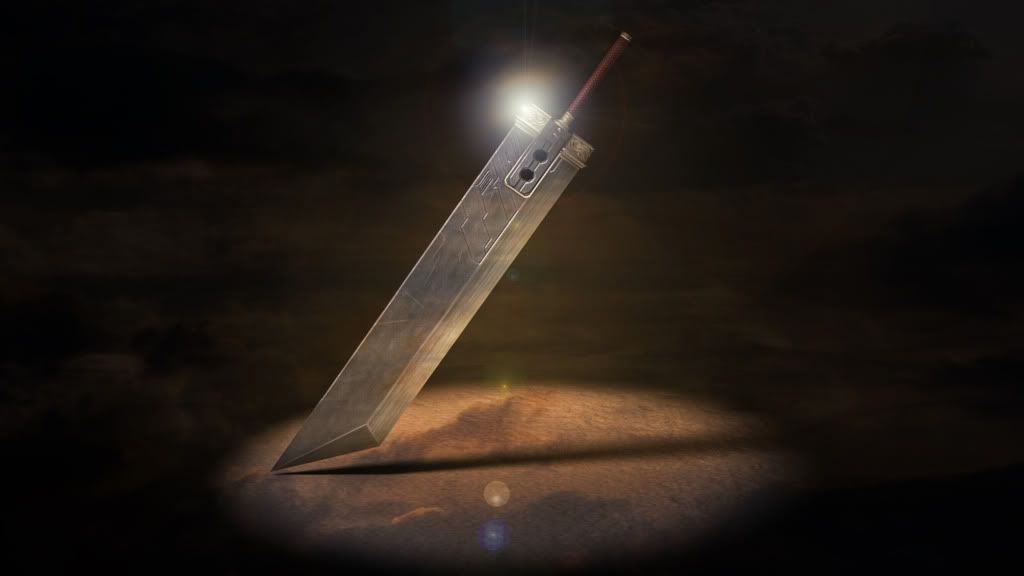
Here's what I've used as my background for the last couple of months, thought you guys might like it as well:

 
just wondering how to i insert that image ^^ into my start screen?
Install Aali's OpenGL driver.
Open the ff7_opengl.cfg file using notepad.
Go to the line that says "mod_path =" and set it to "mod_path = avalanche".
Download the image and rename it to buster_00 and place it in mods\avalanche\menu.
     32-bit: C:\Program Files\Square Soft, Inc.\Final Fantasy VII\mods\avalanche\menu
     64-bit: C:\Program Files (x86)\Square Soft, Inc.\Final Fantasy VII\mods\avalanche\menu
 
Install Aali's OpenGL driver.
Open the ff7_opengl.cfg file using notepad.
Go to the line that says "mod_path =" and set it to "mod_path = avalanche".
Download the image and rename it to buster_00 and place it in mods\avalanche\menu.
     32-bit: C:\Program Files\Square Soft, Inc.\Final Fantasy VII\mods\avalanche\menu
     64-bit: C:\Program Files (x86)\Square Soft, Inc.\Final Fantasy VII\mods\avalanche\menu
THANKYOU xD
 
Wow. The sword looks incredible, can't wait for a release, or is there a way to use the image? :)
 
Wow. The sword looks incredible, can't wait for a release, or is there a way to use the image? :)

Please read the post above yours Stan.  Download the image and convert to a .png file then rename the pic and place it in the correct folder.
 
Sorry guys :) school's beating me to a pulp! I got Production Team where a team of 7 students make an animated short film in 3 months... and I'm the art lead and most of my team isn't very skilled... So I'm kind of teaching everyone what we've already learned for the last year (Sigh inducing disappointment)... It'll be great though! Me and the Production Team leader are decent enough and I'm sure that with enough grinding we'll make something cool! Also Advanced Rigging (which is more like advanced round about way of making things more complicated for animators  ;) but seriously I'm learning a TON) and lastly I got Animation Studio V Which is a 3 month long project dedicated to the area of cg that I'm most interested in (Character Concept/Creation/and Animation) the whole purpose is that I make something polished to put on my demo reel.

I'll include my version of the opening screen (made to look more like the original but with the new sword of course) when I finally get around to releasing Cloud.

Have faith guys  :) I'm sorry, it'll be worth it! I won't let you down
 
Status
Not open for further replies.
Back
Top