Blagnarok's Ultimate 7H Load Order 2.0 - Best Graphics, Bug Free, Complete

  • Thread starter Thread starter Blagnarok
  • Start date Start date
Status
Not open for further replies.
Did you mean to deny access to, FF7.SYW.Fields.Chars?  Because when i click on it, it doesnt allow me to start the download unless you give permission (if so, could I have permission? ^_^)

Also, your walk-though is amazing, thank you so much for putting in the time and creating it!
I'm getting the same deny access error. Would be awesome to get permission for it! I'm also noticing some of the addons in 7th Heaven give me a warning that says "enabling this addon may harm your computer!" should I be worried about that?
 
Great guide! But also getting stuck on FF7.SYW.Fields.Chars not being accessible
 
One of the SYW mods google drive link requires permission and most things wont download through 7H but it does look great! Also in the media and sound files have no actual mods in the folders. When you go to import it theyre all empty.
 
One of the SYW mods google drive link requires permission and most things wont download through 7H but it does look great! Also in the media and sound files have no actual mods in the folders. When you go to import it theyre all empty.
Empty mod folders are actually normal... 7H intercepts the game's request for an asset (sounds, textures, models, etc), looks down its list of active mods (from top to bottom, this is why load order matters!), and if it finds a match, unpacks it in memory and feeds the game a pointer to that address.  When it doesn't it sends back a pointer to what's in the original lgp file.
 
All of the Satsuki SYW mods are included in the Qhimm mods in the catalog. You don't need permissions, or a special downloader program or other nonsense.

The media/sound mods do in fact, contain content (obvious by their huge file size). If you have a problem with a mod missing something, it is probably corrupted and you should re-download.

Right now, some downloads are slow due to the large number of people downloading right now. I will be posting mirror links on http://7thheaven.rocks very soon.

Let's let Blagnarok have his thread back. Issues with mods or 7th Heaven can be posted in their respective threads.
 
Great guide! But also getting stuck on FF7.SYW.Fields.Chars not being accessible
Thanks, fixed!

Did you mean to deny access to, FF7.SYW.Fields.Chars?  Because when i click on it, it doesnt allow me to start the download unless you give permission (if so, could I have permission? ^_^)

Also, your walk-though is amazing, thank you so much for putting in the time and creating it!
Hi, that was just a mistake in my Google Drive.  I thought I turned on link sharing but I must've toggled it off accidentally.  Thanks for the heads up.  I'm glad you like the guide!
 
Last edited:
One of the SYW mods google drive link requires permission and most things wont download through 7H but it does look great! Also in the media and sound files have no actual mods in the folders. When you go to import it theyre all empty.
The Music and Sound mod needs to be fully extracted from the zip and imported into 7H as a "Folder" due to it's file structure.  To do that you need you need to go to the import button to the top right of your mod list and choose "Import From Folder" then navigate to the folder you just extracted named "2bdd4a94-4b06-46ca-af0a-37b9dfef25aa_Media___Music_and_Sound_2.1" and hit OK. 

If you try to "Import from IRO," you will just see what looks like a lot of empty folders, because the mod is made up of music files, not IRO files.  I clarified this a bit in my instructions.  Thanks for the feedback!
 
Last edited:
Hey Blagnarok, satsuki updated the installer and now we are able to create individual IROs for each pack and they can all be loaded simultaneously in 7H.
This will allow you to set the correct category for each pack and correct load order.
 
Last edited:
Hey Blagnarok, satsuki update the installer and now we are able to create individual IROs for each pack and they can all be loaded simultaneously in 7H.
This will allow you to set the correct category for each pack and correct load order.
Thanks for the info!
 
Bug report: Selecting something other than Original Soundtrack can cause the end of the Cosmo Canyon section to hang.
 
Hi, I followed your guide all the way but I'm afraid I have an issue: ff7 launches successfully (at least that's what 7th Heaven 2.0 says) but immediately closes itself. Mod selection and load order is exactly the same, I have no clue what can cause the problem. I'm using a fresh steam install as well. Please help :c
 
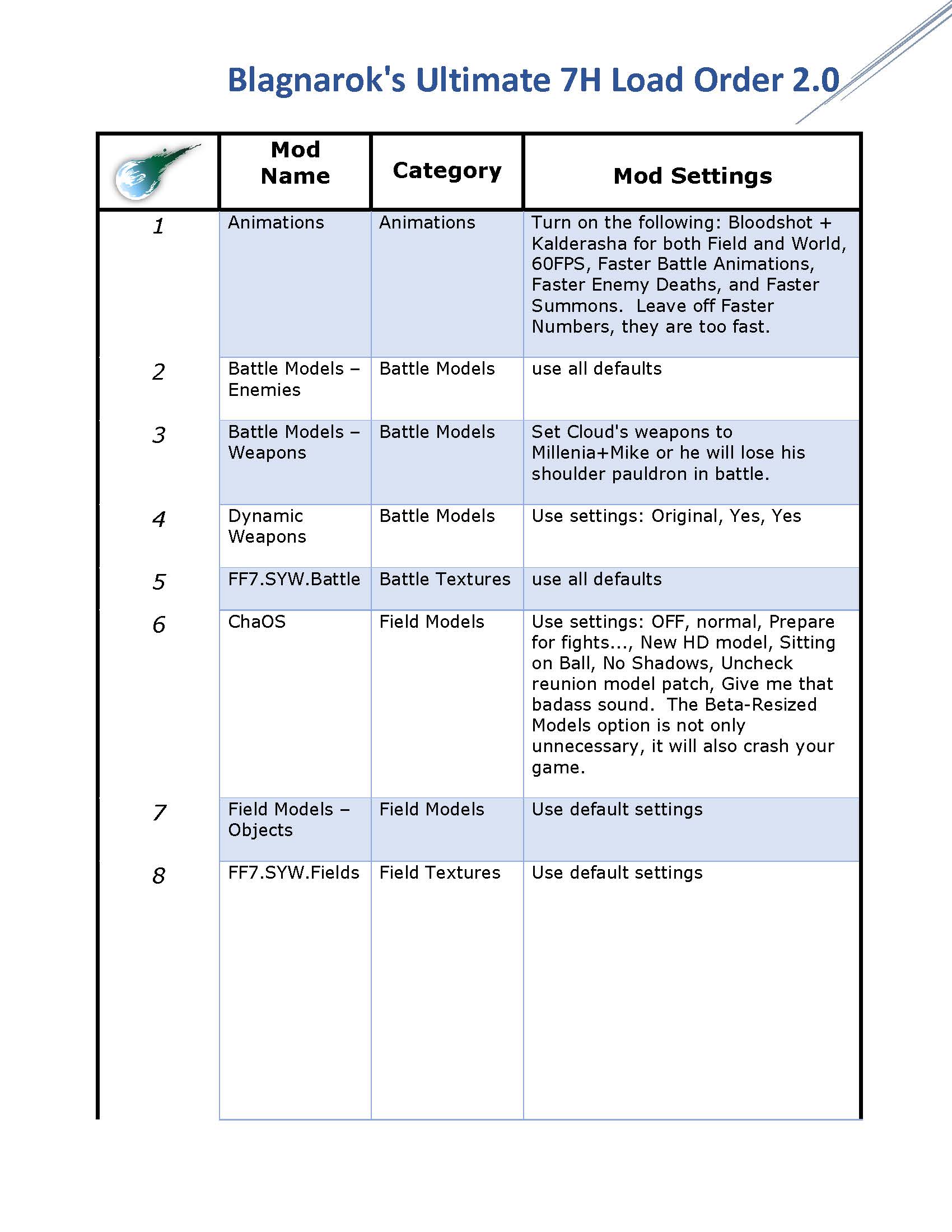
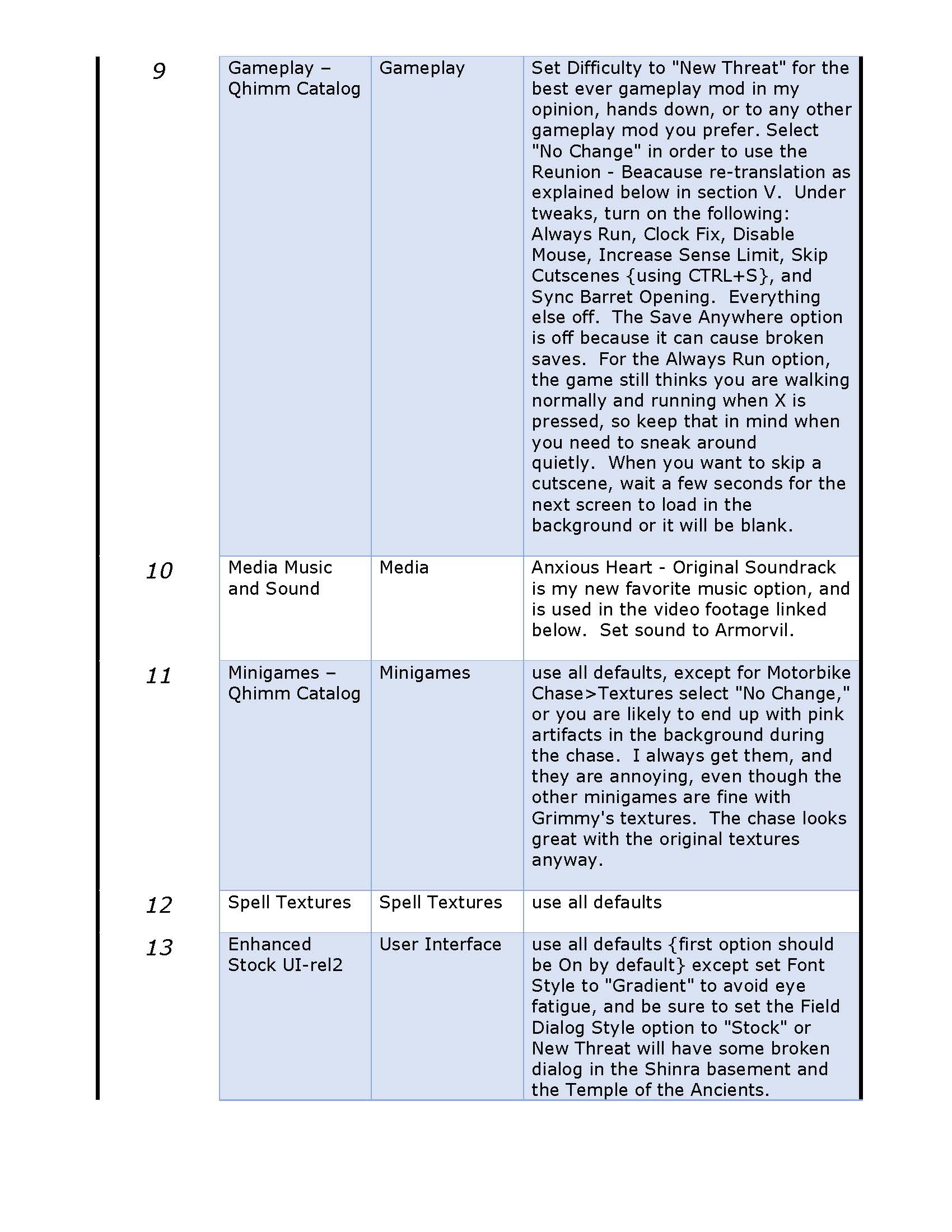
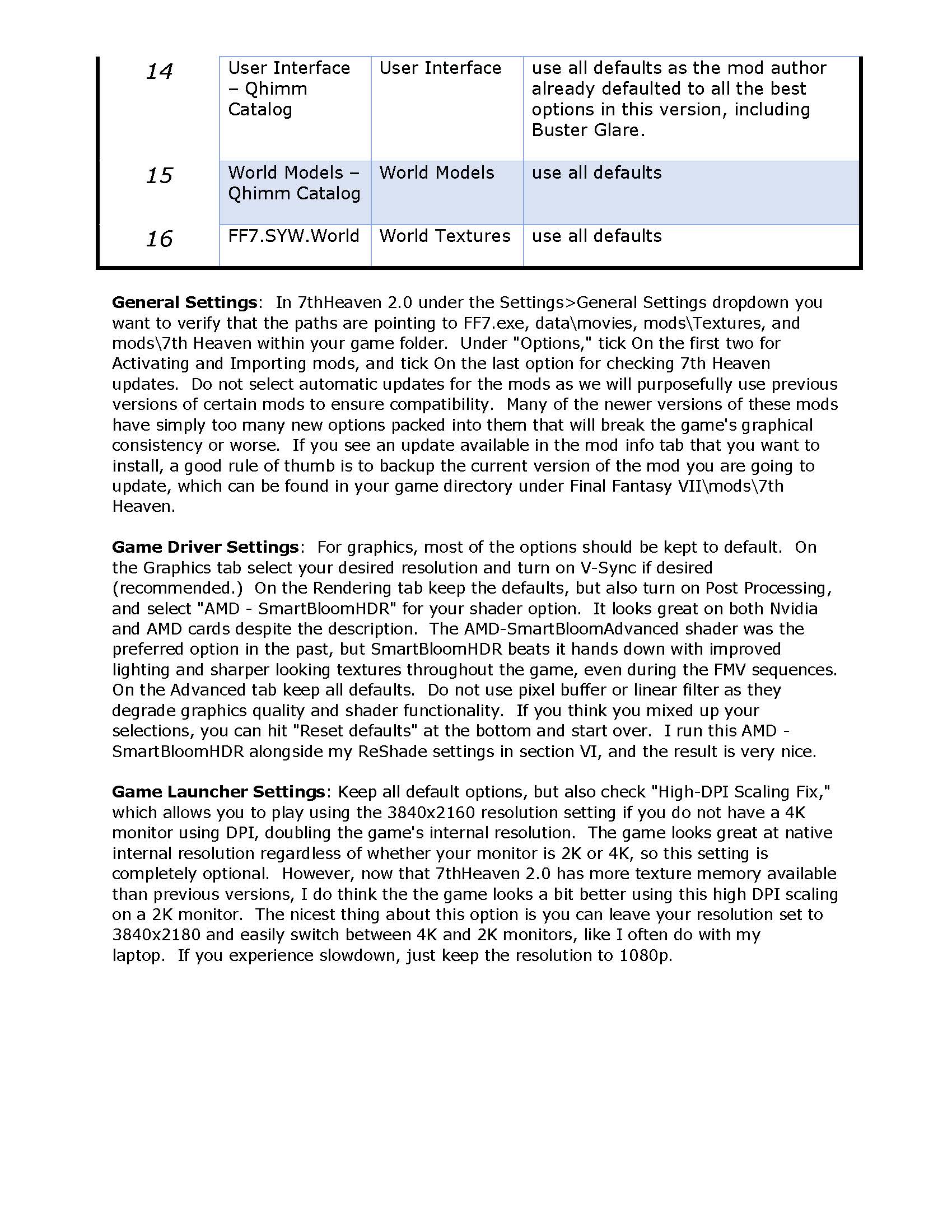
[size=10pt]Your guide is awesome Blagnarok, aaannndd I'm a fan of excessive organization ^_^
So I made a table that organizes the load order, mod category, and mod settings you suggested.

Thanks again for your guide, and I hope everyone finds this useful!
[/size]

https://drive.google.com/open?id=1kW8jPAft6JAuEEVXNjtI_mxVGhvmrVcN

L4f1pxO.jpg

6ARinDE.jpg

UKisPgk.jpg
 
Something in this setup causes random black screens before or after battles. When it happens after a battle there is a crash. When it happens at the beginning of a battle, the screen goes dark just before you get control and you can still pick attacks and spells, but nothing happens after you have given all 3 characters commands. Screen stays blank and nothing ever happens. You can only pause and unpause. Otherwise you've gotta quit.

It's a nice combo otherwise, but this problem is a dealbreaker. It happens so infrequently (once every few hours) that I'm not going to test by disabling a couple mods at a time to try it out. That would take all week. But frequently enough that it's just not going to work out for me. I guess I'll try Remako + Reunion 6.
 
Hi, I followed your guide all the way but I'm afraid I have an issue: ff7 launches successfully (at least that's what 7th Heaven 2.0 says) but immediately closes itself. Mod selection and load order is exactly the same, I have no clue what can cause the problem. I'm using a fresh steam install as well. Please help :c
Make sure under general settings in 7H 2.0 it is pointing to FINAL FANTASY VII\FF7.exe
Also, check the Game Launcher settings under the Settings menu in 7H 2.0 and make sure all the options in the upper left box are selected and the high dpi scaling fix is selected.
If that doesn't work you may have to reinstall 7H 2.0.  If you reinstall 7H 2.0 you can right click and try running it as an administrator.
If for some reason you need to fully delete FF7 and do a clean install, follow the steps in the 7H FAQ: https://www.ff7catalog.com/threads/11329/
Hope that helps.

Something in this setup causes random black screens before or after battles. When it happens after a battle there is a crash. When it happens at the beginning of a battle, the screen goes dark just before you get control and you can still pick attacks and spells, but nothing happens after you have given all 3 characters commands. Screen stays blank and nothing ever happens. You can only pause and unpause. Otherwise you've gotta quit.

It's a nice combo otherwise, but this problem is a dealbreaker. It happens so infrequently (once every few hours) that I'm not going to test by disabling a couple mods at a time to try it out. That would take all week. But frequently enough that it's just not going to work out for me. I guess I'll try Remako + Reunion 6.
That's what happens when your computer is having a hard time loading screens.  If it transitions to the next screen before it loads the screen will go black.  I have not had that issue on my computer, and you are the first to report it here.  I would double check your game driver settings, make sure your texture memory is set to 2048, which is what I use.  If it already is set to that, maybe your video card can't handle that much texture memory, so try setting it to 1024.  You can also try lowering your video resolution, or basically any other performance solution you can think of to get your system to run a bit faster.

Also, Remako's Field Textures and Battle Textures, actually all parts of Remako, are compatible with this mod.  I just prefer SYW's slightly to Remako, so that's why I use his mods in my guide.  Just download and install the IRO versions of Remako's fields and battle texture mods, then put that in the load order in place of 5. FF7.SYW.Battle, and 8.  FF7.SYW.Fields.Chars.  Keep in mind his textures use the same amount of video memory, so it might not solve your problem but the above troubleshooting methods might.

(Windows 10 pro gaming tip: To get the best video performance in Windows 10 with an Nvidia Card, right click on your desktop, select NVIDIA control panel, go to Adjust Image Settings Using Preview, choose the third option and move the slider to Quality.  Setting individual graphics settings on Nvidia cards used to be the best method, but with the new cards it's far more efficient and better looking in every game to let the card control those settings.)

Bug report: Selecting something other than Original Soundtrack can cause the end of the Cosmo Canyon section to hang.
Thanks for the bug report.  I'll look into it if I get the time, but I may not get around to it.  I also have not had this bug reported previously.  What scene specifically hangs, and are you using the New Threat gameplay mod or Reunion?

[size=10pt]Your guide is awesome Blagnarok, aaannndd I'm a fan of excessive organization ^_^
So I made a table that organizes the load order, mod category, and mod settings you suggested.

Thanks again for your guide, and I hope everyone finds this useful!
[/size]
You're welcome, and nice job organizing the list!

 
Last edited:
That's what happens when your computer is having a hard time loading screens.  If it transitions to the next screen before it loads the screen will go black.  I have not had that issue on my computer, and you are the first to report it here.  I would double check your game driver settings, make sure your texture memory is set to 2048, which is what I use.  If it already is set to that, maybe your video card can't handle that much texture memory, so try setting it to 1024.  You can also try lowering your video resolution, or basically any other performance solution you can think of to get your system to run a bit faster.  (Windows 10 pro gaming tip: To get the best video performance in Windows 10 with an Nvidia Card, right click on your desktop, select NVIDIA control panel, go to Adjust Image Settings Using Preview, choose the third option and move the slider to Quality.  Setting individual graphics settings on Nvidia cards used to be the best method, but with the new cards it's far more efficient and better looking in every game to let the card control those settings.)
My GTX 1050Ti is definitely not incapable of handling this. I highly doubt this is a performance issue.
 
And for whatever reason I cannot edit my own post.

Besides, if you read what I said when it transitions to the next scene and then it goes black.
 
And for whatever reason I cannot edit my own post.

Besides, if you read what I said when it transitions to the next scene and then it goes black.
Well, sorry to hear that, other than double checking your load order and settings, I don't know what could fix it.  Remako field and texture mods are compatible with my guide as well, just use the IRO versions.  Let me know if that solves it for you.
 
Damn this looks great. I just can't decide between New Threat or The Reunion... Both are great for completely different reasons, I'm just sad that I can't have Beacause and New Threat together.
 
Damn this looks great. I just can't decide between New Threat or The Reunion... Both are great for completely different reasons, I'm just sad that I can't have Beacause and New Threat together.
Don't be sad about that at all.  New Threat can't work with Beacause dialog since it would overwrite too many of the dialog elements New Threat relies on to expand the story and gameplay.  Both options are really good, but I do not think Beacause has any real advantage as far as the story goes.  New Threat more competently fleshes out the backstory with less loopholes believe it or not.  The world feels more real with New Threat and there are tons of new surprises to keep you enganged. 

On the other hand, if you want strict Vanilla gameplay, go with Beacause, and you won't have any surprises with bosses or item drops, and the GameFAQ's online will all still be relevant.

It's pretty easy to try em both out, but I'd give New Threat a try first if you are on the fence.  I think you'll have a blast with it.
 
Well, sorry to hear that, other than double checking your load order and settings, I don't know what could fix it.  Remako field and texture mods are compatible with my guide as well, just use the IRO versions.  Let me know if that solves it for you.
I have tried using the up-to-date versions of the mods you said to get from the old repository thinking the outdated mods might have stability issues with the newer mods. That didn't help. I have no other ideas.
 
Status
Not open for further replies.
Back
Top