
K
Kuraudo
Guest
Final Fantasy VII PC
 Best Must Install Mods 2026
7th Heaven Mod Manager • 60 FPS • Ninostyle • Real-Time Lighting • True Widescreen
Last updated: February 25, 2026 (Steam ReRelease and GOG Release support)
Best Must Install Mods 2026 7th Heaven Mod Manager • 60 FPS • Ninostyle • Real-Time Lighting • True Widescreen
Last updated: February 25, 2026 (Steam ReRelease and GOG Release support)
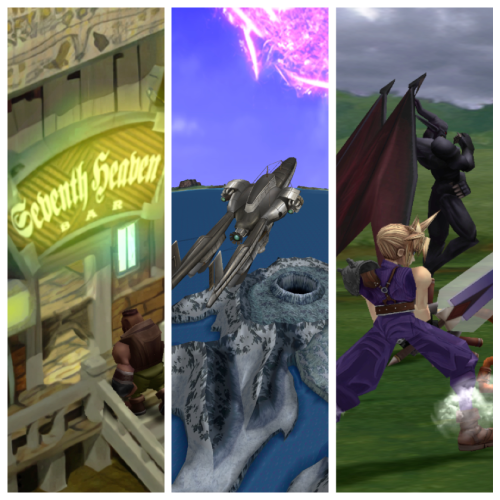
16 Must Install Mods at a Glance
Code:
[b]#[/b] | [b]Mod name[/b] | [b]What it does[/b]
1 | Cosmo Memory | Full sound overhaul + ambience + footsteps
2 | Aavock ESUI | Remasters OG UI, requires ESUI
3 | Enhanced Stock UI | Full UI overhaul, required for AavockESUI
4 | Cosmos FMV | Magically replaces characters in FMV
5 | 60/30 FPS Gameplay | Bumps up the FPS to 60 for battle, field & world mode
6 | Ninostyle Chibi Fixes and Additions | Adds fixes and addons for NinoStyle Chibi & Battle
7 | NinoStyle Battle Models | Battle models matching the official art
8 | SYW Unified Battle Textures | Upscales battle backgrounds
9 | AxlRose Blender | Provides a fix for the battle stage blending
10 | NinoStyle Chibi Field Models | Field & World Chibi models painstakingly recreated matching the official art
11 | Cosmos Limit Break | Upscales and extends field backgrounds for widescreen display
12 | Shinra Archaeology Cut | Full Retranslation, optional cut-content and a plethora of features
13 | FFNx FF7Music | PS1-quality music
14 | SYW Unified Minigame Textures | Upscales minigames
15 | SYW Unified Spells Textures | Upscales spell textures
16 | Cosmos Gaia | Worldmap overhaul + re-implements terrain rendering
↓ Full detailed guide with exact settings below ↓
Table of Contents
- 16 Must Install Mods at a Glance
- Quick Start – How to Install Everything
- Full 17 Must Install Mods
- Optional but Amazing Mods
- Compatibility Table
- Game Driver Settings
- Useful Links
- Modding Scene
Quick Start – How to Install Everything
- You must own a genuine FF7 edition of either: 1998 Eidos, 2012 Eidos, 2013 Steam, 2019 Windows Store, GOG Release, Steam ReRelease
- Install it. If you're using the CD version ensure you hit full install and not minimal
- Launch FF7 at least once
- Download 7th Heaven Mod Manager Canary from Assets and launch it
- Ensure you install both Visual C++ and the .NET Desktop Runtime when asked
- General Settings → Select Canary for 7H & FFNx → Check for Updates → Yes → Save
- General Settings → Auto Sort Mods by Default → Save
- Browse Catalog → Install every mod listed below
- My Mods → Play!
If you're after a true FF7 Remastered experience that's improved —
but still faithful to the original... we've got you covered!
but still faithful to the original... we've got you covered!
Full 16 Must Install ModsBelow is a list of 16 mods that will amaze you.
Once installed, go to the "My Mods" tab and configure them by double-clicking on them.
[list type=decimal]
[*]Cosmo Memory ? – Thread
→ These HQ sounds are designed to immerse you in the game world and create a sense of realism (if you want vanilla SFX, you've got to disable this mod).
[*]AavockESUI ??
→ Choose the configuration based on your preferences. Requires Enhanced Stock UI mod (alternative: Finishing Touch mod for FF12 inspired UI or else Retouch mod for Remake battle UI, go for whichever one you like).
[*]Enhanced Stock UI ? – Thread
→ Backbone for all modern UI themes. Required for AavockESUI, Finishing Touch, Retouch (if you're looking to play without ESUI+AavockESUI, I'd suggest checking out the mod SYW Unified Menus and Fonts).
[*]Cosmos FMV (30 FPS) ? – Thread
→ Enable "Ninostyle Chibi" + "Ninostyle"
[*]60/30 FPS Gameplay ? – Thread
→ Enable "Full 60 FPS" + "NinostyleHD animations" for breathing animation otherwise select "Original animations" + Disable "Field mode 60 FPS Fix"
[*]Ninostyle Chibi Fixes and Additions ?? – Thread
→ Enable "Facial Animation" if using SAC/UBF + "Dynamic Weapons Cloud" + "Cloud Alt. Outfits>Vanilla Cloud" for OG gloves (alternative: black Remake costume "RE Cloud". If you're bothered about the mouth texture you can just get rid of it with Mouth Replacer mod above Ninostyle Chibi Fixes and Additions).
[*]NinoStyle Battle Models ? – Thread
[*]SYW Unified Battle Textures ? – Thread
[*]AxlRose Blender ? – Thread
→ Place it under SYW Unified Battle Textures.
[*]NinoStyle Chibi Field Models ? – Thread
→ Disable "L@zar0's upgrades" + Disable "Efryt's Little Work" + Enable "Dynamic Weapons BETA".
[*]Cosmos Limit Break ?? – Thread
→ Enable "Upscaled + Extended Backgrounds" + "Background Uncrop" + "Recommended 99% Animated Fields". If you get a slowdown, just set the last option to "Light" (hopefully, any CLB field script issues will be sorted and implemented in SAC or any other mod that changes the script chunk. Alternative: SYW Unified Fields Textures).
[*]Shinra Archaeology Cut ?? – Thread
→ If you're after a closer-to-OG experience, go ahead and enable "Gameplay Mode Vanilla mode" + "Advanced Facial Animation" + Disable "Music fixes" if you using FFNx FF7Music + Disable "Opening FMV w/ Text Crawl" (Note: vanilla HQ SFX built in, closer to PS1. SAC offers a plethora of features that are worth exploring during a 2nd Playthrough with Archaeology Mode. Otherwise if interested in Voice Acting for your 2nd Playthrough then try this different retranslation: Echo-S 7 in tandem with the mods Mouth Replacer, Universal Blink Fix, Ninostyle Chibi Fixes and Additions, NinoStyle Chibi Field Models).
[*]FFNx FF7Music ? – Thread
→ Enable "Override opening movie audio" + "Synchronize Music" for Cloud's subconscious music bug fixed (Note: this mod contains superior PS1 sound and tweaks for a bug-free experience. The OGG tracks in the standard PC version have lower clarity and volume due to higher compression, as well as looping issues and music bugs compared with PS1 version, the FFNx FF7Music mod fix all these issues. Alternative: ReMusic 2.0 mod for Remake Project OST or FF7 Ever Crisis Soundtrack mod, check the Soundtrack Options thread).
[*]SYW Unified Minigame Textures ? – Thread
[*]SYW Unified Spells Textures ? – Thread
[*]Cosmos Gaia ?? – Thread
→ The world has never looked this good! (Note: This mod turns on automatically Advanced Lighting and Analog Control even if those are off. If you are not interested in the Advanced Lighting and in true widescreen 16:9 worldmap overhaul that re-implements terrain rendering, analog movement, camera controls, real-time lighting and extended view distance then use: SYW Unified WorldMap Textures)
[/list]
You are now ready to start. However, if you want to tweak and change some of the mods that are not to your taste, or simply prefer a different style, or just want to go wild, then continue with the optional mods below. Also, you are free to look for more mods in Browse Catalog tab and play as you wish. It goes without saying that there are at least one hundred mods that can enhance your experience. One such mod is Postscriptthree's Tweaks, featuring Multi-Linked Slots and In-Battle PHS just to name two amazing features. Another gem is New Threat 2.0 which needs no introduction: a gameplay mod that changes the entire experience. Or the most recent and entertaining CloudReplacer.
Important: Remember, you can't usually have multiple mods that strive to achieve the same thing. Also, the Qhimm thread links above are used for reference and introduction, you still need to download the mod from the 7th Heaven mod manager, search for the mod name in the Browse Catalog tab and install it from there. Whatever is not installed from the catalog is not supported. The idea behind creating this list is to make life easier for the end users, since not everyone is an expert.
Optional but Amazing Mods
You will also find 32 optional mods below, if you want to activate these mods you must check the "Compatibility Table" section below, in terms of not having mod conflict. Remember: you can't usually have multiple mods that strive to achieve the same thing. Search for the mod name in the 7H Browse Catalog tab and install it from there. Mods are updated regularly, so something might change regarding compatibility. Please always read the descriptions. Once installed, go to the "My Mods" tab and configure them by double-clicking on them.
Noteworthy mods, but not ultra-compatible with all the aforementioned mods, try at your own risk:
Gameplay Tweaks - This is unsupported mod. Use at your own risk. Disable "Always Run" option due to incompatibility.
FFVII OVA Remake {Spanish}{Gameplay Mod}{Story changes involved}
Traducciones XT Spanish ReTranslation
SYW Unified includes Néo-Midgar French ReTranslation
Caledor Italian ReTranslation - Ensure SYW Unified Minigame Textures, SYW Unified UI Menu and Fonts are both turned OFF since included already, also turn OFF New Threat, Echo-S 7, AavockESUI, Retouch, Finishing Touch, Enhanced Stock UI, IFRIT, and KACTUAR since not compatible [any mods that modifies the script such as Gameplay mods etc. and other translation mods are not compatible]
Unreleased:
Extended Mod by Shampignon {WIP}
Consider supporting your favourite mod and individual modder with the button "Donation Link" in within 7th Heaven Mod Manager in "My Mods>Mod Info" tab.
- Chthonic Harmony ? – Thread
→ Enable "Ending2 Final Game Dialogue" + "Jenova_E" 30FPS FMV for SAC only (Check readme for more details). - Postscriptthree's Tweaks ? - Thread
→ Tweaks, addons and powerful unique features. - New Threat Combat Only - Thread
→ Combat rebalance mod. - Nitpick ?
→ Seventh Heaven Bar Sign Field fix. Spherical Black Materia fix. No Battle Pyramid fix. Red XIII's avatar fix. Field Backgrounds fixes and more. - Finishing Touch ? - Thread
→ Requires Enhanced Stock UI. - Retouch ? - Thread
→ Requires Enhanced Stock UI. - Echo-S 7 ? – Thread
→ Full Voice Acting Mod! Set Music to "OFF" if using FFNx FF7Music. Music volume to 65% + Voice volume to 75% in 7H Settings>Game Launcher Settings (Note: vanilla HQ SFX built in, closer to PS1. Also, disable Wizard Staff mod since already built in. Unfortunately, Echo-S has not yet fully implemented the "Field Mode Fix" from the 60 FPS mod, but it will not affect your playthrough. I recommend using Echo-S 7 in tandem with the mods Universal Blink Fix, Ninostyle Chibi Fixes and Additions and Ninostyle Chibi.) - Idle Animations ??
- 60 FPS Animations for ChaOS - Thread
→ Ensure this mod and also the other 60/30 FPS Gameplay mod are both ON, this will fix Sephiroth 60 FPS infamous bug for ChaOS mod. - 60/30 FPS Animations for New Threat 2.0 - Thread
→ Ensure this mod and also the other 60/30 FPS Gameplay mod are both ON for New Threat. - SYW Unified FMV - Thread
- ModdersHaven Base Model Pack - Get it on Nexusmods.
- The Cetra Project - 3D Model Pack - Get it on Nexusmods.
- Gaia-VII Remaster - 3D Model Pack - Get it on Nexusmods.
- Avalanche Arisen Battle Textures - Thread
- CloudReplacer ?
- Mouth Replacer
- Universal Blink Fix ??
→ For OG Vanilla blocky models and Ninostyle Chibi. - ChaOS - Thread
- NinoStyle HD Field Models (Incomplete) - Thread
- Project Edge/Team Avalanche Remodeled HD Fields (WIP) ? - Thread
- SYW Unified Field Textures - Thread
- New Threat 2.0 ? - Thread
→ This one's a must for your second playthrough. Gameplay Mod. Story changes involved. - Chocobo Racing-Bike Chase Character Overhaul ?
- Bynyl FF7 Soundtrack (WIP) ? - Thread
- ReMusic 2.0 ?? - Thread
→ Remake and Rebirth musics. Feature Dynamic Music: game music is interactive, music flows seamlessly from exploration-to-battle! Get it on Nexusmods. - FF7 Ever Crisis Soundtrack ?? - Get it on Nexusmods.
- SYW Unified Menus and Fonts - Thread
→ Enable English HD fonts + avatars + credits + game over + indicators + new game (if you are not using ESUI, FT, AESUI, Retouch then SYW UI is a must). - High-Detail World Map - Thread
- Realistic Subtle World Map Animations - Thread
- SYW Unified Worldmap Textures - Thread
- ReShade CRT-Royale ?
→ If you would like to simulate the CRT TV-like picture quality; click home button on your keyboard while in-game for extra settings. - PSX Battle Shadows and Vertex Snapping ? - Thread
→ The original PlayStation battle shadows restored (not compatible with Advanced Lighting and Cosmos Gaia.) - WereXIII - Thread
→ Converts Red XIII to a biped lycanthrope.
Noteworthy mods, but not ultra-compatible with all the aforementioned mods, try at your own risk:
Gameplay Tweaks - This is unsupported mod. Use at your own risk. Disable "Always Run" option due to incompatibility.
FFVII OVA Remake {Spanish}{Gameplay Mod}{Story changes involved}
Traducciones XT Spanish ReTranslation
SYW Unified includes Néo-Midgar French ReTranslation
Caledor Italian ReTranslation - Ensure SYW Unified Minigame Textures, SYW Unified UI Menu and Fonts are both turned OFF since included already, also turn OFF New Threat, Echo-S 7, AavockESUI, Retouch, Finishing Touch, Enhanced Stock UI, IFRIT, and KACTUAR since not compatible [any mods that modifies the script such as Gameplay mods etc. and other translation mods are not compatible]
Unreleased:
Extended Mod by Shampignon {WIP}
Consider supporting your favourite mod and individual modder with the button "Donation Link" in within 7th Heaven Mod Manager in "My Mods>Mod Info" tab.
Compatibility Table
You cannot usually use two mods that edit the same thing. Always read mod descriptions!
-If to use "Enhanced Stock UI" make sure you turn OFF the "HD Fonts and icons" by double tapping "SYW Unified Menus and Fonts".
-If to use one of the following "Finishing Touch" or "Retouch" or "AavockESUI" (can't use these at the same time) then you must install and activate "Enhanced Stock UI" as well as requirement.
-You must choose between "Finishing Touch" or "Retouch" or "AavockESUI"
-You must choose between "Project Edge/Team Avalanche Remodeled Fields" or "SYW Unified Fields Textures" or "Cosmos Limit Break" (unless you want to mix Project Edge with SYW Unified Fields Textures, only in this unique case you can place Project Edge on top of SYW Unified Fields.)
-You must choose between "SYW Unified FMV" or "Cosmos FMV (30FPS)" (can't use both at the same time.)
-You must choose between "Ninostyle Chibi" or "Ninostyle HD Field Models" or "ModdersHaven Base Model Pack" or "ChaOS" (can't use these at the same time.)
-You must choose between "Ninostyle Battle" or "ModdersHaven Base Model Pack" or "ChaOS" (can't use these at the same time.)
-You must choose between "Avalanche Arisen Battle Textures" or "SYW Unified Battle Textures" (can't use these at the same time.)
-You must choose between "ReMusic" or "Final Fantasy VII Ever Crisis OST" or "Bynyl FF7 Soundtrack" or "FFNx FF7Music" (can't use these at the same time, unless you want to use the complete mod of your choice to cover the missing ones from a work-in-progress mod.)
-"Echo-S 7" should be listed under "Enhanced Stock UI"
-"Echo-S 7" and "New Threat" are not compatible with each other
-"Echo-S 7" and "ReMusic" are not compatible with each other
-"Echo-S 7" and "Shinra Archaeology Cut" are not compatible with each other
-"Echo-S 7" and "Chthonic Harmony" are not compatible with each other
-"Cosmos Limit Break" and "SYW Unified Fields Textures" are not compatible with each other
-"Cosmos Limit Break" and "Project Edge/Team Avalanche Remodeled HD Fields" are not compatible with each other
-"Cosmos Gaia" and "SYW Unified WorldMap Textures" are not compatible with each other
-If you are playing "Echo-S 7" and "Postscriptthree's Gameplay Tweaks" mod with "Multi-Linked Slots Equipment" ON, make sure "Echo-S Equipment" is ON as well.
-If to use "Enhanced Stock UI" make sure you turn OFF the "HD Fonts and icons" by double tapping "SYW Unified Menus and Fonts".
-If to use one of the following "Finishing Touch" or "Retouch" or "AavockESUI" (can't use these at the same time) then you must install and activate "Enhanced Stock UI" as well as requirement.
-You must choose between "Finishing Touch" or "Retouch" or "AavockESUI"
-You must choose between "Project Edge/Team Avalanche Remodeled Fields" or "SYW Unified Fields Textures" or "Cosmos Limit Break" (unless you want to mix Project Edge with SYW Unified Fields Textures, only in this unique case you can place Project Edge on top of SYW Unified Fields.)
-You must choose between "SYW Unified FMV" or "Cosmos FMV (30FPS)" (can't use both at the same time.)
-You must choose between "Ninostyle Chibi" or "Ninostyle HD Field Models" or "ModdersHaven Base Model Pack" or "ChaOS" (can't use these at the same time.)
-You must choose between "Ninostyle Battle" or "ModdersHaven Base Model Pack" or "ChaOS" (can't use these at the same time.)
-You must choose between "Avalanche Arisen Battle Textures" or "SYW Unified Battle Textures" (can't use these at the same time.)
-You must choose between "ReMusic" or "Final Fantasy VII Ever Crisis OST" or "Bynyl FF7 Soundtrack" or "FFNx FF7Music" (can't use these at the same time, unless you want to use the complete mod of your choice to cover the missing ones from a work-in-progress mod.)
-"Echo-S 7" should be listed under "Enhanced Stock UI"
-"Echo-S 7" and "New Threat" are not compatible with each other
-"Echo-S 7" and "ReMusic" are not compatible with each other
-"Echo-S 7" and "Shinra Archaeology Cut" are not compatible with each other
-"Echo-S 7" and "Chthonic Harmony" are not compatible with each other
-"Cosmos Limit Break" and "SYW Unified Fields Textures" are not compatible with each other
-"Cosmos Limit Break" and "Project Edge/Team Avalanche Remodeled HD Fields" are not compatible with each other
-"Cosmos Gaia" and "SYW Unified WorldMap Textures" are not compatible with each other
-If you are playing "Echo-S 7" and "Postscriptthree's Gameplay Tweaks" mod with "Multi-Linked Slots Equipment" ON, make sure "Echo-S Equipment" is ON as well.
Game Driver Settings
For an enhanced gameplay ensure as well to have these settings ON in 7th Heaven Settings>Game Driver Settings.
- Graphics API: Auto (suggestions: NVIDIA/AMD RDNA → DX11, Old AMD pre-2019 → DX12, Linux → Vulkan)
- Resolution: Native monitor resolution
- Window mode: Fullscreen
- Aspect Ratio: Widescreen 16:9 (Report bugs here — It's not bug-free. If you picky just use Native 4:3 option)
- Antialiasing: OFF (no benefit in FF7 if you are already using internal resolution 4x or 6x)
- Anisotropic: ON (yes, always ON in any game that has any kind of 3D in it)
- V-Sync: OFF (turn it ON only if suffering from screen tearing, to avoid screen tearing ensure your display refresh rate is at its max setting)
- Advanced Lighting: ON
- Analogue Controls: Turn ON (unfortunately as of now, this also activates analogue camera controls in battle, which can have some unwanted effects on camera movement in certain battles and prevent you from toggling target assist)
- Gamepad Auto Run: ON
- Steam Compatibility: ON (if you want to unlock achievements during your playthrough turn this flag ON, and ensure that Steam is running in background)
- Internal Resolution Scaler: 4x (for 1080p and 4K that's OK. Otherwise, you'll need to increase and find a value suitable for your screen resolution. FYI IR it's a super-sampling function and its sweet setting is 4x or 6x depending on the screen resolution)
- NTSC-J Gamut Mode: ON (noteworthy, but not ultra-compatible with all the mods)
Useful Links
Frequently Asked Questions | 7H Catalog Mirror | In-game Shortcuts | Black Chocobo Save Editor | Soundtrack Options
SYW Unified Full Installer | Qhimm Discord | Tsunamods Discord | FF7 Modding Wiki (Mirror) | Qhimm Website Archive
Welcome to the best way to play Final Fantasy VII in 2026
Last edited:

