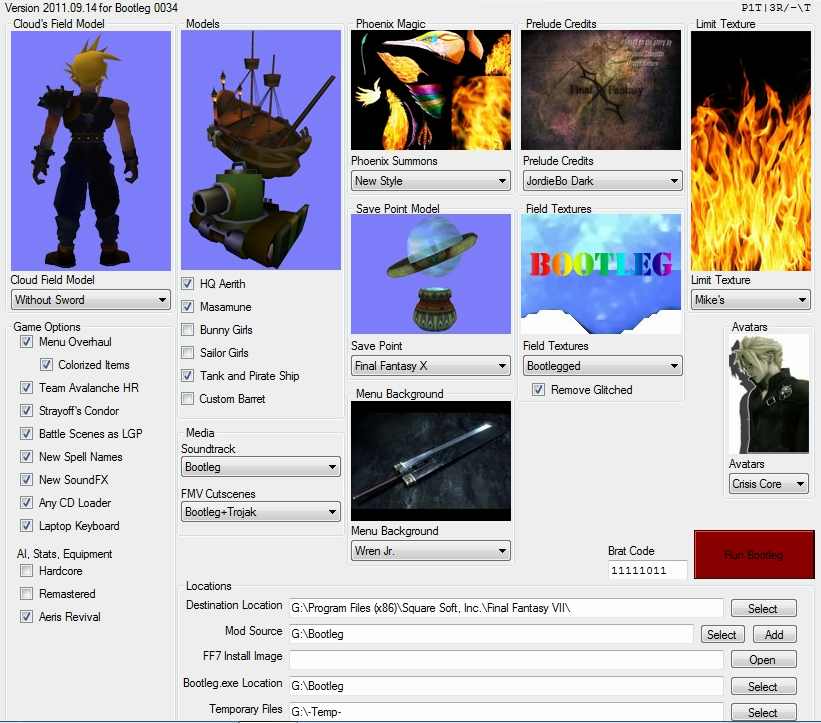
[FF7] Original and Outdated Tutorial - Bootleg Configurator

  • Thread starter Thread starter PitBrat
  • Start date Start date
Status
Not open for further replies.
bonez89,
Install Bootleg with the 'Battle Scenes as LGP' option checked.  Then delete the .\mods\Bootleg\battle folder.
Now the Magochocobo texture packs 1, 1.5 and 2 will load from the battle.lgp file.  Unfortunately there is not an LGP version of pack 3 nor of the initial reactor and train station textures included in Bootleg.
Didn't help. Still slow. :(... I'll just have to do without. At least the rest of the game is beautiful now thanks to your installer. I would never have installed all these mods if I had to do it by hand.
 
Hi PitBrat,

yesterday evening (i was helping killuminati777) my Bootleg (0034)
installation crashed suddenly at the "Motorbike" section.
(I used his setup parameters to reproduce his problem.)

Today i tried to reproduce this error four (4) times, but without any luck.
Every installation worked like a charm. So i can't analyze the error.
Do you have any idea ?


Code: [Select]
Code:
INFO: Bootleg Version 2011.09.14 Version .0034INFO: 17.09.2011 21:10:26,85INFO: Bootleg Options: /C0 /S0 /P0 /R1 /O1 /N1 /A1 /V1 /H0 /L0 /M3 /K0 /E2 /T0 /Z2 /B0 /J0 /U1 /W4 /Y1 /Q2INFO: Brat Code: /@11111011INFO: Destination Location: "G:\Program Files (x86)\Square Soft, Inc.\Final Fantasy VII\"INFO: Mod Path: "G:\Bootleg\;C:\Users\Master\Downloads\;G:\Bootleg\"INFO: Temporary Files: "G:\-Temp-\Bootleg_Setup\"Backing up Vanilla DataBackup completed.Preparing Sprinkles . . .Sprinkles are ready.Applying the official Final Fantasy VII 1.02 Patch . . .Searching for "ff7102zx.zip" in "G:\Bootleg\"Extracting "ff7102zx.zip"Final Fantasy VII 1.02 patch installation completed.Searching for "Final_Fantasy_VII_Remix_v2-5-1_Installer.exe" in "G:\Bootleg\"Installing The Remix . . .Final Fantasy VII Remix istallation completed.Building system files . . .Updating Registry . . .Registry completed.Updating shortcuts . . .Shortcuts completed.Installing Aali's OpenGL Driver . . .Searching for "ff7_opengl-0.7.11b.zip" in "G:\Bootleg\"Extracting "ff7_opengl-0.7.11b.zip"OpenGL Driver completed.Searching for "Avalanche High Res.exe" in "G:\Bootleg\"Installing Team Avalanche Menu Graphics . . .Avalanche completed.Searching for "Avalanche GUI v2.0.8.exe" in "G:\Bootleg\"Updating Avalanche GUI . . .Avalanche GUI completed.Searching for "ff7music_install_15112.exe" in "G:\Bootleg\"Installing FF7Music . . .FF7Music completed.Searching for "3-06 - The Nightmare's Beginning-rev8.ogg" in "G:\Bootleg\"Installing additional track 3-06 - The Nightmare's Beginning-rev8.oggSearching for "3-16 - Interrupted by Fireworks-rev18.ogg" in "G:\Bootleg\"Installing additional track 3-16 - Interrupted by Fireworks-rev18.oggSearching for "3-20 - Buried in the Snow-v.2.ogg" in "G:\Bootleg\"Installing additional track 3-20 - Buried in the Snow-v.2.oggSearching for "JenovaRemix.ogg" in "G:\Bootleg\"Installing additional track JenovaRemix.oggIntegrating Remix Soundtracks . . .Integration completed.Music Installation and Integration Completed.Searching for "FMVRes.exe" in "G:\Bootleg\"Installing FMV Restoration Cut ScenesFMV Restoration completed.Installing Enhanced MoviesSearching for "ff7_enhanced_movies_1.zip" in "G:\Bootleg\"Installing Enhanced Movies pack 1 . . .Installing Enhanced Movies pack 2 . . .Enhanced Movies completed.Searching for "eidoslogo.avi" in "G:\Bootleg\"Installing Eidos Logo . . .Logo completed.Copying LGP Files . . .Extracting LGP Files . . .Extracting Vanilla archive - World_US.lgpExtracting archive - Battle.lgpExtracting archive - Magic.lgpExtracting archive - Char.lgpExtracting archive - High-US.lgpExtracting archive - World_US.lgpExtracting completed.Updating Remix Files and Adding Texture Slots . . .Repairing Damaged Battle Models . . .Remix files updated and texture slots added.Installing Phoenix Rejuvenation Project models . . .Phoenix Rejuvenation Project completed.Updating Sephiroth model . . .Sephiroth completed.Searching for "FacePalmer.zip" in ""Searching for "FacePalmer.part01.rar" in "G:\Bootleg\"Verifying FacePalmer Files . . .Installing FacePalmer Field Textures . . .FacePalmer completed.Searching for "Field Files Pack 1.rar" in "G:\Bootleg\"Installing sl1982's Field Enhancement . . .Field Enhancement completed.Searching for "yarLson Field Upscale Project v0.35.zip" in "G:\Bootleg\"Installing yarLson's Blackfan Field Upscale Project . . .yarLson's Blackfan Field Upscale Project installation completed.Deglitching field textures . . .Deglitching completed.Installing Strayoff's Condor Minigame Upgrades . . .Extracting Condor.lgp . . .Modifying Condor.lgp . . .Building Condor.lgp . . .Condor completed.Searching for "FL-WME Beta.exe" in "G:\Bootleg\"Installing FeliX Leonhart's World Art . . .FeliX Leonhart's World Art installation completed.Searching for "FL-BSE v0.1.zip" in "G:\Bootleg\"Installing FeliX Leonhart's Battle Art . . .Extracting "FL-BSE v0.1.zip"FeliX Leonhart's Battle Art installation completed.Searching for "FL-BSE v0.1.1 UPD.zip" in "G:\Bootleg\"Installing FeliX Leonhart's Battle Art Update . . .Extracting "FL-BSE v0.1.1 UPD.zip"FeliX Leonhart's Battle Art Update installation completed.Searching for "Magochocobo png battle files.rar" in "G:\Bootleg\"Installing Magochocobo Battle Pack 1 . . .Magochocobo Battle Pack 1 installation completed.Searching for "corel prison and bonus.rar" in "G:\Bootleg\"Installing Magochocobo Battle Pack 1.5 . . .Magochocobo Battle Pack 1.5 installation completed.Searching for "Magochocobo ff7 battle pack 2.rar" in "G:\Bootleg\"Installing Magochocobo Battle Pack 2 . . .Magochocobo Battle Pack 2 installation completed.Searching for "magochocobo_ff7pack3.rar" in "G:\Bootleg\"Installing Magochocobo Battle Pack 3 . . .Magochocobo Battle Pack 3 installation completed.Installing Textures to Battle.lgp . . .Searching for "Magochocobo Battle Scenes (lgp use).rar" in "G:\Bootleg\"Installing Magochocobo Battle Scenes . . .Magochocobo Battle Scenes installation completed.Searching for "Battle Scene enhacement lgp use.zip" in "G:\Bootleg\"Installing FeliX Leonhart's Battle Scene Ehancements . . .FeliX Leonhart's Battle Scene Ehancements installation completed.Adding textures to Battle.lgp completed.Searching for "0.MY REBUILDED MODELS.rar" in "G:\Bootleg\"Installing Squallff8 and Dahfa models . . .Extracting "0.MY REBUILDED MODELS.rar"Searching for "aerith 5yrsold Release new version.rar" in "G:\Bootleg\"Extracting "aerith 5yrsold Release new version.rar"Searching for "aerith 10 yrs old.rar" in "G:\Bootleg\"Extracting "aerith 10 yrs old.rar"Searching for "Barret Navy Model PRP.rar" in "G:\Bootleg\"Extracting "Barret Navy Model PRP.rar"Searching for "BLDE RELEASE.rar" in "G:\Bootleg\"Extracting "BLDE RELEASE.rar"Searching for "BMEE Release.rar" in "G:\Bootleg\"Extracting "BMEE Release.rar"Searching for "BOHE release.rar" in "G:\Bootleg\"Extracting "BOHE release.rar"Searching for "bpdc release.rar" in "G:\Bootleg\"Extracting "bpdc release.rar"Squallff8 and Dahfa models installation completed.Unaveraging Heads . . .Reheading completed.Searching for "HQMBV2 - Classic Buster.rar" in "G:\Bootleg\"Installing Bloodshot's High Quality Motorbike . . .Extracting "HQMBV2 - Classic Buster.rar"
 
Last edited:
PitBrat,
Here's how I see the new thing about the mods :
The Vanilla files would finish by _nm (stands for Normal Mode) i.e. kernel_nm.bin kernel2_nm.bin and so on.
The Remastered files would have _rg (stands for Remastered Game) i.e. kernel_rg.bin kernel2_rg.bin and so on.
The Aeris Revival would be _ar (stands for Aeris Revival) i.e. kernel_ar.bin kernel2_ar.bin and so on.
The Hardcore Mode would be _hm (stands for Hardcore Mode) i.e. kernel_hm.bin kernel2_hm.bin and so on.
The Aeris Revival + Hardcore Mode would be _hr (stands for Hardcore Revival) i.e. kernel_hr.bin kernel2_hr.bin and so on.
Once I'll reconvert it, the Lost Wings mod would be _lw (stands for Lost Wings) i.e. kernel_lw.bin kernel2_lw.bin and so on.
Once finished and converted, the Rebirth mod would be _rm (stands for Rebirth Mod) i.e. kernel_rm.bin kernel2_rm.bin and so on.
Once finished, the Total Grudge Mod would be _tg (stands for Total Grudge) i.e. kernel_tg.bin kernel2_tg.bin and so on.
Also, the Shalua Rui would be _sr (stands for Shalua Rui) i.e. kernel_sr.bin kernel2_sr.bin and so on.

The batch files for the game would give the player the choice of the mod before launching the game. I.E.

1 - Vanilla FF7
2 - Remastered Changes
3 - Aeris Revival
4 - Hardcore Mod
5 - Hardcore + Revival
0 - No change

Also, it would be wise to incorpore the Aeris Revival with every other mod out there. The batch file would OVERWRITE the older files instead of renaming, because it would be easier that way if one has to change anything. The battle.lgp file needs no copying, since using a Vanilla scene with the Hardcore battle never caused any issues for me. The scene just uses no new models inside battle.lgp when using a Vanilla scene. Only the folowwing files needs copying :

kernel.bin
kernel2.bin
window.bin
scene.bin
flevel.lgp
ff7.exe

If you are confused, you can let me do this for you.

Also, a typo : you wrote istallation instead of installation at the Remix step.

About the Lost Wings Mod, just be patient, I'll convert it.

I think that's about what I had to say. It'd be way easier if one wants to add any mod, one would just have to add some lines in the batch file.

10-seconds edit : It makes the Remastered changes installing auto, and you select it only if you want to.
 
Last edited:
UGerstl,
Wow, you're good.  I found a bug in the HQMB algorithm.  I had a POPD without a PUSHD . . . fixed for 0035.
I'm continually amazed that Bootleg worked for anyone with all the mistakes I made.
My fingers are crossed that I've squashed the biggest bugs.

VGR,
I've completely revised the batch I use to switch modes.  Adding new modes poses no problem now.  I can even switch saves and Menu Overhaul graphics with each mode.
Incorporating Aeris Revival into the difficulty mods requires altering the scenes in flevel.lgp.
There are still three scenes where Aeris is missing from the Hardcore mod.  Mr. Espio has stated that he will release a version of Revival for use with Hardcore.
I still have a lot to learn about editing the scenes.  I don't even know which tool is best for the task.

Wallmarket crashes when I try to patch the Hardcore kernel.  It even crashes in a virtual XP machine.
I've had no luck using the Remastered scene.bin with the Hardcore mod.
From my understanding, using the vanilla scene.bin with Hardcore removes some of the added content.

When DLPB releases the retranslation, the changes made to flevel.lgp may create additional challenges.

I definitely need help merging these mods!
I'm learning, but it takes a lot of time.
What editing tools should I focus on for altering the scenes in flevel.lgp?

Here is the batch I'm using to launch Normal mode:
Code: [Select]
Code:
@ECHO OFFSET FF7Path=%~dp0IF NOT EXIST "%FF7Path%ff7.exe" (    FOR /F "tokens=2* delims=  " %%A IN ('reg query "HKLM\System\CurrentControlSet\Control\Session Manager\Environment" /v PROCESSOR_ARCHITECTURE') DO SET Architecture=%%B    IF "%Architecture%"=="AMD64" (        FOR /F "tokens=2* delims=  " %%A IN ('REG QUERY "HKLM\SOFTWARE\Wow6432Node\Square Soft, Inc.\Final Fantasy VII" /v AppPath') DO SET FF7Path=%%B     ) ELSE (        FOR /F "tokens=2* delims=  " %%A IN ('REG QUERY "HKLM\SOFTWARE\Square Soft, Inc.\Final Fantasy VII" /v AppPath') DO SET FF7Path=%%B     ) )CD /d "%FF7Path%"IF EXIST "n_ff7.exe" ( rename "ff7.exe" "h_ff7.exe" rename "n_ff7.exe" "ff7.exe")CD dataCD battleIF EXIST "n_scene.bin" ( rename "scene.bin" "h_scene.bin" rename "n_scene.bin" "scene.bin")IF EXIST "n_battle.lgp" ( rename "battle.lgp" "h_battle.lgp" rename "n_battle.lgp" "battle.lgp")CD..CD kernelIF EXIST "n_kernel.bin" ( rename "kernel.bin" "h_kernel.bin" rename "n_kernel.bin" "kernel.bin")IF EXIST "n_kernel2.bin" ( rename "kernel2.bin" "h_kernel2.bin" rename "n_kernel2.bin" "kernel2.bin")IF EXIST "n_Window.bin" ( rename "Window.bin" "h_Window.bin" rename "n_Window.bin" "Window.bin")CD..CD fieldIF EXIST "n_flevel.lgp" ( rename "flevel.lgp" "h_flevel.lgp" rename "n_flevel.lgp" "flevel.lgp")CD..CD..IF EXIST "FF7Music\launchff7.exe" (    CD FF7Music    START launchff7.exe ) ELSE IF EXIST "ficedula\ff7music.exe" (    CD Ficedula    START /min ff7music.exe    CD..    SET __COMPAT_LAYER=Win98    START /wait ff7.exe    TASKKILL /im ff7music.exe ) ELSE (    SET __COMPAT_LAYER=Win98    START ff7.exe )EXIT
 
Your batch is no good compared to what I mean. You can only use 2 mods with it. Here's mine :

Code: [Select]
Code:
- OBSOLETE -
Something like this would work well :)

Edit : Tested it, it works fine, except for one thing. When I type 0, the computer thinks I entered a wrong value. However, it doesn't get back to the beginning, but instead writes this :

You chose to use
 could not be applied!
There are missing files with the 'ar' ending.
Modding aborted!

I modified it accordingly, and it still pops up that error =/


Edit2 : This ways it works!


Code: [Select]
Code:
@echo off:startecho 1 - Normal Modeecho 2 - Remastered changesecho 3 - Aeris Revival (Vanilla)echo 4 - Hardcore Modecho 5 - Aeris Revival + Hardcoreecho 6 - Lost Wings Modecho 7 - Rebirth Modecho 8 - Total Grudge (Official version)echo 9 - Total Grudge (No Grudge version)echo A - Total Grudge (Changed enemies)echo B - Total Grudge (Changed enemies, no Grudge)echo C - Shalua Ruiecho 0 - No changeecho.Set mod=set /p mod=Choose which mod you want to apply REM Namemod is what will be displayed to the playerREM Name is part of the filename and must not be alteredif %mod% == 1 (set namemod=Vanilla FF7set name=nm)if %mod% == 2 (set namemod=The Remastered Changesset name=rg)if %mod% == 3 (set namemod=Aeris Revival (Vanilla)set name=ar)if %mod% == 4 (set namemod=Hardcore Modset name=hm)if %mod% == 5 (set namemod=Aeris Revival (Hardcore)set name=hr)if %mod% == 6 (set namemod=Lost Wings Modset name=lw)if %mod% == 7 (set namemod=Rebirth Modset name=rm)if %mod% == 8 (set namemod=Total Grudgeset name=tg)if %mod% == 9 (set namemod=No Grudgeset name=ng)if %mod% == a (set namemod=Total Grudge Enemiesset name ge)if %mod% == b (set namemod=No Grudge Enemiesset name=ne)if %mod% == c (set namemod=Shalua Ruiset name=sr)if %mod% == 0 goto ff7goto next:nextecho You chose to use %namemod%if not exist data\kernel\kernel_%name%.bin goto errorif not exist data\kernel\kernel2_%name%.bin goto errorif not exist data\kernel\window_%name%.bin goto errorif not exist data\field\flevel_%name%.lgp goto errorif not exist data\battle\scene_%name%.bin goto errorif not exist ff7_%name%.exe goto errorcopy data\kernel\kernel_%name%.bin data\kernel\kernel.bincopy data\kernel\kernel2_%name%.bin data\kernel\kernel2.bincopy data\kernel\window_%name%.bin data\kernel\window.bincopy data\field\flevel_%name%.lgp data\field\flevel.lgpcopy data\battle\scene_%name%.bin data\battle\scene.bincopy ff7_%name%.exe ff7.exeecho %namemod% applied successfully!goto ff7:errorecho %namemod% could not be applied!echo There are missing files with the '%name%' ending.echo Modding aborted!pauseexit:ff7set ff7=launchff7.exe:launchif exist C:\FF7Music\%ff7% (echo Modding completedecho Ready to play!pausestart C:\FF7Music\%ff7%exit)if exist .\ficedula\%ff7% (echo Modding completedecho Ready to play!pausestart .\ficedula\%ff7%exit)if exist .\FF7Music\%ff7% (echo Modding completedecho Ready to play!pausestart .\FF7Music\%ff7%exit)if %var% == 1 (echo Sorry, could not find %ff7%echo Did you make a mistake somewhere?set mist=set /p mist=Did you make a mistake in the name? [Y/N] if %mist% == n goto path)echo Could not find %ff7%!echo Enter the new full name of %ff7% here.set ff7=set /p ff7=New name of the launcher : set var=1goto launch:pathecho Could not find %ff7% anywhere!echo Enter the path where %ff7% is located with a \ at the end.set path=set /p path=Enter the path here if not exist %path%%ff7% goto endstart %path%%ff7%:endecho Sorry, launching of FF7 impossible right now.echo Please ask for help on the Qhimm forums and/or get in contact with Vgrpauseexit
Edit3 : Aaaaaaaaaaaaaaaaaaaargh! The Revival thing messes up everything! As you can see, the code is the same for everything, but when selecting '0' it searches for 'hr' or 'ar' but if I "remove" these 8 lines of script, then it works fine... Since I have no files with neither hr/ar ending, it could be the issue, but the script is not even supposed to be enabled :/ However, I have no ng/ge/ne/sr files and it works anyways...

So can someone figure out how to do this... Guess I'll switch to AutoIt or NSIS instead of this. Or even better, I'll learn C++ :P

Also this batch file is meant to be in the main FF7 directory.
 
Last edited:
This batch will switch to Normal mode when all of the mods you listed are installed:
Code: [Select]
Code:
@ECHO OFFSET FF7Path=%~dp0SET Architecture=IF EXIST "%FF7Path%ff7.exe" GOTO FoundFF7FOR /F "tokens=2* delims=  " %%A IN ('reg query "HKLM\System\CurrentControlSet\Control\Session Manager\Environment" /v PROCESSOR_ARCHITECTURE') DO SET Architecture=%%BIF "%Architecture%"=="AMD64" (    FOR /F "tokens=2* delims=  " %%A IN ('REG QUERY "HKLM\SOFTWARE\Wow6432Node\Square Soft, Inc.\Final Fantasy VII" /v AppPath') DO SET FF7Path=%%B ) ELSE (    FOR /F "tokens=2* delims=  " %%A IN ('REG QUERY "HKLM\SOFTWARE\Square Soft, Inc.\Final Fantasy VII" /v AppPath') DO SET FF7Path=%%B ):FoundFF7CD /d "%FF7Path%"IF EXIST "ff7_nm.exe" (    IF NOT EXIST "ff7_hm.exe" (        IF EXIST "ff7.exe" rename "ff7.exe" "ff7_hm.exe"        rename "ff7_nm.exe" "ff7.exe"     ) ELSE IF NOT EXIST "ff7_rg.exe" (        IF EXIST "ff7.exe" rename "ff7.exe" "ff7_rg.exe"        rename "ff7_nm.exe" "ff7.exe"     ) ELSE IF NOT EXIST "ff7_ar.exe" (        IF EXIST "ff7.exe" rename "ff7.exe" "ff7_ar.exe"        rename "ff7_nm.exe" "ff7.exe"     ) ELSE IF NOT EXIST "ff7_hr.exe" (        IF EXIST "ff7.exe" rename "ff7.exe" "ff7_hr.exe"        rename "ff7_nm.exe" "ff7.exe"     ) ELSE IF NOT EXIST "ff7_lw.exe" (        IF EXIST "ff7.exe" rename "ff7.exe" "ff7_lw.exe"        rename "ff7_nm.exe" "ff7.exe"     ) ELSE IF NOT EXIST "ff7_rm.exe" (        IF EXIST "ff7.exe" rename "ff7.exe" "ff7_rm.exe"        rename "ff7_nm.exe" "ff7.exe"     ) ELSE IF NOT EXIST "ff7_tg.exe" (        IF EXIST "ff7.exe" rename "ff7.exe" "ff7_tg.exe"        rename "ff7_nm.exe" "ff7.exe"     ) ELSE IF NOT EXIST "ff7_sr.exe" (        IF EXIST "ff7.exe" rename "ff7.exe" "ff7_sr.exe"        rename "ff7_nm.exe" "ff7.exe"     ) )CD dataCD battleIF EXIST "scene_nm.bin" (    IF NOT EXIST "scene_hm.bin" (        IF EXIST "scene.bin" rename "scene.bin" "scene_hm.bin"        rename "scene_nm.bin" "scene.bin"     ) ELSE IF NOT EXIST "scene_rg.bin" (        IF EXIST "scene.bin" rename "scene.bin" "scene_rg.bin"        rename "scene_nm.bin" "scene.bin"     ) ELSE IF NOT EXIST "scene_ar.bin" (        IF EXIST "scene.bin" rename "scene.bin" "scene_ar.bin"        rename "scene_nm.bin" "scene.bin"     ) ELSE IF NOT EXIST "scene_hr.bin" (        IF EXIST "scene.bin" rename "scene.bin" "scene_hr.bin"        rename "scene_nm.bin" "scene.bin"     ) ELSE IF NOT EXIST "scene_lw.bin" (        IF EXIST "scene.bin" rename "scene.bin" "scene_lw.bin"        rename "scene_nm.bin" "scene.bin"     ) ELSE IF NOT EXIST "scene_rm.bin" (        IF EXIST "scene.bin" rename "scene.bin" "scene_rm.bin"        rename "scene_nm.bin" "scene.bin"     ) ELSE IF NOT EXIST "scene_tg.bin" (        IF EXIST "scene.bin" rename "scene.bin" "scene_tg.bin"        rename "scene_nm.bin" "scene.bin"     ) ELSE IF NOT EXIST "scene_sr.bin" (        IF EXIST "scene.bin" rename "scene.bin" "scene_sr.bin"        rename "scene_nm.bin" "scene.bin"     ) )IF EXIST "battle_nm.lgp" (    IF NOT EXIST "battle_hm.lgp" (        IF EXIST "battle.lgp" rename "battle.lgp" "battle_hm.lgp"        rename "battle_nm.lgp" "battle.lgp"     ) ELSE IF NOT EXIST "battle_rg.lgp" (        IF EXIST "battle.lgp" rename "battle.lgp" "battle_rg.lgp"        rename "battle_nm.lgp" "battle.lgp"     ) ELSE IF NOT EXIST "battle_ar.lgp" (        IF EXIST "battle.lgp" rename "battle.lgp" "battle_ar.lgp"        rename "battle_nm.lgp" "battle.lgp"     ) ELSE IF NOT EXIST "battle_hr.lgp" (        IF EXIST "battle.lgp" rename "battle.lgp" "battle_hr.lgp"        rename "battle_nm.lgp" "battle.lgp"     ) ELSE IF NOT EXIST "battle_lw.lgp" (        IF EXIST "battle.lgp" rename "battle.lgp" "battle_lw.lgp"        rename "battle_nm.lgp" "battle.lgp"     ) ELSE IF NOT EXIST "battle_rm.lgp" (        IF EXIST "battle.lgp" rename "battle.lgp" "battle_rm.lgp"        rename "battle_nm.lgp" "battle.lgp"     ) ELSE IF NOT EXIST "battle_tg.lgp" (        IF EXIST "battle.lgp" rename "battle.lgp" "battle_tg.lgp"        rename "battle_nm.lgp" "battle.lgp"     ) ELSE IF NOT EXIST "battle_sr.lgp" (        IF EXIST "battle.lgp" rename "battle.lgp" "battle_sr.lgp"        rename "battle_nm.lgp" "battle.lgp"     ) )CD..CD kernelIF EXIST "kernel_nm.bin" (    IF NOT EXIST "kernel_hm.bin" (        IF EXIST "kernel.bin" rename "kernel.bin" "kernel_hm.bin"        rename "kernel_nm.bin" "kernel.bin"     ) ELSE IF NOT EXIST "kernel_rg.bin" (        IF EXIST "kernel.bin" rename "kernel.bin" "kernel_rg.bin"        rename "kernel_nm.bin" "kernel.bin"     ) ELSE IF NOT EXIST "kernel_ar.bin" (        IF EXIST "kernel.bin" rename "kernel.bin" "kernel_ar.bin"        rename "kernel_nm.bin" "kernel.bin"     ) ELSE IF NOT EXIST "kernel_hr.bin" (        IF EXIST "kernel.bin" rename "kernel.bin" "kernel_hr.bin"        rename "kernel_nm.bin" "kernel.bin"     ) ELSE IF NOT EXIST "kernel_lw.bin" (        IF EXIST "kernel.bin" rename "kernel.bin" "kernel_lw.bin"        rename "kernel_nm.bin" "kernel.bin"     ) ELSE IF NOT EXIST "kernel_rm.bin" (        IF EXIST "kernel.bin" rename "kernel.bin" "kernel_rm.bin"        rename "kernel_nm.bin" "kernel.bin"     ) ELSE IF NOT EXIST "kernel_tg.bin" (        IF EXIST "kernel.bin" rename "kernel.bin" "kernel_tg.bin"        rename "kernel_nm.bin" "kernel.bin"     ) ELSE IF NOT EXIST "kernel_sr.bin" (        IF EXIST "kernel.bin" rename "kernel.bin" "kernel_sr.bin"        rename "kernel_nm.bin" "kernel.bin"     ) )IF EXIST "kernel2_nm.bin" (    IF NOT EXIST "kernel2_hm.bin" (        IF EXIST "kernel2.bin" rename "kernel2.bin" "kernel2_hm.bin"        rename "kernel2_nm.bin" "kernel2.bin"     ) ELSE IF NOT EXIST "kernel2_rg.bin" (        IF EXIST "kernel2.bin" rename "kernel2.bin" "kernel2_rg.bin"        rename "kernel2_nm.bin" "kernel2.bin"     ) ELSE IF NOT EXIST "kernel2_ar.bin" (        IF EXIST "kernel2.bin" rename "kernel2.bin" "kernel2_ar.bin"        rename "kernel2_nm.bin" "kernel2.bin"     ) ELSE IF NOT EXIST "kernel2_hr.bin" (        IF EXIST "kernel2.bin" rename "kernel2.bin" "kernel2_hr.bin"        rename "kernel2_nm.bin" "kernel2.bin"     ) ELSE IF NOT EXIST "kernel2_lw.bin" (        IF EXIST "kernel2.bin" rename "kernel2.bin" "kernel2_lw.bin"        rename "kernel2_nm.bin" "kernel2.bin"     ) ELSE IF NOT EXIST "kernel2_rm.bin" (        IF EXIST "kernel2.bin" rename "kernel2.bin" "kernel2_rm.bin"        rename "kernel2_nm.bin" "kernel2.bin"     ) ELSE IF NOT EXIST "kernel2_tg.bin" (        IF EXIST "kernel2.bin" rename "kernel2.bin" "kernel2_tg.bin"        rename "kernel2_nm.bin" "kernel2.bin"     ) ELSE IF NOT EXIST "kernel2_sr.bin" (        IF EXIST "kernel2.bin" rename "kernel2.bin" "kernel2_sr.bin"        rename "kernel2_nm.bin" "kernel2.bin"     ) )IF EXIST "Window_nm.bin" (    IF NOT EXIST "Window_hm.bin" (        IF EXIST "Window.bin" rename "Window.bin" "Window_hm.bin"        rename "Window_nm.bin" "Window.bin"     ) ELSE IF NOT EXIST "Window_rg.bin" (        IF EXIST "Window.bin" rename "Window.bin" "Window_rg.bin"        rename "Window_nm.bin" "Window.bin"     ) ELSE IF NOT EXIST "Window_ar.bin" (        IF EXIST "Window.bin" rename "Window.bin" "Window_ar.bin"        rename "Window_nm.bin" "Window.bin"     ) ELSE IF NOT EXIST "Window_hr.bin" (        IF EXIST "Window.bin" rename "Window.bin" "Window_hr.bin"        rename "Window_nm.bin" "Window.bin"     ) ELSE IF NOT EXIST "Window_lw.bin" (        IF EXIST "Window.bin" rename "Window.bin" "Window_lw.bin"        rename "Window_nm.bin" "Window.bin"     ) ELSE IF NOT EXIST "Window_rm.bin" (        IF EXIST "Window.bin" rename "Window.bin" "Window_rm.bin"        rename "Window_nm.bin" "Window.bin"     ) ELSE IF NOT EXIST "Window_tg.bin" (        IF EXIST "Window.bin" rename "Window.bin" "Window_tg.bin"        rename "Window_nm.bin" "Window.bin"     ) ELSE IF NOT EXIST "Window_sr.bin" (        IF EXIST "Window.bin" rename "Window.bin" "Window_sr.bin"        rename "Window_nm.bin" "Window.bin"     ) )CD..CD fieldIF EXIST "flevel_nm.lgp" (    IF NOT EXIST "flevel_hm.lgp" (        IF EXIST "flevel.lgp" rename "flevel.lgp" "flevel_hm.lgp"        rename "flevel_nm.lgp" "flevel.lgp"     ) ELSE IF NOT EXIST "flevel_rg.lgp" (        IF EXIST "flevel.lgp" rename "flevel.lgp" "flevel_rg.lgp"        rename "flevel_nm.lgp" "flevel.lgp"     ) ELSE IF NOT EXIST "flevel_ar.lgp" (        IF EXIST "flevel.lgp" rename "flevel.lgp" "flevel_ar.lgp"        rename "flevel_nm.lgp" "flevel.lgp"     ) ELSE IF NOT EXIST "flevel_hr.lgp" (        IF EXIST "flevel.lgp" rename "flevel.lgp" "flevel_hr.lgp"        rename "flevel_nm.lgp" "flevel.lgp"     ) ELSE IF NOT EXIST "flevel_lw.lgp" (        IF EXIST "flevel.lgp" rename "flevel.lgp" "flevel_lw.lgp"        rename "flevel_nm.lgp" "flevel.lgp"     ) ELSE IF NOT EXIST "flevel_rm.lgp" (        IF EXIST "flevel.lgp" rename "flevel.lgp" "flevel_rm.lgp"        rename "flevel_nm.lgp" "flevel.lgp"     ) ELSE IF NOT EXIST "flevel_tg.lgp" (        IF EXIST "flevel.lgp" rename "flevel.lgp" "flevel_tg.lgp"        rename "flevel_nm.lgp" "flevel.lgp"     ) ELSE IF NOT EXIST "flevel_sr.lgp" (        IF EXIST "flevel.lgp" rename "flevel.lgp" "flevel_sr.lgp"        rename "flevel_nm.lgp" "flevel.lgp"     ) )CD..CD..IF EXIST "FF7Music\launchff7.exe" (    CD FF7Music    START launchff7.exe ) ELSE IF EXIST "ficedula\ff7music.exe" (    CD Ficedula    START /min ff7music.exe    CD..    SET __COMPAT_LAYER=Win98    START /wait ff7.exe    TASKKILL /im ff7music.exe ) ELSE (    SET __COMPAT_LAYER=Win98    START ff7.exe )EXIT
Each mode requires a similar batch.
The batch requires modification for each mod that is not installed.
Customization occurs at the time of installation.

The user need only click the appropriate shortcut to run FF7 in the desired mode.

EDIT:
I'm still working on this one:
Code: [Select]
Code:
@ECHO OFFSET FF7Path=%~dp0SET Architecture=IF EXIST "%FF7Path%ff7.exe" GOTO FoundFF7FOR /F "tokens=2* delims=  " %%A IN ('reg query "HKLM\System\CurrentControlSet\Control\Session Manager\Environment" /v PROCESSOR_ARCHITECTURE') DO SET Architecture=%%BIF "%Architecture%"=="AMD64" (    FOR /F "tokens=2* delims=  " %%A IN ('REG QUERY "HKLM\SOFTWARE\Wow6432Node\Square Soft, Inc.\Final Fantasy VII" /v AppPath') DO SET FF7Path=%%B ) ELSE (    FOR /F "tokens=2* delims=  " %%A IN ('REG QUERY "HKLM\SOFTWARE\Square Soft, Inc.\Final Fantasy VII" /v AppPath') DO SET FF7Path=%%B ):FoundFF7SET MODES=hm rg ar hr lw rm tg srCD /d "%FF7Path%"IF EXIST "ff7_nm.exe" (    FOR %%G IN (%MODES%) DO IF NOT EXIST "ff7_%%G.exe" ( IF EXIST "ff7.exe" ( RENAME "ff7.exe" "ff7_%%G.exe" ))    RENAME "ff7_nm.exe" "ff7.exe" )CD data\battleIF EXIST "battle_nm.lgp" (    FOR %%G IN (%MODES%) DO IF NOT EXIST "battle_%%G.lgp" ( IF EXIST "battle.lgp" ( RENAME "battle.lgp" "battle_%%G.lgp" ))    RENAME "battle_nm.lgp" "battle.lgp" )IF EXIST "scene_nm.bin" (    FOR %%G IN (%MODES%) DO IF NOT EXIST "scene_%%G.bin" ( IF EXIST "scene.bin" ( RENAME "scene.bin" "scene_%%G.bin" ))    RENAME "scene_nm.bin" "scene.bin" )CD ..\kernelIF EXIST "kernel_nm.bin" (FOR %%G IN (%MODES%) DO IF NOT EXIST "kernel_%%G.bin" ( IF EXIST "kernel.bin" ( RENAME "kernel.bin" "kernel_%%G.bin" ))    RENAME "kernel_nm.bin" "kernel.bin" )IF EXIST "kernel2.bin" (    FOR %%G IN (%MODES%) DO IF NOT EXIST "kernel2_%%G.bin" ( IF EXIST "kernel2.bin" ( RENAME "kernel2.bin" "kernel2_%%G.bin" ))    RENAME "kernel2_nm.bin" "kernel2.bin" )IF EXIST "Window.bin" (    FOR %%G IN (%MODES%) DO IF NOT EXIST "Window_%%G.bin" ( IF EXIST "Window.bin" ( RENAME "Window.bin" "Window_%%G.bin" ))    RENAME "Window_nm.bin" "Window.bin" )CD ..\fieldIF EXIST "flevel_nm.lgp" (    FOR %%G IN (%MODES%) DO IF NOT EXIST "flevel_%%G.lgp" ( IF EXIST "flevel.lgp" ( RENAME "flevel.lgp" "flevel_%%G.lgp" ))    RENAME "flevel_nm.lgp" "flevel.lgp" )CD ..CD ..IF EXIST "FF7Music\launchff7.exe" (    CD FF7Music    START launchff7.exe ) ELSE IF EXIST "ficedula\ff7music.exe" (    CD Ficedula    START /min ff7music.exe    CD..    SET __COMPAT_LAYER=Win98    START /wait ff7.exe    TASKKILL /im ff7music.exe ) ELSE (    SET __COMPAT_LAYER=Win98    START ff7.exe )GOTO :eof
 
Last edited:
My idea of copying and overwriting the files is something better, because it avoids any error if a file is missing. I can, however, make a batch file that can do it with a success rate at 150% because that's what I used before. However, it would need more than twice the lines there are actually. Hey, who minds anyway? It WILL be better. Just let me do it for a bit.
 
You're right about RENAME being unreliable.  It completely fails if the file is locked.
Here's yet another version that uses COPY.
Start the batch with the two letter mode code.
    EXAMPLE: ff7_mode nm

ff7_mode.bat
Code: [Select]
Code:
@ECHO OFFSET FF7Path=%~dp0SET ValidateInput=0SET FatalError=0SET Architecture=IF EXIST "%FF7Path%ff7.exe" GOTO FoundFF7FOR /F "tokens=2* delims=  " %%A IN ('reg query "HKLM\System\CurrentControlSet\Control\Session Manager\Environment" /v PROCESSOR_ARCHITECTURE') DO SET Architecture=%%BIF "%Architecture%"=="AMD64" (    FOR /F "tokens=2* delims=  " %%A IN ('REG QUERY "HKLM\SOFTWARE\Wow6432Node\Square Soft, Inc.\Final Fantasy VII" /v AppPath') DO SET FF7Path=%%B ) ELSE (    FOR /F "tokens=2* delims=  " %%A IN ('REG QUERY "HKLM\SOFTWARE\Square Soft, Inc.\Final Fantasy VII" /v AppPath') DO SET FF7Path=%%B ):FoundFF7IF NOT EXIST "%FF7Path%ff7.exe" (    ECHO:Missing ff7.exe    SET FatalError=1 )FOR %%G IN (nm hm rg ar hr lw rm tg sr) DO IF /I [%1]==[%%G] SET ValidateInput=1IF %ValidateInput% NEQ 1 (    ECHO:Invalid Input    SET FatalError=1 )IF %FatalError%==1 GOTO EndModeSwitchIF EXIST "%FF7Path%ff7_%1.exe" (    COPY "%FF7Path%ff7_%1.exe" "%FF7Path%ff7.exe" /Y ) ELSE (    ECHO:MISSING ff7_%1.exe    SET FatalError=1 )IF EXIST "%FF7Path%data\battle\battle_%1.lgp" (    COPY "%FF7Path%data\battle\battle_%1.lgp" "%FF7Path%data\battle\battle.lgp" /Y ) ELSE (    ECHO:MISSING battle_%1.lgp    SET FatalError=1 )IF EXIST "%FF7Path%data\battle\scene_%1.bin" (    COPY "%FF7Path%data\battle\scene_%1.bin" "%FF7Path%data\battle\scene.bin" /Y ) ELSE (    ECHO:MISSING battle_%1.lgp    SET FatalError=1 )IF EXIST "%FF7Path%data\kernel\kernel_%1.bin" (    COPY "%FF7Path%data\kernel\kernel_%1.bin" "%FF7Path%data\kernel\kernel.bin" /Y ) ELSE (    ECHO:MISSING kernel_%1.lgp    SET FatalError=1 )IF EXIST "%FF7Path%data\kernel\kernel2_%1.bin" (    COPY "%FF7Path%data\kernel\kernel2_%1.bin" "%FF7Path%data\kernel\kernel2.bin" /Y ) ELSE (    ECHO:MISSING kernel2_%1.lgp    SET FatalError=1 )IF EXIST "%FF7Path%data\kernel\Window_%1.bin" (    COPY "%FF7Path%data\kernel\Window_%1.bin" "%FF7Path%data\kernel\Window.bin" /Y ) ELSE (    ECHO:MISSING kernel_%1.lgp    SET FatalError=1 )IF EXIST "%FF7Path%data\field\flevel_%1.lgp" (    COPY "%FF7Path%data\field\flevel_%1.lgp" "%FF7Path%data\field\flevel.lgp" /Y ) ELSE (    ECHO:MISSING flevel_%1.lgp    SET FatalError=1 )IF %FatalError% NEQ 1 (    IF EXIST "%FF7Path%FF7Music\launchff7.exe" (        START "Final Fantasy VII - FF7Music" /D"%FF7Path%FF7Music\" launchff7.exe     ) ELSE IF EXIST "%FF7Path%ficedula\ff7music.exe" (        START /min "Final Fantasy VII - FF7Music" /D"%FF7Path%ficedula" ff7music.exe        SET __COMPAT_LAYER=Win98        START /wait "Final Fantasy VII" /D"%FF7Path%" ff7.exe        TASKKILL /im ff7music.exe     ) ELSE (        SET __COMPAT_LAYER=Win98        START "Final Fantasy VII" /D"%FF7Path%" ff7.exe     ) ) ELSE (    ECHO:Unable to start Final Fantasy VII. ):EndModeSwitchEXIT
 
Last edited:
VGR,
There's a bug in your batch that could prevent the Revival mods from working.
You need to place "" around variables that contain ().
Using quotes also allows for paths with spaces.
Add quotes around the variables and it should work.
Though not an issue with your batch, note that parentheses in the conditions of IF/ELSE statements cause problems.

There's another potential problem because %PATH% is a system variable.  Overwriting this variable can cause missing file errors.
 
Ok, thanks. For some reason, in the older batches I was using quotes, and in this one... I simply forgot them :P I will use a different var than %path% too.
 
Hi PitBrat,

we have a big problem. These files on the GameFront website are lost (/deleted):


User-Request: >Click me<


Edit 1: Single links added.

Edit 2: Links corrected (hq_ending2.avi + missing_hq.zip)
           (01/22/2012)

Edit 3: MediaFire folder removed (new folder structure)
           (01/23/2012)
 
Last edited:
Hopefully the mods don't disappear forever someday.

I had Bootleg 0035 ready to go, but I had to incorporate the link changes and Magochocobo's LGP pack 3.
Now I have to do a few more tests before I can release.

Soon to be new in 0035:
    Added FMV Options with Rumbah Videos: 1280 Smooth, 1280 Sharp, 640 Smooth, 640 Sharp
    Added Prelude Credits Option: 0=No Change
    Added Phoenix Summons Option: 0=No Change
    Added Toggle Option: Battle Scenes as PNG
    Added Cloud's Swords Options: Slayersnext, Millenia, Millenia+Mike
    Added Audio Driver Check
    Added Clean Up of Cache and Remix Artifacts
    Added FF7_CD.exe Tool to Change DataDrive
    Added Battle Scenes: magochocobo_ff7_pack 3 lpg.rar
    Updated and Optimized OpenGL Mods Folder Generation
    Updated Soundtrack Installation and Integration
    Revised Executable Discovery Algorithm (Supports Spaces in Path)
    Revised Mode Switching
    Revised Options with 0=No Change
    Revised Installing from Image to Support a First Time Clean Install
    +Fixed Stall if 'Removed Glitched' was Selected without FacePalmer
    +Fixed Missing Registry Entry for OpenGL Driver
    +Fixed Incorrect Defaults
    +Fixed Missing Remix FMV car_1209.avi
    +Fixed Installing Incorrect Field Textures
    +Fixed Crash at Bloodshot's High Quality Motorbike
    -Removed Empty 'MP3' Soundtrack

Bootleg will install FF7 from an image to a virgin system.  There's no need to install from the CD-Rom first.
The game disc is required to play!

UGerstl,
You're the best!  Awesome work with the links.
 
I have my batch file ready to go. You would need to install the normal mode, hardcore, Lost Wings (although I do not recommend using the one I already uploaded, it works) and maybe Rebirth, soon. Once I get home (in about 9 hours) I'll put up the batch file and it could work. The only issue I can think of is the flevel.lgp that is 125 Mb and on some computers it might be an issue. I found out what was the issue. I used an ending parenthesis in the description and thus the "set modname=ar" line was taken into account. It has been resolved, and so I can post the working batch file as soon as possible.

Good day to everyone :)
 
Hi PitBrat,

i hope it is not to late for a little extension for your newest Bootleg.

   BFE.exe

  • Locations:  FF7 Install Image  +Create button
  • Locations:  Destination Location

       Do you check the existence of "ff7.exe" when the user changes the folder ?

Waiting with excitement for the new version.  :D


"Those features won't be in 0035.
I'm already testing 0035 and I don't want to delay it's release because of some major bug fixes."

    No problem. Bug fixing is more important.
 
Last edited:
An option to create an image file is a good idea.
I've contemplated adding it for awhile.
I'm still working on adding an INI file to store profiles and mod info.
That way it'll just take a new INI file to update links.
BFE.exe doesn't check for ff7.exe.  A check happens after bootleg.exe restores the image.

Those features won't be in 0035.
I'm already testing 0035 and I don't want to delay it's release because of some major bug fixes.
 
Finally found out.

Code: [Select]
Code:
@echo off:startset namemod=Nothing selectedset name=NOset ff7=ERRORset ff7path=NOTHINGset mod=NOecho 1 - Normal Modeecho 2 - Remastered changesecho 3 - Aeris Revival (Vanilla)echo 4 - Hardcore Modecho 5 - Aeris Revival + Hardcoreecho 6 - Lost Wings Modecho 7 - Rebirth Modecho 8 - Total Grudge (Official version)echo 9 - Total Grudge (No Grudge version)echo A - Total Grudge (Changed enemies)echo B - Total Grudge (Changed enemies, no Grudge)echo C - Shalua Ruiecho 0 - No changeecho.set mod=set /p mod=Choose which mod you want to apply REM Namemod is what will be displayed to the playerREM Modname is part of the filename and must not be alteredif '%mod%' == '0' goto ff7if '%mod%' == 'NO' (goto unexpected_error) else if '%mod%' == '1' (set namemod=Vanilla FF7set modname=nmgoto next) else if '%mod%' == '2' (set namemod=The Remastered Changesset modname=rggoto next) else if '%mod%' == '3' (set namemod=Aeris Revival - Vanillaset modname=argoto next) else if '%mod%' == '4' (set namemod=Hardcore Modset modname=hmgoto next) else if '%mod%' == '5' (set namemod=Aeris Revival - Hardcoreset modname=hrgoto next) else if '%mod%' == '6' (set namemod=Lost Wings Modset modname=lwgoto next) else if '%mod%' == '7' (set namemod=Rebirth Modset modname=rmgoto next) else if '%mod%' == '8' (set namemod=Total Grudgeset modname=tggoto next) else if '%mod%' == '9' (set namemod=No Grudgeset modname=nggoto next) else if '%mod%' == 'a' (set namemod=Total Grudge Enemiesset modname=gegoto next) else if '%mod%' == 'b' (set namemod=No Grudge Enemiesset modname=negoto next) else if '%mod%' == 'c' (set namemod=Shalua Ruiset modname=srgoto next)goto unexpected_error:nextecho You chose to use %namemod%if not exist data\kernel\kernel_%modname%.bin set error=kernelif not '%error%' == '' goto errorif not exist data\kernel\kernel2_%modname%.bin set error=kernel2if not '%error%' == '' goto errorif not exist data\kernel\window_%modname%.bin set error=windowif not '%error%' == '' goto errorif not exist data\field\flevel_%modname%.lgp set error=flevelif not '%error%' == '' goto errorif not exist data\battle\scene_%modname%.bin set error=sceneif not '%error%' == '' goto errorif not exist ff7_%modname%.exe set error=exeif not '%error%' == '' goto errorcopy data\kernel\kernel_%modname%.bin data\kernel\kernel.bincopy data\kernel\kernel2_%modname%.bin data\kernel\kernel2.bincopy data\kernel\window_%modname%.bin data\kernel\window.bincopy data\field\flevel_%modname%.lgp data\field\flevel.lgpcopy data\battle\scene_%modname%.bin data\battle\scene.bincopy ff7_%modname%.exe ff7.exeecho %namemod% applied successfully!goto ff7goto unexpected_error:errorecho %namemod% could not be applied!echo There are missing files with the '%modname%' ending.echo The problem lies in the %error% file.echo Modding aborted!pauseexitgoto unexpected_error:ff7set ff7=launchff7.exe:launchif exist C:\FF7Music\%ff7% (echo Modding completedecho Ready to play!pausestart C:\FF7Music\%ff7%exit)if exist .\ficedula\%ff7% (echo Modding completedecho Ready to play!pausestart .\ficedula\%ff7%exit)if exist .\FF7Music\%ff7% (echo Modding completedecho Ready to play!pausestart .\FF7Music\%ff7%exit)if '%var%' == '1' (echo Sorry, could not find %ff7%echo Did you make a mistake somewhere?set mist=set /p mist=Did you make a mistake in the name? [Y/N] if '%mist%' == 'y' (echo Fine.echo Re-enter the name.)if '%mist%' == 'n' goto ff7pathecho Could not find %ff7%!echo Enter the new full name of %ff7% here.set ff7=set /p ff7=New name of the launcher : set var=1goto launchgoto unexpected_error:ff7pathecho Could not find %ff7% anywhere!echo Enter the path where %ff7% is located with a \ at the end.set ff7path=set /p ff7path=Enter the path here if not exist %ff7path%%ff7% goto endstart %ff7path%%ff7%exitgoto unexpected_error:endecho Sorry, launching of FF7 impossible right now.echo Please ask for help on the Qhimm forums and/or get in contact with Vgrpauseexit:unexpected_errorecho You have done something wrong.echo Please try againecho Reminder :echo You selected %namemod% and theecho files need to have the %modname% ending.pauseclsgoto start
After the Remix is installed, you would need to delete the h_**** files in the FF7 folder to replace them. Also copy the files already there and re-run MOP for each mod.

The only major issue I can think of right now, is that the flevel.lgp is 125 Mb (still...) and the Revival and Hardcore mods alter it. So my idea was to customize the batch for the mods that don't alter the flevel. The Aeris Revival could be applied to any of these mods. For example, I decide to play on Lost Wings AND Aeris Revival. Would be more hassle but a good benefit for a lot of players.

By the way, the batch I posted above DOES work. I tested it. It will show where the error is if there is any.
 
DOWNLOAD BOOTLEG 0035

Bootleg 0035 with BFE is now available.

New in 0035:
    Added FMV Options with Rumbah Videos: 1280 Smooth, 1280 Sharp, 640 Smooth, 640 Sharp
    Added Prelude Credits Option: 0=No Change
    Added Phoenix Summons Option: 0=No Change
    Added Toggle Option: Battle Scenes as PNG
    Added Cloud's Swords Options: Slayersnext, Millenia, Millenia+Mike
    Added Audio Driver Check
    Added Clean Up of Cache and Remix Artifacts
    Added FF7_CD.exe Tool to Change DataDrive
    Added Battle Scenes: magochocobo_ff7_pack 3 lpg.rar
    Updated and Optimized OpenGL Mods Folder Generation
    Updated Soundtrack Installation and Integration
    Revised Executable Discovery Algorithm (Supports Spaces in Path)
    Revised Mode Switching
    Revised Options with 0=No Change
    Revised Installing from Image to Support a First Time Clean Install
    +Fixed Stall if 'Removed Glitched' was Selected without FacePalmer
    +Fixed Missing Registry Entry for OpenGL Driver
    +Fixed Incorrect Defaults
    +Fixed Missing Remix FMV car_1209.avi
    +Fixed Installing Incorrect Field Textures
    +Fixed Crash at Bloodshot's High Quality Motorbike
    -Removed Empty 'MP3' Soundtrack

New in BFE:
    Revised Options with 0=No Change
    Added Priority Color Codes to Mods List
    Updated Links
    Updated Layout
    +Fixed Error with Paths Containing Spaces and Non U.S. Standard Characters

New Mods to Download:


640sharp.part1.rar - 640sharp.part3.rar         Rumbah          All Movies, 640 Sharp Filter            Qhimm FILE MIRROR


640smooth.part1.rar - 640smooth.part3.rar       Rumbah          All Movies, 640 Smooth Filter           Qhimm FILE MIRROR


1280sharp.part1.rar - 1280sharp.part9.rar       Rumbah          All Movies, 1280 Sharp Filter           Qhimm FILE MIRROR


1280smooth.part1.rar - 1280smooth.part6.rar     Rumbah          All Movies, 1280 Smooth Filter          Qhimm FILE MIRROR


Rip it apart so I can build it back better.

 
Last edited:
Hi PitBrat,

just downloaded and tested Bootleg 0035 ("BFE.exe").
YES, i like it.

What do you mean with this senctence:
   "Rip it apart so I can build it back better."


@Vgr: Now i understand...let's start...
 
Last edited:
I will look to it :)

Also will you include my batch in it?

UGerstl, I think he means that we have to check anything for it.
 
Status
Not open for further replies.
Back
Top