[FF7 PC 98/Steam] Tetsuya Nomura Alternate Artwork Avatar Pack

  • Thread starter Thread starter wictoriously
  • Start date Start date
Status
Not open for further replies.
These avatars are already included w/ the 7th Heaven catalog. Download the Qhimm Modding Community "User Interface" mod. You will find these as an option in the Configure Mod window.

 
Btw just want to mention that the Aerith's one is not an official artwork, see here: https://twitter.com/aitaikimochi/status/1350122202956398595

However, even if this Aerith is fan-made it's very close to Nomura's style based off on the last FF7 Crisis Core.
The Aerith portrait is a photoshop of my making. I sort of pasted Crisis Core artwork over someone's deviant art body (the majority of the finished portrait is the Crisis Core head so I didn't feel right crediting the artist when I'd barely used their actual art and mutilated it for my own use... felt like it was kind of insulting? Maybe a bad call on my part, sorry benteja).

The deviant art piece unedited is by benteja (https://www.deviantart.com/benteja/art/Dissidia-Aerith-Gainsborough-348720262). The Crisis Core head I used as a basis for my photoshop is this one (sorry I don't have a better source) https://yande.re/post/show/27801. I actually drew some stuff myself to make it more consistent with the G-bike portraits I used (changed her lips and nose).

I never expected so many people to use this mod and now I feel bad because I caught wind of people confused about the Aerith portrait on Twitter of all things (years later!) and I guess it really is a small world. Anyway, thank you for choosing this portrait pack and also thanks to the many people who made modified versions and added it to the mod manager.
 
Last edited:
Hello, with the release of the 60 Fps mod, I took the opportunity to rework my alternative version.

Changes :
- Rectangular and thinner frames for a better coherence with the modern UI.
- No resizing of the original work of Wictoriously, just a slight cut because of the frame.
- The background is no longer 100% transparent but a white with 10% opacity, to create a slight contrast with the menu.
- Better cutting of portraits outlines.
- New Chocobo avatar (vanilla), for more homogeneity.
- I applied on some portraits a slight noise reduction and adjusted the colorimetry (more by personal taste than by necessity).

1643533657-capture-d-ecran-2022-01-30-100247.png


1643533674-ff7-2022-01-30-10-06-48.jpg


The archive contains files in PNG and DDS formats.
-> See page 2
 
Last edited:
I really like it, Reiletuag.

Did you read the report by Kuraudo about your first version having issues though?
 
Last edited:
I really like it, Reiletuag.

Did you read the report by Kuraudo about your first version having issues though?
Hi, glad you like it.

I don't think there was ever a problem, even with the first version.
I've tested several transparent avatars available here and they behave exactly the same.

In the in-game store, the avatar is highlighted by a rectangle underneath that changes from white to black, so with a transparent background this effect is a bit less aesthetic than with a solid background.

In-game :
1644079837-ezgif-5-ad31014092.gif


So it's more a consequence of how the game works, than a problem in itself.
A solution would be to make avatars with a solid background color identical to the game menu to simulate transparency, but many players change the color via the options.

If there is another solution I'm interested.
 
Last edited:
Oh I understand now.

Thanks for explaining this to me.

And thanks for updating your excellent version!
 
Hello, with the release of the 60 Fps mod, I took the opportunity to rework my alternative version.

Changes :
- Rectangular and thinner frames for a better coherence with the modern UI.
- No resizing of the original work of Wictoriously, just a slight cut because of the frame.
- The background is no longer 100% transparent but a white with 10% opacity, to create a slight contrast with the menu.
- Better cutting of portraits outlines.
- New Chocobo avatar (vanilla), for more homogeneity.
- I applied on some portraits a slight noise reduction and adjusted the colorimetry (more by personal taste than by necessity).

1643533657-capture-d-ecran-2022-01-30-100247.png


1643533674-ff7-2022-01-30-10-06-48.jpg


The archive contains files in PNG and DDS formats.
-> https://drive.google.com/file/d/1BAkj5kC8O1J1EcpRDLPKcdXJGSiLZr9z/view?usp=sharing
Hey Reiletuag, great alternative and update indeed.

A constructive feedback: would be possible to have the same crisp pictures for all avatars?
-Aerith, Tifa, Yuffie blurry comparing with others.
-Vincent, Choco should be slightly sharper (specifically the borders.)

Also I want to suggest this:
-Young Cloud which is visually closer to the Nibelheim sprite in-game, with pauldrons (Before Crisis version): https://drive.google.com/file/d/1HUhbrvrMzpDUH9X35xkGh_DajDqukF7U/view

Also here original avatar rip from FFVII G-Bike (.png):
Cloud, Tifa, Cid: https://drive.google.com/file/d/1SYGUVIdF0VKsgYGp9ev0sWuFRMA73RbE/view?usp=sharing
Barret: https://drive.google.com/file/d/1HxQlpaOdAAvfMHikoF2YHJD3WrN3WwQr/view?usp=sharing\

Yuffie's G-Bike avatar (not original rip unfortunately): https://drive.google.com/file/d/1cTncPhUH07n90mlVRRDpGZt27h88LMcf/view?usp=sharing

What do you think?
 
Last edited:
Hey Reiletuag, great alternative and update indeed.

A constructive feedback: would be possible to have the same crisp pictures for all avatars?
-Aerith, Tifa, Yuffie blurry comparing with others.
-Vincent, Choco should be slightly sharper (specifically the borders.)

Also I want to suggest this:
-Young Cloud which is visually closer to the Nibelheim sprite in-game, with pauldrons (Before Crisis version): https://drive.google.com/file/d/1HUhbrvrMzpDUH9X35xkGh_DajDqukF7U/view

What do you think?
Hi, thanks for your feedback.

I agree with you, I automated the filters to simplify my life, but for more homogeneity it is necessary to adjust each avatar.

Concerning Young Cloud yes I can add your source as an alternative, my goal was to make a version to my taste of the pack of Wictoriously, so I want to keep his version.

As I have installed "Enhancend Stock UI", I'm in the process of making a "Thinnest bar" version, I'll take the opportunity to make corrections on the V2 with your feedback.
 
Last edited:
Can you update the avatar iro on the 7th heaven app? I can't download it. It stays at pending.
 
What a great improvement! Fantastic.
Cait Sith transparency/border is perfect now. I also linked on my previous post the original rip from G-Bike if you need it.

Feedbacks:
-Tifa and Aerith do not have marked lineaments comparing with other avatars (they are both more opaque and not "bold" like the others)
-Alternative Young Cloud looks perfect, only issue is the light source at the bottom (another LQ picture if can help)
-Vincent: is he me or in-game looks too "white/pale" comparing with the others?

Anyway, it looks already perfect as it is. Thanks a ton for this mod and the great effort!
 
Last edited:
Hi,
- Some changes on V2.
- Added an alternative version for Young Cloud.
- Added a "Thinnest" version for a better integration with Enhancend Stock UI.

V2 :
1644392381-capture-d-ecran-2022-02-09-082502.png


1644392381-ff7-2022-02-09-08-20-29.png


Thinnest :
1644392381-capture-d-ecran-2022-02-09-082558.png


1644392381-ff7-2022-02-09-08-23-07.png


The archive contains files in PNG and DDS formats.
->https://drive.google.com/file/d/1atLWMHwAqxmzLptj3_NPotRAD0a0i-qo/view?usp=sharing
Hey Reiletuag,

Great job! Looks really slick.

Could I request that you do the same with the OG avatars? Or the ones from the Minmin pack in the catalogue (which seem to be cleaned-up versions of the OG avatars)?
 
Hey Reiletuag,

Great job! Looks really slick.

Could I request that you do the same with the OG avatars? Or the ones from the Minmin pack in the catalogue (which seem to be cleaned-up versions of the OG avatars)?
For OG avatars there is already the masterpiece Aavock's upscale work included in Satsuki's package here
 
Hi, glad you like it.

I don't think there was ever a problem, even with the first version.
I've tested several transparent avatars available here and they behave exactly the same.

In the in-game store, the avatar is highlighted by a rectangle underneath that changes from white to black, so with a transparent background this effect is a bit less aesthetic than with a solid background.

In-game :
1644079837-ezgif-5-ad31014092.gif


So it's more a consequence of how the game works, than a problem in itself.
A solution would be to make avatars with a solid background color identical to the game menu to simulate transparency, but many players change the color via the options.

If there is another solution I'm interested.

I assume that flash is from the shop UI, I solved that in ESUI by disabling the flash so looks good on transparent avatars.


I dont know of an easy way for the vanilla UI or other UI mods.
 
Tetsuya Nomura Alternate Artwork Avatar Pack
by Wictoriously
---
Hello, all! This is my first FF7 mod I created for myself and I thought maybe some other people would be interested in using it!
This mod features alternate artwork done by Tetsuya Nomura himself from FF7 G-Bike, Crisis Core, Opera Omnia, and Ehrgeiz (with the exception of Red XIII & Aerith, who is a photoshop Frankenstein creation).

Credit for Aerith's body goes to benteja @ deviantart.
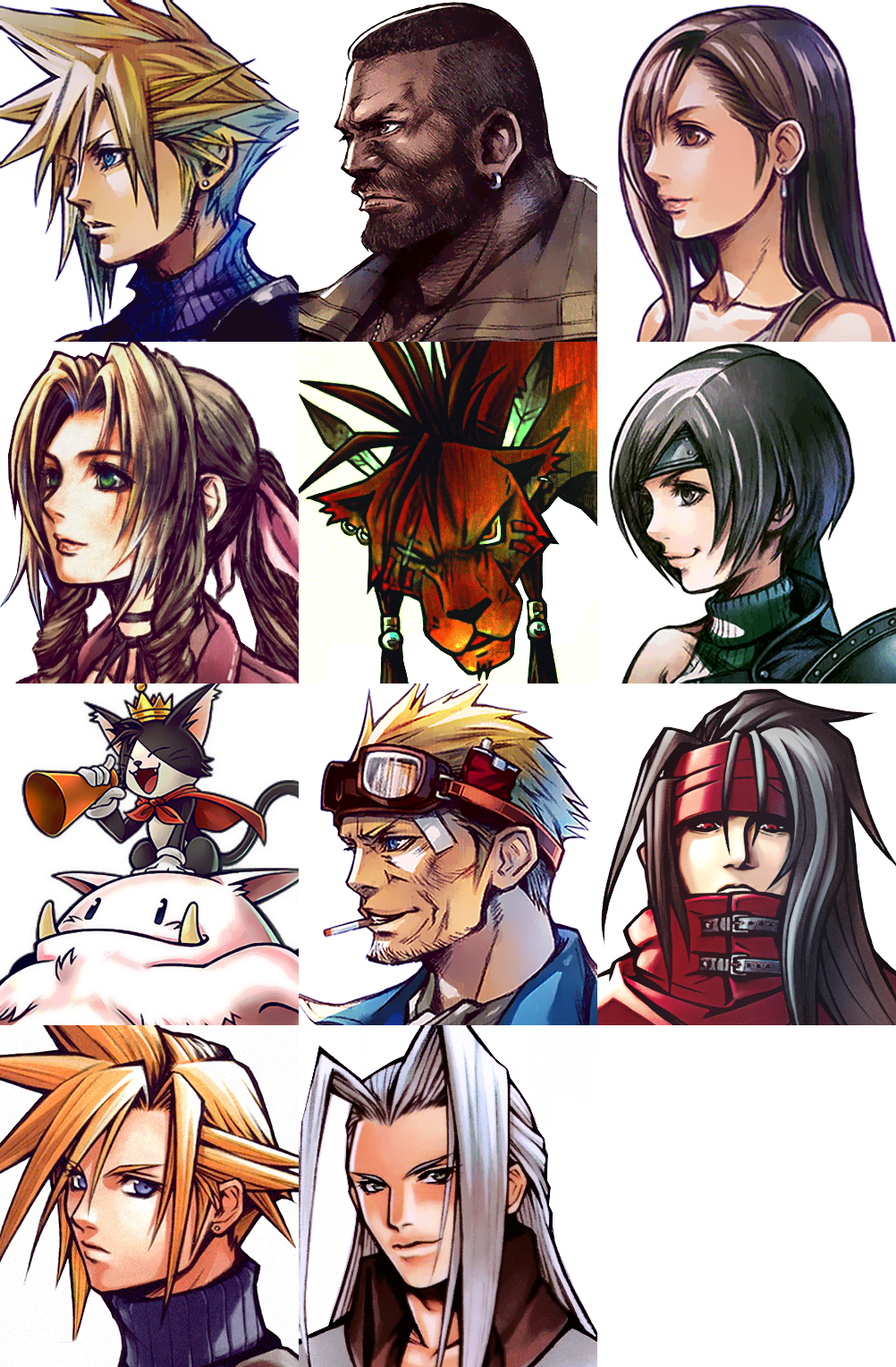

Qi4ypwA.png


Download Here

Can you add these as mini battle avatars like how Finishing Touch has done theirs? I'm trying to give it an Ever Crisis battle view and your avatars are like the ones in the videos of Ever Crisis battle sequences.
 
Can you add these avatars to the dialogue boxes like many of the other mods are doing with avatars? That would be awesome.
 
Bro something is seriously wrong with your mod and it probably needs an update. After the latest updates from 7th Heaven and FFNx the mod installs two versions: 1) Wictoriously Avatar pack and 2) Wictoriously Avatar. The 2) choise is grayed out and off and has an Update promt. Trying to delete or update it makes the applications hang and unable to start on next restart unless you manually delete the the .iro file from the mods folder. Can you please fix as this is quite troublesome.
 
I forgot to mention. Can you add these avatars to the battle menu too?
 
Status
Not open for further replies.
Back
Top