[FF7 PC] Mod Manager - 7th Heaven (v2.2.3.522 Release) Outdated

  • Thread starter Thread starter unab0mb
  • Start date Start date
Status
Not open for further replies.
I'm not sure if "thank you"s can go here, but I wanted to thank everyone involved with this wonderful tool and the community of modders that labors so intensely to make this game even more wonderful. It's my favorite FF and with 7th Heaven and some mods from the catalog, it looks so nice and sleek that it makes me forget the Remake is even a thing. I'll always prefer the original, and this improves it even more.
Thank you Heim_Smasher! Words of thanks are always welcome and appreciated!
 
I think I screwed my mods up because I got a new hard drive and transferred everything over and the mod manager is just like freaking out and idk what to do
 
I think I screwed my mods up because I got a new hard drive and transferred everything over and the mod manager is just like freaking out and idk what to do
hard to say what exactly is going wrong without logs, probably has to do with how the game is installed
 
hard to say what exactly is going wrong without logs, probably has to do with how the game is installed
the log was
Could not find a part of the path 'G:\SteamLibrary\steamapps\common\FINAL FANTASY VII\mods\7th Heaven'.

   at System.IO.__Error.WinIOError(Int32 errorCode, String maybeFullPath)
   at System.IO.Directory.InternalCreateDirectory(String fullPath, String path, Object dirSecurityObj, Boolean checkHost)
   at System.IO.Directory.InternalCreateDirectoryHelper(String path, Boolean checkHost)
   at System.IO.Directory.CreateDirectory(String path)
   at Iros._7th.Workshop.Settings.LogAndCreateFolderIfNotExists(String pathToFolder)
   at Iros._7th.Workshop.Settings.SetPathsFromInstallationPath(String pathToFf7Install)
   at SeventhHeaven.ViewModels.GeneralSettingsViewModel.AutoDetectSystemPaths(Settings settings)
   at SeventhHeavenUI.ViewModels.MainWindowViewModel.InitViewModel()
   at SeventhHeavenUI.MainWindow.Window_Loaded(Object sender, RoutedEventArgs e)
   at System.Windows.RoutedEventHandlerInfo.InvokeHandler(Object target, RoutedEventArgs routedEventArgs)
   at System.Windows.EventRoute.InvokeHandlersImpl(Object source, RoutedEventArgs args, Boolean reRaised)
   at System.Windows.UIElement.RaiseEventImpl(DependencyObject sender, RoutedEventArgs args)
   at System.Windows.UIElement.RaiseEvent(RoutedEventArgs e)
   at System.Windows.BroadcastEventHelper.BroadcastEvent(DependencyObject root, RoutedEvent routedEvent)
   at System.Windows.BroadcastEventHelper.BroadcastLoadedEvent(Object root)
   at MS.Internal.LoadedOrUnloadedOperation.DoWork()
   at System.Windows.Media.MediaContext.FireLoadedPendingCallbacks()
   at System.Windows.Media.MediaContext.FireInvokeOnRenderCallbacks()
   at System.Windows.Media.MediaContext.RenderMessageHandlerCore(Object resizedCompositionTarget)
   at System.Windows.Media.MediaContext.RenderMessageHandler(Object resizedCompositionTarget)
   at System.Windows.Media.MediaContext.Resize(ICompositionTarget resizedCompositionTarget)
   at System.Windows.Interop.HwndTarget.OnResize()
   at System.Windows.Interop.HwndTarget.HandleMessage(WindowMessage msg, IntPtr wparam, IntPtr lparam)
   at System.Windows.Interop.HwndSource.HwndTargetFilterMessage(IntPtr hwnd, Int32 msg, IntPtr wParam, IntPtr lParam, Boolean& handled)
   at MS.Win32.HwndWrapper.WndProc(IntPtr hwnd, Int32 msg, IntPtr wParam, IntPtr lParam, Boolean& handled)
   at MS.Win32.HwndSubclass.DispatcherCallbackOperation(Object o)
   at System.Windows.Threading.ExceptionWrapper.InternalRealCall(Delegate callback, Object args, Int32 numArgs)
   at System.Windows.Threading.ExceptionWrapper.TryCatchWhen(Object source, Delegate callback, Object args, Int32 numArgs, Delegate catchHandler)


basically G was my old drive but my new Drive is E
 
Hello there! First time Final Fantasy player, and thus first time Final Fantasy modder. I downloaded the 7th Heaven mod manager, but Field Textures the mod does not finish download. It gets suck when it there is 1 second left.

I tried it a second time and it still got stuck. I was wondering where the download location for these sorts of mods typically are. As it keeps eating at my hard drive space I would like to find it an delete it.

I did however download it without the manager by direct download through the thread. So I'm fine on that front :)
 
Hi everybody, I'm new to 7th Heaven (but an old FF7 player)! That's an amazing tool, thanks a lot for the work put in it.

I'm having some trouble using it. I have my game through Steam, it plays correctly from outside 7th Heaven, but it doesn't want to work through the modding tool (either with mods or vanilla).
The game starts, but it's like it's skipping all the movies and just showing a black screen instead. For instance, after few seconds of black screen (I assume that's the starting logo-movie which doesn't load) it appears the "New Game / Continue" screen, which I see correctly, I click New Game and black screen again; I assume that's just the first movie which is not being played.
I read on some other post that the registy might be messed up, but I checked and have no registry key relative to 7th HEaven at all.

Also, my installation was originally in a system folder (Program Files) as Steam installs everything there (doesn't let me pick an additional folder in the same drive, and I have only one drive).
So I let 7th Heaven copy all the files automatically to C:\Games , and I checked by hand that everything is there (movies, and so on).

Any ideas? Thanks in advance!
 
It's under the \Settings\General Settings\ menu option
Is there a way to do it without opening the program, as it just crashes on startup due to the old  filepath
 
Hi,

I have tried to play modded FF7 for the first time since last Spring, and I am encountering some issues related to controller support. In short, my controller doesn't work. I have the latest version of 7th Heaven, which I believed was all that was necessary to have native controller support due to FFNx.

I first launched FF7 through 7th Heaven, but that wasn't making the controller work. I then added 7th Heaven as a non-steam game to Steam, but that also didn't make the controller work.

Is there an additional step that I have missed? Do we still need DS4Windows or Antimicro? I thought FFNx enabled Steam's controller wrapper for modded FF7.

Thank you

EDIT:
Oh god damn it. I had forgotten to enable "enable PS4 Xinput Driver" in the "controls" menu. Everything is working now lol.
Thanks!
 
Last edited:
Is there a way to do it without opening the program, as it just crashes on startup due to the old  filepath
If you delete \7th Heaven\7thWorkshop\settings.xml, it should force a re-initialization of all your settings.
 
Hi All,

My music keeps dissapearing after battles.

I have no idea what is causing it. I have tried uninstalling everything then reinstalling but the problem persists.

Any idea what may be causing it?

Thanks
 
Hello everyone!

I have started playing New Threat 2.0 through 7th Heaven, making it up to Mt Corel. Now when I try and start the game through the 7th Heaven launcher, it can't start.
It has an issue mounting/finding the disc. I have tried manually mounting the disc but it says there is an issue with the disc image file. Anyone got a solution? The game w/mods was working perfectly and now it can't even play at all.
I did a reinstall of 7th Heaven but it has not fixed the issue

This is the log:
14:22:31|INFO|SeventhHeaven.ViewModels.GameLaunchViewModel|### Launching Final Fantasy VII ###
14:22:32|INFO|SeventhHeaven.Classes.GameLauncher|Checking FF7 is not running ...
14:22:32|INFO|SeventhHeaven.Classes.GameLauncher|Checking FF7 .exe exists at C:\Games\Final Fantasy VII\FF7.exe ...
14:22:32|INFO|SeventhHeaven.Classes.GameLauncher|Verifying installed game is compatible ...
14:22:32|INFO|SeventhHeaven.Classes.GameLauncher|Verifying game is not installed in a System/Protected folder ...
14:22:32|INFO|SeventhHeaven.Classes.GameLauncher|Verifying English game files exist ...
14:22:32|INFO|SeventhHeaven.Classes.GameLauncher|Verifying game is full/max install ...
14:22:32|INFO|SeventhHeaven.Classes.GameLauncher|Creating missing required directories ...
14:22:32|INFO|SeventhHeaven.Classes.GameLauncher|Verifying additional files for 'battle' and 'kernel' folders exist ...
14:22:32|INFO|SeventhHeaven.Classes.GameLauncher|Verifying all movie files exist ...
14:22:32|INFO|SeventhHeaven.Classes.GameLauncher|Verifying music files exist ...
14:22:32|INFO|SeventhHeaven.Classes.GameLauncher|Verifying latest game driver is installed ...
14:22:32|INFO|SeventhHeaven.Classes.GameLauncher|   Copying C:\7th Heaven\Resources\Game Driver\GameDriver.cfg -> C:\Games\Final Fantasy VII\FFNx.cfg ...
14:22:32|INFO|SeventhHeaven.Classes.GameLauncher|   FFNx.dll file is up to date.
14:22:32|INFO|SeventhHeaven.Classes.GameLauncher|Verifying game driver shaders folders exist ...
14:22:32|INFO|SeventhHeaven.Classes.GameLauncher|Verifying ff7 exe ...
14:22:32|INFO|SeventhHeaven.Classes.GameLauncher|Checking a profile is active ...
14:22:32|INFO|SeventhHeaven.Classes.GameLauncher|Checking mod compatibility requirements ...
14:22:32|INFO|SeventhHeaven.Classes.GameLauncher|Checking mod constraints for compatibility ...
14:22:33|INFO|SeventhHeaven.Classes.GameLauncher|Checking mod load order requirements ...
14:22:33|INFO|SeventhHeaven.Classes.GameLauncher|Looking for game disc ...
14:22:33|WARN|SeventhHeaven.Classes.GameLauncher|Failed to find game disc ...
14:22:33|INFO|SeventhHeaven.Classes.GameLauncher|Auto mounting virtual game disc ...
14:22:33|INFO|_7thHeaven.Code.GameDiscMounter|   attempting to mount iso at C:\7th Heaven\Resources\FF7DISC1.ISO
14:27:33|INFO|SeventhHeaven.Classes.GameLauncher|Looking for game disc after mounting ...
14:27:48|ERROR|SeventhHeaven.Classes.GameLauncher|Failed to find game disc after auto mounting ...
14:27:48|INFO|SeventhHeaven.ViewModels.GameLaunchViewModel|Failed to launch FF7. View the above log for details.

Thanks in advance!
 
I recently deleted a bunch of stuff on my hard drive (including 7H) and recently reinstalled the program. The catalog flat out won't load for me, and it givers me this error at the bottom: "catalog iros://http$pastebin.com/raw.php?i=vXc4PpBS - An existing connection was forcibly closed by the remote host". The pastebin URL loads in my browser without issue and I did allow 7H through my firewall.
 
Hello everyone, I’m also experiencing an issue where I cannot launch the game through 7th heaven at all vanilla or with mods. The logs seem to run fine, I get the ff7 window come up then instantly “ff7.exe has stopped working”. I’m using the steam version and I can launch it without 7th heaven perfectly fine. All files have been moved from “program files (x86)” and put into a suggested folder “Games”. I’ve also tried a fresh install on both FF7 and 7H but nothing seems to be working and I keep having the same issue. Any help would be massively appreciated let me know if there’s anymore information needed.
 
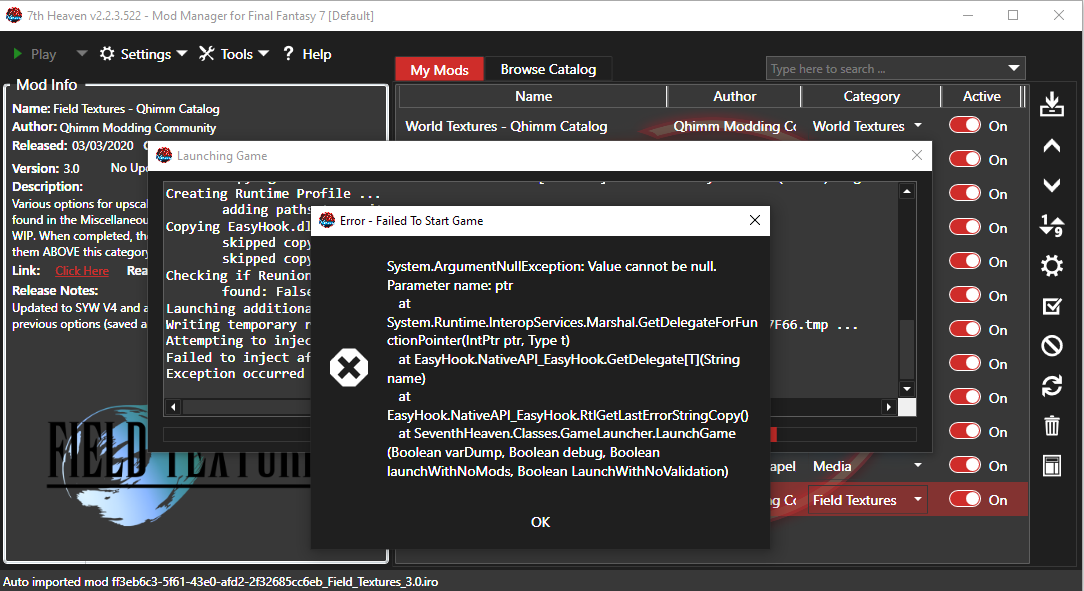
Is there still no solution to this? Game wont launch as long as theres any mod on. Only happens with version 2.2. It was fine with 2.0 but I want controller support.

Error:

Copying EasyHook.dll to FF7 path (if not found or older version detected) ...
   skipped copying EasyHook.dll ...
   skipped copying EasyHook32.dll ...
Checking if Reunion mod is installed ...
   found: False
Launching additional programs to run (if any) ...
Writing temporary runtime profile file to C:\Users\chris\AppData\Local\Temp\tmpE8CF.tmp ...
Attempting to inject with EasyHook ...
Failed to inject after max amount of tries (14) ...
Exception occurred while trying to start FF7 ...
Failed to launch FF7. View the above log for details.
 
Quick question.  Is there a way to have 7th Heaven open and run FF7 straight from the command line, and then shut down once the game stops running?  I'm asking because I'd like to be able to start it straight from my LaunchBox frontend without having to use a keyboard at all.
 
Hi guys.


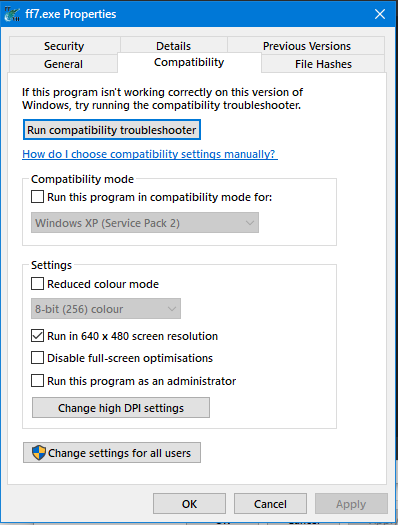
For those who have problems launching the game, specifically a code 5 error (which may show as multiple attempts to inject), then please do the following.


1 - Navigate to the game installation folder.
2 - Right click ff7.exe and select properties.
3 - Click the compatibility tab.
4 - Select "run in 640x480 screen resolution"
5- Click ok.


This will not actually force that resolution but it is a workaround to the problem, your screen may momentarily go black when launching the game.


SvPA4Zn.png
 
Hi everybody!

I'm hoping someone can help with this. Anytime I try to run the game through 7th Heaven with mods enabled, I get an error when trying to inject scripthook. It doesn't happen when I start the game with no mods enabled, and I've already tried changing FF7.exe's compatibility to run in 640x480. I've tried fresh installs of both the game itself and 7th Heaven, but I just can't seem to get the game to start. I've attached a screenshot of the actual error screen that pops up as well as the 7th Heaven log. If somebody could help I would be eternally grateful.
3OBpWQg.png


13:54:36|INFO|SeventhHeaven.Classes.GameLauncher|Verifying latest game driver is installed ...
13:54:36|INFO|SeventhHeaven.Classes.GameLauncher|   Copying C:\7th Heaven\Resources\Game Driver\GameDriver.cfg -> D:\Steam\steamapps\common\FINAL FANTASY VII\FFNx.cfg ...
13:54:36|INFO|SeventhHeaven.Classes.GameLauncher|   backing up existing 'shaders' folder to D:\Steam\steamapps\common\FINAL FANTASY VII\7H2.0-BACKUP\20210316135436 ...
13:54:36|INFO|SeventhHeaven.Classes.GameLauncher|   copying contents of C:\7th Heaven\Resources\Game Driver -> D:\Steam\steamapps\common\FINAL FANTASY VII ...
13:54:36|INFO|SeventhHeaven.Classes.GameLauncher|Verifying game driver shaders folders exist ...
13:54:36|INFO|SeventhHeaven.Classes.GameLauncher|Verifying ff7 exe ...
13:54:37|INFO|SeventhHeaven.Classes.GameLauncher|   FF7Config.exe missing or detected to be different. creating backup (if exists) and copying correct .exe ...
13:54:37|INFO|SeventhHeaven.Classes.GameLauncher|Checking a profile is active ...
13:54:37|INFO|SeventhHeaven.Classes.GameLauncher|Checking mod compatibility requirements ...
13:54:37|INFO|SeventhHeaven.Classes.GameLauncher|Checking mod constraints for compatibility ...
13:54:37|INFO|SeventhHeaven.Classes.GameLauncher|Checking mod load order requirements ...
13:54:37|INFO|SeventhHeaven.Classes.GameLauncher|Looking for game disc ...
13:54:37|WARN|SeventhHeaven.Classes.GameLauncher|Failed to find game disc ...
13:54:37|INFO|SeventhHeaven.Classes.GameLauncher|Auto mounting virtual game disc ...
13:54:37|INFO|_7thHeaven.Code.GameDiscMounter|   attempting to mount iso at C:\7th Heaven\Resources\FF7DISC1.ISO
13:54:38|INFO|SeventhHeaven.Classes.GameLauncher|Looking for game disc after mounting ...
13:54:38|INFO|SeventhHeaven.Classes.GameLauncher|Found game disc at F:\ ...
13:54:38|INFO|SeventhHeaven.Classes.GameLauncher|Applying changed values to registry ...
13:54:38|INFO|SeventhHeaven.Classes.GameLauncher|Copying ff7input.cfg to FF7 path ...
13:54:38|INFO|SeventhHeaven.Classes.GameLauncher|   using control configuration file [Default] Steam KB+PlayStation (Stock).cfg ...
13:54:38|INFO|SeventhHeaven.Classes.GameLauncher|   Copying C:\7th Heaven\Resources\Controls\[Default] Steam KB+PlayStation (Stock).cfg -> D:\Steam\steamapps\common\FINAL FANTASY VII\ff7input.cfg ...
13:54:38|INFO|SeventhHeaven.Classes.GameLauncher|Creating Runtime Profile ...
13:54:38|INFO|SeventhHeaven.Classes.GameLauncher|   adding paths to monitor ...
13:54:38|INFO|SeventhHeaven.Classes.GameLauncher|Copying EasyHook.dll to FF7 path (if not found or older version detected) ...
13:54:38|INFO|SeventhHeaven.Classes.GameLauncher|   EasyHook.dll copied ...
13:54:38|INFO|SeventhHeaven.Classes.GameLauncher|   EasyHook32.dll copied ...
13:54:38|INFO|SeventhHeaven.Classes.GameLauncher|Checking if Reunion mod is installed ...
13:54:38|INFO|SeventhHeaven.Classes.GameLauncher|   found: False
13:54:38|INFO|SeventhHeaven.Classes.GameLauncher|Launching additional programs to run (if any) ...
13:54:38|INFO|SeventhHeaven.Classes.GameLauncher|Writing temporary runtime profile file to C:\Users\Todd\AppData\Local\Temp\tmp4AA2.tmp ...
13:54:38|INFO|SeventhHeaven.Classes.GameLauncher|Attempting to inject with EasyHook ...
13:54:39|WARN|SeventhHeaven.Classes.GameLauncher|   received errors: Value cannot be null.
Parameter name: ptr;  ...
13:54:39|WARN|SeventhHeaven.Classes.GameLauncher|   received errors: Value cannot be null.
Parameter name: ptr;  ...
13:54:39|WARN|SeventhHeaven.Classes.GameLauncher|   received errors: Value cannot be null.
Parameter name: ptr;  ...
13:54:39|WARN|SeventhHeaven.Classes.GameLauncher|   received errors: Value cannot be null.
Parameter name: ptr;  ...
13:54:39|WARN|SeventhHeaven.Classes.GameLauncher|   received errors: Value cannot be null.
Parameter name: ptr;  ...
13:54:39|WARN|SeventhHeaven.Classes.GameLauncher|   received errors: Value cannot be null.
Parameter name: ptr;  ...
13:54:39|WARN|SeventhHeaven.Classes.GameLauncher|   received errors: Value cannot be null.
Parameter name: ptr;  ...
13:54:39|WARN|SeventhHeaven.Classes.GameLauncher|   received errors: Value cannot be null.
Parameter name: ptr;  ...
13:54:39|WARN|SeventhHeaven.Classes.GameLauncher|   received errors: Value cannot be null.
Parameter name: ptr;  ...
13:54:39|WARN|SeventhHeaven.Classes.GameLauncher|   received errors: Value cannot be null.
Parameter name: ptr;  ...
13:54:39|WARN|SeventhHeaven.Classes.GameLauncher|   received errors: Value cannot be null.
Parameter name: ptr;  ...
13:54:39|WARN|SeventhHeaven.Classes.GameLauncher|   received errors: Value cannot be null.
Parameter name: ptr;  ...
13:54:39|WARN|SeventhHeaven.Classes.GameLauncher|   received errors: Value cannot be null.
Parameter name: ptr;  ...
13:54:39|WARN|SeventhHeaven.Classes.GameLauncher|   received errors: Value cannot be null.
Parameter name: ptr;  ...
13:54:39|ERROR|SeventhHeaven.Classes.GameLauncher|Failed to inject after max amount of tries (14) ...
13:54:39|ERROR|SeventhHeaven.Classes.GameLauncher|System.ArgumentNullException: Value cannot be null.
Parameter name: ptr
   at System.Runtime.InteropServices.Marshal.GetDelegateForFunctionPointer(IntPtr ptr, Type t)
   at EasyHook.NativeAPI_EasyHook.GetDelegate[T](String name)
   at EasyHook.NativeAPI_EasyHook.RtlGetLastErrorStringCopy()
   at SeventhHeaven.Classes.GameLauncher.LaunchGame(Boolean varDump, Boolean debug, Boolean launchWithNoMods, Boolean LaunchWithNoValidation)
13:54:39|ERROR|SeventhHeaven.Classes.GameLauncher|Exception occurred while trying to start FF7 ...
13:54:40|INFO|SeventhHeaven.ViewModels.GameLaunchViewModel|Failed to launch FF7. View the above log for details.
 
Status
Not open for further replies.
Back
Top