R
Razgriz777
Guest
Lol yesssss they are all offThis is pretty much how I have mine too. On my 2TB drive in E:\Steam\steamapps\common\FINAL FANTASY VII directory. That still cool? It won't fit on C:\, that's a SATA.


Lol yesssss they are all offThis is pretty much how I have mine too. On my 2TB drive in E:\Steam\steamapps\common\FINAL FANTASY VII directory. That still cool? It won't fit on C:\, that's a SATA.
Final Fantasy VII Installation Located:
""=\"
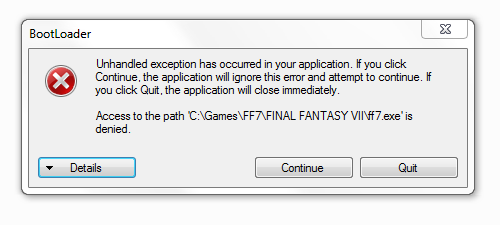
Access Denied! Installation Aborted!!
Frequently Asked Questions➣ When I run Bootleg, I get a message that says "Access Denied. Installation Aborted!".
[list type=decimal]
[*]Right click "My Computer" and select Properties.
[*]Scroll down to "Computer name, domain, and workgroup settings" and click on Change Settings.
[*]In the Advanced tab, click on Environmental Variables.
[*]Under "System variables" find the variable named Path, highlight it, and click Edit...
[*]"Variable value" should have a long string of directories. Add %SystemRoot%\System32; as the first entry.
[/list]
Sorry, I should have mentioned that I did this as well.Frequently Asked Questions
➣ When I run Bootleg, I get a message that says "Access Denied. Installation Aborted!".
Right click "My Computer" and select Properties.
Scroll down to "Computer name, domain, and workgroup settings" and click on Change Settings.
In the Advanced tab, click on Environmental Variables.
Under "System variables" find the variable named Path, highlight it, and click Edit...
"Variable value" should have a long string of directories. Add %SystemRoot%\System32; as the first entry.
I wanna be very clear, Bootleg is not a trojan horse, nor does it contain one. It's often picked up by A/V software's heuristic measures (or as "generic" or something similar) because of the way it's packed. The extent of its "attacking" is that it decompresses and runs an executable file, behavior which is common in malware but is not inherently bad in and of itself. Many lesser antivirus software will just assume it's a trojan horse for that, regardless of what the packed exe actually does.Hey guys, so.. I would totally go ahead and use Bootleg and all, but hell no while it's being picked up as a known Trojan horse virus. A rather nasty one too. Luckily, I had a ton of preventative stuff in place to block it from attacking. Once that business is fixed, I'll be more inclined to not think this is messed up..
Especially with the Steam release, it is important to specify the paths.Final Fantasy VII Installation Located:
""=\"
Access Denied! Installation Aborted!!
Also I'm using the Steam release of FF7

Ok the Destination Location is left blank. What path do I exactly need to put down here? The location of the game install? Such as E:\Games\Steam\SteamApps\common\FINAL FANTASY VII?@Hileict
I can understand you, I had years ago also a dispute here because of something like a False positive.
Until now my PC has survived all
Alternatively, you can use my FF7GameConverter, then you can also manually install all (?) the mods here.
Even without UAC, Antivir, firewall or something disable.
Especially with the Steam release, it is important to specify the paths.
Both the games folder as well as the Temp folder I recommend every 20 GB to have free space.
Ah, and do not use quotes in the pathsboxes ...
@Hileict
I can understand you, I had years ago also a dispute here because of something like a False positive.
Until now my PC has survived all
Alternatively, you can use my FF7GameConverter, then you can also manually install all (?) the mods here.
Even without UAC, Antivir, firewall or something disable.
Especially with the Steam release, it is important to specify the paths.
Both the games folder as well as the Temp folder I recommend every 20 GB to have free space.
Ah, and do not use quotes in the pathsboxes ...

YesOk the Destination Location is left blank. What path do I exactly need to put down here? The location of the game install? Such as E:\Games\Steam\SteamApps\common\FINAL FANTASY VII?
Can be left emptySecond the FF7 Install image is left blank. What exatly do I need to put here
YesLast the temp files entry is blank but this I can put as anything as its just going to temp extract and delete the files after, correct?
Rename a USB stick "FF7DISC1", remove the check mark for "automount" and choose the letter of the USB stick (in Bootloaderconfig)When starting it, verify the options and then click "Play FF7" it tells me I need the disk.
According to the FAQ section it states that I need to use any disk to pass the "CD" check. Well what do you do if you have the steam version and have no CD as a result? Or do i need to tweak something more? I'm not sure now

I get this screen after the initial logos run. I updated my catalyst drivers to the ones recommended. Still no dice. Not sure what to do. Any suggestions would be greatly appreciated. I tried to read as much as I could but there are too many pages to find my specific issue.
Before you install the 13.5Beta2, it will be necessary to uninstall the current display driver. The 13.5 may not overwrite the current driver.
The Catalyst 13.5Beta2 contains the display driver version 12.102.3.0 from April-16-2013.
You can determine your version by using Device Manager.
Do you have a different version, the 13.5 the previous version has not overwritten.
In this case, please uninstall the display driver separately before you install the 13.5 again.
Think maybe... this needs the "Everything Is Made of Light Fix" which is actually a little hard to research, imo, but these links are from the Big List of Mods, which is another of PitBrat's many gifts to the world.I'm sorry if this is a fixed problem already, but I swear I couldn't find the solution in the internet for the life of me (I registered in the forums just to solve this).
So, when the game starts all I get is a blank white screen in what seems to be the intro movie. If I press something after that, it will take me to the menu where I can select a new game, but still with a pretty strong white filter in the image. After that, the screen just goes blank white again.
