
[FF7PC-98/Steam] Multiple mods and Modding Framework-The Reunion [R06f]

  • Thread starter Thread starter DLPB_
  • Start date Start date
Status
Not open for further replies.
Fixed my audio issue by setting Load_SFX_To_Memory = n in the options.

SFX were cut out (the sound when you load a save file, the sound a save point makes when you touch it) or didn't play (most likely cut as soon as they start I guess? ) like the ones I mentionned before.
Setting that line to n fixed every sound.

Again that could be from my own system setup, no "weird" hardware or setup here but since I seem to be the only one with the issue... ;)
 
Hi! I found a minor-ish bug I think. Red XIII's weapon Silver Barrette (the one bought in Cosmo Canyon) seems to make all of his normal attacks miss. Limit breaks and such still hit. I've had him in my active party since I recruited him and have used all his weapons so far -- this is the only one up to this point that does it. The Seraph Comb you obtain after completing the Gi Caverns area once again allows his attacks to land. I'm not sure where to add the log files. The "attachments and other options" section doesn't actually have the ability to attach files -- I suspect because I'm still a new user. I hope I'm posting this in the right place.
 
I've found another oddity - Vanilla field models aren't in sync with the background when the screen pans for any reason. I'm at resolution 1280x960 in windowed mode.
 
Using the game converter always ended with a crash to desktop at any battle you encounter for me. Steam version runs, but many SFXs aren't working (the alarm sound before the first boss, the jumps on ladders, the actual sound of the bomb being rigged just before the first boss...) All theses could be on my end, I'm still trying things.

Any hints to make other mods work with this? I managed to run Satsuki's upscaled fields but nothing else seems to register.

The 60Fps battles are great, by the way ^^
Where do you put Satsuki's upscaled textures? Are they supposed to be unpacked, or in iro format?


DLPB: Many thanks for this, just started tinkering with it, have never used Reunion before, can't wait to do a playthrough with this! The amount of time you've put into this is staggering! You mentioned something about scanlines, preferably with Reshade, you wouldn't happen to have nice preset to share?

Oh, and one last thing, is it possible to boot straight into the game with going through the "Steam Menu" it's not very couch friendly. I know this has nothing to do with Reunion, it's steam thing, just wondering if it's possible :)

Edit1: Managed to get scanlines working by editing psx.post and enabling #define USE_SCANLINES               1
Edit2: Managed to get satsuki's textures working as well! I extracted the iro files to png files and put them all in E:\Spel\Steam\steamapps\common\FINAL FANTASY VII\The_Reunion\GLOBAL\Texture\
In separate folders, battle, char, field etc.

If only I could launch FF7 directly now, instead of going through the Menu, it would be perfect! Many thanks for this!
With the new models, textures and scanlines, it really looks amazing! I so far I really dig the new translation!

Thanks!
 
Last edited:
Where do you put Satsuki's upscaled textures? Are they supposed to be unpacked, or in iro format?
Unpack iro in 7H etc, copy the field folders to the reunion/global/texture/field/ or move them to reunion/custom/EXAMPLE/texture/field and activate EXAMPLE as custom mod folder in options.ini

I too would like a way to launch steam ff7 directly, afaik it's only through the launcher for now.
 
Where do you put Satsuki's upscaled textures? Are they supposed to be unpacked, or in iro format?
Its supposed to be unpacked. I got a bunch of texture mods mixed in and a movie upscale mod working in the custom folder. Also running it with reshade. The interpolated animations are a breath of fresh air and im enjoying the mod so far.
 
Hello, I have really enjoyed Reunion in the past. Linking a video to a something that I don't know is a known issue or an oddity that is affecting my setup, I'm really happy for the audio.dll recode as previously when I played reunion I got super stuck at corel from an audio file not loading issue that to this day I have no idea how to get past but that's not really here nor there anymore, Anyway, The link to the video is
, Spec's and changed options are in the description. Hopefully it's something I messed up and is just a buggy thing with my computer setup.
 
Fixed my audio issue by setting Load_SFX_To_Memory = n in the options.

SFX were cut out (the sound when you load a save file, the sound a save point makes when you touch it) or didn't play (most likely cut as soon as they start I guess? ) like the ones I mentionned before.
Setting that line to n fixed every sound.

Again that could be from my own system setup, no "weird" hardware or setup here but since I seem to be the only one with the issue... ;)
I had an audio issue when using the elevator to get to the observatory in Cosmo Canyon; I tried different settings but it seems to be persist. In default, the music behaviour is you talk to Bugenhagen and he flips a lever; the music then fades out and the elevator SFX plays just as it hits silence:

What's instead happening is: the music cuts off, a small distorted clip of the BGM plays and the elevator comes in at the wrong volume, increases in volume, then goes to normal volume. Another small clip of BGM audio then plays at the end.


Hi! I found a minor-ish bug I think. Red XIII's weapon Silver Barrette (the one bought in Cosmo Canyon) seems to make all of his normal attacks miss. Limit breaks and such still hit. I've had him in my active party since I recruited him and have used all his weapons so far -- this is the only one up to this point that does it. The Seraph Comb you obtain after completing the Gi Caverns area once again allows his attacks to land. I'm not sure where to add the log files. The "attachments and other options" section doesn't actually have the ability to attach files -- I suspect because I'm still a new user. I hope I'm posting this in the right place.
I checked Silver Barette and it has the 'Miss if not dead' flag ticked, which is typically used for KO-restoring items like Phoenix Down. I'll change it and send it to Dan over discord.

I've found another oddity - Vanilla field models aren't in sync with the background when the screen pans for any reason. I'm at resolution 1280x960 in windowed mode.
That seems to be across the board. On screens where there is panning, it's slightly off and can leave characters looking like they're floating slightly.


Where do you put Satsuki's upscaled textures? Are they supposed to be unpacked, or in iro format?

DLPB: Many thanks for this, just started tinkering with it, have never used Reunion before, can't wait to do a playthrough with this! The amount of time you've put into this is staggering! You mentioned something about scanlines, preferably with Reshade, you wouldn't happen to have nice preset to share?

Oh, and one last thing, is it possible to boot straight into the game with going through the "Steam Menu" it's not very couch friendly. I know this has nothing to do with Reunion, it's steam thing, just wondering if it's possible :)

Edit1: Managed to get scanlines working by editing psx.post and enabling #define USE_SCANLINES               1
Edit2: Managed to get satsuki's textures working as well! I extracted the iro files to png files and put them all in E:\Spel\Steam\steamapps\common\FINAL FANTASY VII\The_Reunion\GLOBAL\Texture\
In separate folders, battle, char, field etc.

If only I could launch FF7 directly now, instead of going through the Menu, it would be perfect! Many thanks for this!
With the new models, textures and scanlines, it really looks amazing! I so far I really dig the new translation!

Thanks!
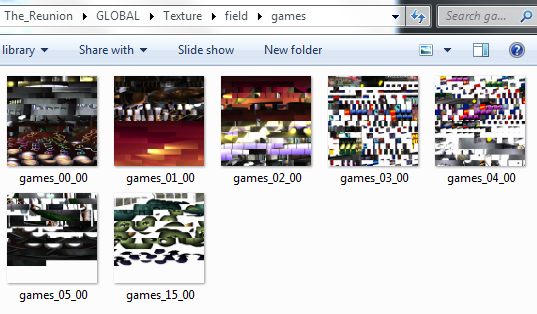
Got a post here about the layout for field textures:
I think it needs to go in a specific file structure. So in either Global, Custom, or Base (I went with Global for example but should be same in all 3 cases):

ZyJZZeV.png


So:
The_Reunion\GLOBAL\Texture\Field\

And then subfolders for each field with the background files in those subfolders. 'games' there is the name of a gold saucer field.
 
I just had my first crash with R06. I was in the basement of Seventh Heaven at the beginning of the game, and the game crashed to the steam launcher while I was walking around. I can't find the crash.dmp file anywhere though. I'm pretty sure I wasn't holding start+select by accident either.
 
Just had a weird audio issue in Aeris house in the beginning of the game. When the flashback starts for Cloud and the text is on screen the sound is messed up, really loud weird noises.
After the flashback is done and I run out of the house the music ramps up in volume and then normalizes.

Tried recording it, but the sounds never made it to the video though.

Below is audio.log with log level set to 5.

Code: [Select]
Code:
0.SetVolume [Channel 0, Volume 127]165.SetVolumeTransition [Channel 0, TargetVolume 0, Time 1000ms]229.StopSound [Channel 0]230.StopSound [Channel 0]230.StopSound [Channels 1 to 4]230.StopSound [Channels 20 to 24]230.SetVolume [Channel 0, Volume 127]230.SetVolume [Channels 1 to 4, Volume 127]230.SetTempo [Channel 0, Tempo 0]230.SetTempo [Channels 1 to 4, Tempo 0]230.SetBalance [Channels 1 to 4, Balance 64]231.SetVolume [Channel 5, Volume 127]261.SetMemoryEffect [Channel 9, Balance 64, Effect: 1]315.SetMemoryEffect [Channel 9, Balance 64, Effect: 2]372.SetMemoryEffect [Channel 9, Balance 64, Effect: 1]383.SetMemoryEffect [Channel 9, Balance 64, Effect: 208]404.SetMusic [Channel 0, 037 Flowers Blooming in the Church.ogg]404.SetLoop [LoopStart 0]404.SetVolume [Channel 0, Volume 127]404.SetVolume [Channel 1, Volume 127]404.SetVolume [Channel 2, Volume 127]404.SetVolume [Channel 3, Volume 127]404.SetVolume [Channel 4, Volume 127]807.SetMemoryEffect [Channel 1, Balance 63, Effect: 122]1177.SetMemoryEffect [Channel 1, Balance 63, Effect: 490]1276.SetMemoryEffect [Channel 1, Balance 63, Effect: 360]2520.SetMemoryEffect [Channel 9, Balance 64, Effect: 1]5308.SetVolumeFromTo [Channel 0, StartVolume 127, EndVolume 63, Time 1500ms]6524.SetVolumeFromTo [Channel 0, StartVolume 63, EndVolume 127, Time 1500ms]7412.SetVolume [Channel 0, Volume 127]7412.SetVolume [Channel 1, Volume 127]7412.SetVolume [Channel 2, Volume 127]7412.SetVolume [Channel 3, Volume 127]7412.SetVolume [Channel 4, Volume 127]170262.SetMusic [Channel 0, 031 Under the Rotten Pizza.ogg]170262.SetLoop [LoopStart 404180]
Here's youtube video, although the weird sounds somehow never made it into the video.

Thanks!
 
Sounds like the observatory thing I had. I'm going to check the field script for both and see what opcodes are common to those scenes.
 
Working great so far, but one thing I do wonder is, is there any way to filter those backgrounds? The original PSX backgrounds look pretty bad in full screen.
 
Working great so far, but one thing I do wonder is, is there any way to filter those backgrounds? The original PSX backgrounds look pretty bad in full screen.
I think someone in this thread mentioned using a CRT filter, which I imagine is applied as a post-processing file. Perhaps they can point you in the right direction? I looked about but couldn't find concrete stuff except for this (first link is dead, 2nd is alive): https://steamcommunity.com/app/39140/discussions/0/152393186500642113/

***

As for the audio, both scenes use this instruction:

Cloud's Mom's House (flashback scene when Cloud is sleeping in Aeris' house):
AKAO Fade music volume (param1=90, param2=127, param3=63, param4=0, param5=0)

Issue: When screen is black, this is first thing to get executed - music cuts immediately instead of fades, clips of song will pop through unexpectedly during silence, leaves audio muted (both bgm and sfx) until you leave Aeris' house where BGM will fade in erratically.


Bugenhagen Observatory
AKAO Fade music volume (param1=255, param2=85, param3=0, param4=0, param5=0)

Issue: After pressing switch, this is called; music cuts and will pop in and out, elevator SFX is also off. Corrects in time for the next scene.
 
Last edited:
Working great so far, but one thing I do wonder is, is there any way to filter those backgrounds? The original PSX backgrounds look pretty bad in full screen.
Another idea would be Remako or another upscale mod. Download, unpack the IROs with IroNite, copy the battle/char/field/minigames/world directories to The_Reunion/GLOBAL (backup the world directory in there first if you like), and you're set. For me the Remako movies didn't have sound, so make sure you backup first if you want those as well.

**

I had the audio issue was well, both when trying to ditch Aeris and entering the first elevator in the Shinra building. Fixed itself when the music came back in both cases. Also, the helicopter sound from just before entering the Shinra building continued until I picked up the elixir on the stairwell.

Seriously DLPB, great work. R06 is fantastic so far.
 
Hello. I'm at a bit of a loss here -- I reached Rocket Town and spoke to Cid at the rocket, headed back to his house, where Palmer shows up and Cid heads outside. When I follow him, the screen goes black and the next scene just doesn't load. I tried toggling on / off pretty much every setting and nothing works. It seems I simply can't get past this point in the game, and I dunno if it's something on my end or a problem with the mod. I can't attach files but I saw someone above use the code feature so I'll try pasting the contents of the log from my most recent attempt in there.

The_reunion.log

https://pastebin.com/cz874mJg

app.log

https://pastebin.com/EcdDeyDT

audio.log

https://pastebin.com/Kuit0dzM
 
Last edited:
Working great so far, but one thing I do wonder is, is there any way to filter those backgrounds? The original PSX backgrounds look pretty bad in full screen.
So what you want to do is download satsuki's upscaled backgrounds from here: https://www.ff7catalog.com/threads/13454/

Unpack the .iro files with the tool that he mentions in the thread, so that you get a bunch of .png files in different folders.
After that, move all those files to E:\Spel\Steam\steamapps\common\FINAL FANTASY VII\The_Reunion\CUSTOM\satsuki
Not the movies though, they go under E:\Spel\Steam\steamapps\common\FINAL FANTASY VII\data\movies, just replace the ones that are already there.

And then in options.ini, put this under CUSTOM

[CUSTOM]
Mod_ID = satsuki

Folder path should look like this: https://imgur.com/a/kMJLVP0
If you want scanlines, go to Reunion folder, then program_files, edit psx.post and under MISC put a 1 at #define USE_SCANLINES .

Game should look miles better now!

Let me know if you can't get it working.
 
Last edited:
-snip-

Won't let me post the entirety of the app.log. Sorry...
 
Last edited:
Status
Not open for further replies.
Back
Top