
[FF7PC] Doing my font Mod. I have transparency issue. Help.

  • Thread starter Thread starter Panteleimon
  • Start date Start date
Status
Not open for further replies.
They're actually not corrupted, those are the actual colors. The explanation for this has something to do with the way PSX used palette information to display certain colors, I think it was done to save on memory or something similar.

If anyone who can explain it better than I can wants to chime in, please do!
Thanks for explanation! So I need a way to convert it to colors it should looks like in the game then :)
Anyway, how to do it looks like natural colors, so I can upscale and edit it?
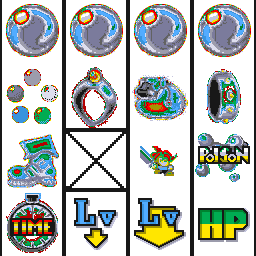
 
Each icon depends on a specific palette. For example the frog is palette #12, the mini-Cloud is palette #14, the ring is palette #10, the item bag is palette #9 and so on.
 
Each icon depends on a specific palette. For example the frog is palette #12, the mini-Cloud is palette #14, the ring is palette #10, the item bag is palette #9 and so on.
Thank you!
I broke my head thinking what are those "pallette 12, palette 14". Tried to Google it - nothing.
Found a program called Omega - there are those settings "pallette 1, 2 , etc" :)
But I was able only to get Mini Cloud correct

Edited.
Seems like it is working. Colors seems odd, but it's ok. Thank you one more time!
 
Last edited:
Does anybody know tools to extract some textures correct?
I tried TexTool, Image2Tex, Reunion, Aali, FFnx possibilities to extract textures - all of them return corrupted colors for some textures.
For example coloa.tex looks like this:
X2zr8O5.png


Please, help.
I use omega, where you can specify the palette id, not sure if it still has a working download link, if you cant find one let me know.
 
panteleimon, you're a ferning god

had the white bleed-through problem when doing the limit bar, and tried exporting with GIMP with no success, but the TIFF method worked flawlessly from what i can see

EDIT:  OMG, i made a little edit, resaved the png with photoshop and the white bleed came back, redid the TIFF method on it and it worked for one side but not the other

WHY CANT I JUST DRAW MY STUFF INTO THE GAME!?!?! /rant

i dont know wtf the problem is, might be a whole different problem even though i'm seeing white bleedthrough where i shouldnt

sometimes when a battle first starts and the camera is zooming the bars will look normal, then as soon as the camera sets all the bottom-right corners bulge out with white a bit... i dont get it
 
Last edited:
EDIT:  OMG, i made a little edit, resaved the png with photoshop and the white bleed came back, redid the TIFF method on it and it worked for one side but not the other
Yeah. Something is off. Can't resolve the problem with "45 degrees" cursor's transparency you mentioned this way too.
 
Status
Not open for further replies.
Back
Top