[FF7PC]FF7 SYW "ArkTsukiVock" (v4) upscale : Battle, world map, fields, videos

  • Thread starter Thread starter satsuki
  • Start date Start date
Status
Not open for further replies.
i am having a bug where my world map cloud displays the buggy smoke exhaust behind him when he runs in forests

and also the tiny bronco has the buggy exhaust instead of the water animation

it may very well be that i've put a file in the wrong place, just wondering if anyone else has this? i looked through the png files that i have in the world directory, but there's too many and i cant find the buggy smoke one
 
sorry for the double post, but i did some testing and stuff and this is indeed a bug on the world portion of this mod

the buggy exhaust animation replaces several other animations other than the 2 I listed as well, (like when riding on a chocobo in forests, as well as just running through forests with Cloud, the tiny bronco's water animation, i think i found one on the highwind  as well but dont remember the condition)
 
All those effect are in the dfx_00.png file
No bug here.
But ff7 driver don"t deal well with alpha channel so as long as this file exists you'll have some alpha bug on world map.
If you don't want alpah channel bug, delete this file, but you'll have pixelisated world map fx instead.
 
All those effect are in the dfx_00.png file
No bug here.
But ff7 driver don"t deal well with alpha channel so as long as this file exists you'll have some alpha bug on world map.
If you don't want alpah channel bug, delete this file, but you'll have pixelisated world map fx instead.
interesting... thanks for pointing me to that file, i'll play around with it

i was thinking this bug might be a confliction with kaldarasha's models or another mod but i uninstalled everything but this and it was still happening, i still need to try reinstalling the whole mod i guess, whatever happened i guess the damage is done

this mod really is breathtaking though, freakin' sweet  (cant believe how much detail they put in the original game, just to have it so blurry you can hardly make anything out)

edit: removing that file fixes it, however, the default animation for the highwind going over the water is so bad i'll probably just deal with the bug, haha, i may end up reinstalling ff7, reunion, and this mod to see if that does anything
 
Last edited:
Hi Satsuki,

I love this mod. I've been using it with 7th heaven 2.0 and I don't think I can ever go back to Remako.

I want to use Reunion now, which doesn't support 7h, so I've been trying to install your mod without it but I'm having issues.
I unpacked the iro file for the fields mod with Ironite like you said, and it's left me with a folder called 'Fields'. Inside that folder are two subfolders called 'Field' and 'char's, which contain all the pngs. The issue I'm having is that I have no idea where to place any of these files in order to get the game to load the mod. I tried placing the field and chars folders into Steam > steamapps > common > FINAL FANTASY VII > mods > Textures, but that didn't work. I am running the game from the FF7.exe, not through Steam or 7h.

Any advice would be appreciated, thanks.
 
Hi Satsuki,

I love this mod. I've been using it with 7th heaven 2.0 and I don't think I can ever go back to Remako.

I want to use Reunion now, which doesn't support 7h, so I've been trying to install your mod without it but I'm having issues.
I unpacked the iro file for the fields mod with Ironite like you said, and it's left me with a folder called 'Fields'. Inside that folder are two subfolders called 'Field' and 'char's, which contain all the pngs. The issue I'm having is that I have no idea where to place any of these files in order to get the game to load the mod. I tried placing the field and chars folders into Steam > steamapps > common > FINAL FANTASY VII > mods > Textures, but that didn't work. I am running the game from the FF7.exe, not through Steam or 7h.

Any advice would be appreciated, thanks.
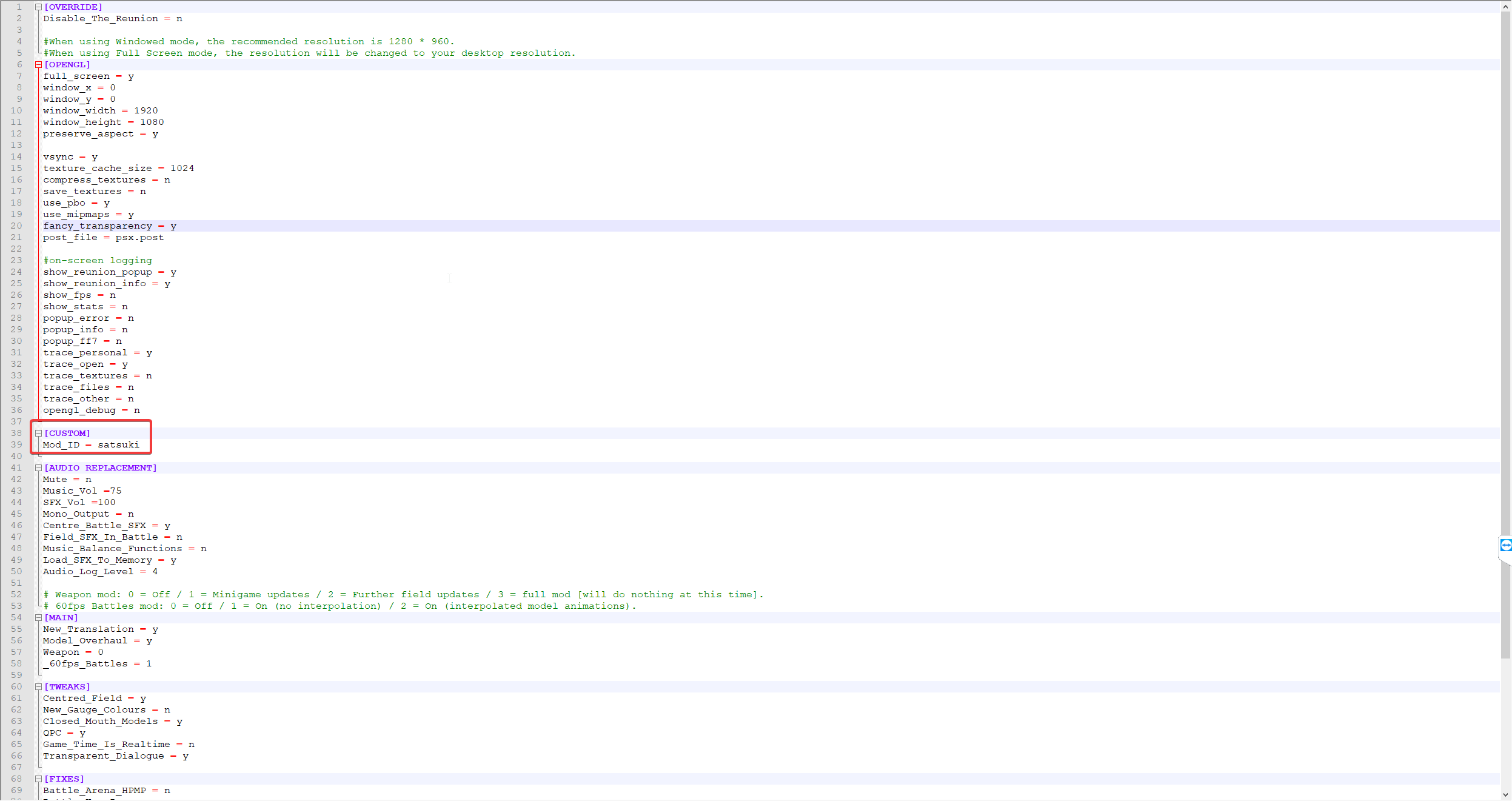
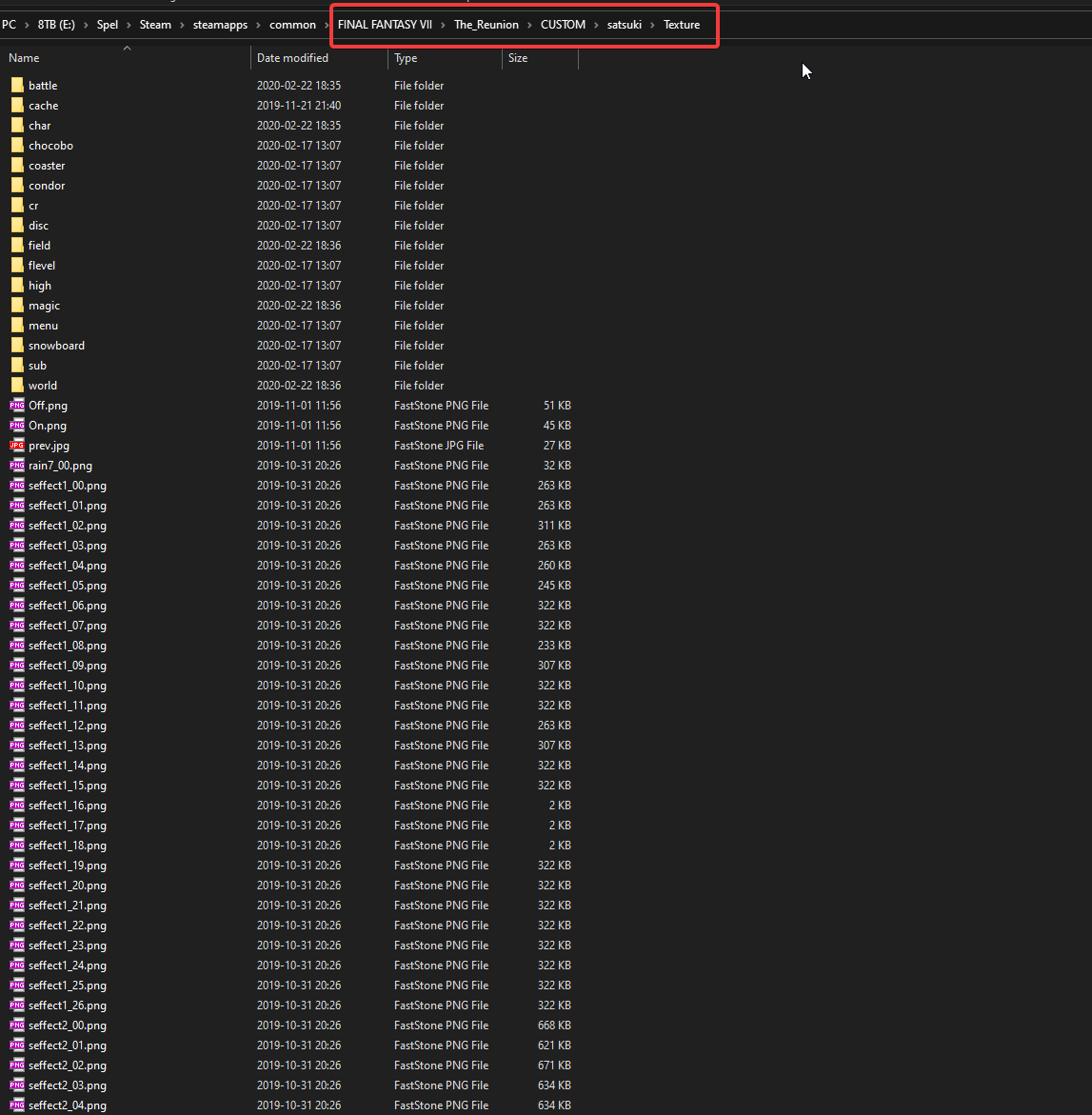
I'm using Reunion and satsukis textures. Here's how you should set it up.

Extraxt all png's from the .iro files.
Then create a folder in The_Reunion\CUSTOM called satsuki, then a folder called texture.
Put all extracted png's in that folder.

You should get a folder structure that looks like this.
ODx4lNJ.png


Then in options.ini in the The_Reunion folder you specify satsuki (same as folder name in CUSTOM) as custom mod, like this.

lDasOrA.png


And you're set!
 
Last edited:
Magic textures seem bring some micro stutters during casts, is it something that can be considered normal, or is there some issue with them?
 
I'm using Reunion and satsukis textures. Here's how you should set it up.

Extraxt all png's from the .iro files.
Then create a folder in The_Reunion\CUSTOM called satsuki, then a folder called texture.
Put all extracted png's in that folder.

You should get a folder structure that looks like this.
ODx4lNJ.png


Then in options.ini in the The_Reunion folder you specify satsuki (same as folder name in CUSTOM) as custom mod, like this.

lDasOrA.png


And you're set!
Can you show me what your magic folder looks like? Is there an "ff7" subfolder in there, and are you getting all textures to load correctly with Reunion? I had to move all of the seteffect files directly into the battle folder to get them to work with Reunion, which isn't the original structure from the iro files.
 
Can you show me what your magic folder looks like? Is there an "ff7" subfolder in there, and are you getting all textures to load correctly with Reunion? I had to move all of the seteffect files directly into the battle folder to get them to work with Reunion, which isn't the original structure from the iro files.
it's right. With one of the latest update in reunion the seffect* and rain* go to battle folder. Inside texture\magic shouldbe  a ff7 folder and other pngs without folder (the first is 005_00.png)
 
it's right. With one of the latest update in reunion the seffect* and rain* go to battle folder. Inside texture\magic shouldbe  a ff7 folder and other pngs without folder (the first is 005_00.png)
Thanks :)
 
it's right. With one of the latest update in reunion the seffect* and rain* go to battle folder. Inside texture\magic shouldbe  a ff7 folder and other pngs without folder (the first is 005_00.png)
I don't get it. Some magic textures don't load... What files should be in the ff7 folder? Just folders called blue, limit, limit2, limit3, magic, special, summon, weapon... and their subfolders containing pngs inside them?

Because I have it setup this way and thunder spell (for example) is still not loading properly. But ice and fire spells do load properly.
 
This tutorial for magic upscale is specifically for Reunion mod, though i hope it may be of some use to you. While using Reunion mod, this is what i do in order to get them to work correctly with reunion:

Magic textures will be read from "New_Translation" folder, and inside it, there is a "textures" folder, that's where you put "battle" and "magic" folders which are the textures you need. All of the rain, seffect, etc pngs have to be in battle folder, and a lot of subfolders (like limit, summon, spell) with a lot of pngs have to be inside "magic" folder in order to work.
                                                                               
                                                                                                                                  (eg. rain7_00, seffect1_00)
                                                                                                                         /->battle (folder with 82 pngs)
so... it should be like this: The_Reunion -> BASE -> New_Translation -> texture ->
                                                                                                                         /->magic (folder with 8 subfolders and 1299 pngs)
                                                                                                                              (e.g: blue, limit, summon) (e.g: a1_00, a2_00)

Hope it helped. Do note, that magic textures provide some microstutters during casts, at least that's what it did for me, so you'll have 1-2 seconds freeze whenever you cast a heavy spell, especially summons.

As DLPB stated, enabling texture compression in Options.ini seem to alleviate the stuttering problem, though not completely fix it as heavy stutters seem to be present once, on the first load, after the area completely loads, stutter will be no longer present until you reach a new area.

Hope it helped :D

Edit: Oh, i didn't notice you were actually looking for help with Reunion. Then i guess, this will help you 100% since it works for me no problem.
 
Last edited:
Agravaile, this is such a well made and clear reply. Much appreciated, your method actually worked. Thanks!

Other issues still occur for me, like random crashes but that's probably because of Reunion.
 
Nice, you're welcome! Glad i could be of help. If you're suspecting crashes that involves reunion, see the Reunion database to know if there is a fix or not. Also, make sure you're using either latest version of Reunion which is R06d, or Hotfix11 if you're currently on R06c.

Also, another advice i can give to avoid crashes, is to set texture cache size in Options.ini to 1024. If crashes still occur after that, you can also use CFF explorer to modify your exe to use 2GB memory, that way, you can now set 2048 texture cache size in Option.ini file. But that is very optional, since 1024 should be more than enough.

Do note, that texture cache size does not fix the crashes entirely, but do alleviate the problem to nonexistent since the larger cache size is, the fewer crashes occur, as far as i know, at least.
 
Ok I'll try resizing the the cache, could be a good solution and I'll have a look in the the database too.

Been playing for 30 minutes so far..no crashes. But I'll keep on saving game at every opportunity just in case lol.
 
Also, another advice for the future that, if you happen to use some mods that are located inside BASE folder, make sure to back them up if you're upgrading Reunion version, since the installer basically deletes and reinstates BASE folder again. Because of that, make sure to back up the things you've put in there, before upgrading the version.

For example, your magics textures are currently installed in the BASE folder, so make sure to back them up, before making changes and after upgrading, putting them back again.
 
Status
Not open for further replies.
Back
Top
