[FF7PC]FF7 SYW "ArkTsukiVock" (v4) upscale : Battle, world map, fields, videos

  • Thread starter Thread starter satsuki
  • Start date Start date
Status
Not open for further replies.
winrar may very well be able to open .7z files, but have you tried using 7zip?

 
winrar may very well be able to open .7z files, but have you tried using 7zip?
it extract everything except the EXE file (i am using my admin account which is the only one i got in the computer)
 
It has an Installer program.  Point the installer to the directory 7th Heaven mods are stored in (usually "<FF7 Install Path\mods\7th Heaven\").

There should be a button labeled "create IRO using PNG".  Use that, and wait.  When its done, the next time you load 7th Heaven, it should be there.  Activate as normal.
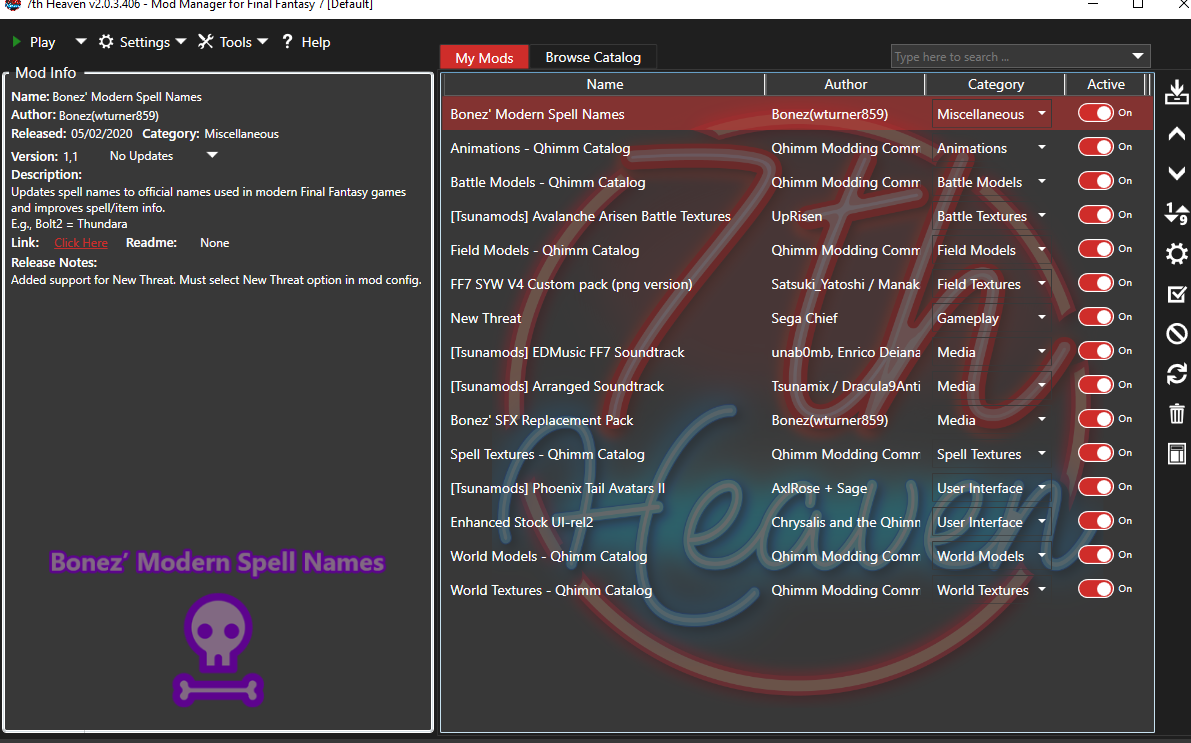
gXK2osw.png


this is what looks like th heaven after i imported the field texture only is it sttled as it should be? or in your opinion something conflict?
 
I just installed this and it works fine without the upscaled movies, but when I add those the music won't play, except during movies. I'm not sure why it would do that unless it's Steam reacting somehow to its files being replaced. I could just remove the movies but is there a way to keep them and have music?
 
it extract everything except the EXE file (i am using my admin account which is the only one i got in the computer)
So you have a software blocking it.
 
could you try my mod without the "magic" part ?
because magic is realy high quality, and if you use it in png version instead of dds (with ffnx) you can get game memory overflow > crash
Hey friend, just installed this along with Reunion last night.  Works great!  But I'm also having issues with the game crashing sporadically after battles.  Here is what I've experienced so far:

- First was after a random battle in the train graveyard
- Second was after fighting the specimen in Hojo's lab (when you first meet Red XIII)
- Third time was when you fight the double robot boss battle in the elevator at Shrina HQ

The first time the screen went to the post-battle screen, but there was audio distortion and it crashed. The second time it crashed immediately after the boss disintegrated. The third time the victory fanfare played, then a black screen with audio distortion and it crashed.

Could this potentially due to the magic files and, if so, how would I go about removing that piece?  Is it a reinstall of the mod deselecting that part or is there a quicker way?  If not, any other thoughts on what it could be?

Thanks in advance for any insight.


Nevermind. I see this issue is logged in the Reunion database. Should have checked that first.
 
Last edited:
could you try my mod without the "magic" part ?
because magic is realy high quality, and if you use it in png version instead of dds (with ffnx) you can get game memory overflow > crash
Seems to have helped. I will have to play more to know for sure.
 
I also get no sound when using the upscaled movies. I'm playing with Reunion, so not sure if that would cause any problems.

I assume the dds format will work when Reunion is updated to R06G since its transitioned to ffxn, right?

Awesome mod, looks so much better!
 
Did you delete the original movies and add the upscaled ones to the folder? That's what I did when the sound stopped working. Try reinstalling the original movies, then copy the upscaled ones and overwrite the old ones. I did it that way and the sound kept working. I don't know why overwriting instead of deleting makes a difference, but it seemed to for me at least.
 
I'm new at this stuff, how do i install this mod withouth using 7th heaven? I mean, what's the manual way to do it? Where should I place the files, does it use aali's tool or...?
 
Sorry to make a a dumb question but is there a link to the IRO file to download? Not the manually pack. Thanks in advance.

I have found how to use the tool, don't put attention to the above sentence, please.

I have a question, does anyone know if is better to make an IRO file with the DDS files (FFNX driver) OR is it better to make the IRO from PNG files?
 
Last edited:
I have a question, does anyone know if is better to make an IRO file with the DDS files (FFNX driver) OR is it better to make the IRO from PNG files?
If you're using FFNx, then DDS all the way, and never look back :)
 
If you're using FFNx, then DDS all the way, and never look back :)
Thank you LordUrQuan but I tried it and all the mods I have activated before stopped working, am I doing something wrong?? Or the FFNx doesn't work with certain mods???
 
am I doing something wrong?? Or the FFNx doesn't work with certain mods???
Probably the former, but FFNx absolutely HATES the 60fps mod, so if you're trying to use that combination, kill 60fps and see if things improve.  If not, come join us on the discord and we'll figure out what's going wrong.
 
new version 4.22:
-Removed menu mod because of too much bug with others mods
-Removed the "one iro for all part" option, was not usable with others mods
-Each mod now have is proper description, type and preview

Not improvment in mod quality, only cleaned the iro itself
 
Hi everyone, I am not sure this is the best place to post this, but since I'm using the SYW mod and I see people are being quite helpful here, I just thought it would be a good place... Just tell me if I'm wrong.

So basically I am trying to install FF7 with the SYW mod and the Reunion... That part I managed, but I'm not sure I did it the best way and I have a problem and questions :

- I noticed there is a big change in color between the FMVs and gameplay screens (I think the gameplay is when the colors are not good)... It's obvious after the intro that switches to the first background and when told you can run by pressing X and a direction, when the background changes to a FMV showing the reactor (see pictures below).


How could I prevent that?

- I have replaced the movies at C:\Games\FF7\data\movies by SatsukiMovies
but I have noticed there also are movies in :
C:\Games\FF7\The_Reunion\GLOBAL\Direct\movies (lastmap.avi and starfield.avi)
C:\Games\FF7\The_Reunion\BASE\New_Translation (ending2.avi and jenova_e.avi)
should I replace them by the corresponding SatsukiMovies (lastmap, ending2 and jenova_e)?

Now ideally, I would also use FFNx (so I can use dds files) and the Character Overhaul Seven (ChaOS) mod (if it brings something compared to the character overhaul from the Reunion). The thing is I am not sure they are compatible with what I've already done... If they are compatible, how would I proceed to install them on top of the Reunion and the SYW mods?

For reference, I've written below (in the spoiler) everything I did (if I did something wrong, please tell me what I should have done)...

Thanks


Did a fresh install from Steam
Named a USB drive FF7DISC1 that I keep plugged in the computer
Ran FF7_GameConverter_0.11.exe
The converter showed "" as the path found (I supposed it meant it didn't find any path)
Entered "C:\Program Files (x86)\Steam\steamapps\common\FINAL FANTASY VII"
The converter said
WARNING: DESTINATION is in a system folder...
This can cause some errors with mod installations...
Should I use a non-system folder?
[Y,N]?
Said Y
The converter did its stuff... Then it showed this and open the Final Fantasy VII configuration window:
Please check over the settings for FF7Config...
1) Sound tab should have a Sound device set.
2) Perform the Sound and MIDI tests.
3) Graphics-Tab can be ignore.
Did just that, everything was fine.
The converter did more stuff and asked:
Install the Laptop Keypad patch?
(Only necessary if keyboard does NOT have a NUMPAD)
[Y,N]?
Said N
And the converter ended with
Installation complete.
Press any key to continue...

Renamed ff7_en.exe to ff7_en_Steam.exe
Executed The_Reunion_R06.exe
Clicked Next
Accepted agreement, clicked Next
Folder (C:\Games\FF7) was already selected, clicked Next
Selected:
   -American English
   -Incorrect character names
   -Incorrect place names
   -Series canon
Clicked Next
Clicked Install
(Installation took a while)

Used SYWinstaller.422 (ran SYWv4installer.exe)
Selected:
   -Fields background upscaled textures (SYW v4.10 "ArkTsukiVock")
   -Battle background upscaled textures (SYW v3.17)
   -Magic and combat Fx HD textures (Kela51 v1.05)
   -Worldmap upscaled textures (SYW v4.10 + Avalanche minimaps)
   -Minigames upscaled textures (SYW v2 + Grimmy english translation)

Chose output folder (C:\Games\FF7)
Left Iro compression to: Nothing
Clicked Install with The Reunion (R06 and above)
(Installation took a long while)
Closed the installer once finished

Replaced movies at C:\Games\FF7\data\movies by SatsukiMovies

Made a backup of the Options.ini in C:\Games\FF7\The_Reunion
Made the following changes:
[OPENGL]
full_screen = y

vsync = y
[MAIN]
Model_Overhaul = y
_60fps_Battles = 2
[TWEAKS]
Game_Time_Is_Realtime = y
[FIXES]
Battle_Arena_HPMP = y
Battle_Key_Press = y
At first the game was wider than the screen (and cropped) and I realized that changing the "Scale and layout" in the display settings from Windows 10 to 100% solved it.
 
you already have everything working that i can see, including kaldarasha's models (they are included in the reunion)

the change between fmv and the game is caused by just that: a change between a movie and the field file you walk around in, when you ride the ropeway to the gold saucer you will see another transition like this (and in several others places as well, cant remember them all), the movie is always going to look quite a bit better because the field file has several graphical limitations that dont exist in movies

a seamless change would be near impossible, and there is nothing that can be done about that
 
Thank you for your reply...
I didn't remember that much of a change between the FMVs and the game but I guess last time I have played it was a long time ago so I probably just forgot...
I guess that settles it then, now I just have to enjoy the game.  ;D

And Satsuki, those upscaled backgrounds look really awesome, thank you for the time an effort spent on that mod!
 
Hi satsuki ,

First off, nice work on this mod. It's great.
I was wondering if you could let me know on how to "de-scramble" the upscaled images so that they can be viewed normally in all their glory without using FF7.exe

Cheers.
 
Status
Not open for further replies.
Back
Top