P
Panteleimon
Guest
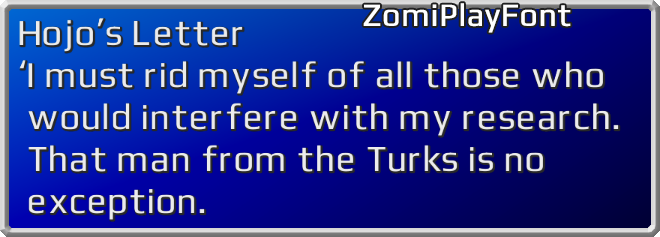
ZomiPlayFont UI 0.98 (The Reunion compatible)
Download here:
• Version with PlayStation buttons support: https://drive.google.com/file/d/189oY9TcgUqJmoeGnQcAt_7UlEafovZSx/view?usp=sharing
• Version with XBOX buttons support: https://drive.google.com/file/d/18kWOYupot3O-b4Nm8oqgMff6rYcQgK_f/view?usp=sharing
• .IRO file: https://drive.google.com/file/d/1ZlFj_F6-GCEFxA-PcQlRVdQceSab1yiT/view?usp=sharing
Install it above other UI mods.
How to install:
Issues:
• This font isn't friendly with 7th Heaven. It will work, but if you use other UI mods that change symbols position (Enhanced UI for example), then it can get messy, letters can stand on each other.
• There is something strange with vertical borders - sometimes it's ok, but sometimes their vertical bright line is shifted to the right. Standart borders are ok. But modified borders should suit perfectly.
I'm sure it's that bad scaling FF7 thing. In one pattern it scales so there are more dark lines, and another patern - more bright lines - so those patterns won't match. In high resolutions there is no such thing. The only fix I can think of is to make very blury border.
Or maybe I miss something, and it is not scaling thing.
• The similar issue to above one. The disabled cursor (when you summon an esper) is shifting all the time, because its disabled and enabled state do not match, but they are, I calculated it to the every pixel. Standart cursor is ok. (I don't want to shift the cursor, because I don't understand the reason of this issue, It IS on its position.) Must be scaling problem again.
Description:
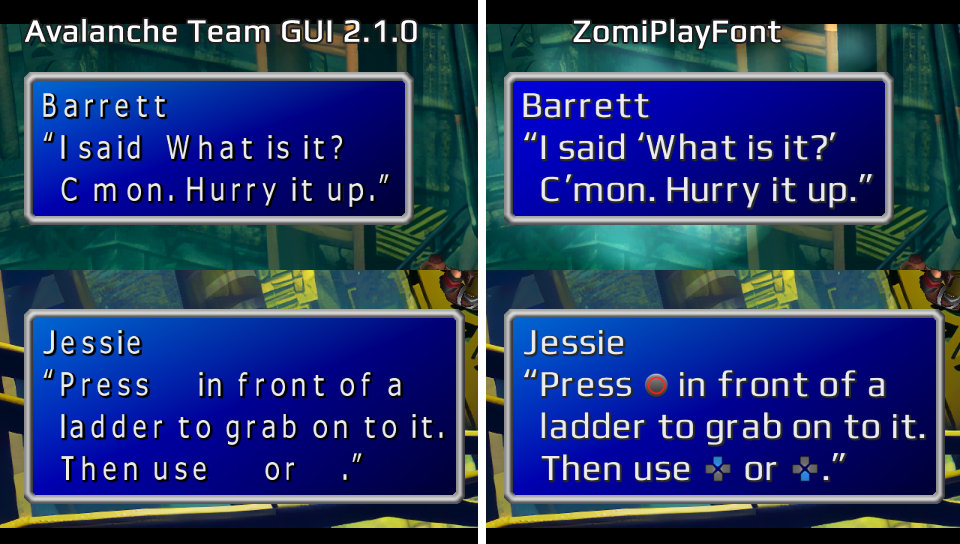
The main reason to create this project was a lack of existing fonts (or I didn't find any suitable) for The Reunion mod with "New_Translation" option is ON. I played FF7 with the great Avalanche Team GUI 2.1.0 , but for some reason it doesn't contain a lot of symbols (controller buttons, some apostrophes/qoutes and so on) and it is hard to read for me - too large spaces between letters:
ZomiPlayFont vs GUI 2.1.0 comparison (click SHOW)
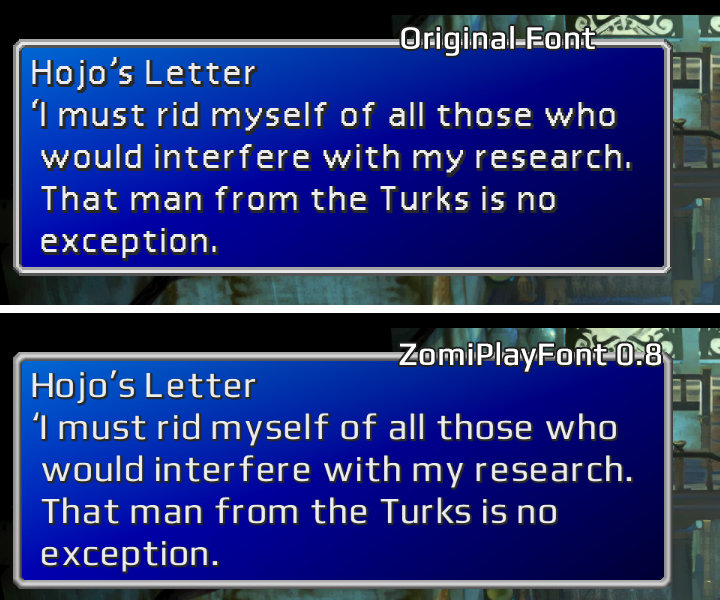
ZomiPlayFont vs Original font:
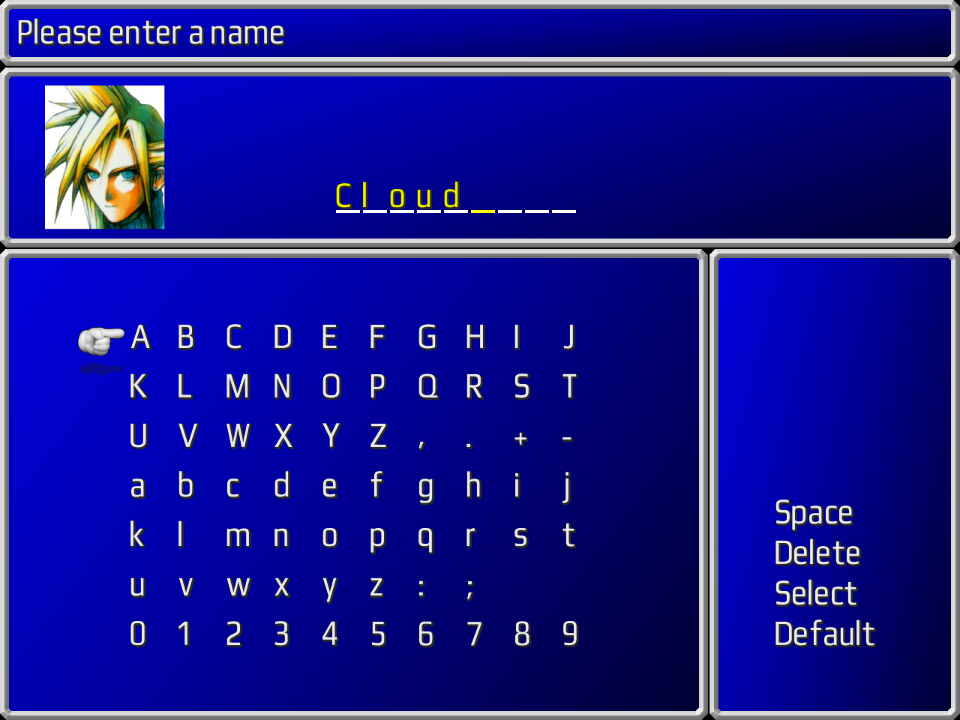
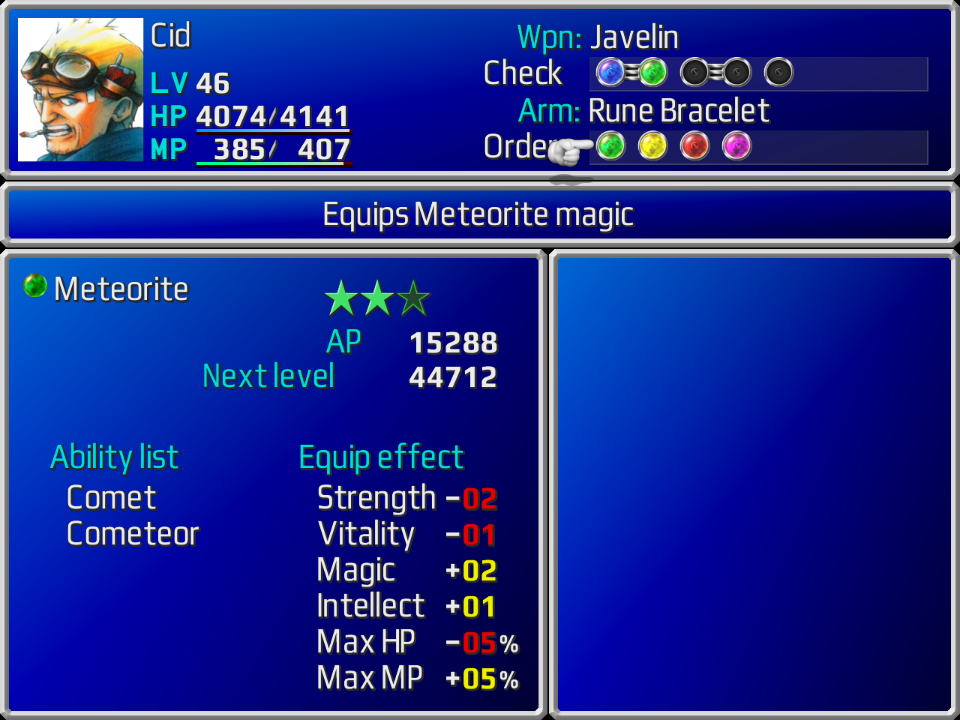
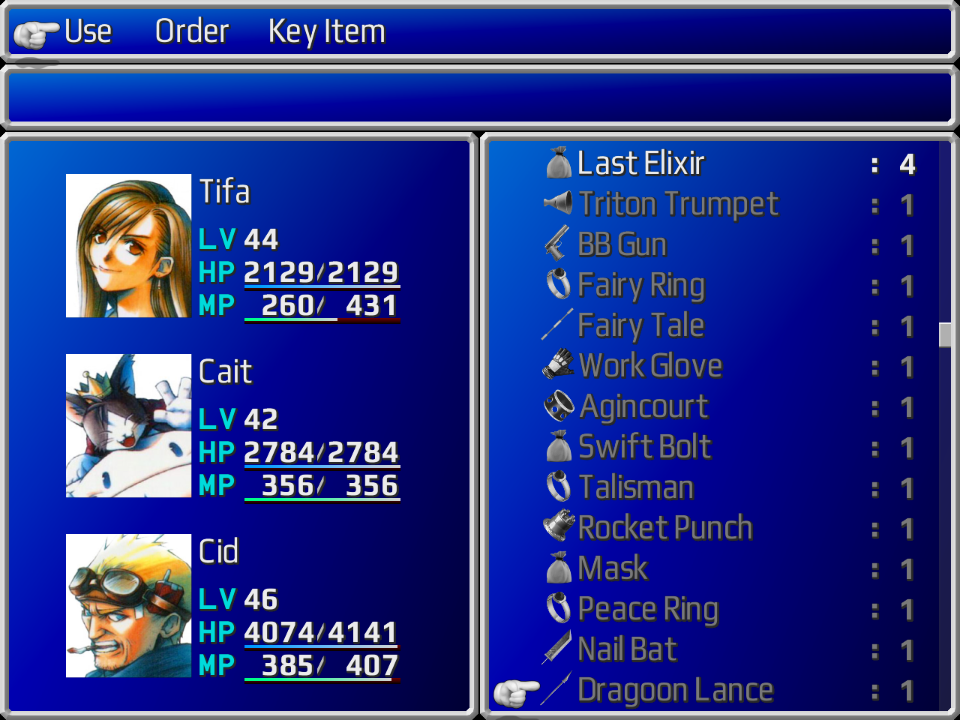
More screenshots:
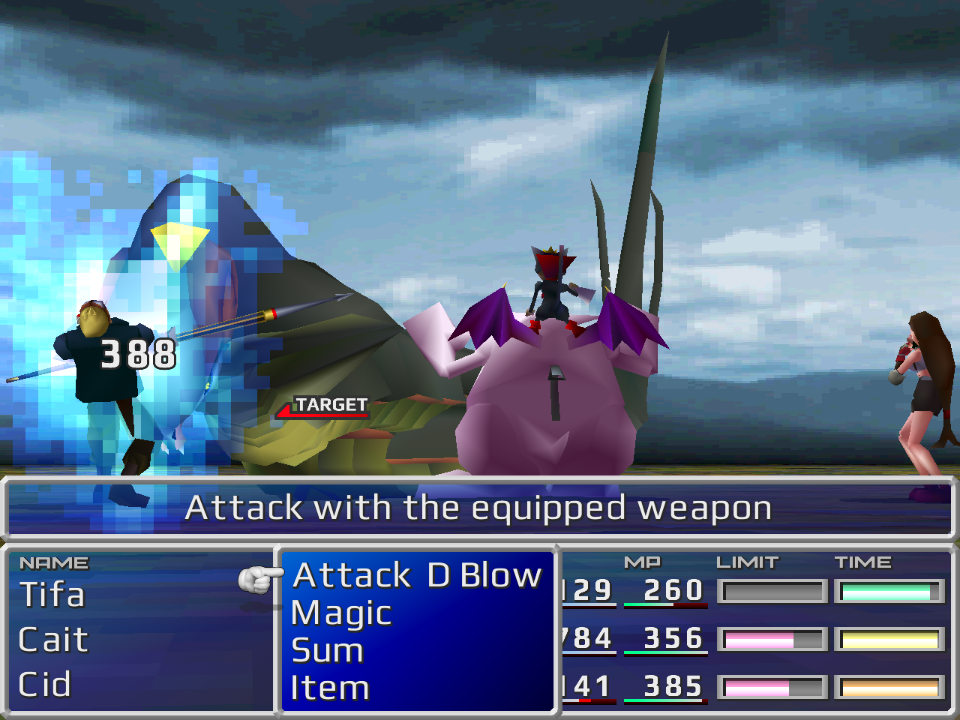
Changelog:
Thanks to:
• Avalanche Team for their GUI. This mod temporally uses its reels and in-game timer.
• Fewtch for helping with transparency issue.
• Users who report bugs thus making this mod better.
The Reunion mod: https://www.ff7catalog.com/threads/10159/
Avalanche Team GUI: https://www.ff7catalog.com/threads/12812/
Download here:
• Version with PlayStation buttons support: https://drive.google.com/file/d/189oY9TcgUqJmoeGnQcAt_7UlEafovZSx/view?usp=sharing
• Version with XBOX buttons support: https://drive.google.com/file/d/18kWOYupot3O-b4Nm8oqgMff6rYcQgK_f/view?usp=sharing
• .IRO file: https://drive.google.com/file/d/1ZlFj_F6-GCEFxA-PcQlRVdQceSab1yiT/view?usp=sharing
The below files were requested for Italian porting project https://www.ff7catalog.com/threads/13704/
It contains only the font files with five symbols replaced. Those files are generally for modding. For playing download files above.
PSX buttons: https://drive.google.com/file/d/1TKnpgs1KDW14qUCGrwE8r3Na818Ot9dc/view?usp=sharing
XBOX buttons: https://drive.google.com/file/d/1q2_rXFZ6FjZ7NPvvxwQaZ0EWDt1O9vCa/view?usp=sharing
It contains only the font files with five symbols replaced. Those files are generally for modding. For playing download files above.
PSX buttons: https://drive.google.com/file/d/1TKnpgs1KDW14qUCGrwE8r3Na818Ot9dc/view?usp=sharing
XBOX buttons: https://drive.google.com/file/d/1q2_rXFZ6FjZ7NPvvxwQaZ0EWDt1O9vCa/view?usp=sharing
Install it above other UI mods.
How to install:
The Reunion users.
• Download either PSX buttons support .zip or XBOX buttons .zip archive.
• Unpack that archive to the "...\The_Reunion\GLOBAL\Texture" directory of your Final Fantasy VII (so "menu" folder from .zip should replace "menu" folder in ...\Texture directory, and "flevel" should replace "flevel"). It is the easiest way. You can also use ...\The_Reunion\CUSTOM directory. Read The Reunion manual for that.
The 7th Heaven users.
• Download .IRO file.
• Launch the 7th Heaven.
• On the most right part of the program click the first icon - "Import mod", then click the picture of a folder, then choose downloaded .iro file of ZomiPlayFont. Click OK.
Aali.dll or FFNx.dll (without Reunion and 7th Heaven).
• Open ff7_opengl.cfg (if using Aali.dll) or FFNx.cfg (if using FFNx.dll) in any text editor.
• Find string "mod_path =". Make sure there is NO "#" right before that string on the same line (delete # if it is there). Type desired mod path. For example it should look like this: mod_path = mods\Textures It means that the game will look for textures in your Final Fantasy VII ...\mods\Textures folder.
• Save .cfg file.
• Unpack ZomiPlayFont .zip archive to that folder signed in "mod_path =". In my example it would be ...\mods\Textures.
• Download either PSX buttons support .zip or XBOX buttons .zip archive.
• Unpack that archive to the "...\The_Reunion\GLOBAL\Texture" directory of your Final Fantasy VII (so "menu" folder from .zip should replace "menu" folder in ...\Texture directory, and "flevel" should replace "flevel"). It is the easiest way. You can also use ...\The_Reunion\CUSTOM directory. Read The Reunion manual for that.
The 7th Heaven users.
• Download .IRO file.
• Launch the 7th Heaven.
• On the most right part of the program click the first icon - "Import mod", then click the picture of a folder, then choose downloaded .iro file of ZomiPlayFont. Click OK.
Aali.dll or FFNx.dll (without Reunion and 7th Heaven).
• Open ff7_opengl.cfg (if using Aali.dll) or FFNx.cfg (if using FFNx.dll) in any text editor.
• Find string "mod_path =". Make sure there is NO "#" right before that string on the same line (delete # if it is there). Type desired mod path. For example it should look like this: mod_path = mods\Textures It means that the game will look for textures in your Final Fantasy VII ...\mods\Textures folder.
• Save .cfg file.
• Unpack ZomiPlayFont .zip archive to that folder signed in "mod_path =". In my example it would be ...\mods\Textures.
Issues:
• This font isn't friendly with 7th Heaven. It will work, but if you use other UI mods that change symbols position (Enhanced UI for example), then it can get messy, letters can stand on each other.
I'm sure it's that bad scaling FF7 thing. In one pattern it scales so there are more dark lines, and another patern - more bright lines - so those patterns won't match. In high resolutions there is no such thing. The only fix I can think of is to make very blury border.
Or maybe I miss something, and it is not scaling thing.
• The similar issue to above one. The disabled cursor (when you summon an esper) is shifting all the time, because its disabled and enabled state do not match, but they are, I calculated it to the every pixel. Standart cursor is ok. (I don't want to shift the cursor, because I don't understand the reason of this issue, It IS on its position.) Must be scaling problem again.
Description:
The main reason to create this project was a lack of existing fonts (or I didn't find any suitable) for The Reunion mod with "New_Translation" option is ON. I played FF7 with the great Avalanche Team GUI 2.1.0 , but for some reason it doesn't contain a lot of symbols (controller buttons, some apostrophes/qoutes and so on) and it is hard to read for me - too large spaces between letters:
ZomiPlayFont vs GUI 2.1.0 comparison (click SHOW)
ZomiPlayFont vs Original font:
More screenshots:
Changelog:
0.98
• Fixed an issue with some symbols had a part of another symbol
• Made borders brighter
0.97
• Changed borders
• New item ring icon
• Some minor changes
0.96
• Fixed some pointers transparency
• All PNGs were optimized. So there should be no that transparency issue anymore
• Done borders
• Done materia slots
• The project was renamed to "ZomiPlayFont UI"
0.95
• Fixed and done sleep and silence effects
0.94
• Added items and equipment icons
0.93
• Done battle screen "target", "Death", "Recovery" words
0.92b
• Fixed slash symbol in the game menu
• Added some files to be sure Cait Sith's limit works
0.92a
• Fixed scrolling text won't disappear
0.92
• Fixed Tifa's and Cait's limits reels not shown
• Fixed in-game timer not shown
0.91
• Done battle screen numerals
• Done Exp, limit, etc bars
• Done menu MP, HP, LV
• Minor changes
0.9
• Done menu numerals
• Done High quality materia and stars images
• Done HQ cursor
• Done battle menu headers (NAME, LIMIT, TIME, etc)
• Edited some colors
0.8
The first public release.
• Done all letters, except those in HP, MP, etc. and some words on battle screen ("target", "yeah", etc.)
• Added PSX and XBOX buttons
• Fixed an issue with some symbols had a part of another symbol
• Made borders brighter
0.97
• Changed borders
• New item ring icon
• Some minor changes
0.96
• Fixed some pointers transparency
• All PNGs were optimized. So there should be no that transparency issue anymore
• Done borders
• Done materia slots
• The project was renamed to "ZomiPlayFont UI"
0.95
• Fixed and done sleep and silence effects
0.94
• Added items and equipment icons
0.93
• Done battle screen "target", "Death", "Recovery" words
0.92b
• Fixed slash symbol in the game menu
• Added some files to be sure Cait Sith's limit works
0.92a
• Fixed scrolling text won't disappear
0.92
• Fixed Tifa's and Cait's limits reels not shown
• Fixed in-game timer not shown
0.91
• Done battle screen numerals
• Done Exp, limit, etc bars
• Done menu MP, HP, LV
• Minor changes
0.9
• Done menu numerals
• Done High quality materia and stars images
• Done HQ cursor
• Done battle menu headers (NAME, LIMIT, TIME, etc)
• Edited some colors
0.8
The first public release.
• Done all letters, except those in HP, MP, etc. and some words on battle screen ("target", "yeah", etc.)
• Added PSX and XBOX buttons
Thanks to:
• Avalanche Team for their GUI. This mod temporally uses its reels and in-game timer.
• Fewtch for helping with transparency issue.
• Users who report bugs thus making this mod better.
The Reunion mod: https://www.ff7catalog.com/threads/10159/
Avalanche Team GUI: https://www.ff7catalog.com/threads/12812/
Last edited:

 Link is in main post.