[FF7PC] ZomiPlayFont UI

  • Thread starter Thread starter Panteleimon
  • Start date Start date
Status
Not open for further replies.
Last edited:
I tried to do it so. Thanks.
It is because my mod does not include Borders :(

Version 0.92a is released
• Fixed scrolling text won't disappear


Orichalcon, if you play Cait Sith, can you, please, tell me, is his limit with reels ok or invisible?
yes, will test this and report back, had a nephew stay over last night with my 2 boys (4, 5, and 6 year olds), as soon as i clean up the mako reactor explosion that is my house i will hop on ff7 :)

EDIT:  tifa and cait sith's limits both work great, timers are back, and text scrolling issue is solved as well, everything i reported is solved... thanks!

my only (very small) gripe now is that i hate the border, i used to have thin bars extracted from the enhanced ui mod imported to reunion, i added them to your mod but they are not thick enough to block the text scrolling issue

i am gonna work on the border and see if i can't make it a bit sleeker and will donate it if i have success

i envision something like the border on my avatar, would go perfect with the game, but idk if there is enough room for that but i'm gonna try

if someone wants to steal my idea (its a good one, isnt it?) and beat me to it i'd be fine with that :)
 
Last edited:
EDIT:  tifa and cait sith's limits both work great, timers are back, and text scrolling issue is solved as well, everything i reported is solved... thanks!

my only (very small) gripe now is that i hate the border, i used to have thin bars extracted from the enhanced ui mod imported to reunion, i added them to your mod but they are not thick enough to block the text scrolling issue

i am gonna work on the border and see if i can't make it a bit sleeker and will donate it if i have success

i envision something like the border on my avatar, would go perfect with the game, but idk if there is enough room for that but i'm gonna try

if someone wants to steal my idea (its a good one, isnt it?) and beat me to it i'd be fine with that :)
Thank you. I don't play Cait Sith, and his limit break is Dice only :)
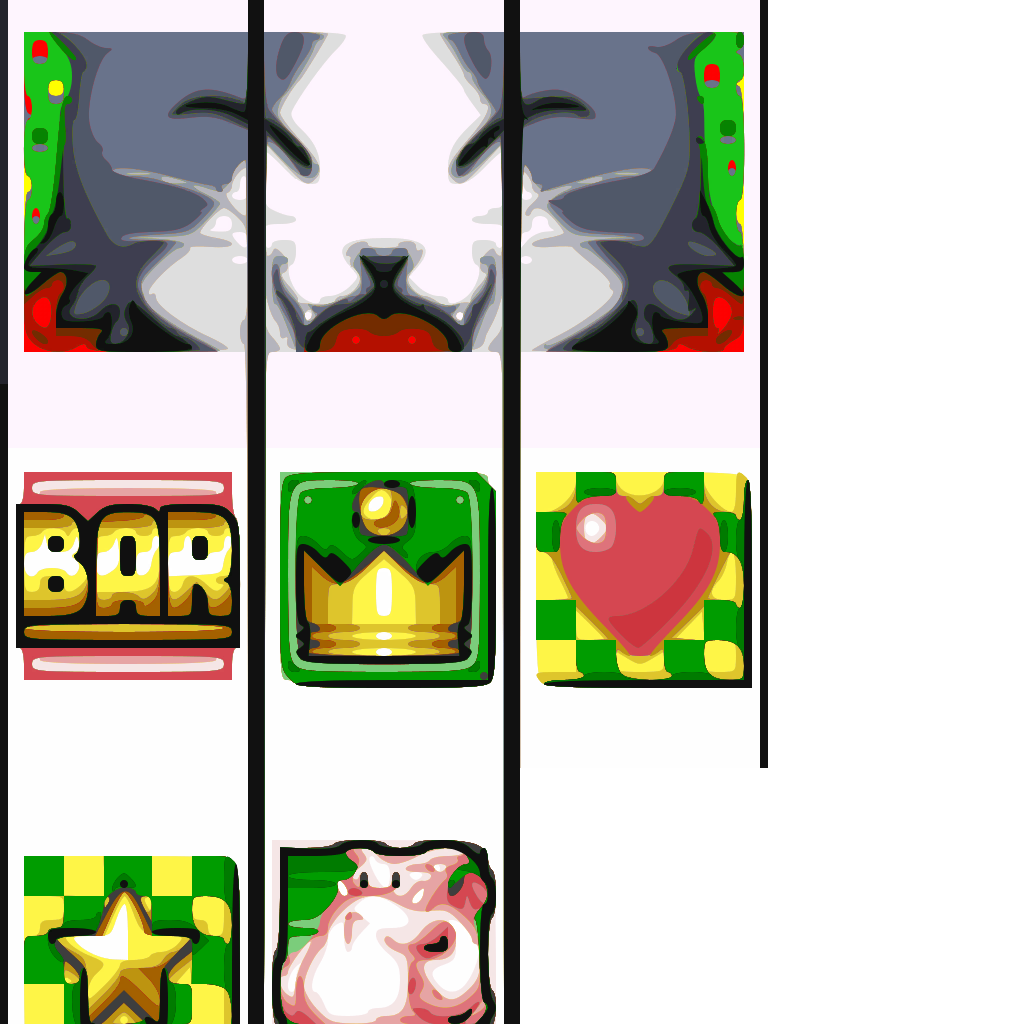
Is his Slot limit break looks like on the screen below?

MzyJZGE.png

I'm asking, cause I forgot to add it (ketcy2a_00.PNG and ketcy2b_00.PNG) to release. So it works even without it? Anyway, I'll add those files to be safe)

And about thin borders - I think it needs to be HEX edited...
And you can try this https://www.ff7catalog.com/posts/235651/ Not sure if it works fine.


Version 0.92b is released
• Fixed slash symbol in the game menu
• Added some files to be sure Cait Sith's Slot limit is visible
 
i think the slots looked a tad different than that, but it was indeed working

and nope, hext to fix text under the border doesnt work with reunion apparently, text scrolling issue still exists, gotta have the thick border

however the main hext file makes it so the border in btl_win_c_l_00.png applies to the whole game where it didnt before, pretty neat
 
Last edited:
also the blue icons for the weapons/armor/accessories on this same file as the border are the icons that show up in shops/inventory, and they are bluish and pixelated instead of normal
I believe they are never intended to be shown.
 
Version 0.93 is released.

• Added battle screen "target", "Death", "Recovery" words
 
There's a bit of rough edges in the numbers. Is it yet to be fixed or intended?

Edit: Ok, nevermind, i think it's the transparency i messed up on my own so there's nothing that needs to be fixed, everything is perfect and i figured it out. By the way, as i said before, amazing work, and it just keep getting better with each update!
 
Last edited:
Ok, nevermind, i think it's the transparency i messed up on my own so there's nothing that needs to be fixed
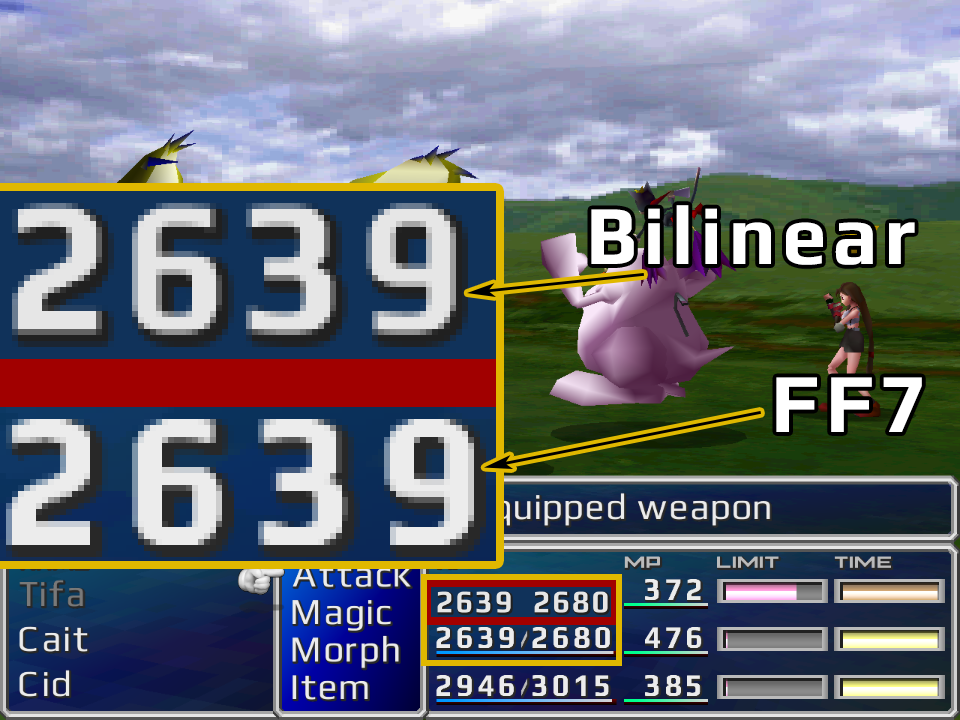
I also thought that in battle menu numerals are  a little bit messy, pixelated (Number 8, number 3)... I think it's because of FF7 scaling method maybe.
See screenshot. Upper numerals are the same font, the same font-sheet, but scaled manually with cheap Bilinear, the bottom one is FF7 scaling. You can see, even bilinear make it more smooth, no sharp pixels. Only way to avoid it, I think, is to make default numerals blurry... or to find another font for numerals

H0stoOV.png


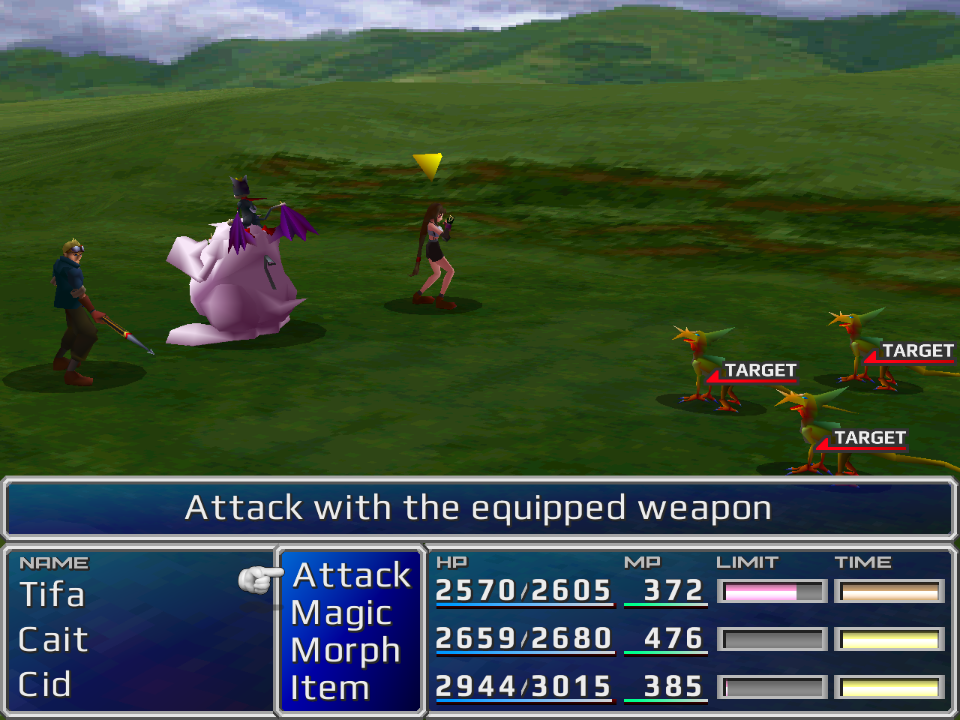
screenshot with blurry numerals

KJoHS5p.png


Thank you for kind words


Edit: Yes. Something with Final Fantasy 7 scaling method. The smaller the resolution, the worse the scaling, the worse a quality.
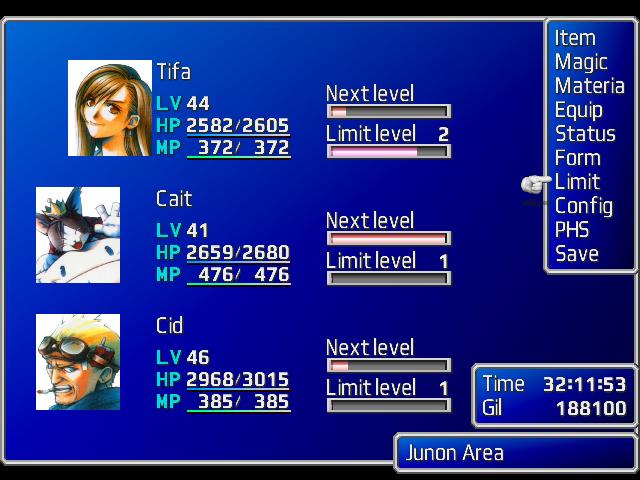
Final Fantasy with ZomiPlayFont in 640x480:
GgK3CUa.png
 
Last edited:
Stupid question:  how do i install this with Reunion?  I've found two possible install directories, and I'm not sure which to use.
 
Stupid question:  how do i install this with Reunion?  I've found two possible install directories, and I'm not sure which to use.
Download either PSX buttons support .zip or XBOX buttons .zip archive. Then unpack that archive to the "...\The_Reunion\GLOBAL\Texture" directory (so "menu" folder from .zip should replace "menu" folder in ...\Texture directory, and "flevel" should replace "flevel"). It is the easiest way.
 
Download either PSX buttons support .zip or XBOX buttons .zip archive. Then unpack that archive to the "...\The_Reunion\GLOBAL\Texture" directory (so "menu" folder from .zip should replace "menu" folder in ...\Texture directory, and "flevel" should replace "flevel"). It is the easiest way.
Thanks!
 
instead of dicking around with changing the color palettes of the original images, i've photoshopped new icons into the game  (all sticking with gray scale for the most part)

however, i've put in the icons on top of Panteleimon's mod, so i cant post the files for others to use atm, i had to modify the mod a bit and shrink the item bag and cloud's sword icon to match the size of the ones i did (these icons are separate for some reason, in a different file)

https://drive.google.com/file/d/1L9dRQdpnT_qIYdiNAB--GulQ8nA_U1ZP/view?usp=sharing

https://drive.google.com/file/d/1k1GND63176wOzhlsn0HmObP0zVmdkfU8/view?usp=sharing

https://drive.google.com/file/d/1pfTzw_Jlfierkd-IKt_rvZiQMm9Dgs0J/view?usp=sharing
 
Last edited:
Hello Panteleimon, great addition so far, thanks.

I have a request, kindly is it possible to add following:

-Indicators of order: º , ª (underlined: see image; their position in usfont should be: here)
-Gender symbol: ♂ , ♀ (their position in usfont should be: here)
-Degree symbol: ° (the position in usfont should be above L2 button: here)

It would be really useful for translations.
 
Last edited:
instead of dicking around with changing the color palettes of the original images, i've photoshopped new icons into the game  (all sticking with gray scale for the most part)

however, i've put in the icons on top of Panteleimon's mod, so i cant post the files for others to use atm, i had to modify the mod a bit and shrink the item bag and cloud's sword icon to match the size of the ones i did (these icons are separate for some reason, in a different file)

https://drive.google.com/file/d/1L9dRQdpnT_qIYdiNAB--GulQ8nA_U1ZP/view?usp=sharing

https://drive.google.com/file/d/1k1GND63176wOzhlsn0HmObP0zVmdkfU8/view?usp=sharing

https://drive.google.com/file/d/1pfTzw_Jlfierkd-IKt_rvZiQMm9Dgs0J/view?usp=sharing
Nice!  I hope you get around to getting these and your Sleeker Borders mod into a cohesive UI touchup one day. =D
 
Nice!  I hope you get around to getting these and your Sleeker Borders mod into a cohesive UI touchup one day. =D
i made the border a few days ago (and am still working on it) and the icons i just did today (just now fixed a few spacing issues and touched up the feather...should be done now)

patience, my friend!  :-D

EDIT: since they didnt really fit the theme i had going, i went ahead and replaced the item sack and cloud's sword icons as well

https://drive.google.com/file/d/15FQyerJF_ds6JQ2pz7TaUrrV_jOqomID/view?usp=sharing
 
Last edited:
i made the border a few days ago (and am still working on it) and the icons i just did today (just now fixed a few spacing issues and touched up the feather...should be done now)

patience, my friend!  :-D
Oh, I know!  I'm not expecting it anytime soon.  But I've got 2 FF7 installs at the moment, one with Reunion, and one with 7th Heaven + New Threat.  The only thing left I feel like my Reunion install needs to be perfect is something akin to ESUI 2.0.
 
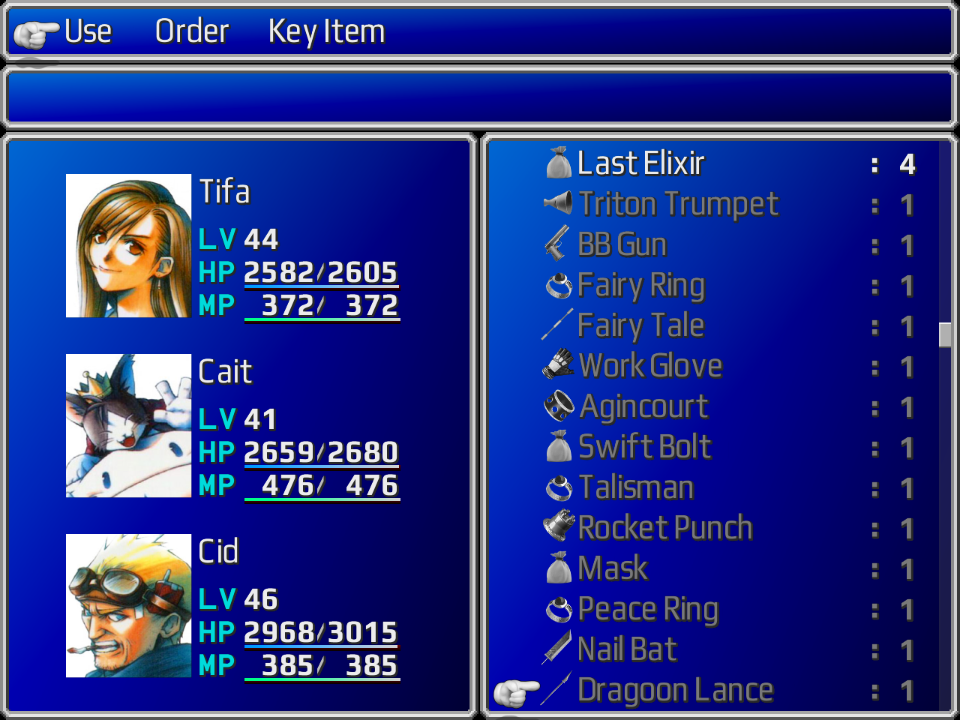
Version 0.94 is released.

• Added items and equipment icons


2NBH0rH.png
 
Last edited:
Hello Panteleimon, great addition so far, thanks.

I have a request, kindly is it possible to add following:

-Indicators of order: º , ª (underlined: see image; their position in usfont should be: here)
-Gender symbol: ♂ , ♀ (their position in usfont should be: here)
-Degree symbol: ° (the position in usfont should be above L2 button: here)

It would be really useful for translations.
Hello. Thank you.
I'm don't know much about translation of FF7. Where can I read about it? I can't understand how those symbols can help for translations.
Plus... It's not very pleasant to delete original game symbols. If those symbols required empty positions - it would be no problem.


Version 0.95 is realesed

• Fixed and done sleep and silence effects
 
Last edited:
Hello. Thank you.
I'm don't know much about translation of FF7. Where can I read about it? I can't understand how those symbols can help for translations.
Plus... It's not very pleasant to delete original game symbols. If those symbols required empty positions - it would be no problem.


Version 0.95 is realesed

• Fixed and done sleep and silence effects
For example the Italian porting use those characters in several occasion such as 1st class Soldier which will become 1ª classe SOLDIER (just an example).

What could be great is to have those missing characters in 2 new 'empty' png (for font h and l) and with your permission and of course credit we could use for the same project moving the characters needed in the right position.

Let me know if that sounds good for you. Cheers

PS: great great updates
 
Last edited:
For example the Italian porting use those characters in several occasion such as 1st class Soldier which will become 1ª classe SOLDIER (just an example).

What could be great is to have those missing characters in 2 new 'empty' png (for font h and l) and with your permission and of course credit we could use for the same project moving the characters needed in the right position.

Let me know if that sounds good for you. Cheers

PS: great great updates
But what if some languages uses those symbols you want to remove? (I'm not sure, but is there a posiblity?)
Maybe I would do a different .zip package with modified font-sheets? Will it be ok?
And give me, please, a degree symbol position - in your screens it has screen with gender symbols
 
Last edited:
Status
Not open for further replies.
Back
Top