[FF7PC] ZomiPlayFont UI

  • Thread starter Thread starter Panteleimon
  • Start date Start date
Status
Not open for further replies.
But what if some languages uses those symbols you want to remove? (I'm not sure, but is there a posiblity?)
Maybe I would do a different .zip package with modified font-sheets? Will it be ok?
As the author of the italian porting translation a different zip file for the fonts would be perfect, thanks. So the compatibility with other language will not be broken

And give me a degree symbol position - in your screens it has screen with gender symbols
it' above L2 in usfont_a
here a picture:
 
Last edited:
As the author of the italian porting translation a different zip file for the fonts would be perfect, thanks. So the compatibility with other language will not be broken
PSX buttons https://drive.google.com/file/d/1jhNzGfyfq8tjr8vn7OBYcJlPNT5R-sGS/view?usp=sharing
XBOX buttons https://drive.google.com/file/d/1x9-lqdIhFEzeeZRmFh9q2URjqJip6BBh/view?usp=sharing

Hope I didn't forget anything.
Please, let me know if something is wrong, cause I don't have a possibility to check non-English symbols in the game. (maybe some of them are too wide or too condensed)
 
PSX buttons https://drive.google.com/file/d/1jhNzGfyfq8tjr8vn7OBYcJlPNT5R-sGS/view?usp=sharing
XBOX buttons https://drive.google.com/file/d/1x9-lqdIhFEzeeZRmFh9q2URjqJip6BBh/view?usp=sharing

Hope I didn't forget anything.
Please, let me know if something is wrong, cause I don't have a possibility to check non-English symbols in the game. (maybe some of them are too wide or too condensed)
thanks, in these days i'll do further tests. As a first test they're perfect. Can I create a mirror link or post a link in my thread to your message? (for now i'll use this second option)
 
Last edited:
thanks, in these days i'll do further tests. As a first test they're perfect. Can I create a mirror link or post a link in my thread to your message? (for now i'll use this second option)
Do what suits you more :)
 
your own .TIF method needs to be applied to every image in flevel   :-P
 
Last edited:
i'm playing without maintaining aspect ratio, so i wonder if that has something to do with it, but with the icons in the latest version i get white splotches on the left side of both triangles (and a bit on the hand) until i fixed it with your method, i'll post a video sometime today

EDIT:  nope, widescreen has nothing to do with it, i have transparency issue with version 0.95 flevel icons no matter what

https://drive.google.com/file/d/1XSP_unHZrQOwgvAwyQR615WaFimSrNDx/view?usp=sharing

see how there is a white line in the animation on the left of the red triangle? there is also some white at the bottom and top too that shouldnt be there

also the hand has white at the top and right past the black border that shouldnt be there

after i did your .tif fix to flevel images, all these issues dissappeared

is it possible you arent looking closely enough or are you really not having this issue? you have me wondering about my computer now
 
Last edited:
@Orichalcon you are right, there is the issue. I play in a lower resolution so I didn't notice it.
Strange, I thought I used .tif method there...
Thank you. Will fix it in next update. Trying to draw my own materia slots.

UPD: Strange. .tif method doesn't fix it...

UPD2: GIMP method worked  :-o
 
Last edited:
Version 0.96 is released

• Fixed some pointers transparency
• All PNGs were optimized. So there should be no that transparency issue anymore
• Done borders*
• Done materia slots
• The project was renamed to "ZomiPlayFont UI"

*There is an issue with borders in low resolutions.
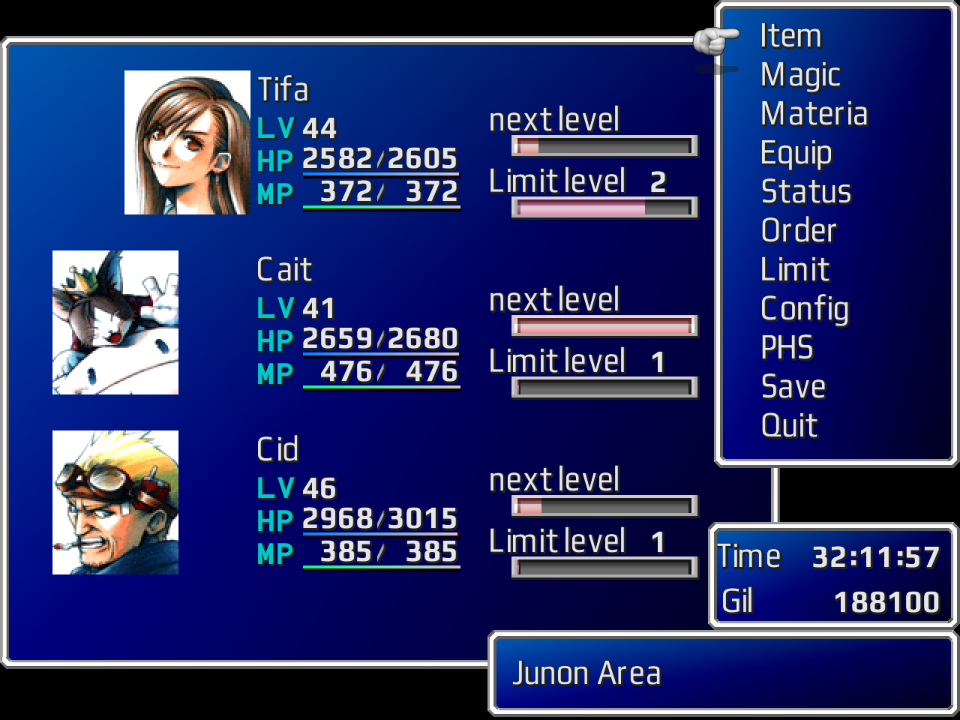
"There is something strange with vertical borders - sometimes it's ok, but sometimes their vertical bright line is shifted to the right. Standart borders are ok. But modified borders should suit perfectly.
I'm sure it's that bad scaling FF7 thing. In one pattern it scales so there are more dark lines, and another patern - more bright lines - so those patterns won't match. In high resolutions there is no such thing. The only fix I can think of is to back very blury border.
Or maybe I miss something, and it is not scaling thing."

The main big border is glitchy, vertical border is shifted. The rest borders are ok.
rzc4wtY.png

(And a little scaling issue in high resolution too. Sometimes some skew lines in the corners scaled with noise)
 
Last edited:
Appreciate your hard work with the font.. They're very similar to OG IMO. Pointer and materia slots look cleaner.

Just a question with 0.96, if it will be enough to replace other UI mods out there like ESUI or Satsuki's (in his pack builder)?
 
Appreciate your hard work with the font.. They're very similar to OG IMO. Pointer and materia slots look cleaner.

Just a question with 0.96, if it will be enough to replace other UI mods out there like ESUI or Satsuki's (in his pack builder)?
Yes. You can install any mods you want, then install ZomiPlayFont above with replacing files.
 
Version 0.97 is released

• Changed borders
• New item ring icon
• Some minor changes
 
the capital Z in the usfont_b_h series makes an artifact from the open bracket being a tad too close

not sure if this happens in the b_l series or not, i just noticed it from the chocobo naming screen when you breed a new chocobo
 
the capital Z in the usfont_b_h series makes an artifact from the open bracket being a tad too close

not sure if this happens in the b_l series or not, i just noticed it from the chocobo naming screen when you breed a new chocobo
Thank you. There are a lot of that stuff with other symbols too :( Will fix it soon.
 
Version 0.98 is realeased

• Fixed an issue with some symbols had a part of another symbol
• Made borders brighter
 
Hi Panteleimon

Before everything else, amazing job with this font. I'm the author of the italian localization that usb ported to Reunion and i'm trying to make my original release compatible with mods as well. Would you mind if i bundle with my mod a customized version of your font? Obviously with full credit for your work.

EDIT: Just found out that you haven't logged in since June, hope you're well. I released the Iro containing an customized version of your font for the time being, which i repacked for you here: https://drive.google.com/file/d/1hfT6_conKM3Ln4kgFq78UZ6l8wO7qzkX.

I mainly fixed some alignment and spacing issues i spotted, some of which might have been caused by my customized window.bin, which is also included in the pack in case you want to test. Let me know when you read this.
 
Last edited:
Great mod, looks wonderful.

One issue I had was the button images, as I use X to accept and O to cancel, so I had to manually swap the buttons on the images.
If anyone wants to save themselves some time; I uploaded the updated files here, just drop them in the menu folder and overwrite when prompted.
 
Status
Not open for further replies.
Back
Top