[FF8 STEAM]FF8_Buttons patch : show PSX buttons

  • Thread starter Thread starter Shunsq
  • Start date Start date
Status
Not open for further replies.
German and Spanish versions released. See first post.
Mcindus, i don't know where is used the spacing information in the code. From B00 buttons i only copy the location, not the spacing. I think the spacing is done in the text. It doesn't adapt to the icon automatically.
 
EN version works great, just a reminder you have to delete MyFolder1 in the settings if you want it to work correctly
 
Hey mate, thanks a lot for this!
BTW, is there a way to switch the Circle button with the Triangle? In the EN version (at least in mine), Triangle cancels and Circle opens the Menu, but I prefer the traditional FF buttons layout.

Thanks in advance!
 
Hey everyone!!!

I wanted to drop this here, since it's for use JUST with this mod!

Here are the files for XBOX buttons for Shunsq's mod!  You just need to install Tonberry and SeeDReborn 3.2 or later! (If you don't want all of SeeDReborn, you can just use these files along with the proper SeedReborn hashmap for your language.)

Also, GREAT NEWS for this mod -- now that the new RaW (W07) is out, you can install it and then just place Shunsq's Hext file from the first page into /FINAL FANTASY VIII/RaW/GLOBAL/Hext/ instead of going through the headache of HextLaunch!

XBOX Buttons for Shunsq's Mod

Just put this in your FINAL FANTASY VIII/textures/ folder once you've installed this mod and Tonberry!

e5fe92a7578dd387974842cd6ed3181a.png

One tiny visual glitch next to RB, but it's not in my seed reborn image file, so i'm not sure where that glitch is coming from.

I'll be adding this file to my new controller mod version that i'm releasing very soon!
 
Last edited:
Very nice Mcindus!
I'll modify the first post once i understand how works RaW. I'll also cross link to your seedreborn topic.
 
I don't get it, we have to download separate Xbox buttons but no PSX buttons? Do we have to use your buttons from the other thread, Mcindus?
SeedReborn works 'out-of-the-box' with the original PSX buttons.  All you have to do is install Tonberry and SeeDReborn and Shunsq's mod will direct to the better textures.  The files I provided are only for Xbox controllers, considering there is no xbox option in his mod.  I will be providing PSX, PS3 (SpcServer), PS4 (DS4), SNES, and these Xbox buttons with my main conroller mod in it's next release.

Hey mate, thanks a lot for this!
BTW, is there a way to switch the Circle button with the Triangle? In the EN version (at least in mine), Triangle cancels and Circle opens the Menu, but I prefer the traditional FF buttons layout.

Thanks in advance!
If there is no way for Shunsq to do it, we can always just change the icon order in the texture file if you're using SeeDReborn alongside this mod.

Very nice Mcindus!
I'll modify the first post once i understand how works RaW. I'll also cross link to your seedreborn topic.
Woohoo!  Thank you.  I will also be cross-linking your mod with my controller mods and with SeeDReborn.  I want more people to be using this fantastic mod!

--JUST ADDED A NEW VERSION OF MY CONTROLLER MOD THAT IS FULLY COMPATIBLE WITH THIS MOD!!--

GO HERE: https://www.ff7catalog.com/threads/10854/
 
Last edited:
Hey Shunsq, is there any way of changing only the icons? Here's my case so you understand me...

p9RaUFO.png

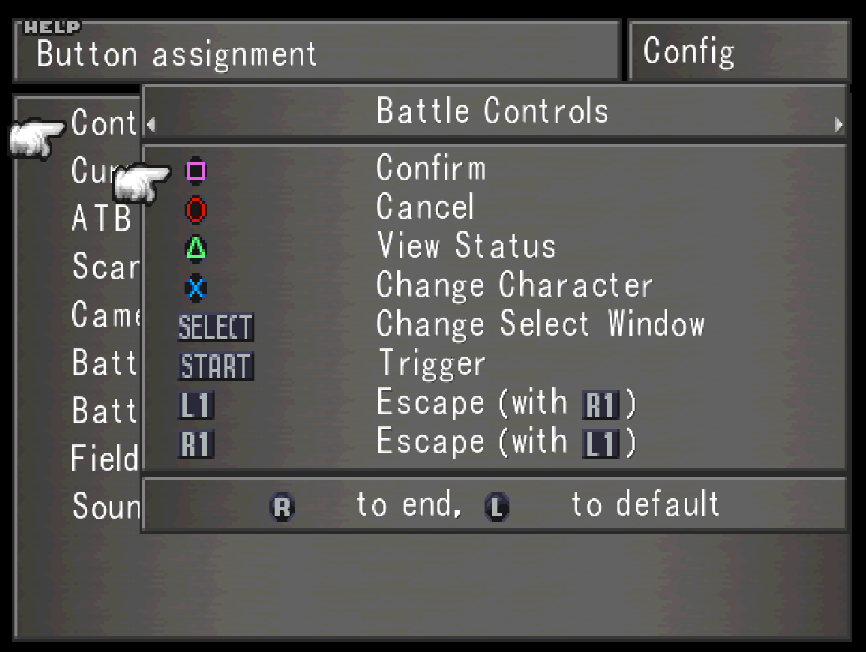
In my case the button layout I have right now is from top to bottom: X, O, [], /\, L1, R1, L2 and R2. Yet the icons are wrong.
I know you can get other mods or whatever to change them, but I like and want to use yours since I don't want the SeeD Reborn and Tonberry mods (I wanna play the game as it is, no graphics revamp and stuff).
Is there any possibility to change the icons order?
 
Last edited:
Bumping the thread. I do really need the rearangement of the controller buttons or a solution without modding everything, and Sunsq does not even check the post or bother to reply. Feels bad.
 
Hey silver, I want this question answered too.  If there's a way to move them around with some hexedit alterations, that would be ideal.  otherwise, there's a way to make it happen and still use the vanilla textures of the game but use tonberry to inject a different button order
let me know if you need this 'last resort'

Also, shunsq is awesome and uber busy.  Give him some time :)  He's our slothy genius.
 
Hey man! Can you help me locate any good drivers for the ps3 controller? I tried some in a friend's pc and they appeared to contain a virus or a false positive or something. Thanks!
 
Hey silver, I want this question answered too.  If there's a way to move them around with some hexedit alterations, that would be ideal.  otherwise, there's a way to make it happen and still use the vanilla textures of the game but use tonberry to inject a different button order
let me know if you need this 'last resort'

Also, shunsq is awesome and uber busy.  Give him some time :)  He's our slothy genius.
Well, I'm basically open to ANYTHING except modding the whole game as I said previously. I just want to make it show the icons of the buttons... Is it that hard? Fml
 
Judging by how shoddy the Steam port version of VIII is in it's current state? Yes  :-D
 
Judging by how shoddy the Steam port version of VIII is in it's current state? Yes  :-D
At this point it's even sad. I'm almost thinking about buying from ebay or amazon a copy for my old PSX.
 
Just wanted to say the mod works great for me! Thank you so much.
 
Hey Shunsq, is there any way of changing only the icons? Here's my case so you understand me...

p9RaUFO.png

In my case the button layout I have right now is from top to bottom: X, O, [], /\, L1, R1, L2 and R2. Yet the icons are wrong.
I know you can get other mods or whatever to change them, but I like and want to use yours since I don't want the SeeD Reborn and Tonberry mods (I wanna play the game as it is, no graphics revamp and stuff).
Is there any possibility to change the icons order?
I have the same problem but in a different order  :(
 
Hello Silverkun and Iva_nfs,
What controller are you using?
The button patch is configured to work with a "plug and play" xbox controller. I don't have a lot of feedback from people using other types of controller, like ps4 or ps3 controllers, or any other brands of controller. For these other controllers you must use a 3rd party software. Maybe that is why it is getting strange results.

But if you don't want to buy a xbox pc controller you have to modify the patch file for every specific controller. I can't have a patch that works with every brand of controller,sorry.
When i have time to spend at home I will explain how to modify the patch to map any button to any icon.
 
If you have a ps3/ps4 controller just download scptoolkit to emulate the xbox 360 driver, you can edit the buttons inside the game itself or use tonberry with just the original graphic textures. So use deling to find the menu textures scale the image x4 then cut and paste the appropriate textures over the existing textures.
 
I might be a fossil at this point. I do keep using my trusty PS2 controller since it works like a charm in whatever other games I play.
I do use a PS2 to PC adaptor. Also I use x360 to map the controls whenver there's a game that does not get my controller... Atm I'm using it since FFVIII does not recognise my adaptor.
 
Status
Not open for further replies.
Back
Top