[FF8 STEAM]FF8_Buttons patch : show PSX buttons

  • Thread starter Thread starter Shunsq
  • Start date Start date
Status
Not open for further replies.
Bonsoir everyone,
For some controllers the icons don't match the actual buttons on the controller, even if you change the properties in steam.
So i updated the first post with a new tool to associate any icon to any button on your controller.  See here : https://www.ff7catalog.com/threads/12623/
It is an additional hext instruction list that you put in the same folder as "FF8_Buttons_**.txt". You must not change the name of the file.
 
Bonsoir everyone,
For some controllers the icons don't match the actual buttons on the controller, even if you change the properties in steam.
So i updated the first post with a new tool to associate any icon to any button on your controller.  See here : https://www.ff7catalog.com/threads/12623/
It is an additional hext instruction list that you put in the same folder as "FF8_Buttons_**.txt". You must not change the name of the file.
Wow, this is great!

Now everyone can use your mod unless they're using a HID interface mapper like xpadder - and then my mod is perfect for those occasions!

Quick question -- there's a 'bug' right now in your mod where if i hit anything other than a controller button, all of the buttons get replaced with the pointer hand with every push.  is there a way for this not to happen or to pull a different texture instead?

Also, for those of you using RaW, the mod became super easy to install!
instructions:

1.  download the files you need from this mod
2.  put the .txt files into FINAL FANTASY VIII/RaW/GLOBAL/Hext/

no need for hextlaunch this way!  also, DLPB released RaW 'lite' which is just the hext injector without the hextlaunch cmd window -- this might be a better option to install your mod than actually using hextlaunch at all anymore!
 
Last edited:
Hello Mcindus,
Thank you for the RaW explanation. I changed my first post with RaW instructions!
Regarding the icons switching to the finger icon when you press the keyboard, i am aware of it but i don't plan to correct it. In fact the bug happens because the game doesn't know which PSX icon to show when you press the keyboard. The patch is not supposed to be used when you use a keyboard at the same time as the controller.
If it really prevents people from playing the game i might think about a workaround.
 
Last edited:
Works like a charm now! Thanks Shunsq for the tool and thanks Opaque for the already mapped txt, you saved me a lot of time having to map them 1 by 1 myself!
Also, Mcindus, same happens to me whenever I wanna tab out, but once you get in the game window again it just comes back to normal. It's not a gamebreaking bug or flaw Shunsq. It's there, yeah... But hurts nothing in terms of being able to play the game afaik.
 
Hello, I'm using a PS4 controller and edited the config to show the correct buttons for it. I'm Jenny_San on Steam. Thanks for all the hard work.  ;D

{BUTTONS MAPPING:change the value on the right to change the icon}
39A +1   =   87   
3A4 +1   =   86      
3AE +1   =   85      
3B8 +1   =   84      
3C2 +1   =   82      
3CC +1   =   83      
3D6 +1   =   80      
3E0 +1   =   81      
3EA +1   =   88      
3F4 +1   =   8B      
3FE +1   =   89      
408 +1   =   8A
 
Soooo I followed the instructions to the best of my knowledge, but I am having a weird issue. I am using a PS4 controller through Steam. The buttons in game are showing up as the little white hand cursor. For every button. :-(
 
itsTaytay, can you copy the content of your config file here?
Your error happens when you use the keyboard or the mouse at the same time as your ps4 controller.
Another cause could be that your button config file maps to values outside the range [80,8B].
 
Heya

Have installed the mod using hexlauncher. Currently the keyboard-induced-hand error is effecting me as I use a steam controller profile for my xbox one controller that uses key bindings to interact. I've tried reseting to buttons but i'm having a hard time of it. A Work-around to the problem would be much appreciated
 
I'm having the same issue, I had it working fine yesterday.

Get on today and the damn hand error wont go away, I've uninstalled FF8, reinstalled it, reloaded the Ragnarok Mod / RaW and redownloaded and used your Button Patch to no avail, the damn finger wont go away.
 
Hello people,
i am aware that some players use "key binding", so as to say people who use controllers that replicate the keyboard . I will start searching for a way to prevent the fingy error.
 
Thank you @Shunsq!

I really appreciate it, your patch is much more simpler and less time consuming than using other mods, cant wait for a fix on this!
 
I'm trying to get the buttons to show for me but the only thing show is the FF8 cursor in every slot. Any idea what's up?
 
What about Button mod for pc-2000? (1.2/1.2nv)
for me it is too difficult, so I hope that someone will do for her
 
Last edited:
I'm trying to get the buttons to show for me but the only thing show is the FF8 cursor in every slot. Any idea what's up?
I'm having that issue also. I downloaded the 2 text files, EN & Config, put them in Raw/Global/Hext

The controller is working its just all the icons are cursors

Please help!
 
What about Button mod for pc-2000? (1.2/1.2nv)
for me it is too difficult, so I hope that someone will do for her
You can use the existing SeeD mod for 2000 and then replace the GREEN font text pages (sysfld00 and sysfld01 green palettes) with the ones from my controller buttons mod. it uses the same textures as the 2000 SeeD mod, but you might have to rename something.
 
You can use the existing SeeD mod for 2000 and then replace the GREEN font text pages (sysfld00 and sysfld01 green palettes) with the ones from my controller buttons mod. it uses the same textures as the 2000 SeeD mod, but you might have to rename something.
I know, but there will be some problems with it, hd font in English, it is not for Russian.
The problem is not even that, but that if you do not use HD, it will be superfluous.
 
Last edited:
I know, but there will be some problems with it, hd font in English, it is not for Russian.
The problem is not even that, but that if you do not use HD, it will be superfluous.
Not sure I understand completely, but are you saying that you only have low-res fonts to use with the Russian version? (The green text is barely ever used so it's not that bad if it's English)
Could you send me a link to the russian version so I can see what's in it to see if I can help?  (I am the author of all SeeD mods and the other controller mod)
 
Not sure I understand completely, but are you saying that you only have low-res fonts to use with the Russian version? (The green text is barely ever used so it's not that bad if it's English)
Could you send me a link to the russian version so I can see what's in it to see if I can help?  (I am the author of all SeeD mods and the other controller mod)
I know you, you are the most famous modder for final fantasy)
The main reason, because I do not use the hd font, and the second, that the green font, although it is used little, can be a problem.
Therefore, we need a hext button mod, this is exactly the minimum that is needed for the game.

offtopic

We have long created russian SEED based on yours, without source,
it was then difficult, as no one knew at the time how to edit the width, tonberry at this time only appeared.
https://ffrtt.ru/forum/viewtopic.php?f=11&t=213
https://ffrtt.ru/forum/viewtopic.php?f=11&t=222
People ask for a new version, but so far there is no one to do it.

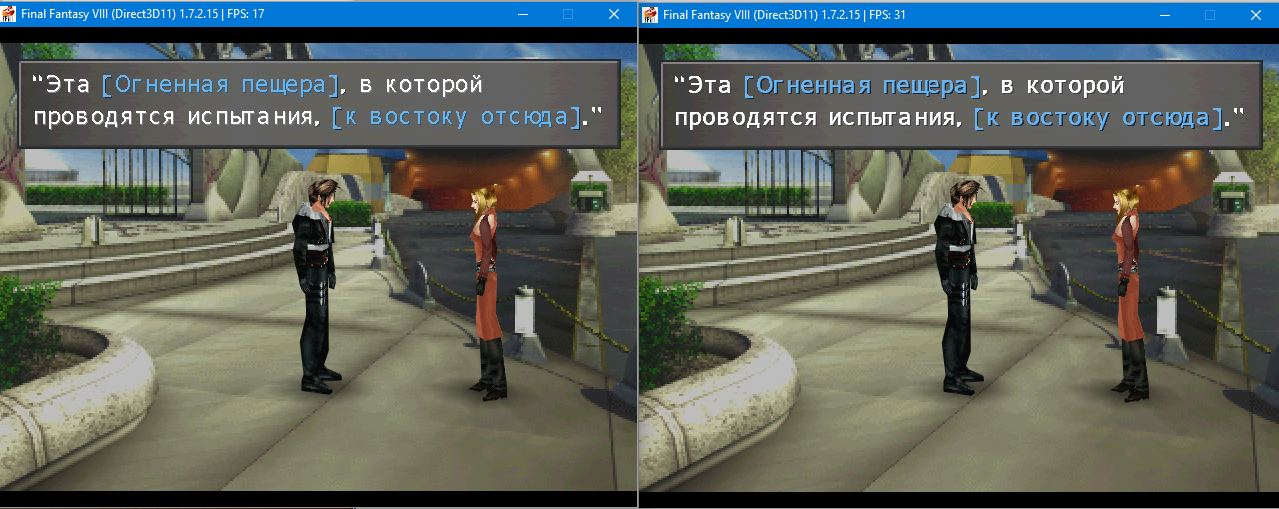
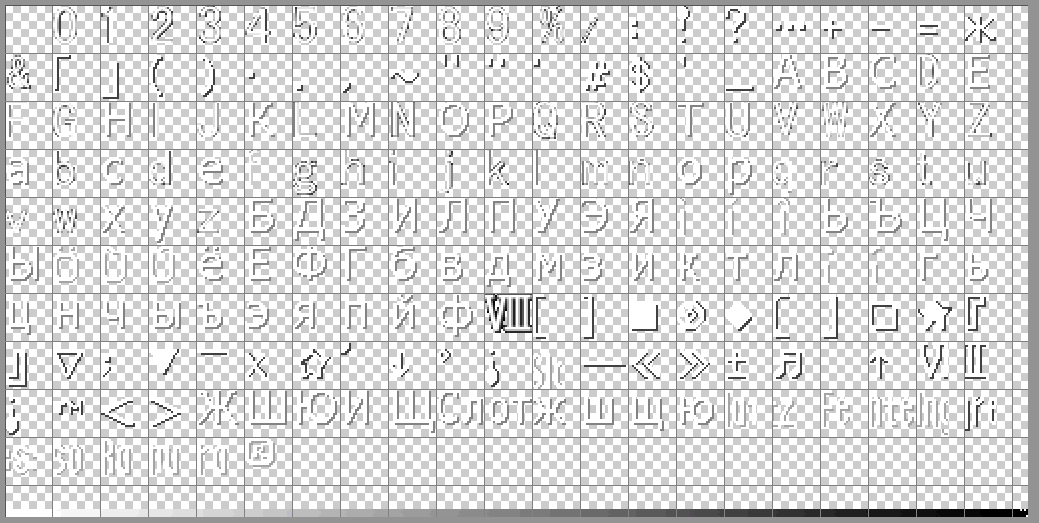
Currently, I'm the only one doing font, trying to create a nice low-res font:
ZVpPAU3.png

RF3wNrL.png


most importantly I do not know how to recreate the effect of shadow as in the original, I tried to smooth the font, use a shadow with noise, nothing came even close.
So I'm sorry until I make a low-res font, i can forget about the hires font too, without the sources to recreate the seed reborn no one will definitely be.
 
Last edited:
Status
Not open for further replies.
Back
Top