[FF8] .x battle fields

  • Thread starter Thread starter Halfer
  • Start date Start date
Status
Not open for further replies.
Of course I'm going to work on worldmap next. :)
Didn't touch the walkmesh yet, but as far as I just fast looked on those files is:

Wmrail is set of points. Probably points telling where tracks should go, just like splinemesh in UnrealEngine, but I'm not sure yet.
Wmtex is just a file containing textures only
Wmset is a file containing balamb garden model, train models, probably towns, consist similiar geometry data as levels and characters.
Wmsetus - almost same as above, but does have some differences?
And that biggest 20 MB file. Didn't test it out, but appears it doesn't have any textures in it.

I'll finish this .x file (texture support, and tool for it), then I'll start on worldmap. 
You are amazing. :*)  I've upscaled the entire worldmap from the original textures and inserted it using Tonberry - but with this news, I'm going to continue my full worldmap texture replacement pack.  Currently, I've only done Balamb justice and no one has done anything to the towns because they are the most common objects to have messed up coordinates. 
Thank you!!
 
Just started writing that tool. God, that's so time consuming. My code is a total mess, but I do learnt some important things like how to deal with padding, how to read model and etc. Paul wrote, he'd help me with this tool if it'd be on QGears. :)

I already wrote some info dumpers for these stage models. I'll release one. It's no more than a just tool that say's where script, texture, camera and geometry sections are, it's length, vertices count, quad location and quad count. Only for first object. Also can rip .TIM texture.

https://www.dropbox.com/s/atp478d41trqk20/StageDump.zip?dl=0 (source included)

There's also another one, but it's still not fully working. Just give me a couple days, and we make it. :)
Thanks!
 
Last edited:
Chrome thinks your zip is malware and won't let me save it.
Go into the downloads window (Ctrl+J), find the download, and click "recover malicious file". You can save it from there, just not from the normal download bar.
 
@UP - Yup, browsers automatically scans what's inside .ZIP file, and it sees it's .EXE. There's totally no malware inside it, but some antivirus softwares can just report is as "potentially risky". It's by the way just a stupid header dumper, that's all.

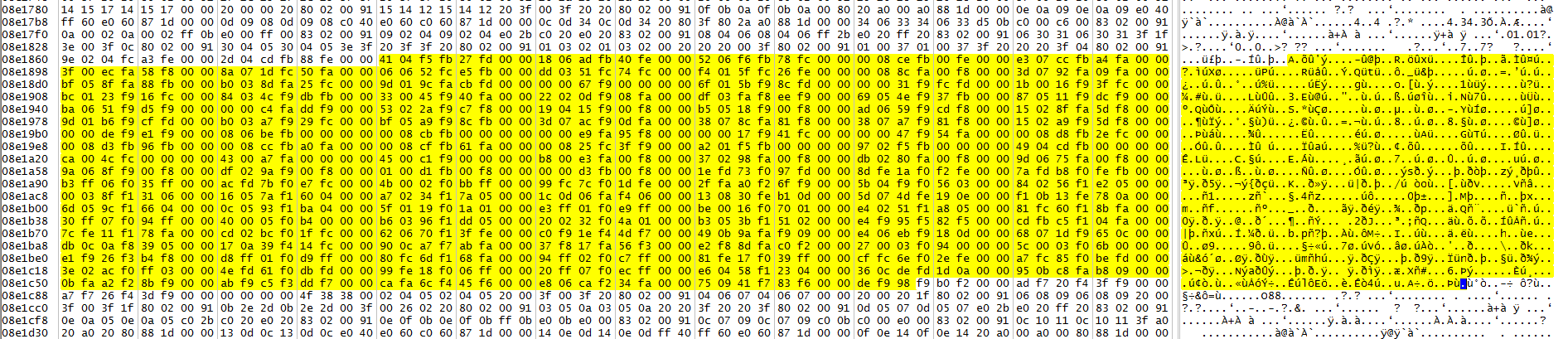
Getting back to World map. Wmrail is just some crap file. It does NOT contain the road/track points. It does contain some hardlinked path's to FFVIII work exe. Also, to prove, the roads and tracks are in fact in wmset.obj, here's the proof:
27rjwbsjohrx.jpg
uniy4deawk99.jpg

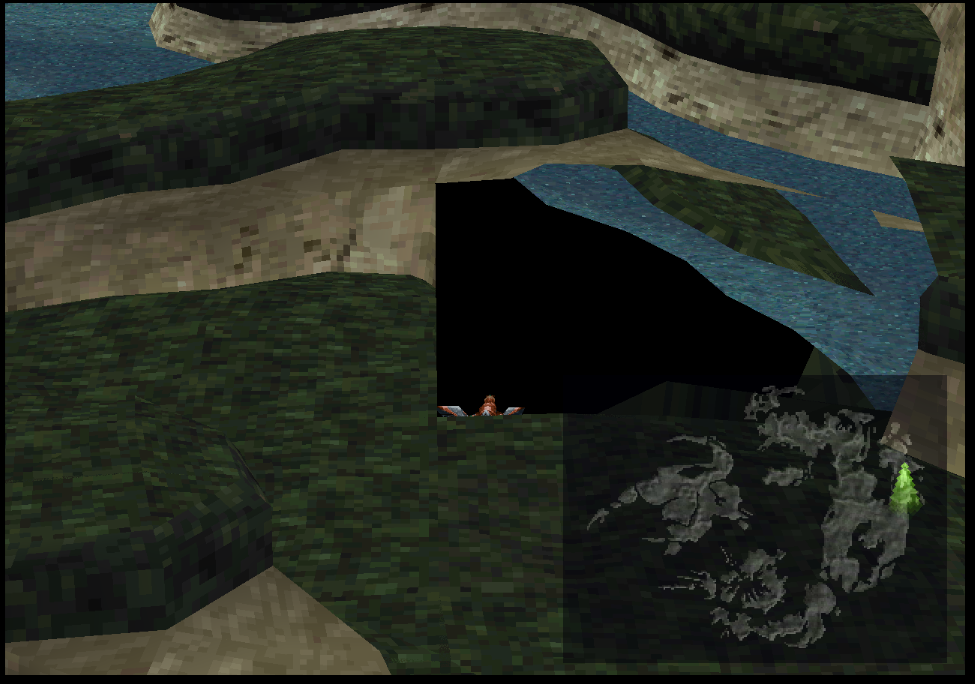
Also, I hacked the camera. Finally, we can see that the world map is not loaded fully, but only it's part that are set to be visible. Researching 30 MB file is still painful. It has 16 bytes triangles in it. (Same as characters/enemies, for battle stages it's 20 bytes for triangles).
9br4vidzqzef.jpg


@Getting back to Battle stages - I'm researching camera now. Debugger is doing the job much faster than normal HEX reversing.
 
Last edited:
Wow cool! Especially with the camera shot!

Do the world map files contain the same headers as other files? I wonder if the rendering settings are fixed in the executable or maybe it's a setting in wmx.obj?
 
Do the world map files contain the same headers as other files?
Unfortunately, they not. BUT! They contain some weird:
AKAO

Also, ran my info dump test, to see if it does contain some data as stage had. Nor script, camera, geometry data was found.
I think this wmx.obj is an archive.

Oh, going back to stages, here's the cake:
rer7ff0y45f0.png
~350 poly. This is Tomb of unknown king level.
See this triangle holes? It's because it contained triangles, and triangles wing order is a thing I can research in minutes. ATM it's neither ABC nor ACB. So, there's like 9 possibilities to try. :) For quad it was ABCD>ABDC.
Forget it. I just wrongly calculated the triangles (I put the triangles manually). This should be uint16, instead I made it normal int. It works now.


EDIT:
Oh, forgot to wrote. I debugged battle camera today. After 30 minutes I could alter both camera rotation (signed 16 bit), its "skew". Even force the camera to move from orthographical image, so I could just look at "2D plane with moving texture" from side. Still I can't find X Y Z of camera in World.


EDIT2:
I am having hard time with UV's. Here's so far:

24 bytes quad:
Code: [Select]
Code:
uint16 X;uint16 Y;uint16 Z;
8 bytes of faces

Left 16 bytes:
Code: [Select]
Code:
Sample:60 21 40 3c 40 21 b2 00 80 01 40 01 64 64 64 2cProbably:UU UU OP IX IX UU UU XX UU UU UU UU AM1 AM2 AM3 IXWhere:UU - U or V of textureOP - opacity sbyte/char (?)IX - Texture ID, like I don't know...XX - changing makes the texture go away? AM:AM1 - R (red) byteAM2 - G (green) byteAM3 - B (blue) byte
Yes, the texture can be colorized just how you want. :)
 
Last edited:
Nice progress being made, Vehek posted some great info for wmset.obj and wmsetus.obj
in here for the world map if you haven't read it.
https://www.ff7catalog.com/threads/9280/

I think the majority of the world map geometry is all stored in the big file wmx.obj

Reverse bytes made this happen

NB0Nep0.png


Problem is the file is pretty big, and you have to ride the ragnarok around whole map the spot differences.
 
Nice progress being made, Vehek posted some great info for wmset.obj and wmsetus.obj
in here for the world map if you haven't read it.
https://www.ff7catalog.com/threads/9280/

I think the majority of the world map geometry is all stored in the big file wmx.obj
Reverse bytes made this happen

NB0Nep0.png


Problem is the file is pretty big, and you have to ride the ragnarok around whole map the spot differences.
Thanks, that sure is really much info. :)
If he found the model offset and how it corresponds with texture, then I can examine model itself.
Yagami, could you write which offset was that? That would help me much. Thanks! :)
 
here is the bytes I reversed I will keep trying till I affect the towns

LH6hp9D.png
 
Okay, I liked to jump a bit for wmx.obj and what i found out is that this file is containing the sea quads of the world:

There seems to be a header starting with 20 19 01 00 , and nullifying every corresponding variables it gave the following results.

871d367ec05cef5b4f335bc98be813f1.png

1eeff0edb0486a59c23f6643fee43af9.png

Here you can see how to sea is formed from big quads.
EDIT: Also worth to mention that I wasn't able to pass those empty blocks with ragnarok meaning that there is some sort of collision when land (or sea) is removed

That's interesting yagami light. I reversed a big chunk of bytes from that offset and it did very odd stuff following hard lock. Although the ff8.exe seemed to eat my CPU while it was freezed so I don't know what I did wrong :D

Also I would appreciate if MakiPL could say how you managed to hack that camera like that! Would really help a lot! :D
 
Last edited:
Okay, I liked to jump a bit for wmx.obj and what i found out is that this file is containing the sea quads of the world:

There seems to be a header starting with 20 19 01 00 , and nullifying every corresponding variables it gave the following results.


Here you can see how to sea is formed from big quads.
EDIT: Also worth to mention that I wasn't able to pass those empty blocks with ragnarok meaning that there is some sort of collision when land (or sea) is removed

That's interesting yagami light. I reversed a big chunk of bytes from that offset and it did very odd stuff following hard lock. Although the ff8.exe seemed to eat my CPU while it was freezed so I don't know what I did wrong :D

Also I would appreciate if MakiPL could say how you managed to hack that camera like that! Would really help a lot! :D
Those big quads are actually smaller quads combined see here

xgMOOkb.png


the engine seems to run slow if you modify even a small bit of the wmx file, I've had times when the vertex got moved high up in the sky and moving near it caused ragnarok to fly high up going crazy till you moved away, and reverse byting too much leads to ff8 not responding when you fly near the affected area, just something you have to be careful of.
 
Last edited:
I see, anyway they seem to be "unmodified" particles meaning that every quad is similiar thus the effect seen in first image. The reason why there is still sea left in my screens means that vertice group is modified by landscape and has a different variables in place of 20 19 01 00. That may be a count or reference to something.
 
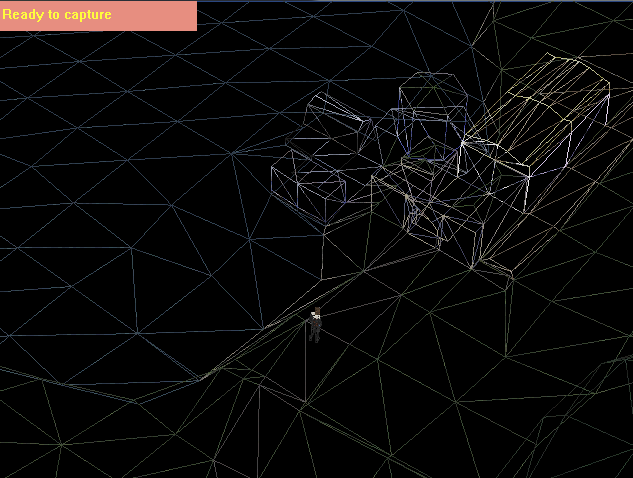
Now where I see the wire it looks like that they have baked the world map and the objects together. That might be the reason why the UV for the tile don't work anymore. I assume that on PSX objects (roads, cities, etc.) are placed on the world map in realtime. Maybe they couldn't done it for PC and simply baked everything together.

Seems like we need to extract the wm from the PSX version and fix the PC rendering. Hopefully this is doable.  :?
 
That wireframe picture is from the ps1 version, I used 3D ripper dx to capture it, can't get it to work with the pc version though, the pc version is just an earlier development build of the ps1 version which was the final build. Thats why there is only small differences, I noticed a lot of small areas on the world map with texture flickering above balamb towns door, parts of ragnarok, parts of mountains etc, which to me seems like mesh overlap, and then there are other areas like the grey path or the traintracks which has misaligned mesh/missing mesh altogether, need to see what the pc versions wireframe is like to be completely sure though.
 
Isn't this format likely to be similar to FF7 where it is splitted into a grid and each grid contains a collection of meshes? Is FF9 WM the same way? If so the FF8 must be too.
 
Towns are in wmset.obj and wmsetus.obj (also Gardens, trains etc.), not wmx.obj.

For the camera:

x01CA92E4 this is 2 bytes.
Select mode by 'F' default on steam release, and make it zoomed out, then search for 80 02 (640). For zoomed in it's 00 04 (1024). 
But as I see VIII allocates memory on fixed addresses. More funny thing is that this zoom is also fixed.


So to summary:

ASM write instruction:
Code: [Select]
Code:
mov [eax*4+01CA927C],ecx at 0x0045D7FA (FF8_EN.exe+5D7DA)
Code: [Select]
Code:
FIXED address: FF8_EN.exe+18A92E4 / 0x01CA92E4FIXED values:-Zommed in: 1024 (2 Bytes) / 00 04 (uint16 ByteArray l=2)-Zommed out: 640 (2 Bytes) / 80 02 (uint16 ByteArray l=2)/[code]
@Yagami - that wireframe shot is cool. :)

@EDIT:
Still working on that UV. This is really weird thing. But, luckily there's a hidden stage there in files, that contains this texture:
du223enf766f.png
, and ground square with this texture associated as-is. :) I just reminded it.
 
Last edited:
Thanks anyway! Too bad that I don't have the steam version so can't find that line :/
 
Thanks anyway! Too bad that I don't have the steam version so can't find that line :/
Just search for this fixed array of bytes.
-Zommed in: 1024 (2 Bytes) / 00 04 (uint16 ByteArray l=2)
-Zommed out: 640 (2 Bytes) / 80 02 (uint16 ByteArray l=2)

JESUS! This UV drives me crazy!

EDIT2: I checked FF7 and FF9 documentation on model textures. None of them were identical, but FF9 finally had info about RGB + ??.
This way, the quad in FF8 level is:
Code: [Select]
Code:
## fuint16 A; +1uint16 B; +1uint16 D; +1uint16 C; +1## vtuint8 U1;uint8 V1;uint8 U2;uint8 V2;uint8 U3;uint8 V3;uint8 U4;uint8 V4;## engine specificUnsigned 24 bytes:Byte R; //RedByte G; //GreenByte B; //Blue##UNKNOWNByte ??
Where UV4 is top right corner, UV3 top left of bottom right? This needs to be converted to -1.0 - 1.0 and I completely don't know how. Like getting short, then a percentage? I need some sleep... Ugh..

UPDATE:
AAAAH! I get it now. In f after it get's texture the whole thing looks like:

f 1/2 2/1 etc...
where:
Vertex index/vertex texture index
I'll test this out, but tomorrow.
 
Last edited:
Status
Not open for further replies.
Back
Top