L

You are using an out of date browser. It may not display this or other websites correctly.
You should upgrade or use an alternative browser.
You should upgrade or use an alternative browser.
[FF8PC-Steam] BerryMapper- texture replacement for Tonberry mod (2014-12-15)
- Status
- Not open for further replies.


O
olearyf2525
Guest
Saw this and started singingLOL!
How about this one?
More world texture progress!


It seems like I may have made things a shade too olive...
C
Crestian
Guest
I have all the files! and its the weekend! Textures incoming....
Good work guys.
Good work guys.
M
Mcindus
Guest
-some- of the codes are the same. I don't know why you're getting the same code for everything. are those texl files the original bitmaps?How did you get different hash codes for the world map? Berry just gives me the same codes..
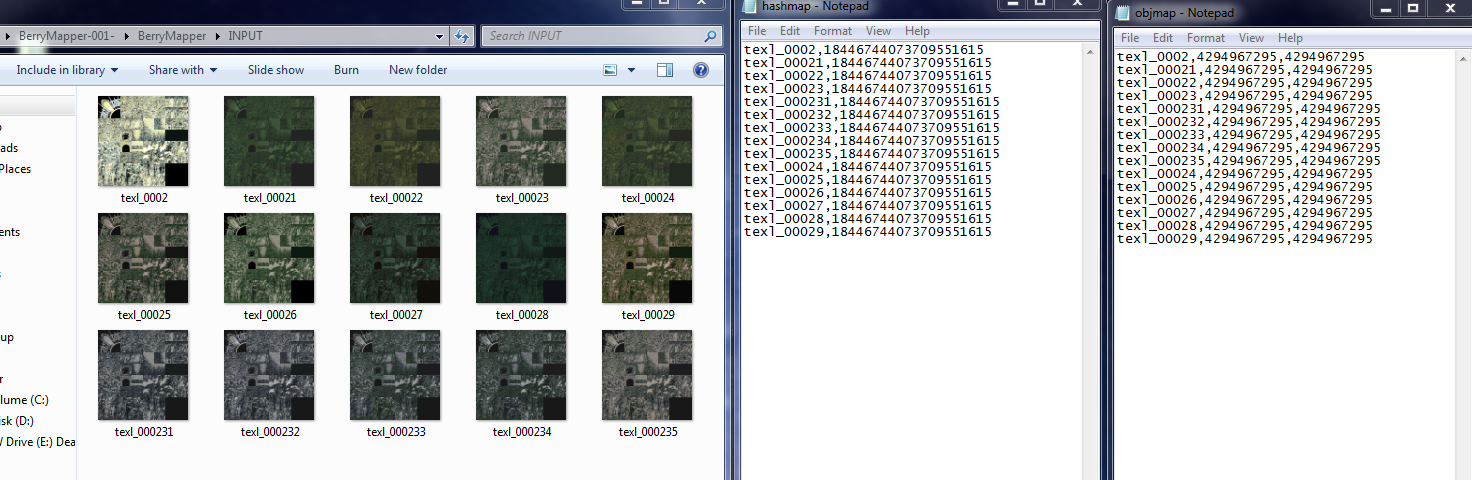
Also heres original textures for world map and a battle scene separated and x4 res for artists all you gotta do is put a new texture on top. If you want to upres them differently I only used nearest neighbor so you can just downscale them and upscale however you want.
https://www.dropbox.com/s/lo9wtflxf1e4rzr/Tonberry ready ff8.rar?dl=0
ALSO - I can't seem to get summons to load with new textures. I have hashes and obj codes and i've tried with just hashcodes, with just objmap codes and with both. I use the proper codes for top/bottom loading, etc. Anyone have any clue where I might be going wrong? Mortael? Shunsq? Will this be any different than loading characters?
OOPS! I figured it out.


Made him purple to make sure the texture was working!
Shiva's going to be sexy.
Hashing these should be easier than I thought. I'm going to make a package with all of the summons hashed for upscaling. I probably won't upscale them myself (this is crazy!) but who knows?
***Update ***
I only have the sea and the coast to upscale and then I'm going to release a Balamb Worldmap Upscale for you guys to enjoy!
Last edited:
A
Aavock
Guest
Awesome job guys!
Don't know if someone noticed before but PSX textures are better than PC as for the worldmap; I've been looking in the world.fs file and there is 2 kinds of worldmap textures, one is low res and the other is 2 times bigger; the road doesn't even have borders... is the PC version uses the low res textures only ?

Don't know if someone noticed before but PSX textures are better than PC as for the worldmap; I've been looking in the world.fs file and there is 2 kinds of worldmap textures, one is low res and the other is 2 times bigger; the road doesn't even have borders... is the PC version uses the low res textures only ?
M
Mcindus
Guest
The low res original is this:Awesome job guys!
Don't know if someone noticed before but PSX textures are better than PC as for the worldmap; I've been looking in the world.fs file and there is 2 kinds of worldmap textures, one is low res and the other is 2 times bigger; the road doesn't even have borders... is the PC version uses the low res textures only ?

Whereas the PC version has 3/4 of that page upscaled as 3 different files separated by the 4 quadrants. For some reason, the top right corner quadrant doesn't seem to have an upscaled version... maybe it's in the PSX version (the road too?) Or maybe they updated it for japanese and not for English/everyone else?
As Kaldarasha has mentioned several times, the Walkmesh is also messed up somehow on the PC version... they are either doubled up over themselves OR there is some other glitch. I've noticed that every archway and 'curve' in the game on the worldmap seems to have the walkmesh go crazy and fold itself upwards into the left top corner of the texture block.
Last edited:
K
Kaldarasha
Guest
It's my only explanation why the UV is messed up.As Kaldarasha has mentioned several times, the Walkmesh is also messed up somehow on the PC version... they are either doubled up over themselves OR there is some other glitch. I've noticed that every archway and 'curve' in the game on the worldmap seems to have the walkmesh go crazy and fold itself upwards into the left top corner of the texture block.
If you look at the area around 4 you can clearly see that the 'quad' UV mesh is broken by strange placed tris, so the tile map is wrongly placed on this.Some progress:

The texture is properly the same as on psx, but it looks like that the UV is smaller as the tile texture and that's might be the reason why the textures aren't displayed seamless.
M
Mcindus
Guest
Hey guys!
Merry early Christmas!
These are the GFs! Have fun upscaling these babies!
I have found, named, and hashed them to make it as easy as possible to upscale! Remember to upscale the file 4x (to 1024px) and save as .png if you want to see it! All of the file names correspond to the appropriate files (head,body,tail,wing,etc) and hashcodes.
Here's the file!
GF Textures Low Res
Code: [Select]
Some codes happen multiple times - this is due to the texture having an animation. Not sure how these animations will really work out, but if you guys have squall's eyes blinking with the main character replacement mod, then this should be the same concept. Let me know if you have any ideas 
Happy Modding!
HOLY CRAP I just made a huge breakthrough. I think. It's tested positively so far anyway.
If I'm right, I can unpack the .tim and .tex files from the game and put them through berrymapper! This means certain files will be MUCH easier to hash... we won't have to depend on the 'debug' process in Tonberry for a lot of the game files!
Merry early Christmas!
These are the GFs! Have fun upscaling these babies!
I have found, named, and hashed them to make it as easy as possible to upscale! Remember to upscale the file 4x (to 1024px) and save as .png if you want to see it! All of the file names correspond to the appropriate files (head,body,tail,wing,etc) and hashcodes.
Here's the file!
GF Textures Low Res
Code: [Select]
Code:
sum_axbd1_13,15935377769621977511sum_axbd2_13,15971406566640942502sum_axbd3_13,8022270368522877477sum_axbd4_13,17245642405376604708sum_bmbdy_13,15932217990091329690sum_bmhd_13,7757904884579093101sum_bmtl_13,7757904884548946541sum_bmwng_13,14779296210602381466sum_br1bdy_13,8464346616054501679sum_br2bdy_13,11336235803404490027sum_brhd_13,9180427752882653487sum_cblbdy_13,5063725404343096626sum_cblhd_13,5649193356438132022sum_cbrsbdy_13,2762481545044277883sum_cbrshd_13,2762481545044277883sum_cbrstl_13,7842273896358048938sum_ctbd_13,7853509650918636627sum_dblbdy_13,6512026207192540327sum_dblhd_13,6584083938669388967sum_dblwg_13,16638888973858463546sum_dblwg2_13,16638889523614277434sum_dtbd1_13,9032173104019760426sum_dtbd2_13,8450254200304383590sum_dtbd3_13,8450254200304383590sum_dthd_13,9032137919647409450sum_ednbdy_13,9190349637454457363sum_ednbdy_14,9190349637454457363sum_ednbdy_15,9190349637454457363sum_ednbdy_16,9190349637454457363sum_ednbdy_17,9190349637454457363sum_ednbdy_18,9190349637454457363sum_ednbdy_19,9190349637454457363sum_ednfc_13,15362752834859918522sum_ednfc_14,15362752834859918522sum_ednfc_15,15362752834859918522sum_ednfc_16,15362752834859918522sum_ednhd_13,16557192545203745110sum_ednlt_13,15362752800495920307sum_ednst_13,17133653280327299670sum_ednwng_13,9190349637454457371sum_ifbdy_13,7230199162327160154sum_ifhd_13,7230200812534157786sum_lvhd_13,6227781700387628843sum_lvbdy_13,6804238604534572843sum_pnbdy_13,7802028211296754859sum_pnhd_13,18209413859569354283sum_pnsc_13,7802027111785135275sum_quezbody_13,8536139567466345131sum_queztail_13,6806441483047646774sum_quezwing_13,17759511599891903163sum_shvabdy_13,8489889433990430059sum_shvahd_13,8489907026176474475sum_shvahd_14,8489907026176474475sum_shvahd_15,8489907026176474475sum_srnbdy_13,15180664260399887786sum_srnhrp_13,15180724732432117162sum_srnwng_13,14761505877821443511sum_tbft_13,12797980175438140837sum_tbhd_13,8021278812566934005Happy Modding!
HOLY CRAP I just made a huge breakthrough. I think. It's tested positively so far anyway.
If I'm right, I can unpack the .tim and .tex files from the game and put them through berrymapper! This means certain files will be MUCH easier to hash... we won't have to depend on the 'debug' process in Tonberry for a lot of the game files!
Last edited:
E
eXistenZe
Guest
This is progressing so fast that I come here twice a day just to check the awesomeness of this...
Great work...
Great work...
J
JeMaCheHi
Guest
+1 ;DThis is progressing so fast that I come here twice a day just to check the awesomeness of this...
Great work...
E
Encore
Guest
Through what program you are improving texture? =)
R
renginered
Guest
I Think most guys are using photoshop. Any way please start your own thread if you have questions on modding.Through what program you are improving texture? =)
Sorry, off topic here.
Just wanted to point out the awesome work being done here!
Although i have found some bugs, it appears sometimes my npc's get retextured. Ill double check my objmap.csv.
And if anyone was wondering, tonberry does work under linux using wine. :-D
M
Mcindus
Guest
I posted a release for HorizonPack v1.0 - a world texture replacement pack. Check it out. Use it
S
Shunsq
Guest
Hi Mcindus,
There is now a link to Horizon pack on first page ! To your paintbrushes texture modders!
There is now a link to Horizon pack on first page ! To your paintbrushes texture modders!
O
olearyf2525
Guest
Okay so I'm using all the hashcodes from this thread as well as McIndus new textures and I'm having two issues. One is the bottom half of Squalls/Mago's new texture will use the old texture in some spots. So far I've seen this in Dr Kadiowaki's office in the window room. As well as in Squall's dorm. Secondly if I alt+tab and try to alt+tab back into the game I can't the graphics are all messed up all I can hear is the noise of me moving when I try to move I can't see anything.
F
FatedCourage
Guest
Make sure the names of your textures match the name of your hashcodes. Like, the hash name is sqbody_13. So make the sure the texture is named that as well.Okay so I'm using all the hashcodes from this thread as well as McIndus new textures and I'm having two issues. One is the bottom half of Squalls/Mago's new texture will use the old texture in some spots. So far I've seen this in Dr Kadiowaki's office in the window room. As well as in Squall's dorm. Secondly if I alt+tab and try to alt+tab back into the game I can't the graphics are all messed up all I can hear is the noise of me moving when I try to move I can't see anything.
O
olearyf2525
Guest
I'm using Mortael's Squall textures and there is no folder called sqbody there is a sqpant should i rename that?Make sure the names of your textures match the name of your hashcodes. Like, the hash name is sqbody_13. So make the sure the texture is named that as well.
Edit: Also when your about to embark on your first mission to dollet after Cid gives his speech he is a pixelated blob/mess, like it's really bad is this normal? Should I turn on linear filtering? I don't have it on.
I was able to workaround the alt+tabbing issue by just doing it multiple times and quickly.
Last edited:
F
FatedCourage
Guest
Yes, just rename the folder sqbody and then rename the texture inside that is sqpant_13 to sqbody_13. I made that same mistake.I'm using Mortael's Squall textures and there is no folder called sqbody there is a sqpant should i rename that?
I've ran into Cid looking like that long before using the textures. Not sure why he looks like that. No, linear filtering will not fix it.
M
Mcindus
Guest
Lol that's because he's rendered as a background image... and they were way less resolution than the character models...Edit: Also when your about to embark on your first mission to dollet after Cid gives his speech he is a pixelated blob/mess, like it's really bad is this normal? Should I turn on linear filtering? I don't have it on.
Same issue with any NPC that doesn't move in a scene (like in your classroom at the beginning of garden)
If someone wants to find these NPCs and then use PuPu to paste new images of NPCs over them, this would help the overall appeal of the game. One of the only things that truly looks poop.
J
JeMaCheHi
Guest
Hi everyone. Mcindus and me are trying to replace the clouds in the worldmap but they are restored to original ones when you go into some cities or to the Ragnarok bridge and then return to the worldmap. However, it doesn't happen when you go into some others (the garden for example, the static garden, no the driven one).That exact ones? Nope, the field textures and battle textures are different ones. We'd need to hash the battle texture and design its own one.
By the way, I can hash some textures for you guys, I've been making some tests and I think I got it. A sample pic:

As you can see it's just a placeholder, I'm not good at graphic design so I won't even try it xD
@Shunsq, your Berrymapper works like a charm, by the way.
I'm using the objmap code since it works, but hash1map code will also work. Any combination of the two codes will make this problem disappear.
Well, I'll leave you the codes so you can do your testings:
- objmap code:
wmclouds_b00_13,4210753023 - hashmap code:
wmclouds_b00_13,9223372036446845695
I used the second hashcode Berrymapper gives because the other seems to correspond to the world map. I don't understand anything

Last edited:
- Status
- Not open for further replies.