[FF8PC-Steam]SeeDReborn v4.1 Multi-Language [NEW! More Options!] (5/22/19)

  • Thread starter Thread starter Mcindus
  • Start date Start date
Status
Not open for further replies.
yayyyyyyyyyyyyy,
As soon as I get home I try it right away, Now I can not try it, because I'm on vacation hehe
thank you so much MCINDUS

italian's Loving you hahaha
 
yayyyyyyyyyyyyy,
As soon as I get home I try it right away, Now I can not try it, because I'm on vacation hehe
thank you so much MCINDUS

italian's Loving you hahaha
So I'm dying to hear what you think :)
 
Hello,

I can't download the French Pack.
I'm block on AddFly, and when i click on "skip add" i'm redirect on a new tab (white) and i can't download the file.

Can you help me, or upload it on a new site ?

Thanks
 
Hi,

I installed SeeD Reborn 3.2 with spanish package and i'm having some bugs in some places. For example the "time battle bar" looks like this:
nu5sRjm.jpg


Has anyone else had that problem? Thanks very much

Mcindus, great job! your dedication in improving ff8 is impressive.
 
Hi,

i can't get a proper display with seed reborn and the french version.

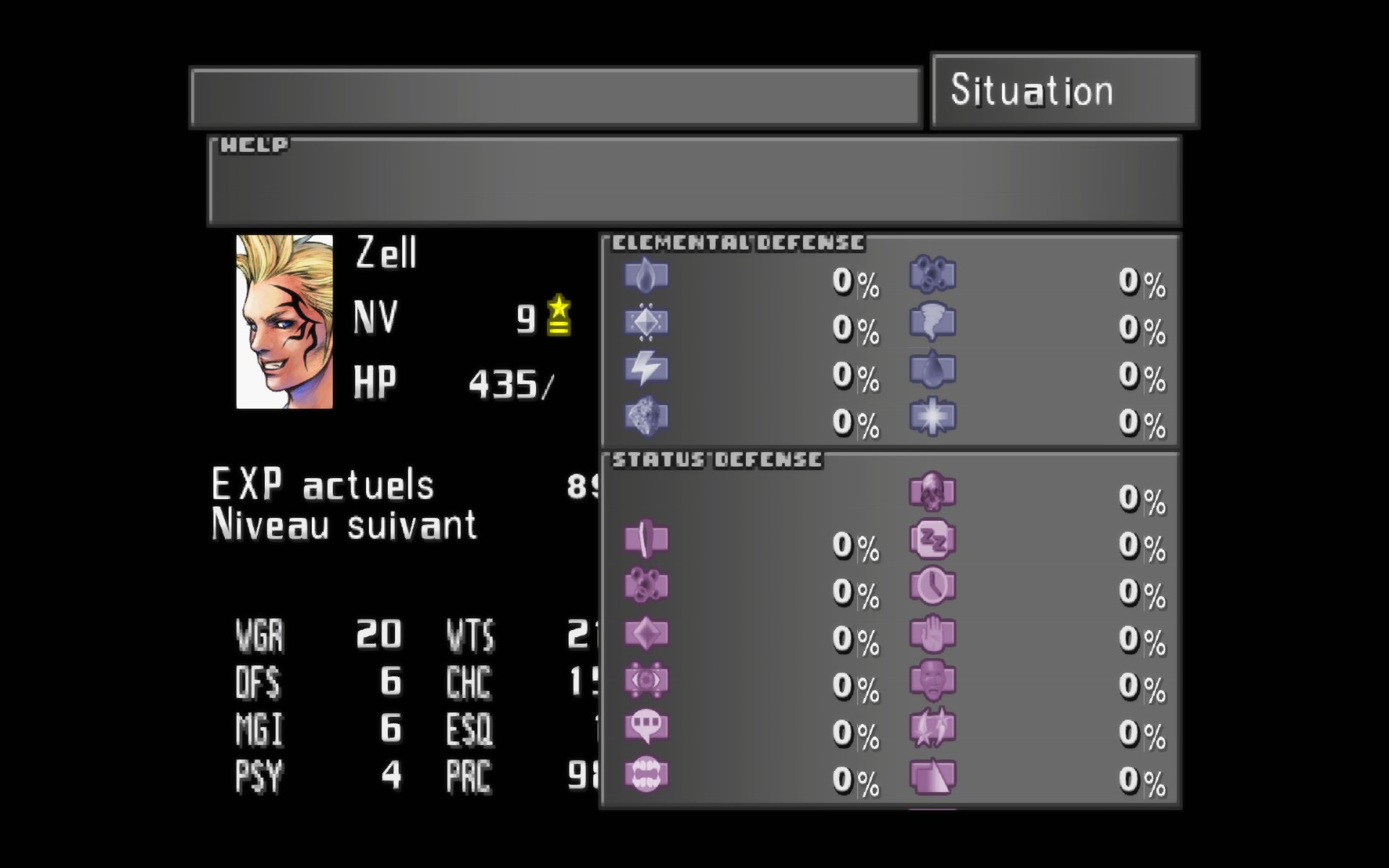
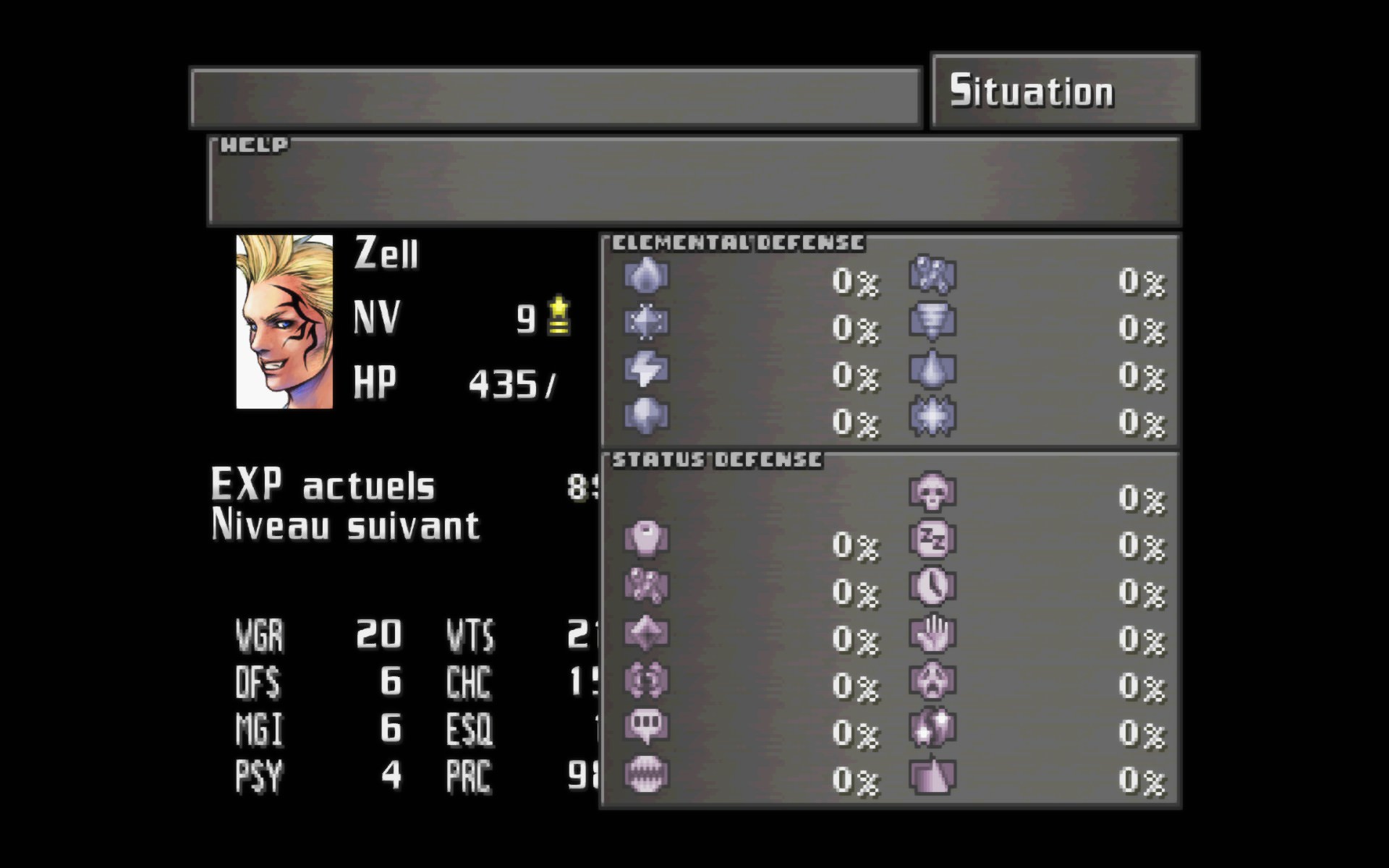
with reborn 3.5 and reborn 3.5 hash,  letters are perfect but not numbers :

eVPAz84.jpg


with reborn 3.5 and french language pack (ic textures) and french hash , i have the numbers but the letters are kind weird, some are missing :

3vmHgWa.jpg
>> french textures /french hash

JX7pg2U.jpg
>> eng textures /  original hash

also i don't have the elemental pictos with eng. hash and i have them with french textures / french hash

but for now i prefer the look with reborn 3.5 eng and eng hash, i mean all letters are well shape but i'd like to have the numbers too (and the pictos would be great but if not it's ok)


any idea ? thx (and thx for all those mods guys, i re discover this game and i enjoy playing it)
 
problem kinda solved. I have put my game in english, everything is fine now
 
I made a .bat script, to transfer new versions of Seed Reborn for
old version of FF8 (compatible with Aali's Driver)
https://drive.google.com/file/d/1dPOfCawdhlyjRAASEgcgCJL6AyXE7uKS/view?usp=sharing
Several palettes could not move from iconfl 0-1-2-3 because I do not know which numbers these colors have.
If anyone is interested, you can finalize.
==
I hope Mcindus and the others, you can write a document how to correctly redraw the texture, I manually redraw the 2.x version when often began to update, I just abandoned ..
For example, how to align, how to quickly make all palettes, and what font parameters of text, shadows and colors, so as not to select manually
 
I don't know if this is the best place for this but I thought I'd ask.

I'm looking to find out if it's possible get the PSX Font working on the current PC version of FF8 through using a mod such as this. I quite like the sharp blocky look of the PSX font and was hoping to get it and the original PSX Button icons working with the current PC version for a somewhat more vanilla FF8 experience, I grabbed the PSX Music replacement mod and also grabbed the FMV mod that uses the higher res version of the FMV videos from  the old version of FF8 on PC.

So you can understand what I'm going for here, I'm just trying to scrounge together the different parts of FF8 that were better in different versions but still "Vanilla" if that makes sense. I'm not looking to bog the game down with HD fan stuff.
 
I don't know if this is the best place for this but I thought I'd ask.

I'm looking to find out if it's possible get the PSX Font working on the current PC version of FF8 through using a mod such as this. I quite like the sharp blocky look of the PSX font and was hoping to get it and the original PSX Button icons working with the current PC version for a somewhat more vanilla FF8 experience, I grabbed the PSX Music replacement mod and also grabbed the FMV mod that uses the higher res version of the FMV videos from  the old version of FF8 on PC.

So you can understand what I'm going for here, I'm just trying to scrounge together the different parts of FF8 that were better in different versions but still "Vanilla" if that makes sense. I'm not looking to bog the game down with HD fan stuff.
There's actually a font mod that's around.... what I recommend doing for your experience is getting SeeD Reborn 3.2, and then installing the PSX-style font replacement over the top of it.  3.2 is a 'close to the PC' version, but for the PSX text, someone has re-created it for use with SeeDReborn hashes. Not sure where the link is, but it installs right over the top of SeeDReborn (any version) - and you should be able to find it easily.
 
There's actually a font mod that's around.... what I recommend doing for your experience is getting SeeD Reborn 3.2, and then installing the PSX-style font replacement over the top of it.  3.2 is a 'close to the PC' version, but for the PSX text, someone has re-created it for use with SeeDReborn hashes. Not sure where the link is, but it installs right over the top of SeeDReborn (any version) - and you should be able to find it easily.
That sounds basically perfect, I'll go looking around for it. Thanks alot.
 
So after trying various things I've spent the last day or so grabbing and restoring the PSX font by hand using the SeeD Hashmap, thankfully the text palettes all line up perfectly with the original PSX text and so the colors and usage and everything seem to be displaying properly at fullscreen
VRb6Pl.png


Side note: There's 2 versions of the old PSX style font by the way, they look identical but one is significantly more broken looking when used in game because for some reason in that one they remove all the "grey" parts of the white and it looks noticeably simplified and shitty, just a guess but this seems to be what the old PC version used as the default when Hi-Res wasn't turned on which is very weird to me why they'd do that (It has "GAME FOLDER" characters instead of "MEMORY CARD" so that's how I deduced it was for the PC version). The actual PSX font with the "MEMORY CARD" characters in the font sheet (and also the font used in my screenshot) is a lot more "complete" looking.

However, as you can see there is something wrong here, the Icon sheets that SeeD uses don't map 1:1 to the original icon palettes like the fonts do, which is why we get this white text. I have been able to fix 95% of that before I took this screenshot but I was still finding every so often an arrow or a symbol in different circumstances would be pulling from the wrong palettes and I decided that rather than pick through ever intance of misuse in the game I'd rather ask here instead about how I might go about using Tonberry and Berrymapper to get the Icon palettes to match 1:1 with the game defaults. (This is to override the Icons in the Hires folder with the original Icons, they've been split into quadrants to match the Hires versions)

I do still wish I could find where the game decides to use "B10" and stuff to try and replace that text with the PSX buttons, that would be the Icing on the cake, the work arounds are messy and frankly don't look very good even when done properly to me. I'll keep digging.

 
Last edited:
So after trying various things I've spent the last day or so grabbing and restoring the PSX font by hand using the SeeD Hashmap, thankfully the text palettes all line up perfectly with the original PSX text and so the colors and usage and everything seem to be displaying properly at fullscreen

However, as you can see there is something wrong here, the Icon sheets that SeeD uses don't map 1:1 to the original icon palettes like the fonts do, which is why we get this white text. I have been able to fix 95% of that before I took this screenshot but I was still finding every so often an arrow or a symbol in different circumstances would be pulling from the wrong palettes and I decided that rather than pick through ever intance of misuse in the game I'd rather ask here instead about how I might go about using Tonberry and Berrymapper to get the Icon palettes to match 1:1 with the game defaults. (This is to override the Icons in the Hires folder with the original Icons, they've been split into quadrants to match the Hires versions)

I do still wish I could find where the game decides to use "B10" and stuff to try and replace that text with the PSX buttons, that would be the Icing on the cake, the work arounds are messy and frankly don't look very good even when done properly to me. I'll keep digging.
Download SeeDReborn 3.5 and look through the master files that I have to make sense of where the icons go.  I have a master text file around here with a list of where the palettes get paged in tonberry, but I can't seem to find it right now lol.  Also, download the PSX controller button mod to see what I did to modify the buttons.  They go in the 'green' master text file... in sy/sysfld00(and sysfld01) somewhere.  This may all change in the future, but for probably the next 6 months will work that way.  When/if it gets 'fixed', it will also enable the mod to be much smaller.
 
Download SeeDReborn 3.5 and look through the master files that I have to make sense of where the icons go.  I have a master text file around here with a list of where the palettes get paged in tonberry, but I can't seem to find it right now lol.  Also, download the PSX controller button mod to see what I did to modify the buttons.  They go in the 'green' master text file... in sy/sysfld00(and sysfld01) somewhere.  This may all change in the future, but for probably the next 6 months will work that way.  When/if it gets 'fixed', it will also enable the mod to be much smaller.
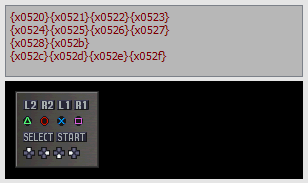
While digging around in Deling I came across what seems to be codes for the X, Circle, Square & Triangle, Start & Select buttons, that the game uses to display the PSX Button Icons ingame.

They look like this:
Triangle x0524
Circle x0525
X x0526
Square x0527
START x052b
SELECT x0528
(I haven't found the sticks or the R1/R2/L1/L2 button codes yet)

I figure somewhere in there, the game has to have a file that defines what the Buttons do or look like, and so you would probably use those codes to display the proper PSX Icons instead of B10, B9 etc. etc. But I haven't had any luck figuring out where the game determines this with the tools available.

By the way the Qhimm wiki no longer seems to work in all the times I've tried to visit it to look at FF8 file structure stuff and so on.
 
While digging around in Deling I came across what seems to be codes for the X, Circle, Square & Triangle, Start & Select buttons, that the game uses to display the PSX Button Icons ingame.
Hey Xiraiya, using these different codes would make things much easier for everyone! Are you going to create some kind of batch replacer mod?

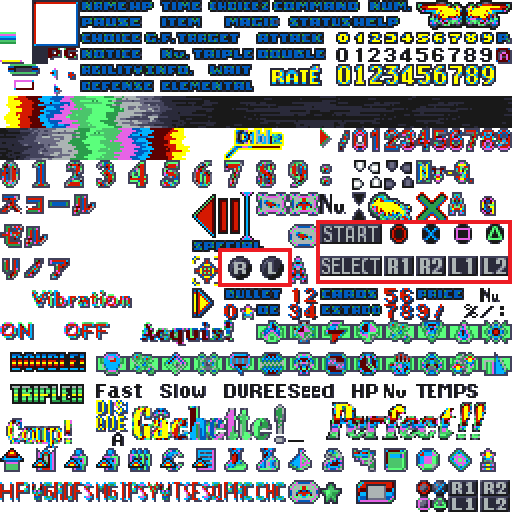
The texture for all the PSX buttons are in the icon.tex file (palette n°4) located in ff8\data\en\menu\
There's also very small buttons (bottom right) but I think they're unnecessary.

0EYpVkf.png


Edit -> Never noticed it but Deling have all PSX buttons codes (I haven't tried in-game yet):

FkYmlT8.png
 
Last edited:
Edit -> Never noticed it but Deling have all PSX buttons codes (I haven't tried in-game yet):

FkYmlT8.png
:O

So... if we had the assembly pointers the Steam version currently uses to call the B1-10 buttons, we could replace them with these codes?  If so, we could just pop those into hext tools from DLPB to replace one with the other! (which I currently use to inject Maki's UV patcher that fixes the PC UVs to match the PSX version - and prevents us from having to mod the .exe at all with a patcher, etc.)
 
It would be perfect if it can be done that way, I don't have any knowledge in terms of hex editing but when I saw the button codes in deling I thought "Surely these codes can replace the current green text ingame somehow"
Nice job finding the L & R buttons and the D pad buttons too, I didn't have any luck finding them initially but I did assume that since all the code numbers are very similar that you could feasibly guess them out.

I haven't a clue what the small Icons do, I assume they're used in a tutorial or perhaps a minigame or menu within the game I've forgotten about.

My only goal is to find ways to restore the game and undo all the garbage changes the PC versions have gone through. Things like restoring the old PSX font and Icons and proper controller buttons etc. I would be all for re-creating HD Menus and fonts and all that jazz but since the game can't seem to handle transparency properly without making it look messy and shit, I'd rather have a purist/nostalgic experience instead with a couple of nifty modern conveniences.

If someone were to be able to get the exe to use those button codes properly, I can have have a crack at making some XBOX Button icons that match the style of the PSX buttons for those who want that old PSX look but don't use Playstation controllers. I have some skill in Photoshop but I'm all about trying to recreate things as accurately as possible.
 
Last edited:
A faithfull hi-res PSX font restoration was already made here here. Hi-res PSX buttons should be easy too.

There's a mayor issue (in my opinion) about recreating a very accurate user interface: unlike FF7, there's only 1 type of texture for field and non-field. For example the game displays 1:1 text texture in dialogues on field, on the other hand, the text in menus is horizontally shrinked and same thing occurs with the rest of the textures which causes some artifacts. So even if you do manage to get perfect hi-res textures the menu UI will never look sharp and crisp.
 
I'm aware, I've been looking at this game and the forums on and off for years and years. That's the sort of thing I was referring to though, it's amazing all the work that people have done for the game but I don't really like any of the Hi-res stuff for FF8 for the exact reason no one figured how to make it display correctly, if I can't fully redo the UI with pinpoint accuracy then I don't really want to bother with a mishmash of things. So that's why I'm going in the other direction and trying to figure out how to get it to be as true to the PSX version as possible, which is what I mentioned earlier.

Speaking of.
HbfIWj.jpg


pfF8MY.png

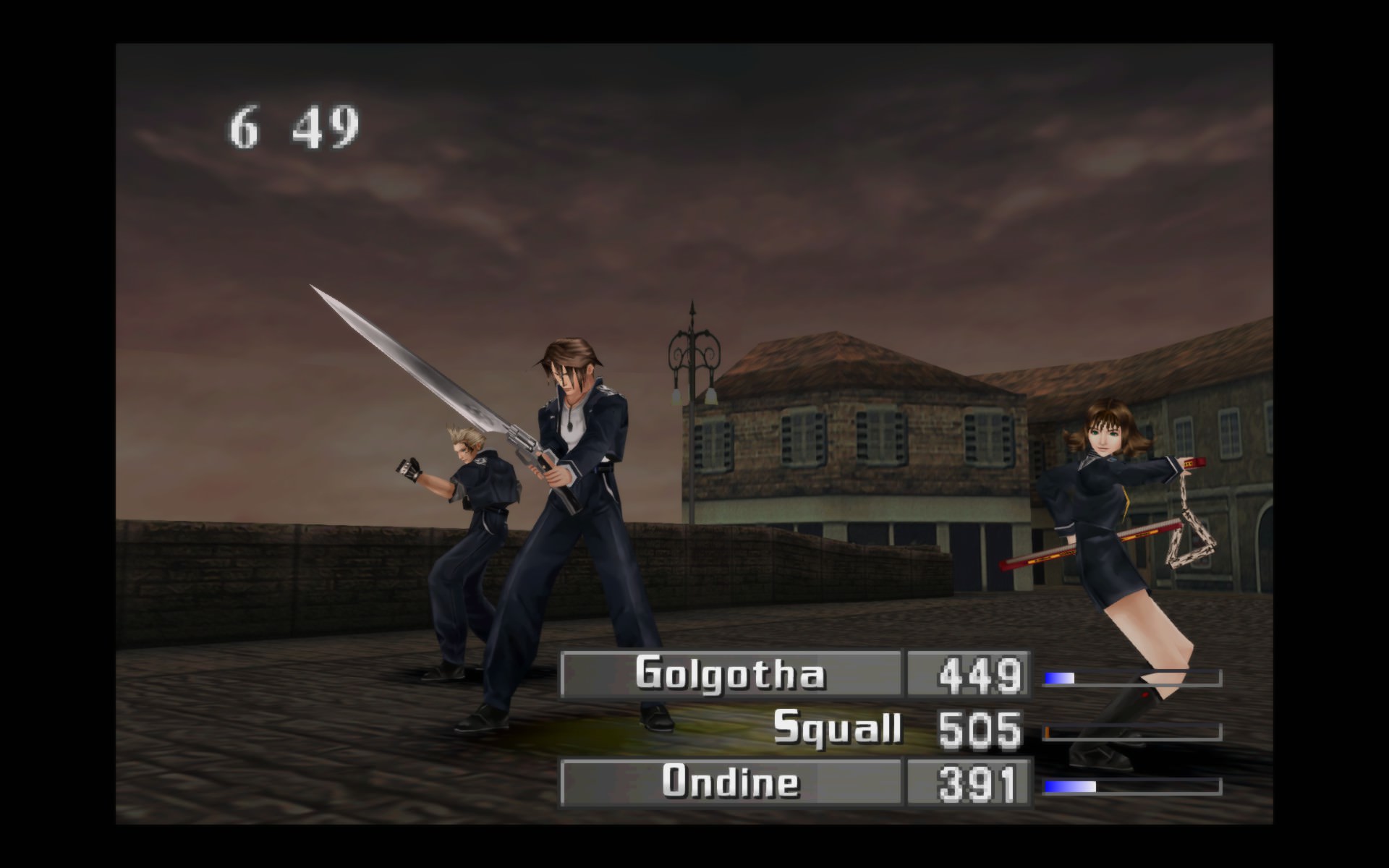
Character Names in battle on PC

opWGvq.png

Clearer example of the PSX version

See that font on the character names in battle in that tutorial image, I don't think I've ever seen anyone point this out but that font is seemingly removed from the PC version, Battle names use the default dialogue font and it looks bad when there's a bright background behind the text. I had an old copy of FF8 on PSX laying around that I made an image of to see if I could find the font or texture that has that Battle font, but even there I've had absolutely no luck finding it. If I could track it down from the PSX game I could try and figure out where it's suppose to go and then with Tonberry it could be re-mapped properly back into the game (I still don't know how to figure out the Icon sheets the game calls from to make it a 1:1 recreation.

I've been stuck with the awful blurred Icons for awhile.
 
Last edited:
Not to mention the blue-ish effect during most of the attacks, spells, etc. We're exactly on the same page Xiraiya, I was interested in faithfully recreating the UI too and yes I've been searching on how to target a specific and separated font for character's names during battle (the tutorial picture is a stand-alone texture) and new "narrowed" textures for menus.

Maybe Maki have a clue on triggering new textures during specific events?
 
Status
Not open for further replies.
Back
Top