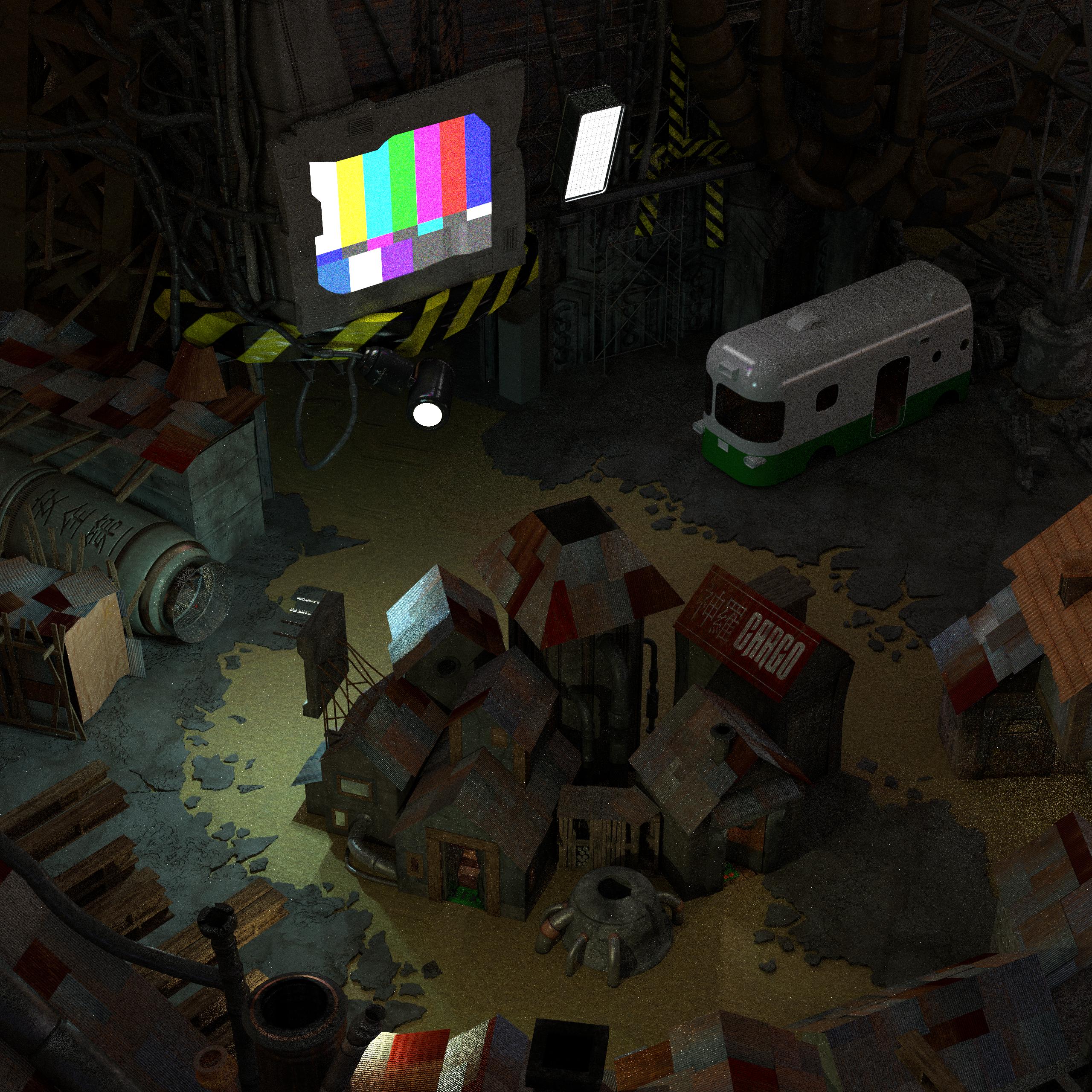
[HD Remake] WIP Sector 5 slums

  • Thread starter Thread starter Mayo Master
  • Start date Start date
Status
Not open for further replies.
OK - I'm impressed. Particularly by the PSX model.

Really great to see such attention to detail and faithfulness to the original's aesthetic.
 
Last edited:
Thanks! I hope the bonsai trees I'm doing for this scene will live up to that.
 
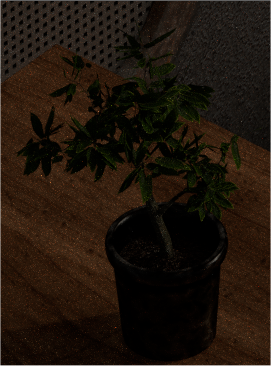
Update: bonsai!

Z5eiYsh.png


This is actually a 300% sized render, compared with how it would look like in the actual scene. I used the best method I could for having something that looked ok without spending an ungodly amount of time on it - in the final image it will fit within a 85 x 85 pixels square. All the branches were made manually (which was very tedious) and I added the leaves using a distributed particle system. It's a chestnut tree, by the way.
On another note, some other scenes in game feature bonsai trees, I'll be happy to provide this one as a reusable resource. The mesh is clean (all the junctions between branches are cleaned), so I think it can be exported fairly well, too.
 
Last edited:
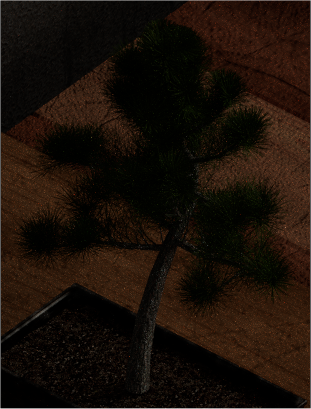
Bonsai part 2!

sivs8yv.png


This time, instead of making the bonsai manually, I used Blender's plugin called "Sapling". The plugin generates parametric trees. I think the results are pretty awesome, it's very simple and quick to use, and one can achieve a large variety of results. I don't think I'll make trees manually branch by branch, ever again (it took me 4-5 days to make the previous bonsai, and barely more than an hour fiddling with the settings to make the second one).
Well... the scene is almost done, actually. Yay  :D
 
Yes, my abilities in Blender 3d are essentially self-taught, I started 3d modeling in August 2012. However, as I explained in this post, I used a good wikibook and some good tutorials for getting the hang on this.
(snip)
Thank you - I'm reading through that wiki book now. If I can get half as good as what you make here I'll be a happy man. :)

Good job on the bonsai too!
 
I wish you the best in your 3d modelling adventures! When starting, I think patience is the main virtue, taking the times to get through the baby steps.
If at some point later you feel like trying out a field screen, let me know!
 
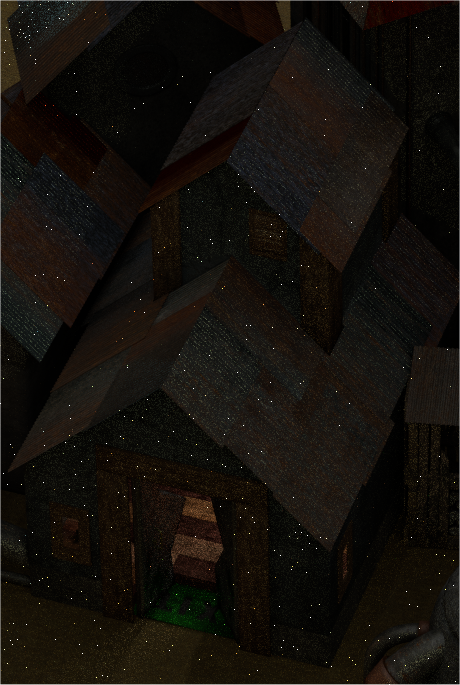
Update: I incorporated the indoor stuff of the materia shop into the main outdoor scene of the Sector 5 slums.

1AceoEr.png


There were some inconsistency issues to solve, since the house as seen from outside is actually much smaller (about half the size) of how it is laid out in the indoor scene. This is the best I could manage for the materia shop, I think it's fairly decent.

Now, I have another problem. I decided to go back to the weapon store scene, which is supposed to be located inside a "refurbished" bus. The whole scale of the scene is complete nonsense, let alone trying to match how it looks like from outside with how it's supposed to be inside. I realized, after making some preliminary tests in game (i.e. comparing Cloud's height to objects in the scene), that the height and width of the bus would be about 5 metres  :-o  (basically, it's assuming that the top of the crate where the kid sits is about 2 metres high). So I'm really wondering about how to turn that environment into something believable. While the height could correspond to a double-decker bus (which is absolutely not how it looks like from outside), the width is way to big for any regular road vehicle (it's about twice the size of a regular bus). So... suggestions are welcome, because I don't quite know how to get started. I could try to keep to the original idea, but some elements will be ridiculously sized. I could try to transform the scene completely and have a matching exterior, but it's pretty much like creating something from scratch. All in all, it looks like this mds5_w scene is going to be a huge pain  >:(
 
Have you ever tried my community flevel project? I had rescaled the models to fit better to the backgrounds.
For mds5_1 the model size is 576 (previous 512).
And mds5_w has a model size of 640 (previous 512).

The only solution for the inconsistent of the scenes I could imagine, is to make the models smaller for mds5_1. But I fear the doors will look then a  bit to huge. I have no idea how much it is possible for Makou Reactor to alter the walkmesh for it. It has the ability to do it, but the question is if it works.

Anyway all what I wanted to say is that we are not (entirely) stick to the size of the models.
 
Have you ever tried my community flevel project? I had rescaled the models to fit better to the backgrounds.
For mds5_1 the model size is 576 (previous 512).
And mds5_w has a model size of 640 (previous 512).

The only solution for the inconsistent of the scenes I could imagine, is to make the models smaller for mds5_1. But I fear the doors will look then a  bit to huge. I have no idea how much it is possible for Makou Reactor to alter the walkmesh for it. It has the ability to do it, but the question is if it works.

Anyway all what I wanted to say is that we are not (entirely) stick to the size of the models.
Well, no, I've never tried. And thank you for mentioning, because that's going to be a life saver! Honestly, if I can have characters resized for mds5_w, then most of my troubles are over. If all characters were bigger, then it would mean that, in comparison, I could get the interior of the bus rescaled to reasonable proportions. We'd have to go by trial and error, because if I just get all character scaled by 1.5, I'm not sure how everything is going to look like. Still, it is by far the most accommodating option  :)
I would not resize the character much for mds5_1. The walkmesh is what it is, and doors are already much larger than need be.
 
Update!

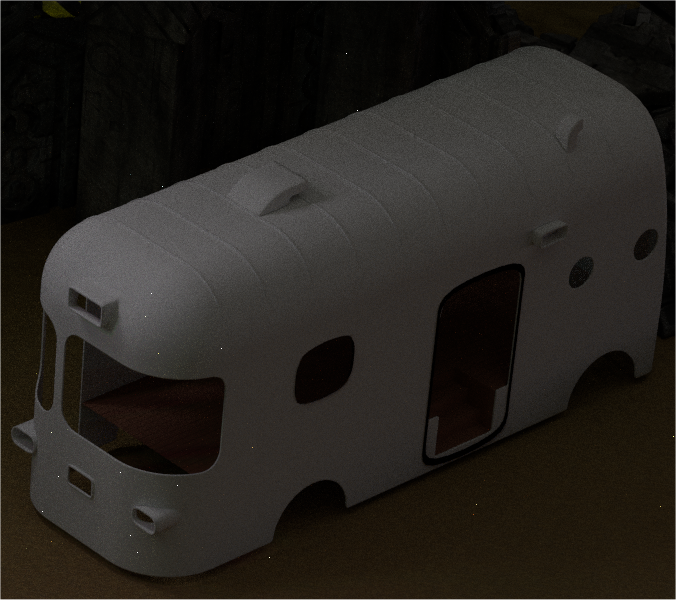
So... I've mostly worked on trying to make a compatibility of environments between mds5_w and mds5_1, and it's pretty much figured out. I initially tried to piece the walls of the bus together using what I originally made for mds5_w, but I wasn't happy of the result (among other things, the topology was really messy). So I decided to take the basic dimensions of the bus and remake it from scratch - which took a bit of time. I'm just done with the body of the bus (not textured), and I wanted to share that with you.

DlEUAzM.png
 
It's all coming together now  8)
Oh man am I excited to play this scene
 
Bonsai part 2!

<IMAGE REMOVED TO not be redundant>

This time, instead of making the bonsai manually, I used Blender's plugin called "Sapling". The plugin generates parametric trees. I think the results are pretty awesome, it's very simple and quick to use, and one can achieve a large variety of results. I don't think I'll make trees manually branch by branch, ever again (it took me 4-5 days to make the previous bonsai, and barely more than an hour fiddling with the settings to make the second one).
Well... the scene is almost done, actually. Yay  :D
Bit late but LOL that is funny. Now you might be wondering why I would say that. When I was actively using POV (back 10 years ago) I did the exact same thing. I first made a pine tree by "hand" actually I used a random perturbation calculation along a spiral for each "branch" and scaled the branches (you may now wake up). However this was tedious (even too me) so I found a fractal tree maker that did the same thing in POV by a function call.
The nice thing about parametric tree creation is you can add a bit of randomness for each tree you create so they all look just a bit different.
The down side is the object data explodes. However you are rendering to 2d so the amount of data is all the same (LOL).
Congrats you aren't the only one who has done this (IE don't feel bad).

Update!

So... I've mostly worked on trying to make a compatibility of environments between mds5_w and mds5_1, and it's pretty much figured out. I initially tried to piece the walls of the bus together using what I originally made for mds5_w, but I wasn't happy of the result (among other things, the topology was really messy). So I decided to take the basic dimensions of the bus and remake it from scratch - which took a bit of time. I'm just done with the body of the bus (not textured), and I wanted to share that with you.
<IMAGE removed for redundancy sake>
Oi looks good.

begin brain ramble
With all these details it would be interesting to see it in a preview like one would in Oblivion/Fallout3/NewVegas/Skyrim. Granted that is only partially possible (I did say partially). As you can only insert data into those systems programatically that preexists in the data base for the game. You would also have issues with Vista information for the area (what does the surounding area of midgaard look like relative to sector 5 slums giant pizza in the sky?). Lots of technical difficulties with doing such things.
end brain ramble

I've never been able to "get into" using blender sadly because I learned to make models programmatically (IE snythesize everything instead of using and making chunks of image data to paste on things). It only has certain advantages (for example the models in FF7 look pretty good irregardless the resolution they are displayed at for a similar reason), in that it is far more scalable. It is quite a bit more work for simple results however (LOL). Hence likely it was not a popular method in the end to do things.

Back to the image at hand, you know I never really paid attention to what the bus looked like in game. I've played through it a few times too. Hmmm my guess is the details weren't enough for me to "care". I tend to focus on something that has any detail in games when viewing.

Cyb
 
Last edited:
So I'm really wondering about how to turn that environment into something believable.
Switch off your brain. Making sense out of FFVII's physically impossible BGs is a waste of time. The stairwell in upper Shinra Building, for example, is impossible. The way the stairwell goes up would cause the each subsequent floor to have an overbite. I know because I tried to model it as a continuous model for the Mako Dawn mod. You don't notice because you never compare the BGs side by side. No one besides developers will notice — you're just hyper concious of it because you're making it.

Unless you're planning on solving all continuity issues, my suggestion would be not to worry about it and focus on making it look nice, not logical. Unfortunately, that'll occasionally mean recreating tweaking / things even when they're supposed to be part of the same object.
 
Do we have the ability to make/modify walkmeshes? That's obviously taking greater liberties with the game than this project was ever meant to, but it's pretty much necessary if you want the world to actually fit together properly.
 
Makou Reactor has some possibilities to edit the walkmesh, but it seems to be a bit buggy and uncomfortable. But the option is there...
 
Ah! Scaling and consistency is almost an endless topic. So...

Switch off your brain. Making sense out of FFVII's physically impossible BGs is a waste of time. The stairwell in upper Shinra Building, for example, is impossible. The way the stairwell goes up would cause the each subsequent floor to have an overbite. I know because I tried to model it as a continuous model for the Mako Dawn mod. You don't notice because you never compare the BGs side by side. No one besides developers will notice — you're just hyper concious of it because you're making it.

Unless you're planning on solving all continuity issues, my suggestion would be not to worry about it and focus on making it look nice, not logical. Unfortunately, that'll occasionally mean recreating tweaking / things even when they're supposed to be part of the same object.
I don't think that making sense of the backgrounds is a waste of time. I agree that making a perfect matching of all the connected scenes with extremely realistic proportions is not possible, however. Nevertheless, I do believe in the importance of ensuring consistency in these environments, because having characters in a believable surrounding helps having the player immersed in the world (suspension of disbelief, if you would call it). With that in mind, I'll always do my best to make the environments look logical, or at least "as logical as they can possibly be".
Now, with these criteria, there will always be some compromise to be made (as you mentioned by "tweaking things"), and I have already made a few. For instance, the houses of the outdoor scene of the Sector 5 slums are coarsely undersized (particularly when compared to the indoor counterparts of the shops). Hence, when trying to do the outside/inside matching, it can't work perfectly on a 1:1 scale. The compromise I made in that occasion was to just cut out pieces of the shop that wouldn't fit in the outside scene (it visually works because, from the outside, you only see a small fraction of the indoor environment). For the bus scene, there are some details I am going to change (namely, the driver's seat location). And there will be some other design changes along the way. I also believe it makes sense to take some liberties from the original design, since scaling everything up on the same proportions as the original would create a bunch of absurdly sized objects (mostly smaller objects, like a tin can, a soda bottle, a tea cup, the steps of a staircase, etc).
All in all, I think it is worth to put a lot of thought into scaling, redesigning, and what I would call "reconciliation of discrepancies between environments". 
One other thing: thanks to Kaldarasha, I am now aware of what can be done about the character sizes using Makou Reactor, and that will be a huge help for solving most scale inconsistencies.

Do we have the ability to make/modify walkmeshes? That's obviously taking greater liberties with the game than this project was ever meant to, but it's pretty much necessary if you want the world to actually fit together properly.
Makou Reactor has some possibilities to edit the walkmesh, but it seems to be a bit buggy and uncomfortable. But the option is there...
Given the extremely remote possibilities of walkmesh modifications, I have based all my designs on the constraint that the walkmesh cannot be changed. I will keep on working that way until the day someone ends up with a bug-free in-game test. Even if the walkmesh can be altered and help to solve consistency issues, I would rather go for small edits, not something that would drastically change the whole scene (or at least, not in the near future). That being said, I'll try to keep an eye on the progress made in that department (or, if the person willing to test walkmesh alteration would keep me informed, it would be greatly appreciated  :)).
 
Update!

This past week, I have kept on working on the outdoor scene of the Sector 5 slums, mds5_1. I did not finish the bus yet (mostly the texturing, adding wear, rust and dust). I spent some time modeling the broken asphalt in the scene, until I was happy with the result. It was quite tricky - the objects are very large, so I mostly relied on a combination of procedurals to make all the cracks.
Below is a render with only 50 samples (hence it's a pretty noisy), but 100% resolution (click on image to see the high res):

MwJgB0J.jpg


So... there are about 4 things to do to complete this scene:
- revise the packed dirt texture for the ground where the asphalt doesn't show
- Make a transition in the house on the right to lead to min5_1 indoor scene (I don't think I'll make a straight import, the scale inconsistencies are too great).
- finish the bus, and the hanging canvas (cloth simulation)
- tune the lighting (it's not bad, currently, but needs a few tweaks)

I also thought about adding particle systems to litter the scene with tiny gravels, debris, trash etc. But I think I'm not too far from the limits of this computer. The scene is very, very heavy at this point (about 200 Mb, and roughly 4000 objects, without particles). I'll have to see what I can do.
 
- tune the lighting (it's not bad, currently, but needs a few tweaks)
Does this involve adding a whole lot more lighting in general, or at least brightening what's there? The lighting in any given part of this image is good relative to the rest of the image, but on the whole it's a lot darker than the original.
 
That's true, the brightness level is currently quite lower on my scene than it is on the original image. Lighting is actually rather complex a topic, and we could have an open debate about it.
One thing I started to observe as I was modelling various scenes was the following: generally, the amount of lighting in the slums scenes is fairly high in the original images, and if I try to replicate the same amount of brightness in my remodelling, it's not "working" perfectly. Mostly, it feels the scenes are overexposed, and brightly lit scenes do not convey the "slums feel" very well. Often it seems too saturated. Lighting in original images is also inconsistent at times: very often you would find a light source illuminating an object with a yellow color, while the same light source would have a blue glare associated to it.
My current take on lighting is: use original brightness level as a rough guideline, rather than something to be replicated or perfectly matched. What mostly matters is to convey the "feel" of the place. If the lighting of the scene is significantly modified with respect to the original, the lighting of the character models can always be tuned using Makou reactor. That being said, I am open to suggestions.
On that particular scene: I would like to increase the overall lighting level a little, because the overall brightness is a bit too low when compared with the original. However, I won't try to replicate it. I also made some basic tests already where I just increased the intensity of my enviro lights, and the result wasn't really good. I think that what I should aim for is to have a relatively low enviro (or ambient) lighting and multiple smaller brighter lights, which would be more appropriate for describing a place where there's little difference between daytime and nighttime, and most of the lighting is provided by man-made light sources (as opposed to sunlight). More specifically, I would like the rubble in the top-right corner to remain rather dark - it's meant to be a messy rubble which shouldn't draw much attention to the viewer (even if I spent a lot of time working on this area, it's absolutely not the highlight of the scene). Then, in the original image there are many other "cone-lights" which only have a volumetric effect (i.e. a visible beam of light), I thought of having extra lighting from these sources. There are also some lights in the "tunnel" (for lack of a better word) below the massive tv screen) which are currently missing in my scene, they'll be added. I'll also probably ramp up the intensity of some of the light sources that I already have. The lighting intensity from the tv screen and the four blue lamps on the left hand side is already fairly high, I don't think I'll change these ones. Overall, I also think that if I can have many objects casting multiple shadows, it would help giving the right impression. That's pretty much what I'll be working towards - if you have some suggestions please let me know.
 
I mainly brought it up because at least on my work computer (2012 27" iMac, default color settings) it was by and large too dark to see most of it. Virtually all the detail behind the bus was completely lost.
 
Status
Not open for further replies.
Back
Top