[HELP] Menu Overhaul / Beacause - Catalog 3.0 TESTING

  • Thread starter Thread starter EQ2Alyza
  • Start date Start date
Status
Not open for further replies.
That font is part of the menu overhaul mod.  Or do you mean my modifications?
 
Nevermind :)

You mentioned "bix" font in your previous post, so I misunderstood what you meant.
 
Ahaa I meant big font, I will edit the post, sorry. :)  The font in the stock menu is larger so cannot fit so much text in the description box.

I will play this for a few hours random fights etc. and see if any issues.


----

Game crash when using PHS, when I push right or the button to select character to replace it crashes.
This happens on the kernel version as well.  So removing kernel had no impact.  Ideally need someone else to see if they get this crash as well.

----

Trying to figure out what the cause is.  I deactivated avatar and menu background mod it had no impact on PHS crash.

I then tried the older 2.3 menu overhaul mod, and that one does "not" have the PHS crash.

So the crash is unique to the 3.0 version.  I am tired so will play with this some more after some sleep.

----

One of the hext files in the lro causes the crash, but am so tired, I will post the lines that were the problem later probably in about 8 hours. :)
 
Last edited:
I experienced that crash as well and knew it was from the hext file. If you find the specific line, cancel it out by adding a # in front of it and post your results.
 
Yeah there is numerous PHS related hext blocks but it is this one causing the crash, in this file 01-Base_2.txt.

I dont know which exact line tho, but this at least narrows it down a "lot" for you.  Also I observed in the older menu overhaul there is no kernel files so I think its deffo safe to remove those now, they will conflict when people have customised those files.  kernel2 has some text entries so would perhaps be parts of beacause translation but not the menu mod.


{phs name
006C5C74 = E8     
 
006C5C95 = 1E
006C5CCE = 1E
006C5CD5 = 1B
006C5CEF = 34
006C5D34 = 33
006C5D3B = 1B
006C5D71 = 33
006C5D78 = 51
006C5D92 = 4A
006C5DD7 = 49
006C5DDE = 1B
006C5E13 = 49
006C5E1A = 51
006C5E2D = 07
006C5E31 = 08
006C5E3E = 49
006C5E45 = 48
006C5E58 = 07
006C5E5C = 08
006C5E69 = 33
006C5E70 = 48
006C62C2 = 1B
006C62D5 = 63
006C62DB = 01
006C633B = 1B
006C634E = 63
006C6354 = 01


I see there is many areas patched like battle square, select name screen etc. so I need to test many areas of the game.


I am learning more and more on how 7thheaven works LOL, enough now I think I will be making some of my own lro patches :)  Also i adjusted the defaults on this lro, so by default, all the options are to my liking, like xbox buttons, and coloured items :)

Profile below


Miscellaneous - Dynamic Cloud Weapons
   ID: 5d6a46f7-b0b0-43b1-88cb-f54de763c5b1
   Version: 2.33
   CloudSword = 1
   Sword = 1
   Dynamic = 1
Miscellaneous - Team Avalanche Fields
   ID: 72152e09-7b5c-4942-8465-afa154e20b08
   Version: 2.0
   field_ta = 1
Field Models - Objects
   ID: 7f1274cf-3bf8-4ae6-a722-d2f374c902fc
   Version: 2.1
   huge_materia = 1
   materia = 2
   potions = 1
   save_point = 2
Animations
   ID: 653bb2b6-3999-4bb0-bc21-2ae299bb7b87
   Version: 2.1
   f_animation = 1
   w_animation = 1
   60fps = 1
   fba = 0
   fbn = 0
   fed = 0
   fs = 0
Battle Models - Characters
   ID: 1917178d-5ef1-42e2-9c5c-58045588b3f4
   Version: 2.1
   models_aerith = 1
   models_barret = 2
   models_caitsith = 1
   models_cid = 2
   models_cloud = 4
   models_redxiii = 3
   models_sephiroth = 1
   models_tifa = 2
   models_vincent = 2
   models_yuffie = 1
Battle Models - Enemies
   ID: 267ef1d2-599c-4f4d-860c-b838f402c587
   Version: 2.1
   models_diamond = 1
   models_frogs = 2
   models_scorpion = 1
   models_jenova = 1
   models_joker = 1
   models_life_form = 1
   models_motorball = 1
   models_ruby = 1
   models_soldiers = 1
   models_sweeper = 1
Battle Textures: [Tsunamods] Avalanche Arisen 1k Battle Scenes
   ID: c33191b1-439d-4536-9c70-cc5f6957dfa2
   Version: 1.0
   battle_bg = 1
Field Models - Main Characters
   ID: efe1b0ec-6ce3-43f7-9659-f1bc9d36f60c
   Version: 2.2
   models_aerith = 3
   models_barret = 6
   models_caitsith = 2
   models_cid = 3
   models_cloud = 0
   models_redxiii = 4
   models_sephiroth = 2
   models_tifa = 3
   models_vincent = 2
   models_yuffie = 2
Field Models - Non-Player Characters
   ID: d329bc05-3dc0-4f35-94aa-632986f47194
   Version: 2.34
   models_base = 2
   models_biggs = 2
   models_jessie = 2
   models_wedge = 2
Field Textures - satsuki
   ID: 63c6df8c-971a-47f0-aac5-da4290f36058
   Version: 2.3
   field_bg = 1
Media - Movies
   ID: 4f61f4cf-6733-4503-93f4-ed7fdfee21a6
   Version: 2.1
   movie = 1
Menu - Avatars and Backdrops
   ID: aec06415-0f12-410b-ac43-f4e89e363729
   Version: 2.1
   avatars_aerith = 0
   avatars_barret = 0
   avatars_cait_sith = 3
   avatars_chocobo = 2
   avatars_cid = 0
   avatars_cloud = 0
   avatars_cloud_young = 0
   avatars_red_xiii = 0
   avatars_sephiroth = 1
   avatars_tifa = 1
   avatars_vincent = 0
   avatars_yuffie = 1
   game_over = 1
   prelude = 1
   start_menu = 5
Minigames Collection
   ID: ee718ab3-0aa5-43b2-b7bc-82c69fcd19d0
   Version: 2.31
   chocobo_models = 1
   condor_models = 1
   motorbike_models = 2
   chocobo_textures = 1
   coaster_textures = 1
   condor_textures = 1
   motorbike_textures = 1
   snowboard_textures = 1
   wonder_square = 0
Spell Textures
   ID: b97373a2-aa9f-40e3-9a3d-aeaa846391d4
   Version: 2.1
   magic = 2
   coin = 12
   limit = 0
Menu Overhual - 3.0 TEST - no kernel - fixed PHS
   ID: e320e2b7-159a-425b-baa1-5464b728ff2a
   Version: 1.0
   beacause = 0
   menu = 1
   items_materia = 3
   controls = 2
   nbb = 0
World Models - Characters
   ID: a5b9a2f3-c9e3-4cbb-947a-1489ebeeb921
   Version: 2.1
   cid_world = 3
   cloud_world = 6
   tifa_world = 3
World Models - Enemies
   ID: 0d0cc481-4cc3-4e7e-9529-fa7077b38615
   Version: 2.0
   diamond = 2
   emerald = 1
   ruby = 1
   ultima = 1
World Models - Vehicles
   ID: 0e056cf4-7b37-49e1-aa9e-c57bc73db954
   Version: 2.0
   buggy = 1
   chocobo = 1
   highwind = 1
   submarine = 1
   tiny_bronco = 1
World Textures
   ID: 35e0906d-7da4-4da2-b10d-87149d291a38
   Version: 2.0
   world_bg = 3
 
Last edited:
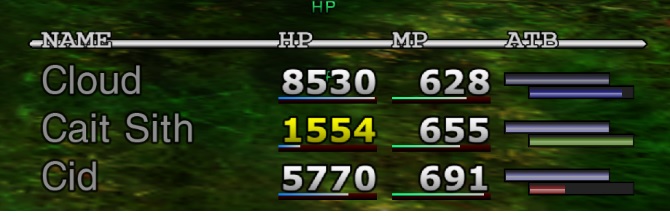
I have managed to make the limit bar change colour again for hyper, sadness in battle so its easier to determine your status, found the hext used for that, this hext system is a lot better than just supplying a modded exe.

I am in two minds now to try and make max HP show again so using ???? is easier as that calculates damage based on difference between max hp and current HP but I consider that not as an important change, however I do want to bring the bars back for barrier and mbarrier.

The hyper, sadness colour can be restored in file 01-base_14.txt, commenting out the following two lines.

Code: [Select]
Code:
{inner limit bar colours#0091E970 = 00 00 FF 00 00 00 FF 00 00 30 FF 00 00 00 00 00#0091E980 = 00 00 00 00 00 00 00 00 00 00 00 00 00 00 00 80
Interestingly there was already colours in the main menu but wasnt implemented for battle screen, although the colours in menu I feel are not differential enough so I am going to try and make them match the default colours been used in battle now.

Pic here, cloud is sadness, cid is fury.  Without disabling these 2 hext injections they would be both same colour.

PaK4EQj.jpg
 
Last edited:
The controller icons are just placeholders, so they don't work right now.

As for the PHS crash, it's not difficult to pinpoint which line. Just begin a set of lines with #, for example 10 lines, and then start up the game to test the results. If the game doesn't crash, you can eliminate those lines as the culprit, but if the crash occurs, you can eliminate the lines without the #. Rinse and repeat until it's pinpointed.

Can you share with me your kernel changes? You can make kernel patches with one of the tools (I forgot the name) that will merge results of different kernels into one. This had to be done with the RedWolf models for Red XIIII.
 
Last edited:
for the lro with fixed PHS and coloured sadness/fury.  I am seeing no glitches with the block removed, so I didnt really concentrate on finding the exact line as the PHS screen looks and works fine.

https://drive.google.com/file/d/1aX_kPV9u3J_tGMJbyuqlqYGw_Rz2OjW2/view?usp=sharing

I will work on the kernel patch, the reason its never been shared before is because of copyright.  So I cannot just provide the full file, but let me see if I can get a patch done.
Also for all the text to work you have to use a kernel compressor as well as the game has a small limit.

.wm patch (inside zip). Can apply patch with wallmarket.  I think I made the patch against stock kernel.bin (dated 1998).

https://drive.google.com/file/d/1G8FQ--6jRVYw71dt2XCx9iDUdus7Cj2u/view?usp=sharing

For compressing kernel2.

https://www.ff7catalog.com/threads/11734/
 
Last edited:
Sharing kernels is not an issue (plenty of mods share them publicly), but you can create patches and just share the patch. What kernel compressor do you use?
 
Thanks, this helps a lot :)

Do you have any documentation for your kernel changes? I can add them to the Catalog 3.0 release, if you want.

Let me know of any other changes/fixes you do with MO. It helps a lot to have others chiseling away at the minor details that need work. I'm on Discord (EQ2Alyza) as well. We can communicate in the 7th Heaven channel.
 
I can write some up, but I feel it isnt finished.

I did a playthru up until just after turks boss battle in midgar raid, and was finding bits to rebalance as I played, final dungeon not play tested.

Also 20 mins ago I had ideas to adjust bits of balance as I am motivated again to work on it, but you are welcome to add it as is now and then can update it later, when I have done documentation and made updated changes.

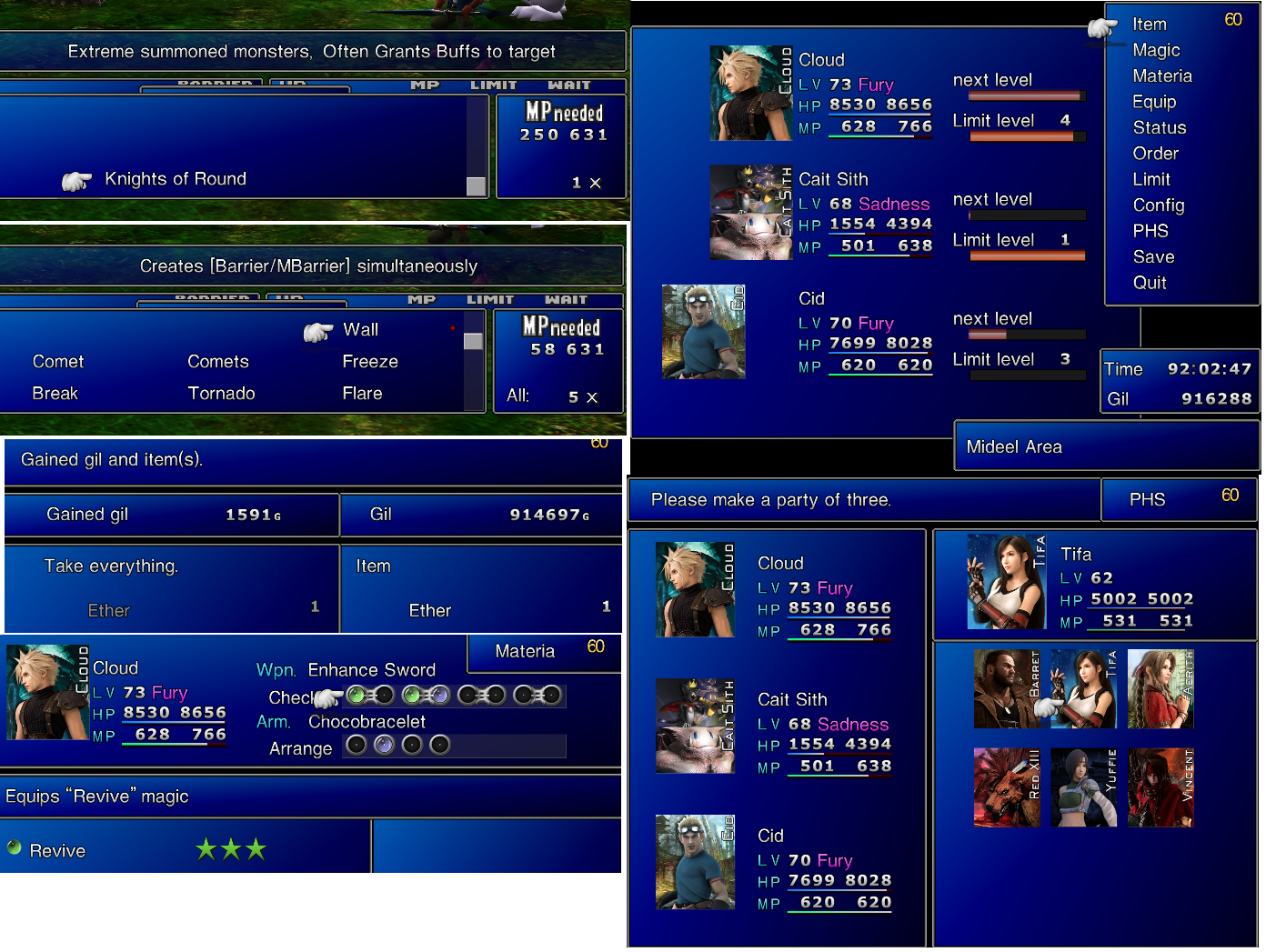
What do you think of my changes to things like consumables and equipment? bare in mind this is supposed to also match my scene file changes with much tougher enemies, on stock enemies this would be overpowered.  Although some summons/enemy skills have notable downsides now, e.g. kotr has 7/8 chance to grant many buffs on target including peerless. Big guard also affects enemies, most bosses wont be ko'd by kotr anymore due to having much more HP so you have to think about the buffs it leaves behind before using it.

Things like chocobracelet got buffed as in normal game they useless noone uses them and that item is so hard to get more than one as its a super rare prize. 

Also you can see I am learning fast, made my first package earlier today :) https://www.ff7catalog.com/posts/235383/

I think thats a good candidate for 3.0, I think wolfman wont mind if you ask.  He was very happy I made the package.
 
Last edited:
I will probably start more work this weekend, I have now my exe as game convertor exe.  Previously there was a few things patched in, now any patches will only be loaded via hext loader so is always standard exe.  This is so I can convert some of my patches to 7thheaven for others to use, and also to make sure when testing menu overhaul my config isnt causing problems.
 
The OP said to use the 1.02 ff7.exe from the Game Converter, so I assumed you had already done that. Hopefully everything falls in place this weekend when you work on it more.
 
I did when testing the mod, but wasnt using it for day to day gaming.  Since I got sick of swapping the exe round, I may even forget to swap it as well and I want to migrate all my patches to hext, I have now made it so its permanently that exe.
 
And that is why hext is so great :)

We need to end the days of .exe swapping.
 
This is proving difficult.

I dont think I will be able to do all my wanted improvements to the menu overhaul but there is good news.

I have made an "enhanced stock".  Using a few of the hext mod's from the menu overhaul and font changes.
The enhanced stock UI has the following changes.
1 - Battle background full screen extending to behind UI.
2 - Font from the menu overhaul, making menu look stil a lot sleaker, and also allows more text to fit in battle menu.
3 - Enhanced icons same as menu overhaul. (not all added yet).

Menu overhaul I am making some fixes, I have found which hex edits manipulate the support materia text on spells and summons (these of course work on the enhanced stock, but working on getting it working on menu overhaul UI), but they look like they will be difficult to fix with my skill level, its still a work in progress.
 
Last edited:
The one issue with enhanced stock is missing independent and command materia icons as can see in equip screen.

This is enhanced stock.

ajnlPjq.png
 
Looks good :)

"Extreme summoned monsters, Often Grants buffs to target"

Might I suggest some changes to have it sound more natural?

"Extreme summoned monsters. Often grants buffs to target." -> Keeps your wording, but fixes the punctuation.

"Extreme summoned monsters. Applies [buffs names here] randomly to targets." -> Changes the wording to be more natural.

Example:
"Extreme summoned monsters. Applies [Wall/Haste] randomly to targets."

I changed the word grant to apply because grant is an act of reward to another. You grant things like peace, money, time etc. to others. Apply doesn't have that rewarding connotation. Buffs are a rewarding thing, but you're giving it to an enemy, which is a negative thing. Apply fits the mold better.

I'm a little picky when it comes to wording in context, sorry ;) Anyways, keep up the good work.

...however I do want to bring the bars back for barrier and mbarrier.
Yes, I do too, but not in the form of bars. I'd prefer the icons that were made for Menu Overhaul. I've got this fixed already for Catalog 3.0.
 
Last edited:
I cannot put the names of the buffs there as there isnt enough room, other summons do have the names of the buffs, but KOTR applies too many to fit.  It would be Applies [Shield/Haste/Resist/Crits] to targets (it used to also have peerless as well in the version you got).  It may fit now with the new UI possibly, I will try it, but I think it wont.  But it was like that because I was trying to make it fit on the old UI.  That isnt part of the UI mod tho remember that, its a separate change for my balance mod.  I can work on that later, I did try the change just now and it does not fit, I would have to remove "extreme summoned monsters".

Summons Knights, Often Grants [Shield/Haste/Resist/Crits] to target, almost fits, it loses the last 3 letters, this is why punctuation isnt a priority, so I can remove the apostrophe, and the 2 brackets and that would just fit.  But only on enhanced stock and menu overhaul.  The stock game it wouldnt fit.

If you are already fixing things on menu overhaul I am not sure the point of me carrying on, especially as you prefer the new barrier icons, I will leave the barrier alone and just see if I can get the support information visible again, if I cannot then I think I have done all I can on it.  So by support information I mean all 5x, or quad cast 3x, that type of information which is currently missing.  Hopefully you keep my sadness/fury changes as they are useful in battle.  The version I posted earlier had a little issue with an extra hp text showing, the version I sent you now on discord that is fixed.

Also I will put enhanced stock in a separate mod but are you ok with me packaging your enhanced icons with it, like you did with menu overhaul?  Shiny materia, and coloured inventory.  I will send you the package and it can be added to catalog 3.0.  As I think enhanced stock is ready now.  I fixed all my big issues with it.  It only has very minor issues left.

 
Last edited:
Status
Not open for further replies.
Back
Top