[HELP] Menu Overhaul / Beacause - Catalog 3.0 TESTING

  • Thread starter Thread starter EQ2Alyza
  • Start date Start date
Status
Not open for further replies.
I want to get the support information fixed as well. The All materia also doesn't show how many uses are left. I wonder if it's an issue with the menu PNG files...

The icons are a Menu Overhaul option, so it'd be best to package them with your IRO. Is there a drastic difference between "Stock Enhanced" and Menu Overhaul, or is everything just a fix to the original MO?
 
This is proving difficult.

I dont think I will be able to do all my wanted improvements to the menu overhaul but there is good news.
KISS principle... Keep It Stupid Simple ;)  Or rather, in this case, release what's reasonable and easy to do (and it sounds like you've already got a huge amount done), then go back and do the nutso parts later in an update to the original mod, or as a second stand-alone.  I'm not sure what EQ2Alyza has in mind for v3.0, but I *think* an easier update mechanism is part of it.  From what he's posted publicly, I think whatever DLPB has in mind for his mod management method makes updates something the author can push (or at least advertise) themselves, rather than sending them through a catalog "gatekeeper."
 
I want to get the support information fixed as well. The All materia also doesn't show how many uses are left. I wonder if it's an issue with the menu PNG files...

The icons are a Menu Overhaul option, so it'd be best to package them with your IRO. Is there a drastic difference between "Stock Enhanced" and Menu Overhaul, or is everything just a fix to the original MO?
Most of it is differences in hext used (Enhanced UI uses only a fraction of the hext as it uses stock window layouts and sizes), I also had moved various menu png files around to suit how I wanted it packaged.

However about 8 hours today I decided to enhance the package before sending it to you to have a look and it caused me to do loads of work on it today.  It took me a few hours to find good working tools for lgp extraction and tex to bmp conversion so I could get some stock including the stock X image for support materia in battle menu.  I also added options in my package for the shiny materia etc. but also for bright text/digits and gradient text/digits (on menu overhaul mod those are linked to shiny/standard materia options).    Finally I have spent some hours manually redoing some of the menu png files for the Enhanced UI to polish it up.  So e.g. I have the coloured icons fully functioning on it now, previously a couple were not due to not having some stock data.

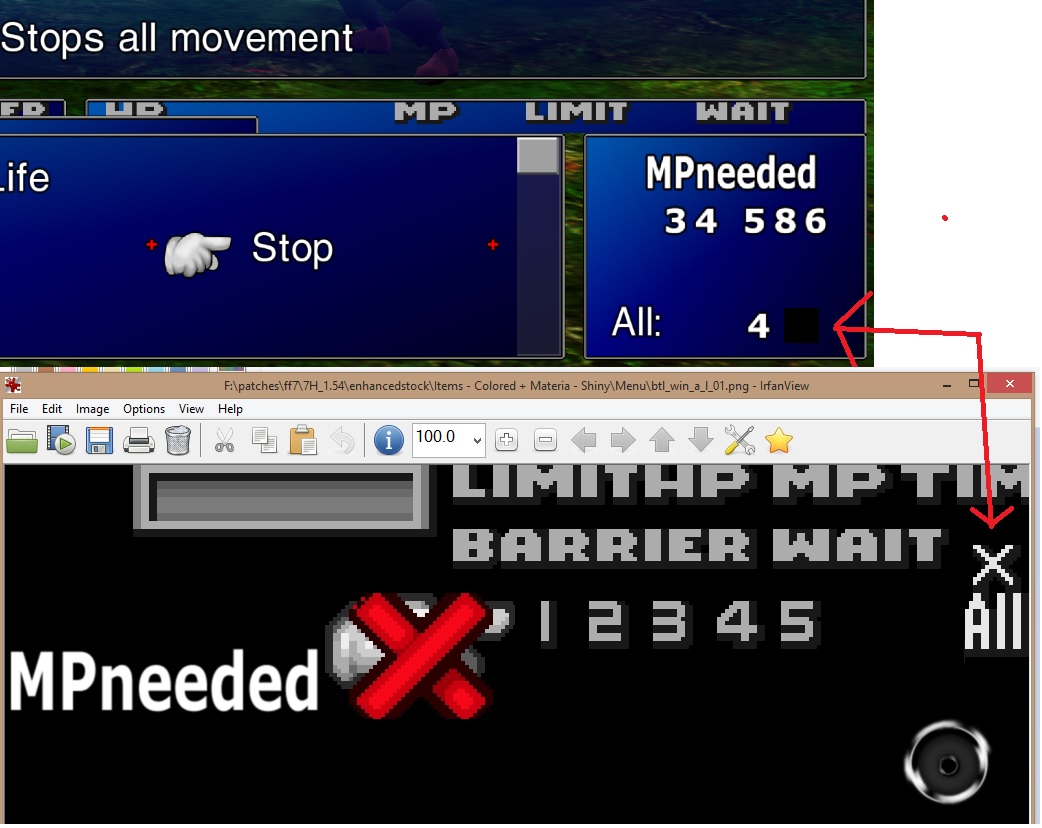
Now however there is one issue left and the X is also now not working on enhanced stock, just a black box instead LOL, but I am too tired so will leave it at that until I look at it again, but will send you the package.  I think they should be separate packages given all the work I have done.

However given I have used lots of DLPB's work for the hext etc. and your work also for the enhanced icons, this isnt really my mod, I just kind of mixed parts of them together, with stock to come with this result.

https://drive.google.com/file/d/1iqwHvrJkpZamfRnzsQQCCy-WVUjxOHvD/view?usp=sharing

Also this isnt really extensively tested either.  In different parts of game which potentially could cause problems, no battle square, chocobo racing, name selection etc.  But you can look at what I have done.  Obviously dont enable this at same time as menu overhaul.

For menu overhaul I know which hext disables the support materia text, its easy to turn back on, but also would need new hext to move it in the new location to fit in menu overhaul UI, and also would have to overcome this weird X symbol issue as well.  As right now the X only works with no custom btl_win_a_l_01.png in place. (my new custom btl_win_a_l_01.png does have the X symbol but unlike all other symbols it doesnt work in game).

Here is my todo list.


Add missing divider on battle screen for HP and spell MP cost menu (should be easy add it to one png file its missing)
Reduce line gap on item menu now all icons modernised.
Diagnose missing X on support info, very strange as icon is added.


Planned readme below.


I present a early testing version of the Enhanced Stock UI Mod.

I am not calling this my mod, because it combines work from other people on this forum.

It is a combination of the stock UI and DLPB's older Menu Overhaul Mod, and also includes icons from InsertNameHere menu overhaul mod for the new catalog 3.0 on 7th heaven.

My motivation was to have a nicer looking UI which included all the features from the stock UI, as some features are lost on the menu rehaul MOD.

This Enhanced Stock UI has the following enhancements.

Some of the Menu Rehaul design changes are present in the menu, including optional thinner bars.
It uses the Sleaker and Thinner font from the Menu Rehaul Mod. So for those of you who have added text in text boxes, this UI supports more text content.
It extends battle screen size to full screen.
It has field UI enhancements same as menu overhaul.
It is higher resolution, so aside from the issues with stock icons listed below, it will have very little blockyness.

It also maintains the fast menu opening speed that stock has (menu rehaul opens very slowly).
The support materia information inside battle is present.
It keeps the original barrier bars in battle UI.

It is worth noting this mod is not perfect.

The known problems are listed below.  I consider none of them gamebreaking.

In battle UI, the barrier bars have no outline.  The fix is probably to update one of the menu image files, but to do this I need stock texture files converted to png, as and so have not managed to find any.  A tool I used to convert .tex files to .png is creating corrupted files.  What I may end up doing is just ripping game images from stock to insert into the necessarily files manually. - PARTIALLY FIXED
In battle UI, the TIME text at top right is missing the last one and half letters, fix and cause is same as above. - FIXED
In menu UI, the bars on main screen have no proper borders, fix is likely same as above again.
In item's menu, the weapons and consumable items have the old stock ugly icons, I have not fixed this yet for the same reason as stated above.  All materia's, armour, other weapon types, and accessories do have the enhanced icons. - FIXED
Loading screen bar is not sized correctly, but you only see this for a second when loading a saved game.
In the 7th heaven config, when selecting no change for icons, you will actually have coloured icons and enhanced materia icons as default, this is because stock icons are not yet available in the files.  Every single known problem is menu.lgp related.  Same causes and fix. - FIXED
Double/Triple growth equipment slots, have same icon as normal growth.

Previous nasty problems, but should now be fixed.

Crashing PHS screen (was also present on namehere's menu overhaul mod) - FIXED
Crashing config screen - FIXED
Dialog boxes with npc/shops crash - FIXED

At least for now this mod will only be available for use in 7th heaven, its by far the easiest way to use it, it does not require a custom exe, any required exe based modifications are done via hext loading.  It is fully compatible with the majority of other mods such as avatar mods, texture mods, gameplay mods etc.  The only mod you shouldnt be using with this mod is of course menu overhaul mod.

Note the mod itself does not change any game text or avatars as seen in the screenshots, those are present due to other mods in my game.

Of course I welcome other bug reports.  This has not been extensively tested, no chocobo racing, no battle square, no full game run.


JsA7EVv.jpg
 
Last edited:
Unfortunately, I can't get it to work. I get the "Oops" crash shortly after the game launch beep. Disabling the Enhanced Stock UI option will launch, so it's apparently something in that folder or the way your mod.xml is written involving that folder.
 
Ok I did a post thinking it was certian things but this is basically whats happening.

If I import the mod from the folder it starts every time.

If I package an .iro and then import that, it crashes on launch.

So I cannot share the mod as an .iro with that issue.

It seems having to unpack the .iro on launch is freaking it out somehow.
 
Last edited:
Importing via folder does start the opening Eidos/Square movies, but once it proceeds to the Start Menu, it "Oops" crashes. The only mod being used is this one.

Turning off Enhanced Stock UI in the Configure proceeds to the Start Menu without crashing.

EDIT: I pulled out the .off folders and put them into the Backup folder, and it seems to be okay now.
 
Last edited:
I found out why the .iro is crashing, I renamed two folders to .off at end and it makes 7thheaven freak out when loading from .iro but not when loading from folder.

A new package will be up in 5 minutes.
 
Looks good, I like the nostalgic feel of the old UI. My only suggestion is to work on the positioning of the command box, if possible. It's always hovered over top the area for the Barrier/MBarrier bars, so I can't see the time left on it very well.
 
I probably wont re position the bar this keeps most of stock layout, but you can hold the switch button to see it on stock.  I will maybe look into it as low priority after other stuff done, but I think its unlikely as moving stuff around is complicated hence how big the menu overhaul mod is.

I think I have an idea why the X is missing, so will try to fix that later, and also to make the item menu compact like menu overhaul since it now has the small icons.

I dont know who made the enhanced icons and thinner bars, are you ok with those been in this mod?
 
Ok I am seeing now why support text wasnt implemented in menu overhaul mod.

Right now I have the following scenarios on Enhanced UI bear in mind this uses parts of menu overhaul mod so same issues would be encountered, currently I am forced to choose from 3 lose scenarios, and no win.

This assumes the hext isnt loaded that disables the function.

1 - Use stock 'btl_win_a_l_01' this makes the X symbol appear whilst using modded menus, no crashes or other issues.  But prevents the use of modern icons on enhanced stock and would pretty much break overhaul menu mod.
2 - Use modded 'btl_win_a_l_01' and enable the hext options to use new font in battle UI and menu UI, everything is almost ok but black box replacing X symbol.
3 - Disable one single hext the value '00919DE6 = 6C' seems to not damage any fonts, and everything looks ok with working X symbol, strangely even works if isnt present in 'btl_win_a_l_01', menu UI looks good, no alignment issues including on check menu function which emulates battle menu, however in battle menu when trying to access a spell with support effect, game crashes.

I assume DLPB was fighting these same issues which is why we are where we are. :(
 
EQ2Alyza the hext you need is in file '01-Base_4.txt'

Disable or comment out this line

is near the bottom

006DFF51 = 70

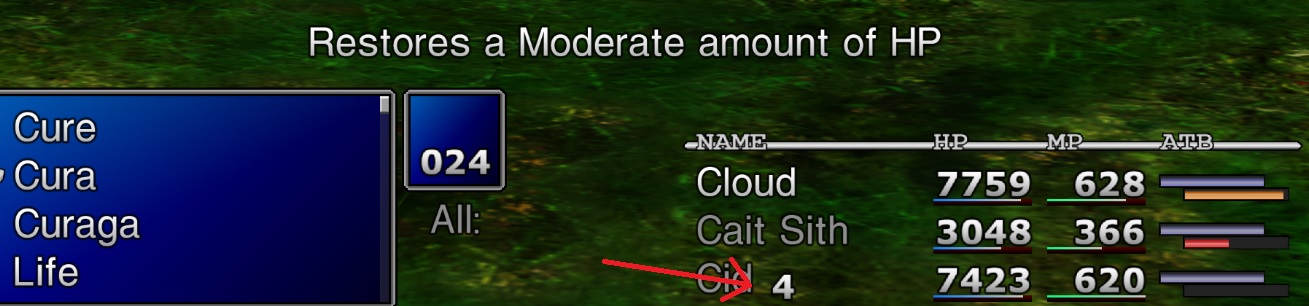
Then you see screen like this in battle, see where the arrow is pointing.

76MsExR.jpg


So need to move that number then you good, I wouldnt bother with the X after it, thats definitely too much trouble.
 
I fixed the niggling issues on Enhanced Stock.  As I put in earlier post the divider was easy for HP and MP.

The missing X?

Clue came from enabling aali driver debug option for failure to load missing png's.

Code: [Select]
Code:
[00000345] START OF MENU SYSTEM!!![00000345] INFO: tried to load F:\games\Square Soft, Inc\Final Fantasy VII\/mods/textures/menu/btl_win_a_l_00.png, failed[00000461] INFO: tried to load F:\games\Square Soft, Inc\Final Fantasy VII\/mods/textures/menu/btl_win_a_l_07.png, falling back to palette 0[00000461] INFO: tried to load F:\games\Square Soft, Inc\Final Fantasy VII\/mods/textures/menu/btl_win_a_l_00.png, failed[00000776] INFO: tried to load F:\games\Square Soft, Inc\Final Fantasy VII\/mods/textures/menu/btl_win_a_l_00.png, failed[00000776] END OF MENU SYSTEM!!!
I made copies of the 01 file to 00 and 07 and it shows now fine.  I will make a newer package and hopefully this can go in the new catalog.
 
EQ2Alyza the hext you need is in file '01-Base_4.txt'

Disable or comment out this line

is near the bottom

006DFF51 = 70

Then you see screen like this in battle, see where the arrow is pointing.

76MsExR.jpg


So need to move that number then you good, I wouldnt bother with the X after it, thats definitely too much trouble.
006DFF51 = 36

Setting that value will align the Y-axis position correctly with the All: text, but I can't figure out yet how to change the X-axis position. What's your method for finding how each hext line makes its changes ingame?

I made copies of the 01 file to 00 and 07 and it shows now fine.  I will make a newer package and hopefully this can go in the new catalog.
Yep, it'll go in Catalog 3.0. I'd rather it be a finished product before its released, but it seems like you're on track to do that before I'm finished with 3.0.
 
Last edited:
You be please to know I added No Battle Boxes to enhanced stock :)

I been running around testing different areas and so far so good, but will do a quick run of a new game to see if its ok with clock at start of game and name dialog boxes.

I got no method for finding position using Hext as I said my skills are low, I found that value by guessing which one of the hext values was modifying the default behaviour as by default the value is visible, but it stands to reason that the X Axis position will probably be a neighbouring hex value so I will play some more to see if I can find it.  I didnt know that was the Y Axis, nice find to catch it.  I guess 70 takes it off screen as a means to hide it.
 
Last edited:
006DFF58 is the Y-Axis for the All: uses number, but setting to 006DFF58 = 00 pushes it the furthest left it can go. Unfortunately, it stops only in the middle of the screen, so I'm stuck at the moment.
 
I got an idea, let me fire it up with the new values to see the new position.  I will edit my post after.

--

Ok Yeah its still over the names, but there is room above the names.

So I think the solution is put the number above "NAME" text and move All: towards it.  Its not uniform I know, but it better then having a huge gap between All: and the number, and the number been over the names.

Is odd All: can move much further left when by default they close to each other.

--

Ok my second thought process turned out to be true.  These value are limited to a maximum of FF hexadecimal so I figured there is multiple hext's that are added together for a combined value, and so far I have found what looks like two more addresses.

006DFF55 and 006DFF53

006DFF53 I tried on 3 random values and the number was off screen. High and even medium range values crash on this one.
006DFF55 number was off screen on first 2 values, then I tried F0 as others were low, and the 4 is now on the far left.  So it can be moved, I am going to increase the first Y value again to try and get it in the right spot.
 
Last edited:
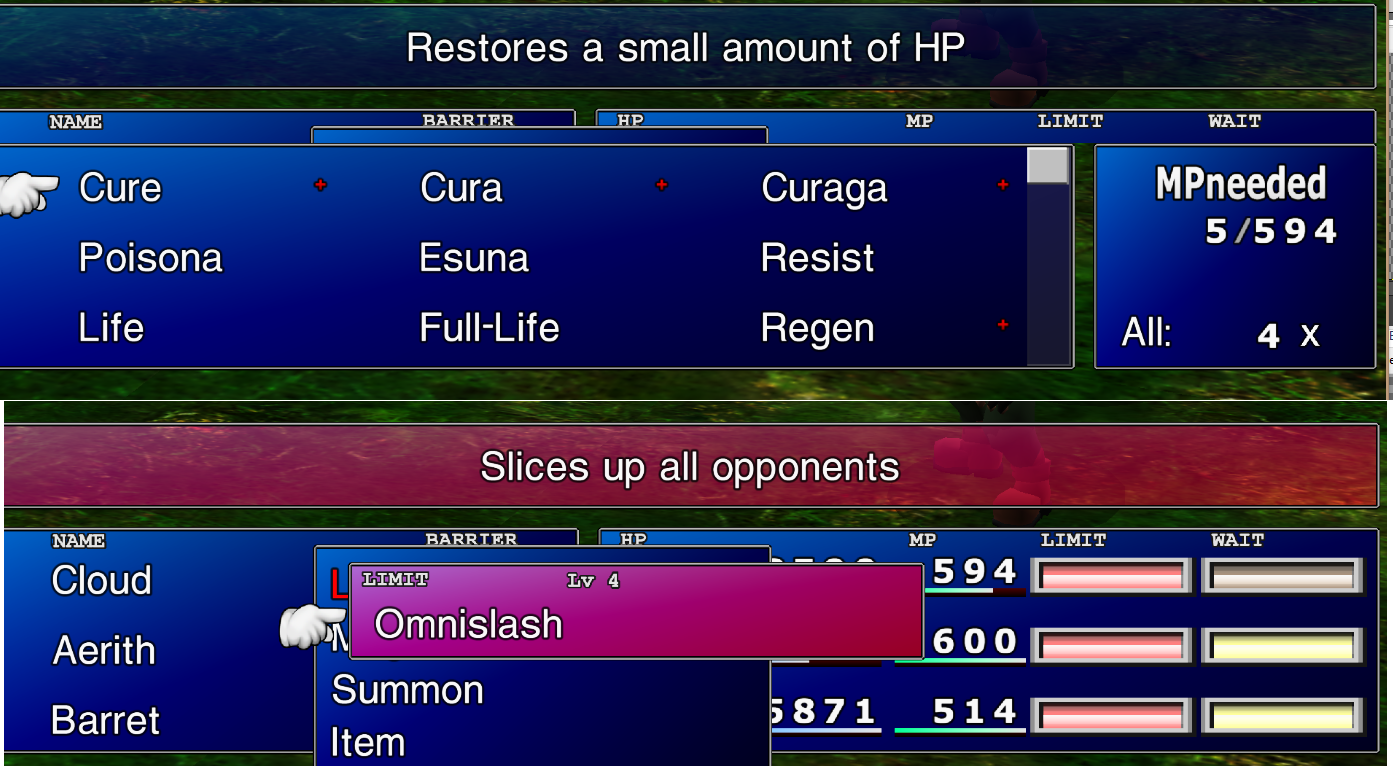
I have made new NAME/BARRIER/LIMIT/MP/HP headers for battle screen, also STATUS for status spell selection and Lv and numbers for overlimit selection so its all consistent and sleeker looking on enhanced UI.
A new symbol for the X that matches up with rest of fonts.
Lv realigned so its next to number on the overlimit window.

I added back the borders for barrier in the battle UI but been honest I feel those borders alongside with the limit and ATB borders look off on the new look.  I added it back so it is at least consistent with the fact ATB and limit had it, but if the time is there I am going to make new ones based on the borders of the new UI, but if I am not done when you release catalog v3 then what I have now we can use for it.

Also I have done a lot of play testing, tested battle square, speed square, chocobo racing, start of game with clock in reactor, start of game naming characters, shops, caith siths slots and tifa reels.  all looks good on that side of things, no graphical anomalies or crashes.

If anyone wants to test where I am at now I will package this up.  Otherwise will be later.

z35H8hG.png
 
Last edited:
https://drive.google.com/open?id=1koN4sh1-tz15vR4dXSFXdI1vi64o2_XO

Look at these (M05c install) and see if you can do anything with it for the Limit/ATB/Barrier bars. They certainly look better than the ones you're currently working with.

If we get Enhanced Stock finished, I'll release 3.0 with it and Menu Enhancement (Reunion R05c) and ditch Menu Overhaul until a 3.1 release.
 
Last edited:
Status
Not open for further replies.
Back
Top