
Y
yarLson
Guest
Here is a screen of what this could look like if we can get it to work.
http://i.imgur.com/azEZkAs.jpg
And here is what I have so far.
https://docs.google.com/file/d/0B3FK0dqybqUCZ3lzR3dvY1c1Zmc/edit?usp=sharing
(download is not a working shader but a wip progress, causes extreme glitches and should only be used by someone who knows how to fix them. I am only posting them up in hopes that someone will fix the errors, if you do try them back up your original shaders)
Okay so a lot has happened since I last posted here, but I have a great idea that will be well worth the time if someone can help me figure this out. I am sure most assumed by now that I died or just killed my project. For those who do not know me I was working on Project Blackfan, you can find it somewhere on here. It eventually evolved thanks to Omzy into his field rescaling package. His script work wonders but honestly I was still dissatisfied with the results for several reasons. Firstly that there were still several glitches, and that I never really liked the blotched look that fractals seemed to create. Also I was extremely upset about the filesize of the project which pretty much ensures that only the most fanatical will spend the time to download several gigs just for a moderate graphics improvement.
Believe it or not I continued working out ways to improve my project over the years however a lot has happened to slow progress (graduated, married, baby, work, etc.). But I have been doing tons a research on image scaling, and working out different ways to improve my results. I have tried literally every program that claims to scale images well (well every english language program at least), and even came across a patent that may or may not prove very interesting if IBM ever decided to do anything with it (however there is nothing so far).
check it out if your interested here
http://www.tomshardware.com/news/ibm-patent-image-resize-quality,15472.html
But back to the point. So far my results have been very unremarkable and really not worth mentioning. But I have stumbled across something that could do exactly what I was trying to do with Project Blackfan, only automatically, with better results and without having to do any manual work. Best of all it would only require a file download of a few kilobytes in size.
I am talking about a relatively new open source shading algorithm called xBR and xBRZ that is being used to improve the graphics of several game emulation programs. I have already tested the algorithm on both 2x and 4x the original background sizes and it looks beautiful with no blotched effecct that fractals produce and it works in real time and uses a reasonable amount of resources. If you want to see for yourself, check this out
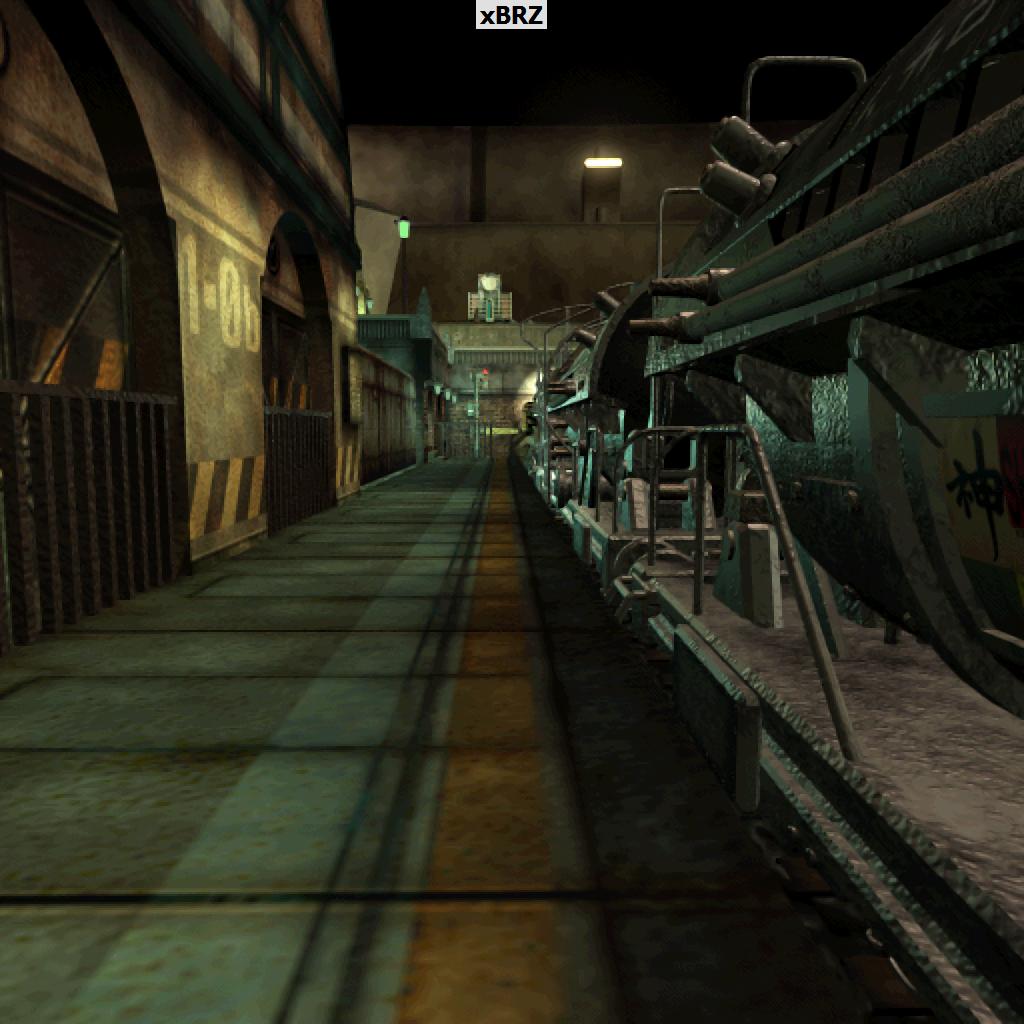
this is 2x the original image size. I personally feel it looks even better than the fractal method. Although nothing provided perfect results I feel this shader is the best overall solution since it provides the highest quality image without any major file replacements and can be downloaded and installed in seconds. This is actually an even bigger deal if you were to realize the insane glitches that came from upscaling these images and then trying to put them back in the game. Its just an unreasonable amount of work.
Basically the layers had to be cut out manually or they looked blocky and horrible which kinda ruined the effect completely but then smoothing them out required several manual edits to get them to fit correctly and they still looked kinda awkward in game even after hours of work and you've only finished a single scene... (and it never ended)
The only problem with my idea is that I know absolutely nothing about programming shaders. I can provide everything I have found so far and of course since this is an open source project there are several common shaders (which are not inherently compatible with aali's driver yet), which i am sure someone with the know how could convert into a texture filter. I am not even 100% sure this is at all possible for aali's driver. I don't think a fullscreen filter effect would work because it would probably blend the 3d objects in undesirable ways but a texture filter is theoretically possible (and has already been implemented in PPSSPP emulator with great results).
So as for what I have discovered so far there are two implementations of this algorithms with several variations.
The original is simply the xBR shader and the original author and is algorithm are presented completely in this forum
http://board.byuu.org/viewtopic.php?f=10&t=2248
in the forum you can find links to several variations of the shader
There is also the xBRZ project
http://vogons.zetafleet.com/viewtopic.php?p=287296
This is essentially the same algorithm with different rules and it was completely rewritten to support multi-core processing and 64-bit architecture.
Pretty much all the resources and information regarding this method can be found if you follow these two links. Hopefully we can get someone who knows what they are doing or perhaps even raise up a few bucks to pay a professional if we can get aali or someone who would know if this would be achievable with the driver in its current state.
If so I think this could be one of the best enhancements so far.
http://i.imgur.com/azEZkAs.jpg
And here is what I have so far.
https://docs.google.com/file/d/0B3FK0dqybqUCZ3lzR3dvY1c1Zmc/edit?usp=sharing
(download is not a working shader but a wip progress, causes extreme glitches and should only be used by someone who knows how to fix them. I am only posting them up in hopes that someone will fix the errors, if you do try them back up your original shaders)
Okay so a lot has happened since I last posted here, but I have a great idea that will be well worth the time if someone can help me figure this out. I am sure most assumed by now that I died or just killed my project. For those who do not know me I was working on Project Blackfan, you can find it somewhere on here. It eventually evolved thanks to Omzy into his field rescaling package. His script work wonders but honestly I was still dissatisfied with the results for several reasons. Firstly that there were still several glitches, and that I never really liked the blotched look that fractals seemed to create. Also I was extremely upset about the filesize of the project which pretty much ensures that only the most fanatical will spend the time to download several gigs just for a moderate graphics improvement.
Believe it or not I continued working out ways to improve my project over the years however a lot has happened to slow progress (graduated, married, baby, work, etc.). But I have been doing tons a research on image scaling, and working out different ways to improve my results. I have tried literally every program that claims to scale images well (well every english language program at least), and even came across a patent that may or may not prove very interesting if IBM ever decided to do anything with it (however there is nothing so far).
check it out if your interested here
http://www.tomshardware.com/news/ibm-patent-image-resize-quality,15472.html
But back to the point. So far my results have been very unremarkable and really not worth mentioning. But I have stumbled across something that could do exactly what I was trying to do with Project Blackfan, only automatically, with better results and without having to do any manual work. Best of all it would only require a file download of a few kilobytes in size.
I am talking about a relatively new open source shading algorithm called xBR and xBRZ that is being used to improve the graphics of several game emulation programs. I have already tested the algorithm on both 2x and 4x the original background sizes and it looks beautiful with no blotched effecct that fractals produce and it works in real time and uses a reasonable amount of resources. If you want to see for yourself, check this out
this is 2x the original image size. I personally feel it looks even better than the fractal method. Although nothing provided perfect results I feel this shader is the best overall solution since it provides the highest quality image without any major file replacements and can be downloaded and installed in seconds. This is actually an even bigger deal if you were to realize the insane glitches that came from upscaling these images and then trying to put them back in the game. Its just an unreasonable amount of work.
Basically the layers had to be cut out manually or they looked blocky and horrible which kinda ruined the effect completely but then smoothing them out required several manual edits to get them to fit correctly and they still looked kinda awkward in game even after hours of work and you've only finished a single scene... (and it never ended)
The only problem with my idea is that I know absolutely nothing about programming shaders. I can provide everything I have found so far and of course since this is an open source project there are several common shaders (which are not inherently compatible with aali's driver yet), which i am sure someone with the know how could convert into a texture filter. I am not even 100% sure this is at all possible for aali's driver. I don't think a fullscreen filter effect would work because it would probably blend the 3d objects in undesirable ways but a texture filter is theoretically possible (and has already been implemented in PPSSPP emulator with great results).
So as for what I have discovered so far there are two implementations of this algorithms with several variations.
The original is simply the xBR shader and the original author and is algorithm are presented completely in this forum
http://board.byuu.org/viewtopic.php?f=10&t=2248
in the forum you can find links to several variations of the shader
There is also the xBRZ project
http://vogons.zetafleet.com/viewtopic.php?p=287296
This is essentially the same algorithm with different rules and it was completely rewritten to support multi-core processing and 64-bit architecture.
Pretty much all the resources and information regarding this method can be found if you follow these two links. Hopefully we can get someone who knows what they are doing or perhaps even raise up a few bucks to pay a professional if we can get aali or someone who would know if this would be achievable with the driver in its current state.
If so I think this could be one of the best enhancements so far.
Last edited:


