[PC] External Texture Support - Tonberry: Enhanced (2.04)

  • Thread starter Thread starter JeMaCheHi
  • Start date Start date
Status
Not open for further replies.
2.0.1. is still glitchy and crashes with the Steam overlay. Works fine without it.

The Steam Overlay is kind of important to me since I need it in order to broadcast the game.
or using my GeDoSaTo config to fix the overlay from crashing Tonberry
 
The Steam Overlay is itself a d3d injector and, to my knowledge, 'there can only be one'

SweetFX created a Steam Overlay 'hack' that enables it to be used simultaneously with the Steam Overlay... maybe one day we can figure out how this can be done with Tonberry.  Until then, sorry you can't broadcast!

I don't think this will help him, because my 'fix' force-stops the overlay from loading.... but let me look into GeDoSaTo further... maybe something?
 
Last edited:
2.0.1. is still glitchy and crashes with the Steam overlay. Works fine without it.

The Steam Overlay is kind of important to me since I need it in order to broadcast the game.
Sorry about that Devina, but for now Steam Overlay is not a priority. Tonberry has never worked with it, and won't do for now since we're focused on more critical features like smoothness, eliminating collisions and remake the hashing algorithm. However, thanks for pointing it out, I'll put it on the "known issues" section so everyone know it before downloading.

To everyone else, we still want your comments, opinions and questions! :)
 
@_@ it seems the debug folder structure was broken by this latest release. Everything is working fine, but when debug_mode=yes the replaced textures that are already on the cache will end up in the tonberry\debug\ directory instead of tonberry\debug\replaced\

It was a simple fix but, again, we'll have to wait until JeMa can get my code and upload a new version.

If you are playing with debug_mode=no then this does not apply to you.

This issue has been resolved. Please use version 2.02 for the best Tonberry experience yet.
 
Last edited:
Hello,

 Will wait more for a new version to test.

 Why don't you use a Github or svn to publish your code, maybe we could help ;) ?
 
@_@ it seems the debug folder structure was broken by this latest release. Everything is working fine, but when debug_mode=yes the replaced textures that are already on the cache will end up in the tonberry\debug\ directory instead of tonberry\debug\replaced\

It was a simple fix but, again, we'll have to wait until JeMa can get my code and upload a new version.

If you are playing with debug_mode=no then this does not apply to you.
I think this was still happening with the 2.0 version when I tried it. Just didn't bring it up because I thought it might've been a normal thing. :P
 
Hello,

 Will wait more for a new version to test.

 Why don't you use a Github or svn to publish your code, maybe we could help ;) ?
We started using a Github but the trouble is a) it's only the files we've modified, the whole D3D9Callback project is large and complicated and the compiler settings are a huge pain and b) JeMa owns this thread so I can't modify the first post. I could compile and upload a new D3D9Callback.dll for you guys but that throws a wrench in our whole version scheme, and if people have problems or feedback we don't know which version they're using... I guess I could upload a temporary fix and then remove it whenever JeMa can modify the first post...

I think this was still happening with the 2.0 version when I tried it. Just didn't bring it up because I thought it might've been a normal thing. :P
My bad guys, I've been focused on my new hashing approach (which is a totally new version of the code) so I wasn't properly testing Tonberry in-game, just trying to fix the cache and get it released.
 
2.02 is out people. We fixed the debug folders issue (it seems we remove a code line by accident hehe  ::) ) and we've enhanced the comparisons in some algorithms.

Peace :)
 
Good news folks - the new hash algorithm should may help fix the Steam Overlay issue.

The problem is that the current hashing algorithm detects matches in some of the overlay textures. If you have "debug_mode=yes" and try to open the overlay, you'll notice some Steam Overlay images end up in your \debug\replaced\ folder. I think this is what causes the ensuing crash.

My new algorithm will avoid these matches, so could help avoid the crash. This will be something I keep in mind as I work towards a release of the new hashing method.

Stay tuned.
 
Last edited:
Good work. Glad to see things are progressing.

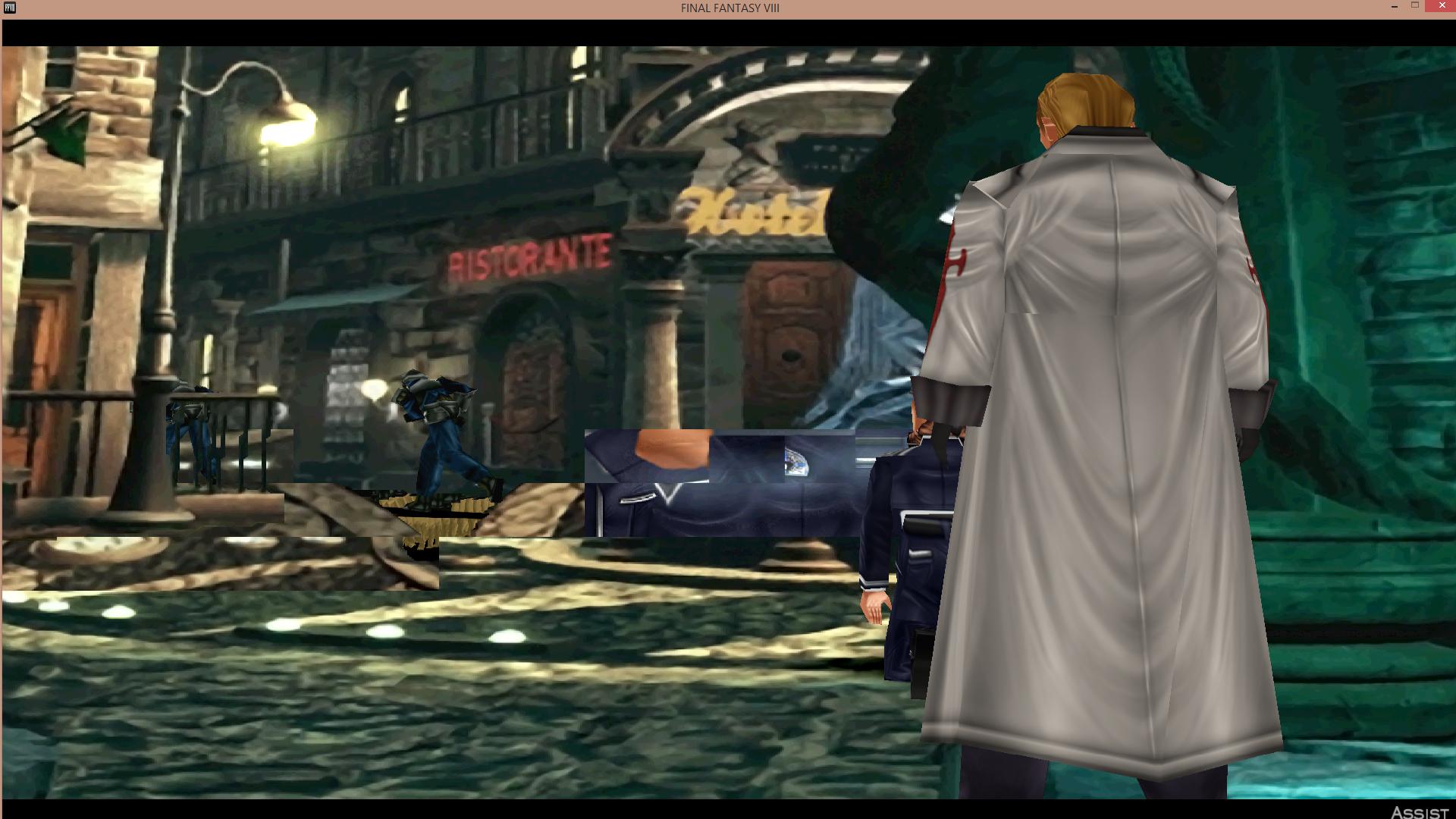
Now... As for 2.02. It seems I've ran into this problem. Surprisingly, this happened in the 2.0 version as well.
o7gYdYZ.jpg

It doesn't appear to happen in the 2.01 version, though.
 
Good work. Glad to see things are progressing.

Now... As for 2.02. It seems I've ran into this problem. Surprisingly, this happened in the 2.0 version as well.

It doesn't appear to happen in the 2.01 version, though.

[/quote]
Erm... all 2.02 changed was the way we saved images to the debug folder. It shouldn't have touched image caching or replacement.

This looks like a classic hash collision. Are you sure it wasn't happening in earlier versions, or in 2.01?
 
Erm... all 2.02 changed was the way we saved images to the debug folder. It shouldn't have touched image caching or replacement.

This looks like a classic hash collision. Are you sure it wasn't happening in earlier versions, or in 2.01?
Never happened on earlier versions(1.61 and back). Those places were always more pixelated, though. I use this spot quite frequently to test textures while gathering codes. It could be something on my end. Never know, really. I only took a screenshot. But what's really happening near the fountain is that it's switching between multiple textures where there is suppose to be animation for the fountain.
 
Never happened on earlier versions(1.61 and back). Those places were always more pixelated, though. I use this spot quite frequently to test textures while gathering codes. It could be something on my end. Never know, really. I only took a screenshot. But what's really happening near the fountain is that it's switching between multiple textures where there is suppose to be animation for the fountain.
If it used to be pixelated there, this might be a good omen
 
Never happened on earlier versions(1.61 and back). Those places were always more pixelated, though. I use this spot quite frequently to test textures while gathering codes. It could be something on my end. Never know, really. I only took a screenshot. But what's really happening near the fountain is that it's switching between multiple textures where there is suppose to be animation for the fountain.
If it used to be pixelated there, this might be a good omen
Yep. Looks to me like the background textures are working in an area where they weren't previously, but you're getting collisions on the fountain texture and the collisions map does not or cannot resolve it. Problems like these won't be fixed until the new hash algorithm is complete.
 
Good work. Glad to see things are progressing.

Now... As for 2.02. It seems I've ran into this problem. Surprisingly, this happened in the 2.0 version as well.
o7gYdYZ.jpg

It doesn't appear to happen in the 2.01 version, though.
That's a classic collision FatedCourage. If you say it worked on 2.01 and it doesn't on 2.02, there's no other explanation. All I changed on 2.02 was the naming for the debug folder and made an enumerated type for the type of mached hash. Nothing to do with that. Also, I've found out that some collisions will happen 100% of the time, and some others are more probabilistic since they depends on where are they placed on memory. Anyway, you all will have to wait until we finish the new hashing to see most collisions solved :)
 
That's a classic collision FatedCourage. If you say it worked on 2.01 and it doesn't on 2.02, there's no other explanation. All I changed on 2.02 was the naming for the debug folder and made an enumerated type for the type of mached hash. Nothing to do with that. Also, I've found out that some collisions will happen 100% of the time, and some others are more probabilistic since they depends on where are they placed on memory. Anyway, you all will have to wait until we finish the new hashing to see most collisions solved :)
I have no problem with this. Didn't want to gloss over anything like I did last time. And if textures that didn't work before are starting to work now, then that's a good sign. It just motivates me more to continue collecting codes/bitmaps for this. :D
 
I have no problem with this. Didn't want to gloss over anything like I did last time. And if textures that didn't work before are starting to work now, then that's a good sign. It just motivates me more to continue collecting codes/bitmaps for this. :D
Yeah, it's a good sign indeed :D. Don't forget to keep all the debug textures and sending them to Mavirick or me!
 
Actually, now that I remember, if I detected that there was no match or an unresolvable collision, I ignored it and let d3d keep the original texture there. So if there are now colliding textures in previously pixelated spots, it might mean that 'ignore' was turned off and it is just placing the last thing in memory there. Again, sorry if I overlook stuff, it has been a while since I looked at the code.
 
Yeah, it's a good sign indeed :D. Don't forget to keep all the debug textures and sending them to Mavirick or me!
Right now, I'm trying to collect as much as possible to send off to you guys. It also helps me since I'm gathering codes for another release down the road.
 
Mavirick, as a continuation from what I have been PMing you and Mcindus, how do I use the Debug Mode in Tonberry so I can find what is randomly crashing my games?  I feel like a proper write up of the Debug Mode should be included in the original post.
 
Status
Not open for further replies.
Back
Top