
[PC] External Texture Support - Tonberry: Enhanced (2.04)

  • Thread starter Thread starter JeMaCheHi
  • Start date Start date
Status
Not open for further replies.
For FF7 are only the backgrounds and the Menu textures interesting. The rest can be replaced directly.
It's all polygons yes, the only textures for field and battles models are eyes, mouth, Barret's tatoo, Cloud's belt and such. You can change/replace them using Kimera.
So am I correct in assuming Kimera cannot replace backgrounds and menu textures?

The only issue I foresee is using custom textures through previous mods in conjunction with Tonberry: if Tonberry is using a hashing algorithm based on FFVII vanilla textures but then gamers start throwing different combinations of modded textures at it, modders will not be able to predict and reproduce (and thereby try to circumvent) collisions. Someone's custom texture could very well hash to the same thing as a vanilla texture, which would cause Tonberry to try to replace it and things would start getting weird. Ideally, you'd use Tonberry for everything or not at all--additional textures won't slow it down significantly.

Obviously this is all further down the line, just something to think about. If Tonberry is to be used with FFVII, its addition to the game needs to be worth the slowdown (which admittedly should be very minor for modern computers) and the effort required to adapt existing texture mods to use it.

EDIT: As an additional and probably far-fetched thought, it's possible that the D3D9Callback interceptor could be modified to catch FFVII's calls to fill in polygons. If those could be replaced with calls to apply a texture to the same polygon... well, that would be very interesting indeed.
 
Last edited:
As an additional and probably far-fetched thought, it's possible that the D3D9Callback interceptor could be modified to catch FFVII's calls to fill in polygons. If those could be replaced with calls to apply a texture to the same polygon... well, that would be very interesting indeed.
That won't work this way. Even if you replace a specific color with a specific texture you will run in tons of problems. As example battle models have gradients. How do you want to replace them?
Texturing models is quite easy: giving the mesh a UV map and a texture and then place everything in back into the lgp (obviously it is more complicated in detail). I should mention that the directx9 renderer has a black texture bug which happens for no reasons.
If Tonberry only looks for menu textures and backgrounds it would be enough.
 
Hey guys! I seem to have an issue running Tonberry with FF8.

I've downloaded Final Fantasy 8, and ran it vanilla no problem.  I installed Tonberry and some mods and my Steam doesn't get past "Preparing to Launch Final Fantasy 8."   I removed the mod and the game runs fine.  I've also put back just Tonberry, and this is causing the game not to launch.  When I say this, the launcher doesn't even come up.

I've installed the Visual C++ 2013 package.
Direct X is up to date.
I have a Nvidia 765m with fully updated drivers.
My Intel Graphics driver is also fully updated.
I have disabled steam overlay both for FF8 and globally just to make sure.

I have installed the mod properly to C:\Program Files (x86)\Steam\SteamApps\common\FINAL FANTASY VIII

in that folder is the tonberry folder, texture folder and all else that comes with the mod..

I've got collisions and hash2map in the tonberry folder.
hashmaps in the hashmap folder
obj files in objmap folder
prefs file is untouched, but I confirmed that it is good.

This is my favorite childhood game D;.  I appreciate the help guys

EDIT:  I have removed ONLY the d3d9.dll so I could see if FF8 then launches... which it does; so hopefully that information helps out D;.
 
Last edited:
Ah got it to work, copied MSVCP120.dll and MSVCR120.dll from another steam game which came with them in the folder.
Yes the TT game now looks a treat!
Thanks for your hard work guys!
I had to copy these two files from my League of legends folder to get ff8 launching after installing tonberry 2.04.
 
Hey guys! I seem to have an issue running Tonberry with FF8.

I've downloaded Final Fantasy 8, and ran it vanilla no problem.  I installed Tonberry and some mods and my Steam doesn't get past "Preparing to Launch Final Fantasy 8."   I removed the mod and the game runs fine.  I've also put back just Tonberry, and this is causing the game not to launch.  When I say this, the launcher doesn't even come up.

I've installed the Visual C++ 2013 package.
Direct X is up to date.
I have a Nvidia 765m with fully updated drivers.
My Intel Graphics driver is also fully updated.
I have disabled steam overlay both for FF8 and globally just to make sure.

I have installed the mod properly to C:\Program Files (x86)\Steam\SteamApps\common\FINAL FANTASY VIII

in that folder is the tonberry folder, texture folder and all else that comes with the mod..

I've got collisions and hash2map in the tonberry folder.
hashmaps in the hashmap folder
obj files in objmap folder
prefs file is untouched, but I confirmed that it is good.

This is my favorite childhood game D;.  I appreciate the help guys

EDIT:  I have removed ONLY the d3d9.dll so I could see if FF8 then launches... which it does; so hopefully that information helps out D;.
Just do what me and skillster did. If you try to launch ff8 from the game directory itself it should tell you that you are missing msvcp120.dll. So I did a C drive search for those 2 files, copied and pasted them in when i found them in my LOL directory and its working now.
 
I just tried using Tonberry v2.04 and Berrymapper with FFVII steam version, the debug mode works great and I pulled off Cloud's avatar, the picture is now 4x the size (512x512px) *.png file and the texture path is "textures\cl\cloud\cloud_0.png".

hashmap.csv:
Code: [Select]
Code:
cloud_0,18446744073709551615
objmap.csv:
Code: [Select]
Code:
cloud_0,4294967295,4294967295
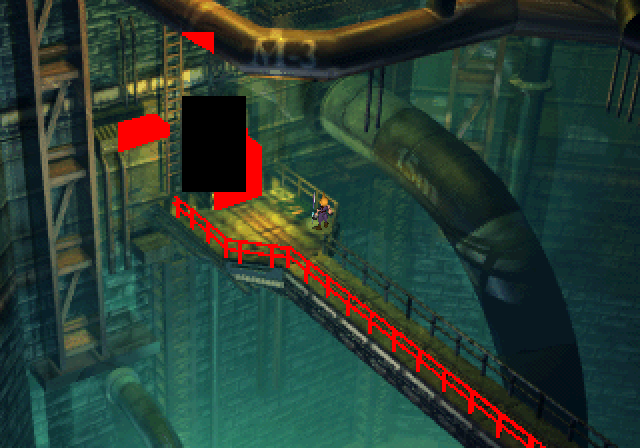
Unfortunately when loading my save file, Cloud's avatar remains unreplaced and several fields layers are red or missing:

Go9jTPL.png
 
I just tried using Tonberry v2.04 and Berrymapper with FFVII steam version, the debug mode works great and I pulled off Cloud's avatar, the picture is now 4x the size (512x512px) *.png file and the texture path is "textures\cl\cloud\cloud_0.png".

hashmap.csv:
Code: [Select]
Code:
cloud_0,18446744073709551615
objmap.csv:
Code: [Select]
Code:
cloud_0,4294967295,4294967295
Are there by chance large areas of black in your 512x512 image you're hashing?  If so, it's not looking at enough pixels and is trying to replace anything that uses a transparency mask (so you get a bunch of black boxes everywhere)

From what I remember, the objmap codes that you're showing are exactly that - ones that are trying to replace every instance of a 'black' or transparency texture.  These I don't have a workaround for, but are what Omzy created the hash2map algorithm and collisions.csv exactly for these instances.   It's why I can't make the intro scenes HD in FF8 - every block of text including the squaresoft logo is using that same objmap code you provided.  Might even be the same hashcode too. 

Omzy would know more about how to isolate the pixels and then what algo to run to get the longer codes.

It's really a shame, because this is the graphic I made for the new Tonberry for whenever we get an actual release with the new hash algorithms.
intro_squarelogo_tonberry.png
 
Last edited:
Nice picture Mcindus ;D

The only texture I wanted to import is Cloud's avatar and there's no large black areas at all; I've only changed the brightness for testing purpose:

1437795951-cloud.png


The avatar still unreplaced in-game no matter what.
 
Nice picture Mcindus ;D

The only texture I wanted to import is Cloud's avatar and there's no large black areas at all; I've only changed the brightness for testing purpose:

The avatar still unreplaced in-game no matter what.
Can you send me the original bitmap that tonberry dumped for this?  If you're using FF7, try to remove hash2map.csv and collisions.csv and see if that helps?
 
It's really a shame, because this is the graphic I made for the new Tonberry for whenever we get an actual release with the new hash algorithms.
I lost all my textures when I uninstalled/reinstalled the game :( They were in my tonberry directory and uninstalling the game wiped the whole directory instead of just deleting the game files. I tried to recover them but I guess the reinstall recycled the memory so they were all corrupt.

What I really need is the tonberry dump from an entire playthrough. It would be a ton of images and the playthrough would be frustrating cause debug mode slows things down, but the texture analysis algorithms are written and with a large enough texture set I could generate a near perfect hash. The only thing thing to solve would be hardcoding some pixels in for the animated textures like characters blinking. One solution might be a way to designate additional pixels to look at for certain textures, so that modders could fix collisions without having to generate a whole new hashing algorithm.
 
hello, i'm not sure if this is the right place to ask but i am having issue with 2 different mods sharing the same folder name in textures. the mods are project eden and seed reborn, both mods have a texture folder labeled gf and i am not sure how to proceed.

am i supposed to put extra folders in the texture folder to separate the textures of different mods? example [ \FF8\textures\Project_Eden\gf ] and [ \FF8\textures\SeeD_Reborn\gf ] instead of  [ \FF8\textures\gf ] ? or maybe can  merge all the folders inside both gf folders to the same gf folder?

edit: my question was answered in the tutorial video, should've watched the entire thing instead of pausing halfway.
 
Last edited:
I just tried using Tonberry v2.04 and Berrymapper with FFVII steam version, the debug mode works great and I pulled off Cloud's avatar, the picture is now 4x the size (512x512px) *.png file and the texture path is "textures\cl\cloud\cloud_0.png".

hashmap.csv:
Code: [Select]
Code:
cloud_0,18446744073709551615
objmap.csv:
Code: [Select]
Code:
cloud_0,4294967295,4294967295
Unfortunately when loading my save file, Cloud's avatar remains unreplaced and several fields layers are red or missing:

[img...]
Sorry I never answered this 5way, I've been stretched thin on other projects for the past few months.

I'm pretty sure the problem you had with FF7 is the hashing function Tonberry uses (which is optimized for FF8) and especially the few hardcoded hashes used mostly for menu textures and the like. Many of the menu textures hash to the same thing and differ only by color (which Omzy's original hash function ignores) so there had to be special accommodations programmed directly into d3d9Callback.dll. It could also have to do with the texture size and resize code.

For the most part, if Tonberry can pull the texture into the debug folder then it can also replace it. If (and it's looking like the ball may get rolling again) we get a new hashing algorithm working in FF8 then we can look into applying the same process to FF7.
 
Thanks for the answer mavirick; yes, Tonberry does debug all kinds of textures so it was looking promising at first. Besides of the d3d9Callback.dll, does berrymapper needs to be optimized too for FFVII?
 
Thanks for the answer mavirick; yes, Tonberry does debug all kinds of textures so it was looking promising at first. Besides of the d3d9Callback.dll, does berrymapper needs to be optimized too for FFVII?
Basically, the method I've tested as a replacement for the hashing algorithm involves finding the set of the most "important" or "telling" pixels to differentiate between textures in the game, then packing their values into any good hashing algorithm. The one I've been using is Murmur2 because it's super fast and collision resistant, but really any hashing function will do.

You're basically trying to solve an optimization problem: maximize the speed of the hash (which is effectively the number of different pixels you use) while also minimizing the number of collisions (which show up as glitching textures in game). Obviously you could use every pixel and have zero collisions but it would be too slow, or use only one pixel and it would be very fast but have a ton of collisions. Theoretically, there is a perfect set of the minimum number of pixels needed to result in 0 collisions. This pixel set is based on the full texture set used by the game, and is--for all intents and purposes--impossible to find. But you can try to get close. Omzy hacked out a pretty good hashing process for FFVIII using some good ole' fashioned trial and error and that's the one we have today, but his process is virtually useless for other games (like FFVII).

TL;DR
All this is to say that yes, everything would have to change for FFVII--because the game uses a totally different texture set, Tonberry would need to hash a different pixel set. Berrymapper just uses the same hashing process as Tonberry to generate the hashes for the replaced and replacement textures. If the new hash function is completed it will come with a new Berrymapper as well. To make Tonberry game-independent, it would have to take the pixels used in the hash as an input (probably just a plaintext file), and the same goes for Berrymapper.
 
Last edited:
Hello Mavirick and JemaheChi,
I've been away for a long time due to my new job; but i keep an eye on Qhimm. If you have any hints about your new hashing algorithm i would be happy to create a "test version" of Berrymapper to test the algorithm.
Anyway, as we have a large number of hashed textures now ( characters, worldmap,GF,weapons, battlefields...) we can define already a close-to-perfect set of key pixels for your algorithm. We could even have different algorithm fit to each type of texture (one for characters, one for objects, one for worldmap).
 
Hello Mavirick and JemaheChi,
I've been away for a long time due to my new job; but i keep an eye on Qhimm. If you have any hints about your new hashing algorithm i would be happy to create a "test version" of Berrymapper to test the algorithm.
Anyway, as we have a large number of hashed textures now ( characters, worldmap,GF,weapons, battlefields...) we can define already a close-to-perfect set of key pixels for your algorithm. We could even have different algorithm fit to each type of texture (one for characters, one for objects, one for worldmap).
Thanks Shunsq, I appreciate the support :)

I had a preliminary version back in March and I used a thrown-together hashing tool to confirm that it would work. The issue was that the textures I had to work with (before I lost them all :oops:), even as many as there were, didn't come close to the full set.

Yeah, we have a large number of textures that have been used in different mods, but even if we had them all in one place it wouldn't be enough. The problem is that the textures we don't replace in any mods are as important--perhaps even more so--than the ones we do; without them we could unwittingly end up with tons of unforeseen collisions and then you'd start seeing the replacement textures all over the place, or they would end up behind the scenes in palette textures, masks, etc.

The reason the new hashing algorithm was never released was because I didn't want people to start using it before the pixel set was solid. Each time the hash algo changes in any way, all of the hashmap CSV's for every mod have to be changed. This means a lot of work for modders who have to keep up with each iteration and a lot of confusion for players who wonder why the hashmap for one mod works great while another causes problems. Maybe this decision was a mistake. Maybe, as I mentioned in my last comment, it would be possible to define the pixels used in the hash externally, such that modders and players could have more control over the set.

Fortunately, FatedCourage has done an incredible job collecting textures from a playthrough of the entire game, and as of today he's gotten all of them to me: a grand total of 293,848 textures collected through Tonberry's debug feature. Obviously a ton of these will be duplicates, but through the same analysis I did earlier this year we should be able to start making headway on a good pixel set. Stay tuned.
 
Thanks Shunsq, I appreciate the support :)

I had a preliminary version back in March and I used a thrown-together hashing tool to confirm that it would work. The issue was that the textures I had to work with (before I lost them all :oops:), even as many as there were, didn't come close to the full set.

Yeah, we have a large number of textures that have been used in different mods, but even if we had them all in one place it wouldn't be enough. The problem is that the textures we don't replace in any mods are as important--perhaps even more so--than the ones we do; without them we could unwittingly end up with tons of unforeseen collisions and then you'd start seeing the replacement textures all over the place, or they would end up behind the scenes in palette textures, masks, etc.

The reason the new hashing algorithm was never released was because I didn't want people to start using it before the pixel set was solid. Each time the hash algo changes in any way, all of the hashmap CSV's for every mod have to be changed. This means a lot of work for modders who have to keep up with each iteration and a lot of confusion for players who wonder why the hashmap for one mod works great while another causes problems. Maybe this decision was a mistake. Maybe, as I mentioned in my last comment, it would be possible to define the pixels used in the hash externally, such that modders and players could have more control over the set.

Fortunately, FatedCourage has done an incredible job collecting textures from a playthrough of the entire game, and as of today he's gotten all of them to me: a grand total of 293,848 textures collected through Tonberry's debug feature. Obviously a ton of these will be duplicates, but through the same analysis I did earlier this year we should be able to start making headway on a good pixel set. Stay tuned.
This makes me want to dance!
::mrgreen::

Let me know if there's anything I can do to help!
 
Thanks Shunsq, I appreciate the support :)

I had a preliminary version back in March and I used a thrown-together hashing tool to confirm that it would work. The issue was that the textures I had to work with (before I lost them all :oops:), even as many as there were, didn't come close to the full set.

Yeah, we have a large number of textures that have been used in different mods, but even if we had them all in one place it wouldn't be enough. The problem is that the textures we don't replace in any mods are as important--perhaps even more so--than the ones we do; without them we could unwittingly end up with tons of unforeseen collisions and then you'd start seeing the replacement textures all over the place, or they would end up behind the scenes in palette textures, masks, etc.

The reason the new hashing algorithm was never released was because I didn't want people to start using it before the pixel set was solid. Each time the hash algo changes in any way, all of the hashmap CSV's for every mod have to be changed. This means a lot of work for modders who have to keep up with each iteration and a lot of confusion for players who wonder why the hashmap for one mod works great while another causes problems. Maybe this decision was a mistake. Maybe, as I mentioned in my last comment, it would be possible to define the pixels used in the hash externally, such that modders and players could have more control over the set.

Fortunately, FatedCourage has done an incredible job collecting textures from a playthrough of the entire game, and as of today he's gotten all of them to me: a grand total of 293,848 textures collected through Tonberry's debug feature. Obviously a ton of these will be duplicates, but through the same analysis I did earlier this year we should be able to start making headway on a good pixel set. Stay tuned.
Glad to hear you're still working on this mav. I'm currently pretty busy on RL so I'd be a burden, more than a helpful hand on this. Actually, I was working on a full research about enemies AI that is at standby for now. But I still come here to read your progress guys(also take a peek at github so keep syncing your code :I)
Keep it up everyone! :D
 
Hey all,  I'm trying out this tool with a fresh new install of FF8 on my Mac. I'm running the game through Wine and it works just fine... for a while. After some time, usually traversing a few screens, definitely a few screens after playing Triple Triad, the next screen loads up with odd green textures. I'm able to replicate this fairly consistently from the first save in the game, at the Balamb Garden directory, then going to the Cafeteria, playing the lovestruck Trepie, then leaving the cafeteria back into the central ring. Upon entering all the water surfaces are overlaid with green textures.

Sometimes this effect can be negated by minimizing & maximizing the game. Half the time it freezes & crashes after a few seconds.

I'm attaching a report: http://www.chopapp.com/#sspmwbid. I noticed it mention d3d9callback.dll, which was supplied by your tool. Any idea what could be going wrong?

In case you're unfamiliar with Wine, it has the ability to use its own inbuilt DLLs but also to commission native, external DLLs, provided that it's set up right. Am I maybe missing a crucial DLL, or is one of the DLLs maybe the wrong version?

Thanks for any help!

Edit: I forgot to mention the issue goes away after removing d3d9.dll. But then textures revert back to original.
 
Last edited:
Status
Not open for further replies.
Back
Top