[PC] External Texture Support - Tonberry: Enhanced (2.04)

  • Thread starter Thread starter JeMaCheHi
  • Start date Start date
Status
Not open for further replies.
Somehow I tend to be too stupid to mod FF's...

I just downloaded this and Project Eden for testing purposes.
(Since this replaces the classic tonberry I'm a bit confused about stuff (hashmaps) going in the \tonberry or \tonberry\hashmaps.

I put the Project Eden hashmap in this folder: D:\Steam\steamapps\common\FINAL FANTASY VIII\tonberry\hashmap
All the textures are in: D:\Steam\steamapps\common\FINAL FANTASY VIII\textures
(Steam Overlay is disabled and it's a clean install)
It doesn't matter if I choose a direct path in the prefs.ini either.

But I get an CTD as soon as I start :(
(unknown error)
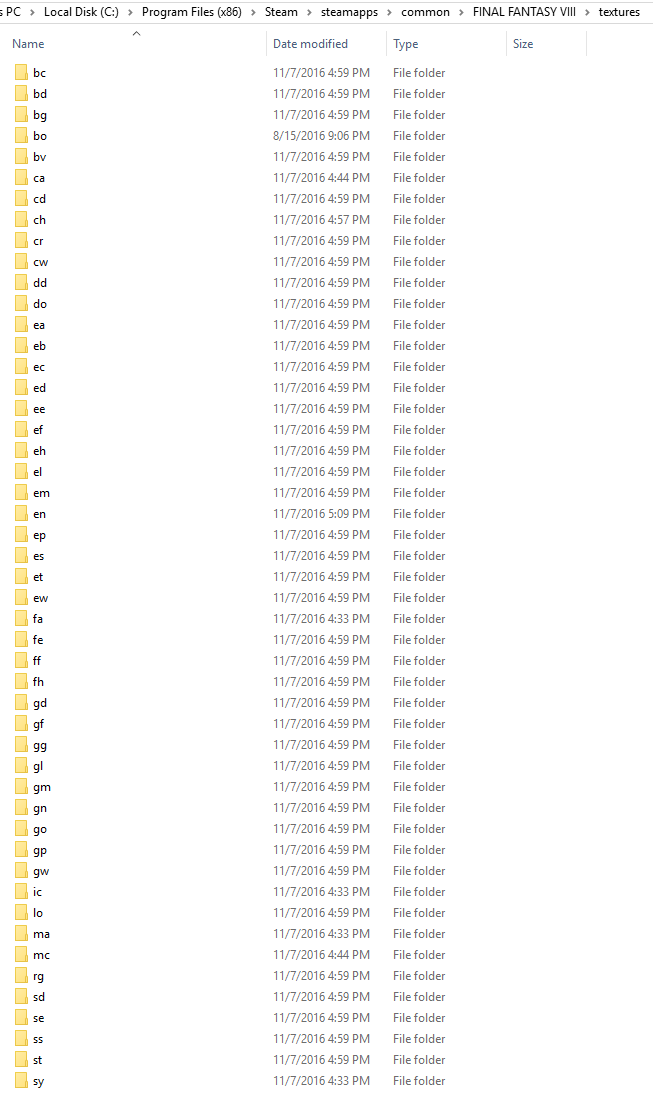
You got the file paths correct.  When you open /textures/, do you see a bunch of two letter named folders?

Also, do you have the new Tonbery .dlls?  They go in your FINAL FANTASY VIII folder.

Try updating microsoft VC also to see if that helps.
 
I tried updating / downloading VC at the very start of the process but I got always the message, that there are newer version of it already on my system (Win 10). So there is no way to update either VC 2010 or VC 2015.
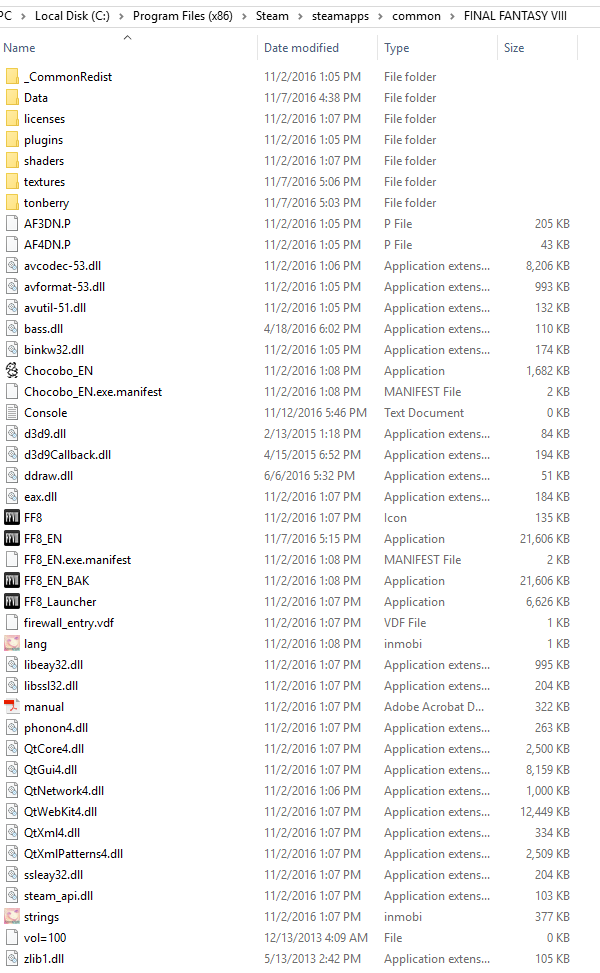
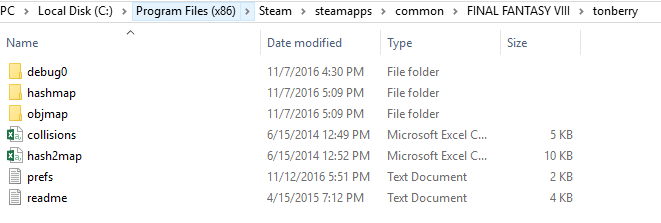
Folderwise it looks like this atm:


Regarding the Tonberry-DLLs: Which one do I need? From Tonberry enhanced or from the "classic" Tonberry project?
 
Last edited:
Regarding the Tonberry-DLLs: Which one do I need? From Tonberry enhanced or from the "classic" Tonberry project?
You need only the .ddl's from the newest version of Tonberry.
Can you screenshot your FINAL FANTASY VIII/ parent folder and your FINAL FANTASY VIII/textures folder?
You don't need VC if you have a newer version, so you're good there.  Try running FF8 in 'compatibility' mode. 
If that doesn't work, go into your TaskManager and assign FF8 to only use the first core of your PC.  I've heard this works for Win10
 
Thanks for the tip - it worked with the DDLs of the original Tonberry :)

I know it's maybe not the correct topic but I don't want to open up some new one either.
So: The game runs fine now "vanilla" but if I want to use GeDoSaTo (even with native 1920x1080) the game crashes. It crashes as well if I disable all post processing effects.
Is there anything I can do? (Win 10)
 
Thanks for the tip - it worked with the DDLs of the original Tonberry :)

I know it's maybe not the correct topic but I don't want to open up some new one either.
So: The game runs fine now "vanilla" but if I want to use GeDoSaTo (even with native 1920x1080) the game crashes. It crashes as well if I disable all post processing effects.
Is there anything I can do? (Win 10)
Go into "Edit Settings" and set "interceptOnlySystemDlls" to true and that should hopefully fix the crashing problem with using GeDoSaTo.
 
This one worked as well and I can see the finish line already.
But the post processing doesn't seem to work (enabled split screen for testing-purposes).
Is there something else to consider?

Some texture.packs work very well like Project Eden or Horizon.
But Rebirth Flame doesn't work :(
(doesn't matter which version or if the hashmap is either in \tonberry or \tonberry\hashmaps.
This is strange.
 
This one worked as well and I can see the finish line already.
But the post processing doesn't seem to work (enabled split screen for testing-purposes).
Is there something else to consider?

Some texture.packs work very well like Project Eden or Horizon.
But Rebirth Flame doesn't work :(
(doesn't matter which version or if the hashmap is either in \tonberry or \tonberry\hashmaps.
This is strange.
That's good. :) The most I can say about the post processing is that you have a choice between two types. Each type has its own settings. And I assume you're going with the one Mcindus has set. So be sure to choose "Alt. Post Processing" settings to edit that one.

That is odd. It should work if the others do. You did take the "ch" folder out of whichever pack you chose and put that in the texture folder, yes?
 
As you can see background is Project Eden but the characters still look vanilla :(
 
The Horizon pack worked as well:

SeeD-Reborn aswell:

So I have no clue why the h*** Rebirth Flame doesn't work - textures are alll in the folders like the other projects that work and the hashmap is even in both folders (\tonberry or \tonberry\hashmaps)

As you maybe realized already: There's some bar still visible. This happens if I don't choose Fullscreen in the launcher. If I do, something more strange happens: Instead of a fullscreen-image, the game is displayed in a small window:


Did someone encounter this before?

PS: I got some post-processing-stuff to work but not the (in my eyes) most important one: CRT.
Did someone get this to work with GeDoSaTo?
 
This is because you are using hash2map.csv and not the individual hashes with the new version of Tonberry.  The old version of Tonberry can only do the mods up to a certain point because it doesn't have the ability to see the hash files individually.  You should really replace those dlls with the new ones.  The new Tonberry also has texture caching, etc.  Much easier to manage.

There is a 'hackish' way to go about it, but it's not desirable and you would encounter a lot of errors.
 
I know, I'm bugging you guys .__.

Well... this whole Tonberry vs. Tonberry enhanced is getting confusing  :o
I'm still not into it actually. Do I need both? Is the "classic" one obsolete? (why is it still linked under "essential mods" then?)
What folder structure is needed  (\tonberry or \tonberry\hashmaps)? Which DLL's I need? :(
I know this is a stupid question but this issue wasn't mentioned in your tutorial vid f.e.

So what do I need to do? Dump all DLL's from Tonberry enhanced and that's it?

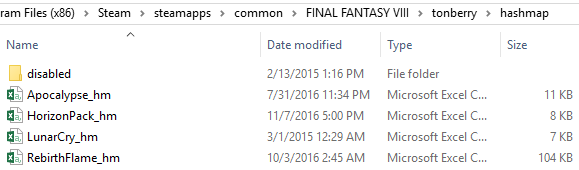
My hashmap-folders look like this atm:


PS: Did you manage to get CRT working with GeDoSaTo?
PPS: Is there anything I can do about this frame / mini-window (when using fullscreen) when going for 3840?
 
I know, I'm bugging you guys .__.

Well... this whole Tonberry vs. Tonberry enhanced is getting confusing  :o
I'm still not into it actually. Do I need both? Is the "classic" one obsolete? (why is it still linked under "essential mods" then?)
What folder structure is needed  (\tonberry or \tonberry\hashmaps)? Which DLL's I need? :(
I know this is a stupid question but this issue wasn't mentioned in your tutorial vid f.e.

So what do I need to do? Dump all DLL's from Tonberry enhanced and that's it?

My hashmap-folders look like this atm:


PS: Did you manage to get CRT working with GeDoSaTo?
PPS: Is there anything I can do about this frame / mini-window (when using fullscreen) when going for 3840?
Just go to the tonberry enhanced page and download the whole package.  Delete the old version of tonberry (except for your textures folder - you can still use this one with the new tonberry).  Then you must place the individual hash files (they normally end in "_hm.csv", like "SeeDReborn_hm.csv") and put those files (they come with the mods) into tonberry/hashmap.  The old Tonberry is obsolete - and the 'essential mods' page isn't really 'essential' it's more 'all the mods' lol.  Go with the MCINDUS mods guide via Steam for a more up to date mods package list.

CRT works just fine with GeDoSaTo.  Is your monitor's resolution 1920x1080?  That's the only way to use 3840 properly.  Just double your resolution and plug it into gedosato.  Also, make sure your monitors refresh rate is correct.  This should fix your windowing, I believe.  Make sure you select the new resolution in the FF8_Launcher settings before you launch the game.

I think I'm going to do a GeDoSaTo comparison via screenshots to show people what they can do with it.  It's pretty massive.
 
Edit: I think I figured out my problem. It seems I missed out on some hashmaps.
Reinstalling everything again just to make sure I didn't miss anything else.
Thanks!!

Edit 2: Everything is working fine now!! Thanks for the guide and your hard work =D

Hi Mcindus,
Thank you for your contribution!
I have followed one of your guides but I don't think any changes have taken place on my FFVIII at all.
I don't have any previous versions of Tonberry installed and I installed everything onto a fresh installation of FFVIII.
Please take a look at my directories in the images below. Is there anything that I missed or doing wrong?
Thanks!!

cJ1OWhr.png

NB8bHvp.png

xvRZ7Ib.png

B4WXpt7.png

VVxaC2V.png
 
Last edited:
Thanks for your many tips FatedCourage and Mcindus - I finally made it work texture-wise (even with Project Hellfire) - windowing, etc. --> gone! :)

I still can'r get some small CRT-things to work (would do some small wonders graphic-wise I guess)
I tried copying the settings from this https://sfx.thelazy.net/games/preset/1033/ into GeDoSaTo but it does nothing o.O
Other stuff like small luma- and texture-sharpening works a tiny bit.

Could someone post a setting for the CRT-stuff?

PS: If I use the Addons and therefore a new Launcher, do I have to edit GeDoSaTo'S whitelist?
 
Thanks for your many tips FatedCourage and Mcindus - I finally made it work texture-wise (even with Project Hellfire) - windowing, etc. --> gone! :)

I still can'r get some small CRT-things to work (would do some small wonders graphic-wise I guess)
I tried copying the settings from this https://sfx.thelazy.net/games/preset/1033/ into GeDoSaTo but it does nothing o.O
Other stuff like small luma- and texture-sharpening works a tiny bit.

Could someone post a setting for the CRT-stuff?

PS: If I use the Addons and therefore a new Launcher, do I have to edit GeDoSaTo'S whitelist?
You have mostly everything correct -- delete 'collisions.csv' and 'hash2map.csv' because you don't need them anymore.

In order to use the CRT settings, you have to pick 'edit postprocessing' and enable it there, in gedosato.  Also make sure you don't use a different postprocessing plugin like asmodean if you're using sweetFX.

You should look through the gedosato forum post and direct any more questions there.
 
Hi friends. Thanks for all your work upscaling my childhood - it really is looking great.

I am trying to run FFVIII and Tonberry using Wine on mac. I have got all the mods working, apart from Tripod and Hellfire (out of choice) which was a challenge in itself (trial and error with .dlls etc using winetricks) but unfortunately get a lot of unknown exceptions. I wonder if it is to do with the cache, as the game can run for a short amount of time before crashing. Do you have any suggestions as to other .dlls or areas that I can look to tweak in order to sort these problems? I understand that Mac is not really supported.

Would a legacy version help, as it does not leave textures in the cache?

EDIT: I have attempted to increase the video memory available on Wine using direct 3D registry keys, which has helped - I now get longer before the error. It also seems to help if I disable Project Eden, as I get longer play time before it crashes out. Without ProjEden I could get from Squall's dorm dressed in pre-Dollet uniform to the world map, where it would crash. Without ProjEden I can get as far as the Dollet beach.

Thanks
 
Last edited:
Hi friends. Thanks for all your work upscaling my childhood - it really is looking great.

I am trying to run FFVIII and Tonberry using Wine on mac. I have got all the mods working, apart from Tripod and Hellfire (out of choice) which was a challenge in itself (trial and error with .dlls etc using winetricks) but unfortunately get a lot of unknown exceptions. I wonder if it is to do with the cache, as the game can run for a short amount of time before crashing. Do you have any suggestions as to other .dlls or areas that I can look to tweak in order to sort these problems? I understand that Mac is not really supported.

Would a legacy version help, as it does not leave textures in the cache?

EDIT: I have attempted to increase the video memory available on Wine using direct 3D registry keys, which has helped - I now get longer before the error. It also seems to help if I disable Project Eden, as I get longer play time before it crashes out. Without ProjEden I could get from Squall's dorm dressed in pre-Dollet uniform to the world map, where it would crash. Without ProjEden I can get as far as the Dollet beach.

Thanks
Try to make sure FF8 is only using the first processor core on your CPU -- also, try lowering the cache in Tonberry's prefs.txt file
 
I don't mean to necropost (or double post for that matter) but I wanted to let everyone know that there's an updated master hashmap list on the second post of the thread!!!  Thanks! Enjoy!
 
I don't mean to necropost (or double post for that matter)
I think you will find legitimate content updates are a perfectly acceptable reason for both.
 
Quick question - This (and other mods) state they are incompatable with the Steam overlay, but if I turn the Steam overlay off, my Steam Controller seems to stop working. I was wondering if anyone here knew of a way to fix this, or if it is simply a choice between using my Steam controller or nice updated textures...
 
Status
Not open for further replies.
Back
Top