[PC+R+Switch] Unofficial bad UV texture patch [powered by DLPB tools]

  • Thread starter Thread starter makipl
  • Start date Start date
Status
Not open for further replies.
Fabulous work, Maki. Would it be possible to make an IPS patch or something of the sort to apply to the DLL file? That way, a hex editor wouldn't be necessary.

 
Could I also get the .dll and/or more detailed instructions on how to apply this fix? The bad mapping is driving me nuts but unfortunately I'm not understanding the instructions on the first post.
 
Thanks for updating this Maki, I got it working on the remaster by editing FFVIII_EFIGS.dll following your notes.

I created a web based patcher, for others to use (it uses Bemani patcher to patch the dll in your browser).

FF8 DLL Patcher

I hope it helps.
 
Last edited:
Thanks for updating this Maki, I got it working on the remaster by editing FFVIII_EFIGS.dll following your notes.

I created a web based patcher, for others to use (it uses Bemani patcher to patch the dll in your browser).

FF8 DLL Patcher

I hope it helps.
Excellent, works like a charm!
 
Thanks for updating this Maki, I got it working on the remaster by editing FFVIII_EFIGS.dll following your notes.

I created a web based patcher, for others to use (it uses Bemani patcher to patch the dll in your browser).

FF8 DLL Patcher

I hope it helps.
This was a big help, I was trying to get it to patch the manual way but had trouble. This web browser worked great! thank you for this wonderful tool. :)
 
I am glad it helped, thanks for letting me know both of you. I will keep the patcher hosted there (hopefully) permanently.
 
If you could credit me please too I'd be thankful.
 
Last edited:
If you could credit me please too I'd be thankful.
Yes of course. I have added credits to the top of the page. Also I don't mind if anyone else wants to host the code or share the link.
 
If you could credit me please too I'd be thankful.
Thank you Maki for your hard work and always doing such a great service for research and progression along with everyone else. And thanks for this wonderful patch.  :-)
 
Maki,

Your switch patches don't work. I re-wrote them, (you were super close!) and these are what needed to be changed:

Switch version 1.0.0

Code: [Select]
Code:
1.0.0----E04E38 02 00 80 52 E04E58 02 00 80 52E04E98 02 00 80 52E04EB8 02 00 80 52E04EFC 03 00 80 52E04F1C 03 00 80 52E04F5C 02 00 80 52E04F7C 02 00 80 52E04FC0 02 00 80 52E04FE0 02 00 80 52E05008 02 00 80 52E05028 02 00 80 52


Switch Version 1.0.1

Code: [Select]
Code:
1.0.1----E04278 02 00 80 52E04298 02 00 80 52E042D8 02 00 80 52E042F8 02 00 80 52E0433C 03 00 80 52E0435C 03 00 80 52E0439C 02 00 80 52E043BC 02 00 80 52E04400 02 00 80 52E04420 02 00 80 52E04448 02 00 80 52E04448 02 00 80 52
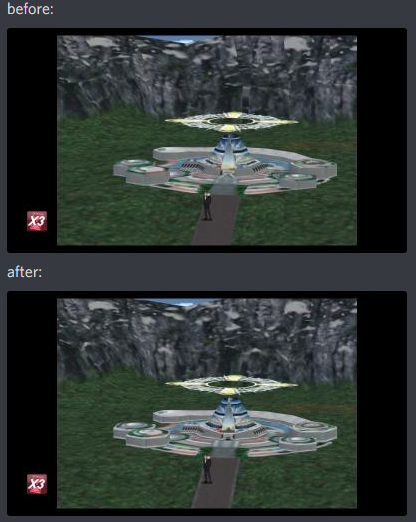

Comparison:
hMY8M7T.png


Download:

https://github.com/onefourthreeNX/ff8-mods/tree/master/switch
Grab the ff8-uv-patch folder and copy it to /atmosphere/nro_patches/ to install on the switch.

Note: this requires a hacked switch running atmosphere 0.8.9 or greater
 
Guess i get a unique error? I'm playing italian and i have made some tests. As i understand the patch is made for english version, FF8_EN, i tried at first (since it makes sense) to write in the txt FF8_IT.exe instead of EN, the file just named FF8.txt. I left the executable in the folder as it was, meaning FF8_IT.exe. It works for the patch, no errors. When i launch FF8 though, the overworld cannot load and i get an error message. I tried renaming the executable as FF8_EN.exe and also the txt content. As before, the patch works, FF8 overworld doesn't. I tried so to write FF8_EN.exe in the txt file and leave the executable named FF8_IT.exe but of course the patch doesn't work since it cannot find the file.

Any suggestions? Is it really multilanguage available?
 
Also, sorry but i like to be precise: the error message for the overworld (with black screen but the music starts playing before that) is "An unknown exception has occurred.". Then FF8 crushes.
 
I'm sorry, i didn't read ALL the messages in this thread, but i think the instructions at the beginning should be refreshed. Meaning, i learned and read i had to use different txt code to make it work, so now it works. BUT normally the first thing people look at (or "for") is the "Instructions" section, so i think, since now it works with some editing (also, fast) it should be stated at the beginning of the thread :) Anyway, again, great job! THIS is a remaster!
 
Someone would be so kind as to share the patched .dll for the 2019 Remastered version? I play on PS4 but a friend started it yesterday on Steam, and I have been trying to help, downloading Cheat Engine, Hex editors, Hex Tools pack, but I have no idea what to do. I open 'FFVIII_EFIGS.dll' with HxD and others yet I can't find '8A2CB2' or '8A20B5' nor any of that. Even looking for them manually they don't exist, I see close ones like "0008A20..." but not any of the ones mentioned in the instructions. I've managed to patch the .dll using the HextEdit method but it didn't fix the world map, I just get lost in the instructions about ASLR, the .dll, the .exe, the hex numbers, I just can't do it.

Oh, and the site made by Lightning isn't working anymore, I don't know if due to a game update that changed the .dll, yet it's not picking the file both dragging or chosing from the prompt window. That's the first method we tried, she's from Brazil and I'm from Spain, and didn't work for either of us, I tried, on many different browsers but it won't pick up the 'FFVIII_EFIGS.dll'. So the only option I have left is to ask for an already patched .dll or more detailed instructions for someone with no knowledge about programming.

My mail is: [email protected]

Thanks for your time!
 
Does this work in the spanish version?
¿funciona esto en la version de españa?
 
Last edited:
Does this work in the spanish version?
¿funciona esto en la version de españa?
I'm sorry but no- except you have a remaster, then keep reading

@Scathach
I understand this may be a little too difficult, so if you do have remaster then you can apply "Demaster" patch that have UV patch built-in. Here you can find more details:
https://www.ff7catalog.com/threads/13601/
 
Status
Not open for further replies.
Back
Top