[PSX/PC] Field Editor - Makou Reactor (2.1.0)

  • Thread starter Thread starter myst6re
  • Start date Start date
Status
Not open for further replies.
My QGears tool for conversion outputs:

0000036F: void script_av_b_2_0_init() {
0000036F:   Char(1);
00000371:   placeObject(0, 0, 3437, 31524, 642);
0000037C:   setSolid(1);
0000037C:   if (game:variable_get(2_0) >= 8) {
00000386:     setTalkable(1);
00000388:     setSolid(1);
0000038A:   }
0000038A:   setVisible(0);
0000038C:   return;
0000038C: }


From:

0000036f: CHAR 1
00000371: XYZI 0, 0, 3437, 31524, 642, 47
0000037c: SOLID 1
0000037e: IFSW 2, 0, 0, 8, 4, 7 (False target address: 0x38a)
00000386: TLKON 1
00000388: SOLID 1
0000038a: VISI 0
0000038c: RET

It seems that VISI 0 should be outside of the if statement, but your tool is including it inside of the if statement? Is this a bug in your tool or mine? I think its yours because 0x37e+7+5 = 0x38A which is the VISI 0 meaning this will be executed when the if block is not entered.
Not related, but, isn't that code redundant?
 
It has to be inside because the model will only be visible if the game moment isn't 8 or higher. If it would be outside then the model wouldn't be seen in no condition. So it will run the main script with an invisible model.

@Artema
Code: [Select]
Code:
   Deactivate talk script for the current field model   Deactivate contact with field model   Hide field model
This has to be seen as one command 'Disable model'. So redundant code has to be seen as a logical limitation of the code compiler of the script tool for their engine.
I guess MR needs to run the script itself to find such code to highlight it. ???
 
Ah the bug is mine - the IFSW is longer than the IFUB, thats what I get for using the same logic for both.
 
Is there some sort of correct procedure for adding walkmesh? I was just joining the dots, and noticed some triangles work, some don't and some crash the game when you run into a joining point.

Edit: Never mind, figured it out. The order of the points and the joining line order seems to be important.  As if it wasn't annoying enough already :P
 
Last edited:
I need help please  :(

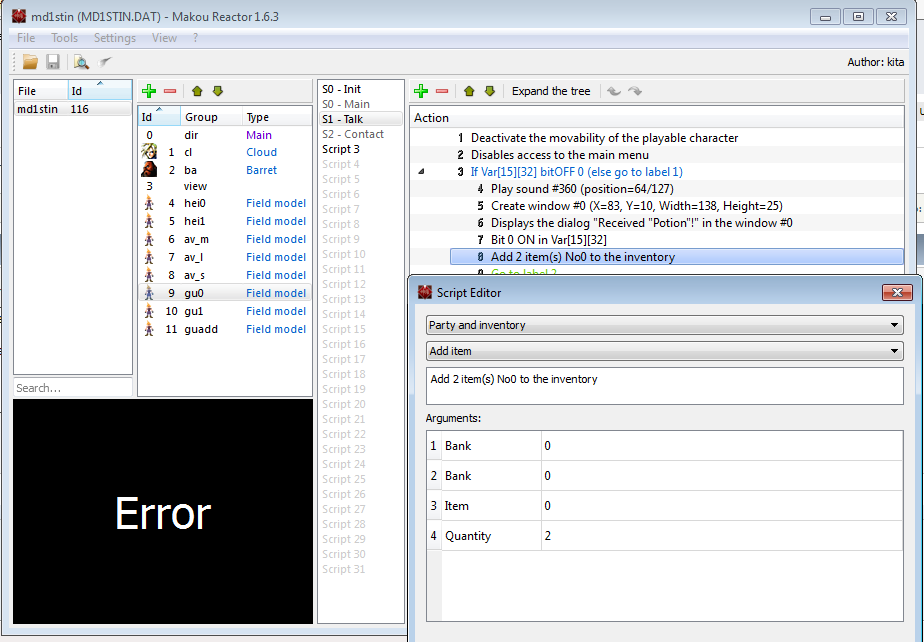
When I edit anything not able to start NEW GAME, example I changed add 2 item inventory  :-(

wJrYhxn.png


Thanks
 
I need help please  :(

When I edit anything not able to start NEW GAME, example I changed add 2 item inventory  :-(

wJrYhxn.png


Thanks
Need more info.. PS or PC? If PC, I can't help since I don't use that version.
 
Need more info.. PS or PC? If PC, I can't help since I don't use that version.
My subject is (when I edited anything and save I run the game but not complete when I start (NEW GAME) only black screen....?

How I can edit without any problem  when I saved ?

Thanks
 
To myst6re: A feature that would help for walkmesh would be a button to flip the position of the points. So for example, you can change point 1 to point 3 (and point 3 to point 1) with one button click, rather than copying/pasting & remembering a bunch of numbers. This could be handy for quite a few reasons, one of them fixing walkmesh errors if you don't put them in the right order.

Another thing that would be handy is if it tells you the coordinates of the center of the triangle, so its easy to move characters there and such without too much messing around.

I know before you said its hard to display things on that 3D view, so I deliberately left out a lot of those suggestions (such as numbering of points etc).. ;)
 
To myst6re: A feature that would help for walkmesh would be a button to flip the position of the points. So for example, you can change point 1 to point 3 (and point 3 to point 1) with one button click, rather than copying/pasting & remembering a bunch of numbers. This could be handy for quite a few reasons, one of them fixing walkmesh errors if you don't put them in the right order.

Another thing that would be handy is if it tells you the coordinates of the center of the triangle, so its easy to move characters there and such without too much messing around.

I know before you said its hard to display things on that 3D view, so I deliberately left out a lot of those suggestions (such as numbering of points etc).. ;)
I'm only change numbers to 2 and saved but not start game ?
 
I have a question.
It is possible to autosize all text windows?
It's some tedious to size each one.
 
Hi, I'm new here. I've been having trouble using the PSX to PC field conversion. All of the scripting, walkmesh, and text converts fine but when I try to import the background I get an "error reopening file" message. I'm trying to restore the onna_1 field, but right now it's stuck with the onna_2 background (I used a copy of onna_2's archive data to import onna_1). I've tried a few things but I get the error message every time, does anyone know what I'm doing wrong?
 
The Doors tab in the Walkmesh editor is bugged. When you set, for example, door 0 where you want to set it and then begin work on door 1, the door 1 coordinates will actually modify those of door 0. It's more annoying than death serious, but it would be nice to be able to just place a door position rather than script it there. :/
 
2 bugs:

1. When file is closed, Makou is still using char.lgp
2. When changing models, you have to close flevel and reopen to see changes
 
When editing opcodes with color dialogs (SWCOL, NFADE, FADE, others?) the RGB order is reversed either when committing the dialog or re-entering it.

Ex:
I enter R=6, G=7, B=8 in the dialog and commit it
Entering the dialog again I see R=8, G=7, B=6
 
The Doors tab in the Walkmesh editor is bugged. When you set, for example, door 0 where you want to set it and then begin work on door 1, the door 1 coordinates will actually modify those of door 0. It's more annoying than death serious, but it would be nice to be able to just place a door position rather than script it there. :/
Which version? 1.6.3?

2 bugs:

1. When file is closed, Makou is still using char.lgp
2. When changing models, you have to close flevel and reopen to see changes
1. When you close the flevel, that doesn't mean char.lgp should be closed too.
2. There is a caching system to open models quickly

When editing opcodes with color dialogs (SWCOL, NFADE, FADE, others?) the RGB order is reversed either when committing the dialog or re-entering it.
Fixed, thanks.
 
Which version? 1.6.3?
Yep, although I seem to remember earlier versions doing the same as well. I just never really edited doors that extensively so the bug slipped my mind before I could actually report it here.
 
I am having trouble making the chests open right for my mod.  I have them set in Nibel basement which will not open and stay open.  One is in the Kalm flashback hotel before the flashback opens just shows it is open but will play the animation and give you the item.  The third one will probably have the same effect as the first but wont show until the other two items are looted.  Is it a case of the map or its just being difficult?
 
I am having trouble making the chests open right for my mod.  I have them set in Nibel basement which will not open and stay open.  One is in the Kalm flashback hotel before the flashback opens just shows it is open but will play the animation and give you the item.  The third one will probably have the same effect as the first but wont show until the other two items are looted.  Is it a case of the map or its just being difficult?
Can't you just copy an entire treasure chest setup and script from another field into yours? :?
 
Status
Not open for further replies.
Back
Top