[PSX/PC] General editor - Hades Workshop (0.50b)

  • Thread starter Thread starter Tirlititi
  • Start date Start date
Status
Not open for further replies.
UPDATE: Guys I guess is solved, I noticed the problem when I tried to import it again with Dnspy, and I saw that every archive (like FF9, UI and stuff) are gone! So i decided to come back with a "Virgin" CSharp an put everything again, now I edit again the font ;)
UPDATE2: Aaaaand, i did it! I made anyway a backup, in case I will find other problems!
Good to hear you got it fixed!
thumb.gif
 
I fixed... but now other stuff is here  x''P

You know guys WHY this thing happen?

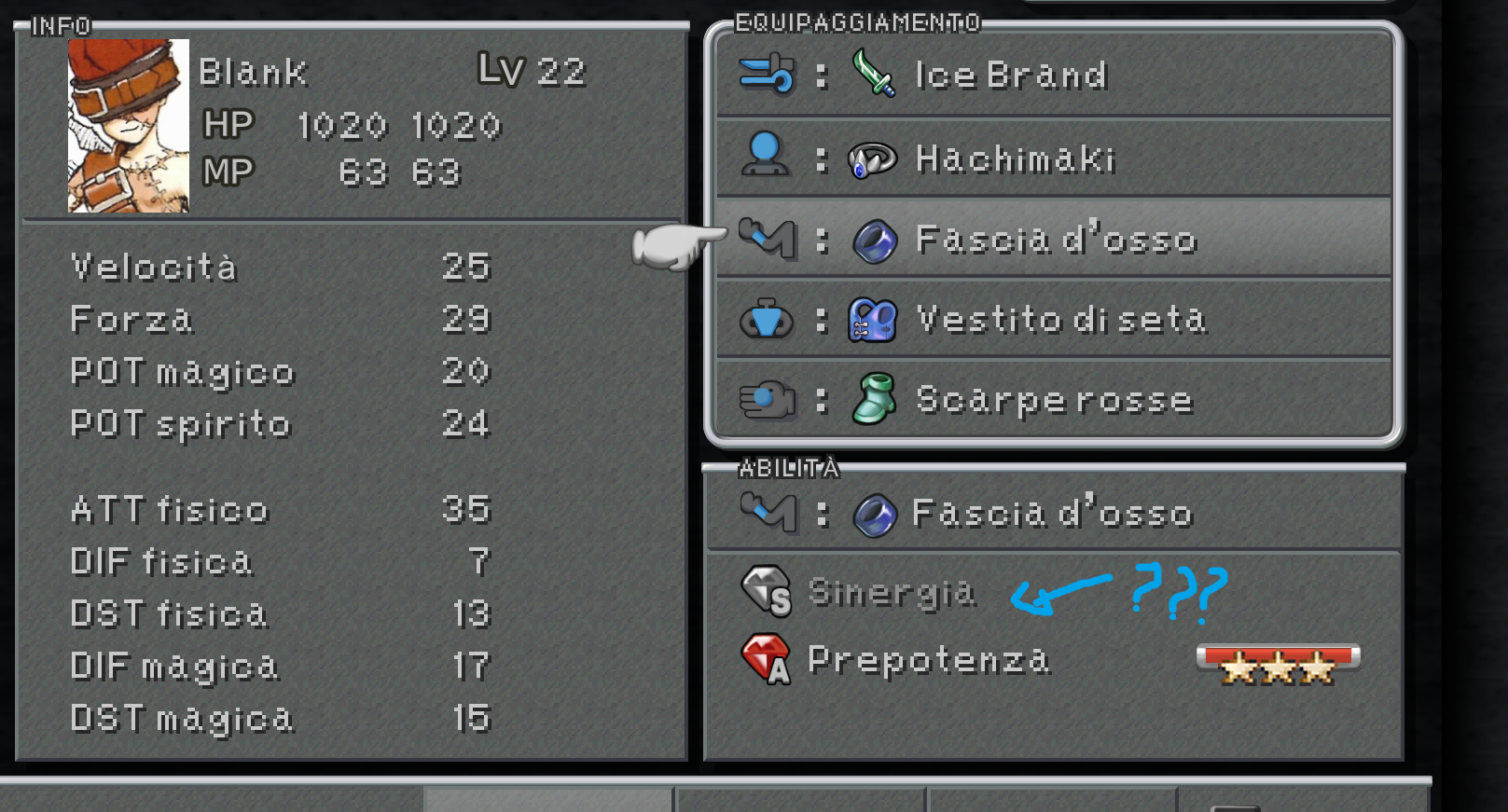
bA55sx8.png


It's because I set the Abillities of Blank? It's kinda strange.. I also applied macro.. so why his support abilities won't activate/appear? :-(
 
Did you set the Ability learning correctly? The first ability must have a non-zero AP requirement (if I remember correctly, that's the only thing to set up).
The method enabling it is "ff9abil::FF9Abil_HasAp". You can check that method to know why it doesn't apply for him.
 
Did you set the Ability learning correctly? The first ability must have a non-zero AP requirement (if I remember correctly, that's the only thing to set up).
The method enabling it is "ff9abil::FF9Abil_HasAp". You can check that method to know why it doesn't apply for him.
It's ok, silly mistake of mine.. it's solved also this one  :mrgreen:


UPDATE: Guys I want to disable the menu button when I'm using Cid Frog... it's possible?

About giving trance to someone else, I'll make a few tests but it may be possible to actually do it now with dnSpy/Albeoris's Memoria. Of course, unless you import another model, the trance appearance will be roughly the same as the normal state.
I don't guarantee anything though ^^'
To not mistake.. could you tell me how to do exactly with dnSpy? I want to try to make a Trance model for Blank, so if someone of you can explain me better..maybe I can give a shot!
 
Last edited:
Guys I want to disable the menu button when I'm using Cid Frog... it's possible?
You know I noticed this myself. The menu is enabled whilst controlling as Cid_Frog before the red light green light mini game.
Wasn’t like that in psx as far as I know.
Never the matter a simple fix.
 
I really hate to make an example of myself but I'm having some serious difficulties trying to work out how to load files into this tool

I have both the steam and physical copy of the game. I have tried loading the .bin files from the steam version (p0data12 for example) all of which produce the unhandled exception error message. With the PSX version, I am even more lost. There is a "raw cd image" file on the disk. How the hell is that loaded in?

I'm sorry to be a pain
 
Steam version: you must load the FF9_Launcher.exe file.
PSX version: you must rip your CD to an ISO file (there are tools for that on the internet). The output must be a .bin file, not .img.
 
Hi Tirlititi  :) Have you checked my latest question? You think you can help somehow?

You know I noticed this myself. The menu is enabled whilst controlling as Cid_Frog before the red light green light mini game.
Wasn’t like that in psx as far as I know.
Never the matter a simple fix.
I know right..
 
I've not checked, it's strange to me... Who is in the party when you open the menu?
Anyway, there can be 2 reasons for that:
- It was already there in the PSX version,
- There is a special check in the engine's source code that prevents the effect of "DisableMenu" in that field at that point, which is likely to be a mistake.

I am very confident that the Field Scripts themselves are exactly the same in the PSX and Steam versions, and that's the thing usually dealing with menu enabling/disabling (unless the engine oversteps it).
 
- There is a special check in the engine's source code that prevents the effect of "DisableMenu" in that field at that point, which is likely to be a mistake.
I'm going to assume it's this.
Like other engine mistakes, such as being able to land the invincible airship on world map bushes.
 
well fortunately be able to land in more places is a good thing , infact i am really interested in make the invinicible able to land anywere :D
 
Is model importing still broken? or am I doing things wrong?

I've tried importing proper versions of ASCII FBX & Binary FBX, but they either crash the game, or fail to load the scene.
 
Yes, it's still broken. I don't know what program you use for creating your FBX files, but you *should* be able to import accessory models.
The character models are a mess... I don't know what fails and why and I gave it up, at least temporarily.
Also, I didn't test replacing only the animations in the latest version, but it was working pretty nicely last time... so you may also do that if I'm not mistaken.
 
Is model importing still broken? or am I doing things wrong?

I've tried importing proper versions of ASCII FBX & Binary FBX, but they either crash the game, or fail to load the scene.
Yes, it's still broken. I don't know what program you use for creating your FBX files, but you *should* be able to import accessory models.
The character models are a mess... I don't know what fails and why and I gave it up, at least temporarily.
Also, I didn't test replacing only the animations in the latest version, but it was working pretty nicely last time... so you may also do that if I'm not mistaken.
Yeah. Still a bit buggy. I've only got as far as model swapping weapons with the importer, but those where invisible in game. I treid test importing the Zodiac SPear weapon, could not import that. I could not model swap Zidane with Quina still. (Vice versa)

The character models are a mess... I don't know what fails and why and I gave it up, at least temporarily.
Also, I didn't test replacing only the animations in the latest version, but it was working pretty nicely last time... so you may also do that if I'm not mistaken.
Regrading the characters, I tried numerous things to try and progress. At the very least, after properly re-rigging custom models to the output's bone hierarchy, and those animations intact, I was able to import it without crashing the model importer, but in game, it still crashed. something is still missing. I use 3ds Max and Maya. (Usually with the .anim files).
Animations still there, everything, but to no avail, the game will still crash.
 
Ah, I mainly use Blender. Thanks for the replies, looking forward to it being fixed no matter how long it takes.
 
Ah, I mainly use Blender. Thanks for the replies, looking forward to it being fixed no matter how long it takes.
What were you trying to import? Accessory, Character?
 
Is there any way to modify the 'Level up' and 'Ability Up' support abilities? As in, modify the values they give (1.5x EXP, 2x, 3x etc.).
 
Yes, but preferably with the tool dnSpy.
The code for that is in the method "BattleResultUI::InitialInfo". There's the following lines there for experience:
Code: [Select]
Code:
    if (ff9abil.FF9Abil_GetEnableSA((int)pLAYER.info.slot_no, 235))    {     battleEndValue.value += this.defaultExp >> 1;    }
And for AP:
Code: [Select]
Code:
    if (ff9abil.FF9Abil_GetEnableSA((int)pLAYER.info.slot_no, 236))    {     battleEndValue2.value = this.defaultAp << 1;    }
If you're not familiar with the shift operators, you can simply consider that "+= this.defaultExp >> 1" adds half of the default experience to the total, and "this.defaultAp << 1" is twice the number of AP (it's like a division or a multiplication by 2).
You can replace those formulae by something else, like "battleEndValue.value = this.defaultExp * 3;" for getting three times the exp with Level Up.

If you want to do it with Hades Workshop, it's in the panel "CIL Code -> Raw -> BattleResultUI -> InitialInfo".
It is CIL Code there, not C#, so it's harder to read/modify, but if you don't want to use dnSpy, I will check how to do (if it is possible: not all the methods can be edited correctly with HW). I can't do it right now.
 
And for AP:
Code: [Select]
Code:
    if (ff9abil.FF9Abil_GetEnableSA((int)pLAYER.info.slot_no, 236))    {     battleEndValue2.value = this.defaultAp << 1;    }
If you're not familiar with the shift operators, you can simply consider that "+= this.defaultExp >> 1" adds half of the default experience to the total, and "this.defaultAp << 1" is twice the number of AP (it's like a division or a multiplication by 2).
You can replace those formulae by something else, like "battleEndValue.value = this.defaultExp * 3;" for getting three times the exp with Level Up.
could this be used to store (save) gained AP for each character separately and spend it on abilities rather?
 
Yes, well, it's more in the "BattleResultUI::AddAp" method that you'd want to do that.
In that method, there's a loop over the equipments, then a loop over the ability slot of each piece of equipment, and the increase of these abilities' AP.
You can replace the whole loop by:
Code: [Select]
Code:
ushort curap = FF9StateSystem.EventState.gEventGlobal[1500+2*pLAYER.info.slot_no] | ((ushort)FF9StateSystem.EventState.gEventGlobal[1500+2*pLAYER.info.slot_no+1] << 8);curap += ap;FF9StateSystem.EventState.gEventGlobal[1500+2*pLAYER.info.slot_no] = curap & 0xFF;FF9StateSystem.EventState.gEventGlobal[1500+2*pLAYER.info.slot_no+1] = curap >> 8;
With this, the general variables "VARL_GenUInt16_1500" will hold the AP storage number (65535 max) of Zidane, "VARL_GenUInt16_1502" will contain the one's of Vivi, etc... I've chosen 1500 randomly ; I think that this general variable is not used but it might be.
But then you need some system to allow players to spend these "ap_store" into abilities. And that's a completly different story, quite harder.

What you can do with that is to make this system with the field scripts: for instance, you can add the option to spend AP in the moogles' menu. If you don't want it, you have to wait until we know how to add a full menu with GameObjects and such. That surely won't be soon.
 
Status
Not open for further replies.
Back
Top