[PSX/PC] General editor - Hades Workshop (0.50b)

  • Thread starter Thread starter Tirlititi
  • Start date Start date
Status
Not open for further replies.
Oops, I forgot to mention the disc, sorry. Yeah, it was Disc 4.
 
That's a bug, then, yes.
Hum.... Maybe the japanese version has some differences about that? I don't have the disc 4 : I do my tests (about the japanese version) on disc 1 and didn't experience bugs like this for now.

I'll try to get where it comes from. Thanks a bunch for telling me.
 
Update to version 0.22.

- Supporting abilities are now available to edit.
--- Only name, help and magic stone cost can be edited for now.

- Stats are now available to edit.
--- You can change the experience recquired to level up as well as the HP/MP progression curve,
--- You can change the default name, primary stats (at lvl 1) and ability list for each characters (the 8 permanents + the 4 temporaries). Note that the "ability list" also completes the edition of the commands.

- Items are now available to edit.
--- For key items, you can change the name, help and description,
--- For regular items, you can change most of things about them (except for the way ores impact eidolons).

- Added the few items' effect to the spell effect list though the formulas aren't relevant for spell uses,
- You may now make Quina learn supporting abilities when s/he eat an enemy (the supporting ability name is not properly displayed when s/he does, though :/),
- Added a way to change the palette selection for making the importation of custom charmaps easier,
- Fixed few visual bugs.

Next things I would like to do are :
- Adding Tetra master's cards edition,
- Adding a Damage Calculator tool (if anyone wants to help me on this, that would be great ^^),
- Adding a way to edit/add text opcodes (at least for the basic ones),
- Fixing that bug Thisguyaresick2 told of... I couldn't reproduce it even though I didn't spend much time on it,
- Completing every things not complete yet, such as the eidolons' power boosts or casting words...

Have fun. Those things should have been editable much sooner since you guys and LandonRay made the documentation about this since a long time ^^'

EDIT : update to version 0.22b : fixed a fatal error bug when some text was copied/pasted + fixed a bug making a weapon's elemental attack non editable.
 
Last edited:
Update to 0.23.
- Synthesis shops are now available to edit.
- Fixed a bug with key items' descriptions on some versions of the game.
- Fixed a bug on items' battle help on PPF exports.
- Fixed a minor bug happening when charmap was changed.

Thanks a bunch to Thisguyaresick2 for pointing out these bugs ^^

Note that on versions with the 2nd fixed bug (most of versions, I fear), you won't be able to get item text modifications when loading HWS files (the ones saved with the versions 0.22). Sorry.
Also, still on these versions, the last key item's description can't be edited at all for now (it will always say "not enough space") but that's not a real problem since it is unused...
 
I can't seem to get text color to change in item descriptions.

I wanted to add an Add Status effect to a weapon and have the text be red like normal. My Add button on the Edit Text Screen is grayed out, clicking in the list doesn't do anything, pasting in the µ doesn't do anything, nor copying and pasting a colored entry...

Please inform? Thank you.

Edit: I had searched 'color,' but now I see that the most recent update's note on text editing may apply to this question. Not sure. Sorry if I should have noticed that.
 
Last edited:
Yes, that was one of my notes. You didn't miss anything : it is not possible to add/edit text opcodes at the time. It'll be possible in the next version, though. Should be ready in 2 weeks or sooner.
 
Hey, thanks so much for the quick reply, even though I had overlooked my own solution (both there and, I now see, in the Help menu).

Question: suppose I play the game with the modded equipment, then in two weeks you release another version and I edit text color. Would I be able to mod the disc and load up my old game? Would it matter if I had the item in my inventory? Essentially, can I get away with fixing the aesthetics later?
 
It will never matter if it's only cosmetic.

I'll speak for memory card saving (because for save states, it's different in the worse way) :
- Modifying the stats given by the items or the attacks of the weapons matter if you had a character equiped with it. I think it goes back to normal (to the newest version) when you un-equip then re-equip them.
- Modifying the party's stats, both the "Level Progression" and the individual stats are likely to bug. I didn't test it so I can't say for sure. It might go back to normal when you level up and/or un-equip then re-equip something.
- Abilities learned are replaced by the new ones and it has the same amount of AP than for the previous one. Let's say I have a save with Zidane's Thievery at 80/100 and I modify the game so he needs 200 to learn Flare instead of Thievery, then he will have 80/200 AP for learning flare. Also, you keep gaining AP once you're done learning an ability (but it's invisible of course).
- If you modify the Magic Stones requirement of supporting abilities and if a character has it activated (when you saved), it will totally mess up with the total amount of magic stones available for that character. I don't know if it's getting back to normal after leveling up but that's still something.

Everything else is safe and should have no side-effect nor bug.
 
Last edited:
Huzzah. I like your program very much and thank you for it.

At the moment I am just doing some minor rebalancing: giving characters who had no weapons with stats such so they can have stat growth more comparable to the others, tweaking Whale Whisker and Angel's Flute so they may be sidegrades to the Tiger Racket... My idea had been to give them statuses to add, but perhaps I'll just give them +2 Magic and they can be upgrades to the Magic Racket and a sidegrade in that way.
 
Hello, I found this great tool on Romhacking.net and now I'm here.
First, thank you very much for your effort.
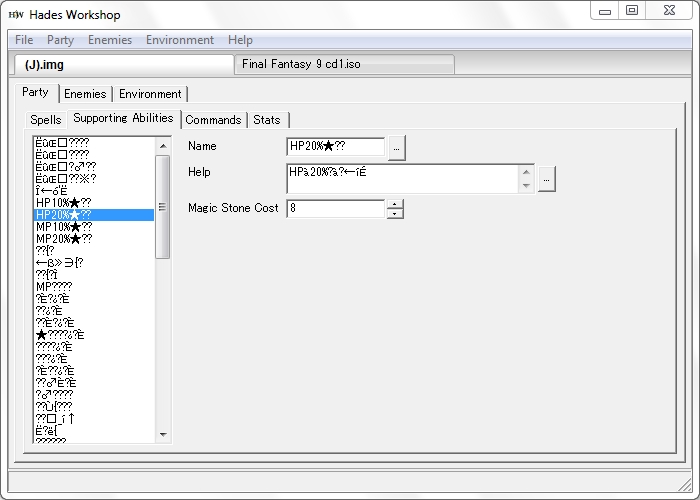
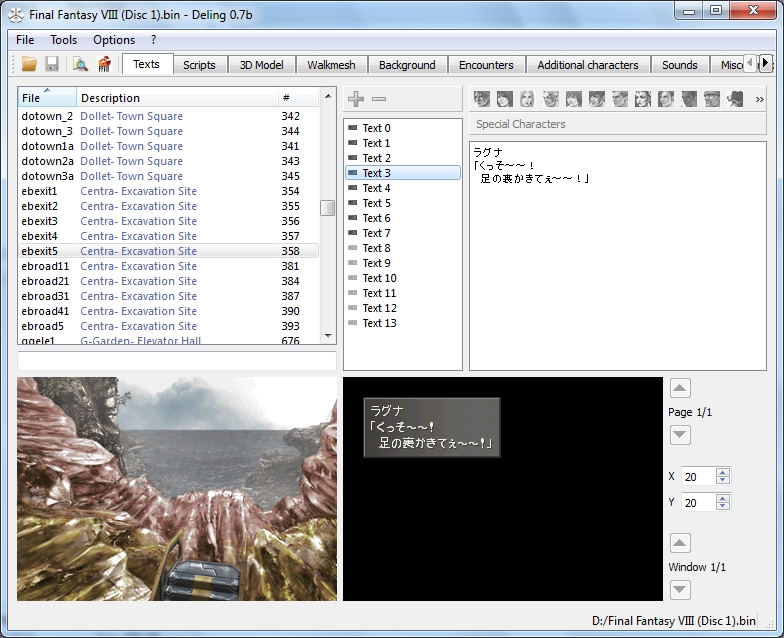
Secondly, my PC can read Japanese properly, but I wonder why the Japanese encoding in Hades Workshop is not right. Below are my screenshots for Hades Workshop and Deling (FF8 editor) for Japanese version of FF9 and FF8.

Hades Workshop, thing are not right
jVSoRRA.jpg


Deling, things are right
Jk3Vcgc.jpg


Can you tell me what I have to do to read the Japanese encoding properly?

Second, I want to translate FF9 to my native language, so I must redraw the font. Can you tell me and people here where the font locate? Is there any tool out there allow me to extract and reinsert to font?

Thank you very much for reading.
 :)
 
Hey thanks !
To properly display the japanese test, go in the File->Preferences menu and select Japanese as the game's alphabet.

The font is in the Environment->Text panel. Check out the "Charmap" section, you'll see several pictures : the global text font is the first one.

Here is the method to import your own font (I should add it in the help but I always forget ><) :
1st step : create an image .tga with every letters and characters you want. That's tedious if you paint it but Gimp and other programs have options to paint characters. Best way to draw them : they must be 13 pixels high maximum, 3, 6, 9, 12 or 15 pixels large, being white on a black background and having ~ 6 different tones of grey. It's also better if you use the same dimensions than in the game, so it's better to export the font before and use it as the base image.
2nd step : open HadesWorkshop.conf with a simple text editor and add a new line in the [Text] section :
Charmap[YourLanguageHere]=
and then you put all the letters one by one. They should be in the same order than in your image (that makes things easier). Since you don't draw the space, you can put it anywhere (it's in 16th position in normal games but that's only a standart). You're limited to 247 characters for the first charmap. If you need more, add a second line "Charmap[YourLangageHere][A]=" and put up to 256 more characters in that line. You can do it once again with a "B" option so you can use up to 759 characters.
3rd step : open Hades Workshop and your game, go to the charmap image (Environment -> Texts -> Charmap) and select the first picture : you see the current charmap. Click on "Manage Textures" then "Browse", select your charmap image, adjust its scale/position and then click on "Import" : you see the characters as they will appear in-game. Because of the way FFIX compresses it, it'll look bad if your letters are not 3, 6, etc... pixels-large.
4th step : in the same screen, select all the paintings one by one and make them surround each a letter. The order here must be the same as the one in the .conf file (let a 0-large painting for the space). You can delete or add paintings with a right-click.
5th step : go to preferences and select your charmap in the field "Game alphabet".
6th step : translate everything you can ^^'

Note that the Japanese version actually uses an extended charmap that is dependant on where the player is located. The font picture for it can be managed the same way, but there is no support for displaying/editing characters from that charmap inside the dialogs...

 
Last edited:
Thank you very much for the quick reply.

Actually, I did choose Japanese alphabet in the preference, but it's no use. I wonder why? Does it concerned to the Non-unicode setting in the Window's control panel? Currently, my setting for non-unicode for program is Japanese, and I can read Japanese properly in other softwares except for Hades Workshop.

I'm pretty used to doing the font editting stuff, I'll try the way you mentioned here.

P/S: I decided to choose Japanese version as the base of my translation because at the first glance, it uses more space than English version (because of Kanjis) so I have much space for my text than the English one.

I wonder does FF9 use any kind of pointer for text?

And one more important thing: it's the character width. How can I adjsut the character width? For example, the original character "A" has 12 pixels width, but I redraw it in to "i", so there's a space after the letter. Is there a way to reduce or enlarge the width space?
 
Last edited:
I have no clue about the japanese, then... Works fine for me when I try to open the japanese version. If I recall well, the unicode encoding for my program is utf-8. Do you read properly the HadesWorkshop.conf file when you open it with a text editor?

For the letters' width, you can use the extra space obtained when you redraw big letters, as long as you keep everything a multiple of 3. It only mean you'll have to actually do the 4th step and adjust every "letter boxes" to fit the letters.

I'm not sure of what you mean by text pointers : there are tables of pointers for each text tokens (so "Cure" has a pointer for it, "Cura" has another which points 5 characters after the previous one). But I don't think there is a pointer table for each location to where there is text (a table saying "there's ability texts here, menu texts here, etc...").
Besides, the pointers for text tokens are not always near the texts themselves, and the 0-position often differs for a case to another.
 
Now I know why I can not read the Japanese version properly. The reason as the video below.


Here's the summery.

1. When I first downloaded Hades Workshop, the HadesWorkshop.conf is 4K (3,107 bytes) and it has Japanese charmap, Latin charmap in it.
2. When I opended Hades Workshop and choose Japanese in the preference, somehow it automatically overwrite the conf file. This is inevitable.
3. The new .conf file (overwrited by the program) now is 1Kb (297 bytes) and the Japanese charmap, Latin charmap was gone!

I wonder is the the bug of HadesWorkshop? 
By the way, I download the proram from Romhacking.net
 
Ok, thanks for the explanation. I'll see what I can do about that (it has to be some sort of option to make sure the .conf file is properly read/overwritten whichever your platform's configuration is).
There is no difference between the Romhacking.net version and the one here. Only the source code is in a separate file here.
 
Last edited:
In the Control panel, there's Region and Language setting. When I chose Change system locale to English, now Hadesworkshop doesn't delete the Japanese charmap in the .conf file so I can read it properly now.
But if I change system locale to Japanese, Hadeworkshop delete Japanese charmap whenever I open it.
Hope to see another version which fix this problem soon.
 
Hello, your program works great, but I have a problem.

I'm not really good with creating charmaps, so could I request your help (or someone else's) to make
Ő, Ű, ő, ű characters for a hungarian translations? Only these characters are missing. It would be a really big help.

By the way, I see, that I can export text blocks, but cannot import them back. Is it possible, that in the near future you make the enviroment/texts part importable? It would fasten up the translation process, because it's really hard and slow to open, then close a text line, and repeat plus it would be possible to work with a group to translate...

Thank you! :)
 
Is there some characters you don't need in the charmap? Because there's the place to add ő and ű but not the upper-case ones without deleting anything.

Here is the lower-case texture (at the right of the picture) :
https://dl.dropboxusercontent.com/u/98687557/Charmap.tga

For the upper-case, just copy-paste a O and a U and the accent from the lower-case and put it over an unneeded character.
If there are no unneeded character, it'll be much more complicated :/ It's really tedious to properly draw letters from nothing because the game's compression algorithm tends to alterate the picture a lot.

You still have to do all the steps 2-6, though.

For the importing feature, that's not my priority.
 
Yes, there are some characters that I don't need, but I downloaded GIMP (it has taken a half hour to learn how to use it :D ), edited the charmap file, (deleted a char that I don't need, copied the normal upper case version and the accent from the lower- case version to make Ő and Ű) and the config file, and now it works perfectly.

The only problem is, that now I can't load the iso file with Hades if it's patched. But I can do make a mod :D

Anyway, thanks for your help. It will be much easier to do the translation from now on.
 
Status
Not open for further replies.
Back
Top