[PSX/PC] General editor - Hades Workshop (0.50b)

  • Thread starter Thread starter Tirlititi
  • Start date Start date
Status
Not open for further replies.
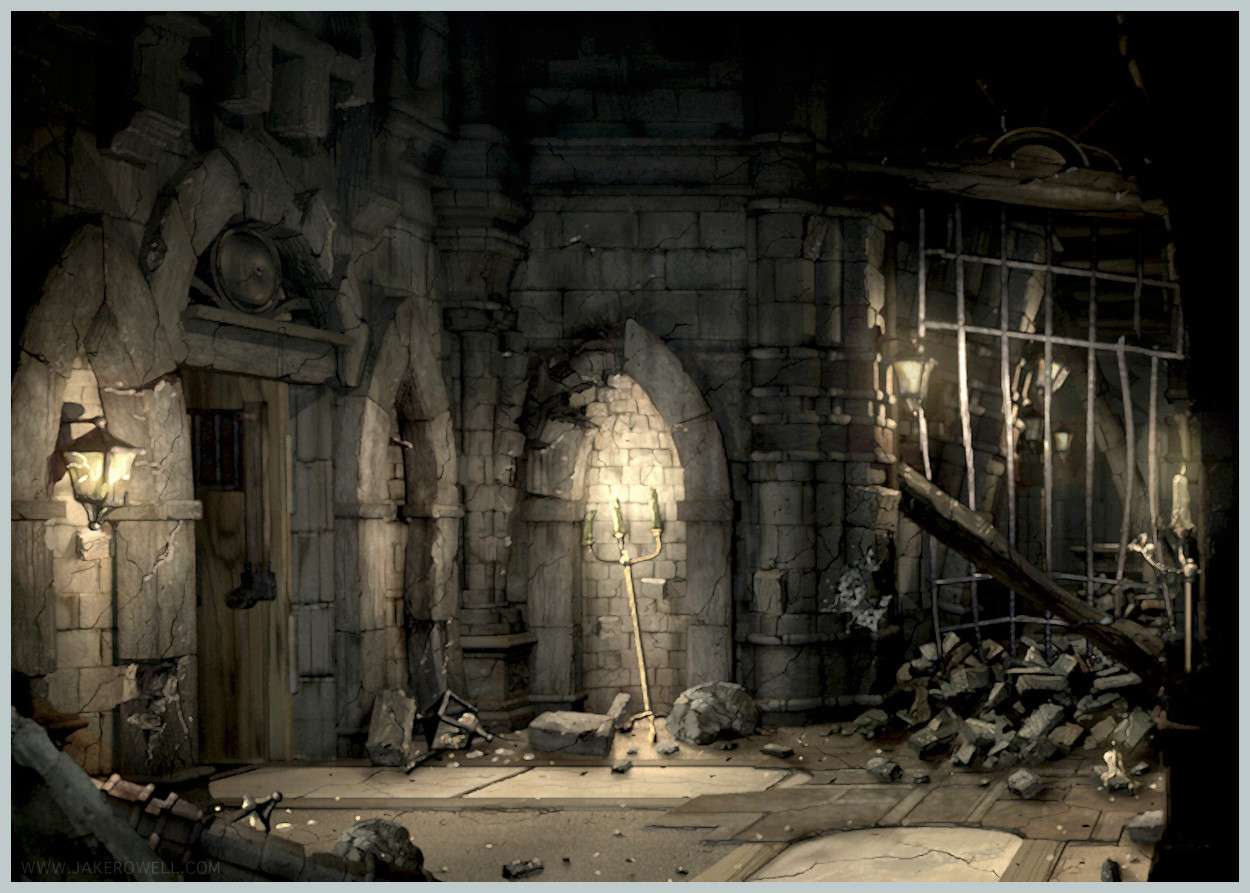
Even on the PS4 today it would be difficult to achieve as much detail as is in this scene for example.
NgD8NGF.jpg

Rendered scenes today can look fairly realistic, look at this for example, digitally created.
large_9ff1f249-e5d4-4f13-9879-07f4ff7f3877.jpg

Compare the two above to what the playstation 4 can do.
maxresdefault.jpg

The thing with pre rendered backgrounds is that they don't even have to be rendered, they could be photos.
Download-Landscape-Forest-Path-HD-Wallpapers.jpg

Creating the pictures isn't hard, even animating parts of it isn't hard. I could easily make the branches in the photo above wave or have it rain or simulate a river. If the camera is static it wouldn't even be so hard creating a walkmesh and have a character run through the picture, you would have to know the lens the camera used but it could all be done fairly easily. For perfect accuracy you would ideally have to put out two paralell lines in the photo so you can figure out the perspective lines and where the vanishing points are.

The problem is understanding how the pictures are layered on top of each other and how the cameras are panning through the picture. As far as I know there is no engine that does this automatically today, what would be even more interesting than being able to rip out models and put them into the game again would be someone implementing a pre rendered background feature in unity or unreal or some other engine. This Hades program could maybe give hints on how to program such a feature?
 
Last edited:
Oh, I see, you want to replicate the functionality of FFIX, in another game engine?
I can respect that, I've wanted to do something similar for a while, but lack the experience to make a robust engine like FFIX.

I don't know that its exactly how FFIX does it, but the you can make a camera pan by altering the width and height and offset parameters of the frustum in any engine that lets you alter the camera matrix. This would keep the perspective vanishing point locked in one place,(in 3D) while moving the rendered image around on the screen.

Does that help?

As for the layering, unity allows for rendering layers, such that even if an object is behind another, it gets rendered later, and thus on top of everything else.
I suspect the hardest part about replicating FFIX in Unity would be the battle stuff.

As for using the models... that's a tricky subject. I have them, but because of the way they export, one model only supports one animation, so in order to use them one would need to export a duplicate of each model, for every animation. I'm strategizing how to get around that.

For now, I think the best option would be to try to work around the problems you might face in HW, as some cool things can be done with it, if not everything you might wish.

For example, beginning the game in the Festival of the Hunt (which is my pet project for HW. End goal: have a choice in playable character, more enemies and getting into scraps with the other participants.)
 
Last edited:
The rendered scene that would be moved around by the width and height offset parameteres would consist of several layers of background, also the "walk mesh" and the character would be in perspective, but how would those move around as the textures on the planes are panning around. I think this is by far the most difficult thing to do, harder than creating a battle system. No doubt they didn't use planes like in the image below when they made the FF games, they had figured out some easy pipeline for creating these backgrounds.

Something as simple as:
1. Setup camera
2. Place objects.
3. Render out scene.
4. Create walkmesh.
5. Send the stuff away to someone else who would put them into the game within 2 min with a few clicks.

There are other 3d objects in the scene other than the player too. I think creating those pre rendered backgrounds might be harder than a battle system. A static camera is easy, an animated camera that is lined up with the perspective of all the 3d elements in the scene, mind boggling. Good luck on your mods. ;)
UpdateII.jpg
 
When the camera pans around a scene in FFIX, the camera position does not change. Only the edges of the frustum are altered. It's easy to manipulate cameras in that way in Blender, and the same kind of matrix is used in Unity, though it does require some scripting to alter the camera matrix in that way...but its not really difficult.

The background images aren't rendered anywhere in the scene at all, they're UI elements that have a layer number, which represents a 'distance from camera', and is used to determine when the image is rendered. Closer imaged to the camera get rendered later, so they appear on top of other images and objects.

What I'm trying to say is, its not as difficult as you seem to think it is. Unity already has all the functionality you'd need to do it, probably in only a small number of lines of code, using generous amounts of Camera.ScreenToWorldPoint(...)

You're thinking about the maps as though they're 3D scenes, when really the only 3D part about them is the walkmesh and character model. Everything else is done through 2D layering the same way as menus and speech windows.

As for the camera moving around the scene, it doesn't happen, except in a select few places, and that uses prerendered video with characters dropped on top of it. Those scenes don't support objects overlapping the character models at all, and you can see them actually in front of the foreground in some of those scenes, if only for a few frames, because of that limitation.
 
Last edited:
But if not all of the walkmesh is seen in the camera view and you run to the right, the background image is scrolling but the walkmesh remains static or is it the walkmesh that moves around while the character is being static. Because when you reach the edge of the camera view and the walkmesh goes beyond the camera view, how are you suppose to see the character if he walks off camera. The walkmesh and the characters would have to "scroll" with the background picture no? I'm no doubt missing something.
 
What I'm trying to say is, computers can render cameras "off center", which is to say, you can move the portion of what is being rendered around, without changing the focal point of the lens, only the edges what it sees. This is what FFIX does. (You'll note in a few places, the character models seem to stretch ever so slightly at different places in the map, that's because they're past the part of the camera lens that would normally be clipped off, and the perspective calculation has become unrealistically drastic....It's hard for me to describe it, but I may be able to show you with a picture.

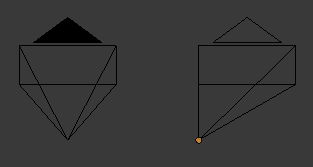
XjWSqYn.png

Here we see two cameras. the pointed part on the bottom is where the camera is, and the rectangular part is 'what it can see'. On the left is a normal camera. Its focal point is directly in front of where it is in space, and what it can see is equal on the left and right of that focal point.
The right camera also has its focal point directly in front of it, but what it can see, has been shifted far off center, to the right, with anything to the left of the focal point being cut off completely, but much more being visible to the right of it.

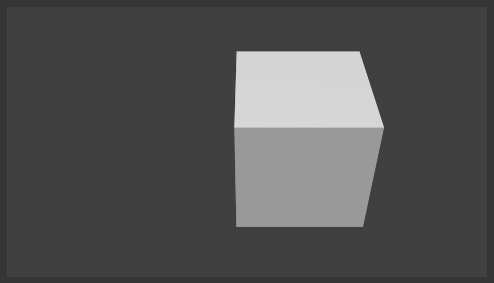
JckZ5bR.png

Here we see the camera on the left, looking at a cube that is slight off center from it.

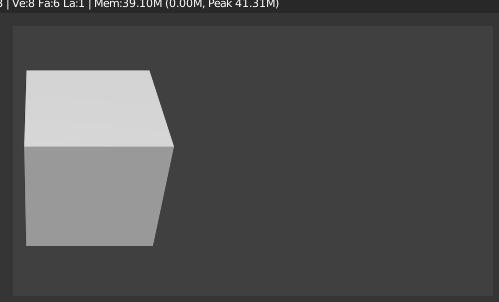
E021mVg.png

And here we see the what the camera on the right sees when looking at the cube from the same location and pointing in the same direction as the first.

Note that the cube looks exactly the same, but appears in a different region of the render area. This is because the camera's position and angle never moved. Only the edges of its periphery were changed.

You can imagine it like being able keep your eyes pointed forward, but shifting your brain's attention to the things in the corner of your eye, instead of what they're pointed at.

That's what I mean by "changing the frustum matrix"
 
Can the frustrum size be animated in blender, or do you have to animate the camera with scripts. Can the frustrum size track an object through the viewport. I want to try to recreate one of the pre rendered backgrounds in the blender game engine. Do you have the code or would it be difficult to type out?

We could use this as our background, since you can walk under that bridge it'll really sell the effect. Let me know if you could do the code, then I'll start recreating the walkmesh in sketchup and create an updated final fantasy character to run around in the scene. Because we're in a modern engine the character will be able to cast shadows, if you're interested let me know.

By the way I appreciate the explanation.
aErJRKN.jpg
jmkalFt.jpg
 
Last edited:
I honestly don't know anything about the blender game engine. There is an addon that allows you to animate just about everything in blender, called AnimAll. Turn it on and you should be able to keyframe any property by hovering and pressing I. The property you want for the frustum will be in the Camera settings (with the camera itself selected that is, not the regular render settings) and its called "Shift" there will be one for X and one for Y. I don't know anything about object tracking. I know blender has it but I don't know if it has the features needed for FF style panning.

I honestly don't have the time to do any coding for it in either Unity or Blender though, otherwise I'd probably have shown an example... Also finally, lets not get too far off track, this is a thread for Hades Workshop.
Recreating the functional engine of FFIX would probably be best discussed in its own dedicated thread... though I've never had luck actually recruiting coders who had more experience than myself, which is probably what you'd need to do, if you don't know how to code...

Also, worth noting, FFIX for PC will be out soon enough, and may open the door for a lot more modding possibilities.
 
Ok Hades related question, when I try to export the field backgrounds, I want to keep the layers but when I export the background it seems to only export half of the background. Shouldn't there be many tiff files that you could layer in photoshop.
 
Thanks for the SetModel parameter Satoh, and for the interesting explanations ^^

Battle Scene importing (and even exporting) is not working well indeed. That's a part of the program I started a long time ago and I didn't got back fixing things there, mainly because they're quiet messy to begin with. Actually, I think the best I've ever done with that is exporting a scene, modify the position of 1 vertex and import back the model. The fact that it worked was a big success for me ^^"
I don't think you can use another amount of materials than the default one (and maybe you can't use another amount of vertices either).
Also, the exportation is partial because some scenes have animations (such as Trance Kuja's battle scene, where the crystal is seen floating behind him).

About the field backgrounds, you can export them :
1) Either one by one using the "Background: Manage" button and then "Export". This way, all the checked tile blocks will be exported as different layers of the .tiff image (unless you merge them). I don't know for Photoshop, but Gimp asks about using those layers as new images or using them as normal layers when I open the .tiff image with it.
2) Either by file batching. This way, all the tile blocks will be exported.

As Satoh said, field backgrounds are composed of tiles, which are 16x16 little images (potentially transparent). Those tiles are then packed into tile blocks, which is what you see in HW.

By the way, if you happen to know about image format and have an idea for a better one than .tiff, let me know ^^
.tiff seemed to me the most standard format that supports multiple layers, but if photoshop can't read them as layers, that's a problem.
 
Yes tiff doesn't seem to have any layers when you open it up in phtoshop. Might be a problem in the future if you'll ever make it possible for people to reimport pictures. But I doubt anyone will ever do that, you can't make the backgrounds higher resolution anyway. I'm trying to recreate the pre rendered effect in another engine and I thought I'd use one of the backgrounds from ff9, if I could export a character model from the game and it's animations too. I could basically recreate a scene exactly as it is from ff9. It's not a big deal, but if you want it to work you could maybe make it work somehow. ;)
 
Yes tiff doesn't seem to have any layers when you open it up in phtoshop. Might be a problem in the future if you'll ever make it possible for people to reimport pictures. But I doubt anyone will ever do that, you can't make the backgrounds higher resolution anyway. I'm trying to recreate the pre rendered effect in another engine and I thought I'd use one of the backgrounds from ff9, if I could export a character model from the game and it's animations too. I could basically recreate a scene exactly as it is from ff9. It's not a big deal, but if you want it to work you could maybe make it work somehow. ;)
I had every plan to reimport new backgrounds at some point. Not everyone cares about a higher resolution.
As I stated Lein, there are other programs that already export the character models and animations to usable formats.
 
From my point of view, Photoshop is faulty there, cause I found the .tiff layer format in some official .tiff documentation. I don't see why Photoshop doesn't support that feature (as said, Gimp does).

Well then, since SE decided to keep the release of the Steam version for later, here is the v0.33 :
 - Added a MIPS editing feature. MIPS is the coding language shared by all the PSX games. It's the deepest level of game modifications and shouldn't be used carefree. More infos below.
 - You can now add and remove several things, so you don't need to recycle another item to create a new one :
 --- Add/Remove texts in text blocks and battles,
 --- Add/Remove enemy groups,
 --- Add/Remove enemy spells.
 - Completed the list of spell effects, though I only know the effect of "Defless" among the new ones : it unconditionally divides both defences by 2.
 - You can now use the field models of most of the playable characters. Indeed, the problem was that you don't only need to add the character's model in the preloading list, but also link it to a script's entry. The related "InitObject" call is a necessary step to preload the 3D model.
 - Added a background artwork image. It was made by Maxa' and I'm really glad of it :D
hades__workshop_by_maxa_art-d9we5wh.jpg


Here is the step-by-step method to use one of the playable character's model on the field :
1) In the target field's script, choose an object's entry. You'll replace that object by your playable character's model, so you need to choose one you won't use anymore. Modify the scripted events and whatever you want in that object's script ; don't touch the "Init" function yet.
Note : in some future version, you'll be able to add new entries, so you won't have to dummy one. You may also keep the old entry's script and thus use both objects (the old one + the new character's) using a trick : use a global variable and increment it in the object's "Init" function. This way, you'll be able to identify different instances of the same entry and give them different models. See the script of Linblum Soldiers in "Brahne's Fleet/Event" in disc 2 for an example of that system : there's only 1 entry for 2 different soldiers.
In any case, the important thing there is to note the chosen entry's ID (the number used in the related "InitObject" call).
2) Change the Preloading stuff of that field and add your character's model. Here is the list of the ones that can be used for now :
Code: [Select]
Code:
Vivi (8)Dagger_Bis (76)Zidane (98)Dagger (185)Freya (192)Beatrix (204)Quina (273)Eiko (443)Amarant (509)Steiner (5489)
I don't think you can use battle models ; there seems to be a problem when using them.
When you add the model, you're asked for a number : enter the ID of the previously chosen entry.
If you don't have enough space, you need to remove some other object.
3) Return to the field's script and modify the "Init" function of your character's entry. Here are the different setups for the animations and sizes :
Code: [Select]
Code:
    // Vivi    SetModel( 8, 61 )    SetStandAnimation( 148 )    SetWalkAnimation( 571 )    SetRunAnimation( 419 )    SetLeftAnimation( 917 )    SetRightAnimation( 918 )    SetObjectLogicalSize( 20, 30, 44 )    SetAnimationStandSpeed( 14, 16, 18, 20 )    SetHeadAngle( 65, 57 )    // Dagger Bis    SetModel( 76, 91 )    SetStandAnimation( 2089 )    SetWalkAnimation( 2086 )    SetRunAnimation( 2091 )    SetLeftAnimation( 2088 )    SetRightAnimation( 2084 )    SetObjectLogicalSize( 20, 26, 42 )    SetAnimationStandSpeed( 14, 16, 18, 20 )    SetHeadAngle( 89, 4 )    // Zidane    SetModel( 98, 93 )    SetStandAnimation( 200 )    SetWalkAnimation( 25 )    SetRunAnimation( 38 )    SetLeftAnimation( 40 )    SetRightAnimation( 41 )    SetObjectLogicalSize( 20, 24, 40 )    SetAnimationStandSpeed( 14, 16, 18, 20 )    SetHeadAngle( 97, 61 )    // Dagger    SetModel( 185, 91 )    SetStandAnimation( 2089 )    SetWalkAnimation( 2086 )    SetRunAnimation( 2091 )    SetLeftAnimation( 2088 )    SetRightAnimation( 2084 )    SetObjectLogicalSize( 20, 26, 42 )    SetAnimationStandSpeed( 14, 16, 18, 20 )    SetHeadAngle( 89, 4 )    // Freya    SetModel( 192, 94 )    SetStandAnimation( 2556 )    SetWalkAnimation( 2553 )    SetRunAnimation( 2558 )    SetLeftAnimation( 2555 )    SetRightAnimation( 2551 )    SetObjectLogicalSize( 26, 34, 48 )    SetAnimationStandSpeed( 14, 16, 18, 20 )    SetHeadAngle( 105, 53 )    // Beatrix    SetModel( 204, 100 )    SetStandAnimation( 2978 )    SetWalkAnimation( 2975 )    SetRunAnimation( 2981 )    SetLeftAnimation( 2980 )    SetRightAnimation( 2974 )    SetObjectLogicalSize( 20, 20, 30 )    SetAnimationStandSpeed( 14, 16, 18, 20 )    SetHeadAngle( 104, 48 )    // Quina    SetModel( 273, 92 )    SetStandAnimation( 3228 )    SetWalkAnimation( 3237 )    SetRunAnimation( 3230 )    SetLeftAnimation( 3235 )    SetRightAnimation( 3227 )    SetObjectLogicalSize( 40, 48, 60 )    SetAnimationStandSpeed( 14, 16, 18, 20 )    SetHeadAngle( 65, 45 )    // Eiko    SetModel( 443, 63 )    SetStandAnimation( 7503 )    SetWalkAnimation( 7518 )    SetRunAnimation( 7506 )    SetLeftAnimation( 7516 )    SetRightAnimation( 7514 )    SetObjectLogicalSize( 20, 24, 38 )    SetAnimationStandSpeed( 14, 16, 18, 20 )    SetHeadAngle( 65, 5 )    // Amarant    SetModel( 509, 122 )    SetStandAnimation( 8307 )    SetWalkAnimation( 8316 )    SetRunAnimation( 8312 )    SetLeftAnimation( 8310 )    SetRightAnimation( 8314 )    SetObjectLogicalSize( 30, 35, 50 )    SetAnimationStandSpeed( 14, 16, 18, 20 )    SetHeadAngle( 65, 0 )    // Steiner    SetModel( 5489, 104 )    SetStandAnimation( 2001 )    SetWalkAnimation( 1996 )    SetRunAnimation( 2005 )    SetLeftAnimation( 1986 )    SetRightAnimation( 2010 )    SetObjectLogicalSize( 30, 35, 50 )    SetAnimationStandSpeed( 14, 16, 18, 20 )    SetHeadAngle( 97, 32 )
You can unfortunatly only use those 5 animations each time. The other character animations are field-dependant.


Now, about MIPS.

The available MIPS code is the one from the battle system. Every time you're in battle, that's the code running in the background and processing everything. A convenient part of it handles the spell effects and that's the main modifiable thing for now. You can modify the different assembly-like instructions and they are displayed a bit more readably on the right. The spell effect scripts are called at the "Effect Point" of spell animations. Be sure to check the help ; though it is far from complete, it's still a first introduction to it.

Let's start with a relatively simple example : the effect of "Pure Damage". It consists of these lines.
Code: [Select]
Code:
$2 = $29[51] & 0xFFnothing$2 = $2 | 0x1$29[51] = $2 & 0xFF$4 = $17[8]nothing$3 = $4[5] & 0xFFnothing$2 = $3 << 1$2 = $2 + $3$2 = $2 << 3$2 = $2 + $3$3 = $4[7] & 0xFF$2 = $2 << 2jump 0xB4CC0$3 = $3 + $2// What lies at 0xB4CC0 :jump 0xB7918$29[54] = $3 & 0xFFFF
The $ things are placeholder for variables (RAM registries actually). There are 31 of them, most of which that have special purposes.
The brackets are used to retrieve or store a data from the memory. While non-brackets can be seen as temporary variables, for calculation purpose, the brackets ones are used to communicate with the whole system.

Let's get a closer look :
Code: [Select]
Code:
$2 = $29[51] & 0xFFnothing$2 = $2 | 0x1$29[51] = $2 & 0xFF
These lines are adding the bitflag 0x1 to $29[51]. That "$29[51]" is a special data that will be used latter by the "jump 0xB7918" call. Note that a lot of spell effects (all I think) end with a "jump 0xB7918" call : it resolves the effect by applying the damage, the statuses, checking if the target should die or change state, run the "hit" animations, etc...
The bitflags "$29[51]" are flags about the effect on the target. The bitflag 0x1 is the one saying "This spell deals damage" so now all you have left to do is to set the amount of damage dealt.

The following lines :
Code: [Select]
Code:
$4 = $17[8]nothing$3 = $4[5] & 0xFFnothing
are used to retrieve the spell's power. "$17[8]" is the casted spell's data offset and the 5th data is the spell power (its written in 8 bits, just like the "$29[51]" flags, hence the 0xFF). Now the variable $3 holds the spell power.

Next are those lines :
Code: [Select]
Code:
$2 = $3 << 1$2 = $2 + $3$2 = $2 << 3$2 = $2 + $3$2 = $2 << 2
You can translate them by "$2 = (($3 * 2 + $3) * 8 + $3) * 4" or, shortly, by "$2 = $3 * 100". Since the raw multiplications are slow operations (or were at the time), the devs prefered to use shifts and sums instead.
Next to it, there's also :
Code: [Select]
Code:
$3 = $4[7] & 0xFF$3 = $3 + $2$29[54] = $3 & 0xFFFF
The spell's accuracy is stored into $3, then added to $2  and stored into "$29[54]", which is the memory place where you need to store the damage number before the "0xB7918" call. Note that the line following a jump call is always executed before the jump actually occurs (there's a delay of one instruction).

To sum up, this code explicitely does that :
1) Add a flag "deals damage" to the effect,
2) Set the damage to 100 * Spell Power + Spell Accuracy,
3) Run the "Apply Effect" code (0xB7918 ; note that it can differ depending on your version of the game).

Check the help to have a list of useful known data addresses. You'll know how to retrieve data such as caster's or target's stats. If you're interested in modifying raw spell effects, I encourage you to check out how most simplest are done. Namely, you should check out these spell effects :
Minus Strike, Lucky Seven, Thievery, Frog Drop, Dragon Crest and Grudge (other "Pure Damage" like effects, with more complex damage formulas),
Defless, Absorb Magic/Strength (another effect than damage, but quiet simple),
Darkside, Drain and Osmose (damage/heal on the caster and use of the different flags),
Chakra (HP and MP heal, and also an example of an effect using a supporting ability),
Curse (change the elemental weakness of the target and display a special text. I suspect the element of the spell Curse to be specially randomized the same way that Roulette's target is randomized ; that's something specially handled by the battle script, but not at the "spell effect" place).

Note that there are a lot of "jump" calls that lead out of the spell effect's range - sometimes to another spell effect's function part, sometimes to another part of the battle script and even sometimes to another part of the RAM script, not battle-related -. You can try to guess what's their purpose (mainly : they do the standard damage and dodge calculations) and treat them as black boxes. You can also copy the address offset and paste it in the "Full Code" area to see the target code.

Since that's complicate even to understand the code (and even more to write one), I'll do samples of custom spell effects and post them here. If you have ideas, you can ask and I'll see if it's reasonably easy to make ^^"


Fiou, I hope some of you will find interests in this version. I'm both glad to be able to modify spell effects and disappointed to have it so complicated ^^"
By the way, to add to the masochism, that MIPS coding thing will surely be useless for the Steam version ; that's one of the first thing they'll have updated for sure.

 
Last edited:
Wow, amazing work with those MIPS codes, it must be possible to do some crazy stuff with it. As an idea for spell effects, is it possible to turn off EXP/Gil gain (like the Break spell) with the Death spell or make an enemy nontargetable while Petrified?

Also, do you think it would be possible to figure out the codes on the game mechanics, to permanently remove the damage limit or use a bigger integer for HP values? What purpose could there be to using just 16 bits for that?

By the way, it's cool that you can add spells now, but then you must manually edit each enemy script. It would be nice to have some samples of scripts for casting a spell randomly or under certain conditions. But that would take a lot of space along with the other scripts, and this thread is getting crazy big. We need somewhere to collect and organize those scripts.
 
Last edited:
Something that my little brother would appreciate would be a much harder version of ff9. That's something I think you guys should start working on, harder bosses and enemies.
 
This brings me a significant step closer to the kind of mods I wanted to make! Awesome, Tirlititi. I didn't expect the model loading to be done so quickly.

I'm curious as to where you found the model IDs (Zidane 98, Beatrix 204). One of my end goals would be to archive all of the NPC models in the same spot as the player models. Hexediting can do that of course, but it won't mean much unless I can begin to understand how the models are organized and labeled.

The models themselves don't seem to have a label anywhere... or not one I've found.

EDIT:
I do realize adding more things to the player model archive with push other data somewhere else on the disc, meaning I'd have to modify HW to look in a new place for it too. But the question is still 'how to better understand why those models are different'
 
Last edited:
Thanks Froggy. I'll implement the Tetra Master MIPS code someday, since you documented pretty much everything important about it already ^^
But it was tedious enough to implement only the battle code, so I've let that be for another version.

@ Lein : Yeah, someone should totally do that x)
Actually, there are already several (difficulty) mods. I don't think someone will ever bother to make a mod even more difficult than Unleashed.

@ Satoh : I've a list of all the cluster datas and I can easily check the objects' ID. That way I know which model IDs are field-dependant and which are not. For naming them, I looked at the game's script and listed them when I could identify them (there are still a lot of unnamed model IDs btw). I don't think they have any label indeed.

@ gorildo : About manually editing the enemy script, I'm afraid that can't be avoided. Maybe I'll add a few macros that will automatically generate some standard code (Squaresoft's devs had some) but that's not for now.

About what can be edited using MIPS code...
1) Making the max HP a data using more than 16 bits : no you can't. I mean, it would require huge changes and not only in the battle MIPS code but also in the other MIPS codes, not to mention messing up the data tables for enemies and updating all the codes refering to one of the enemy's stats. Besides, you can already kind of increase the HP limit by healing the enemies when they reach a certain limit.
2) Removing the damage limit : actually, you see that Pure Damage's formulas cap the damage to 9999. If you remove these lines (change them to "nothing" for instance), you can deal more than 9999 damage in one shoot. However, the damage display won't follow and you will still see the 9999 figures, even though the actual damage are more than that. I don't know how it is possible to make the display works properly for that :/
3) Make an enemy non-targetable : it's surely possible, but not easily and not in the "Spell Effect" part of the MIPS code. One would need to search through the full code to see if and where the targeting is handled and add a check for petrified foes. Not possible without a harsh work.
4) Disable reward for Death-dealt enemies : I don't know. That's surely the easiest thing to do, but it depends on how the rewards are calculated. I know that the Exp gain is updated everytime an enemy dies (it's not calculated in 1 shoot at the end of the battle), so maybe you just need to avoid updating that figure if the enemy dies from a Death spell. That's a bit further than the Spell Effect part of the code, though.
 
@ Satoh : I've a list of all the cluster datas and I can easily check the objects' ID. That way I know which model IDs are field-dependant and which are not. For naming them, I looked at the game's script and listed them when I could identify them (there are still a lot of unnamed model IDs btw). I don't think they have any label indeed.
It is strange that they would use the same index to refer to each model every time, when they are in different places in each field's data. It seems like there must be a master list somewhere that tells the game why [192] is Freya and [74] is Erin...

Also, there seems to be a problem with adding new preloads to a field in some cases. For example, adding a preload to the list in Lindblum Shopping Area, breaks the model loading in Lindblum Church Area. Adding two causes the game to break altogether with an error of [unknown opcode 0x3F]

Second:
I don't understand what preload list does to the data, but I suspect it may be overwriting part of the RAM or ROM data from the other field. You may want to add a size check and warning/error if this happens. Just a suggestion.
 
Well then, since SE decided to keep the release of the Steam version for later, here is the v0.33 :
 - Added a MIPS editing feature. MIPS is the coding language shared by all the PSX games. It's the deepest level of game modifications and shouldn't be used carefree. More infos below.
 - You can now add and remove several things, so you don't need to recycle another item to create a new one :
 --- Add/Remove texts in text blocks and battles,
 --- Add/Remove enemy groups,
 --- Add/Remove enemy spells.
Wow, I'm not checking the thread for a couple days, and look what I missed! Amazing update man, I'll be sure to check it out immediately! Adding in additional enemy spells was something I've craved to do for a long time now.

- Completed the list of spell effects, though I only know the effect of "Defless" among the new ones : it unconditionally divides both defences by 2.
Now this is a very interesting new ability, kinda like Steiner's Armor Break and Mental Break combined, right? And more reliable than LV3-Defless because the reduction is not random. I'll make sure to put this new skill to good use. I've always liked the idea of certain enemies having either pretty high defense (Adamantoise, Iron Giant, enemies made of stone) or magic defense (magical creatures like Agares, Goblin Mage,Magic Vice, all types of Black Mages and such), thus requiring you to use debuffs as a tactical combat element before you can truly hurt them. Likewise, certain enemies should be able to do the same to you, adding another twist to battles.
 
Status
Not open for further replies.
Back
Top