Hi, I tried different versions of Hades 34-41s, none of them could open the psx image, I don’t know the original ones, but I definitely don’t open the Russian images
writes: cant scan as ff9 binary file.
also some hope and wait for the export of text scripts in memoria, I hope I live to see this day
Thanks for his explanations Tirlititi ! Trying to understand everything you tell me ahah
(2) What should have most interest for you: the main method, "CalcMain", that contains the bone structure of spell effects, is written in the .cs files that are inside the folder "StreamingAssets\Scripts\Sources\Battle". The names of the files start with the same numbers as the "case" number inside the "Source_BtlCalc.cs" that I provided (for instance, the "case 9: // Magic Attack" is in the file "0009_MagicAttackScript.cs"; Albeoris and I didn't always use the same names but it shouldn't be to hard to go from one to the other).
HW is a pretty cool software, i respect you (and others modders) to make this kind of tools !
Very easy to edit spells, skills, items and of course... ennemies and IA ! (Didn't test yet model import or background, i will see that later but i success to change content and location of somes hidden chests ^^)
Vive la France ! :-D
For these other files, you don't need dnSpy a priori. Albeoris made it so you can simply change the scripts using a text editor but it comes with costs...
Maybe i will try to make a hard mod for FFIX (because... why not ^^ it's my favourite FF), that's why i need to access all code on the game. That's will be a long project so i am patient !
I finally create my first edit for Vivi's focus : he lost some HPs to earn some MPs... yeah it's nothing but that's was my first step
Code: [Select]
Code:
using System;namespace Memoria.Scripts.Battle{ // Token: 0x0200002D RID: 45 [BattleScript(44)] public sealed class FocusScript : IBattleScript { // Token: 0x0600005C RID: 92 RVA: 0x000023E0 File Offset: 0x000005E0 public FocusScript(BattleCalculator v) { this._v = v; } // Token: 0x0600005D RID: 93 RVA: 0x00004384 File Offset: 0x00002584 public void Perform() { this._v.Target.Flags |= (CalcFlag.HpAlteration | CalcFlag.MpAlteration | CalcFlag.MpRecovery); short num = (short)(this._v.Target.MaximumHp >> 3); this._v.Target.HpDamage = num; this._v.Target.MpDamage = num; } // Token: 0x04000051 RID: 81 public const int Id = 44; // Token: 0x04000052 RID: 82 private readonly BattleCalculator _v; }}
However... i have MORE questions !
Tirlititi :
- It's a mess to search something on .ddl : for example, i want to edit Vanish status. How did you search function of this status on DnSpy ? It's seem the software can't search string :-\
I search on btl_stat or btl_cmd but can't find (or i search on wrong files)
EDIT : Maybe i got something. I found theses lines on BattleTarget + SBattleCalculator on Memoria folder
Code: [Select]
Code:
public void PenaltyBanishHitRate() // i don't understand why Banish, maybe Vanish instead ? { if (base.IsUnderStatus(BattleStatus.Vanish)) { this._context.HitRate = 0; }
Code: [Select]
Code:
if ((v.Command.Data.aa.Category & 8) != 0) // if attack is not magical ? { v.Target.RemoveStatus(BattleStatus.Confuse); v.Target.RemoveStatus(BattleStatus.Sleep); } if ((v.Command.Data.aa.Category & 16) != 0) // if attack is not physical ? { v.Target.RemoveStatus(BattleStatus.Vanish); }
- It's possible to remove paralysis status on Venom ? I remove Venom from SetCounter & SetEnemyCommandBySequenc but that's not enough it seem ^^
EDIT : I think i found it... on btlseq (folder {-} on assembly) but big pain to edit that, so much error CS0266
Code: [Select]
Code:
public const BattleStatus ANIM_STOP_STATUS = BattleStatus.Venom | BattleStatus.Stop | BattleStatus.Freeze;
- On HW, i see somes unused effect : i want to make a special effect for Freya's Reis's Wind.
If i create a new script on Memoria.Scripts.dll with an ID which is unused on HW, that's will work ?
EDIT : Yes you can ! ;D But i found another issue.... :'( Try to apply White Wind effect on Flee for example : that's apply only on first character... wut ?
EDIT 2 : Ok seems that Flee is special, i can add White Wind effect on Vivi's Fire => Works perfectly but impossible with Flee (test with Chakra too)
I have more questions but that's will be enough for the moment ahah, i will continue to understand theses .dll files.
Indeed, there are a few "typos". There are a lot of mistakes like that in the Memoria's battle CS files but also in the normal source code sometimes. It indeed concerns Vanish there.
The "Command.Data.aa.Category" corresponds to the following flags in HW:
Code: [Select]
Flags are checked like that (it was the standard thing at the time). They use bitwise operators like "&" or "|" to manipulate flags and powers of 2 for the different flags.
In order to remove paralysis on Venom, you indeed have to do a lot of modifications. I think that these would be enough:
- In btlseq, you don't need to change the field "ANIM_STOP_STATUS" because it's not used anywhere in fact (you can check that by right-clicking on it -> Analyze -> Read By -> it gives nothing). You need to change the methods "SeqExecEnd" and "SeqExecWaitAnim" though: in both cases, remove the "BattleStatus.Venom" in the first part of the comparison (the second part is ~(... all the statuses...) which corresponds to "0" but it's not decompiled nicely with the BattleStatus type).
- In Memoria.Data.BattleStatus, remove the Venom flag from different status lists at the end:
Code: [Select]
- In the class btl_cmd, remove Venom from the disabling list in the methods "SetCounter" and "SetEnemyCommand[BySequence]".
- In FF9.btl_abil.FindStrongestDefender, remove Venom in the list (for characters who can't cover),
- In FF9.btl_sys.CheckBattlePhase, remove Venom from the list that triggers Game Overs (more specifically for the proc of Phoenix).
... and I think that's all. Not the easiest thing to do.
Flee is actually not a multi-target spell animation, but single-target. If you go in HW's panel "Environment -> Spell Animations -> Flee-Skill -> Edit Spell Sequencing", you can see that the damage point and effect point only apply to the 1st target. Change that to apply to all the targets and you'll be able to use a multi-target White Wind with that (I am not 100% sure of the effect on fleeing though; it might bug to trigger fleeing several time simultaneously but I don't think so).
No, you can't delete files added using UAV and actually... you shouldn't add files either as it bugs and somehow I was never able to make it so new files can be used by the game (it just doesn't find them).
Replacing existing files is okay. Sounds and images are converted back and forth to standard file formats (the raw files couldn't be opened with pretty much all the sound/image readers). 3D models and their animations can be exported to correct FBX files (you need to export the "GameObject" that corresponds to the model, not the "Mesh" entry that usually has the same name and you need to export the textures separatly; sometimes they are not refered automatically correctly in the exported FBX). However, you can barely replace 3D models as it would usually consist of creating new files that the game wouldn't recognize... Using custom 3D models would better be done by reading them out of any archive inside the DLL (last time I've checked, though, I didn't find C# methods for importing FBX models... maybe big libraries like UnityEditor.dll would be required for that).
Thank you for the bug report. Maybe her model's resources are not referenced correctly in HW.
About Vanish & Venom, thank you for his details !
At this moment on my project, to early to use Vanish/Venom so i will see later I take note !
Flee is actually not a multi-target spell animation, but single-target. If you go in HW's panel "Environment -> Spell Animations -> Flee-Skill -> Edit Spell Sequencing", you can see that the damage point and effect point only apply to the 1st target. Change that to apply to all the targets and you'll be able to use a multi-target White Wind with that (I am not 100% sure of the effect on fleeing though; it might bug to trigger fleeing several time simultaneously but I don't think so).
Ooooohh.. ok ! I understand why some ennemy animations can't be cast Multiple (for example : Rainbow Storm to make an Aero spell, only works on single target)
That's interesting... maybe i will check inside this "Spell Sequencing" but i am afraid to break some ennemy attack lol
No, you can't delete files added using UAV and actually... you shouldn't add files either as it bugs and somehow I was never able to make it so new files can be used by the game (it just doesn't find them).
Replacing existing files is okay. Sounds and images are converted back and forth to standard file formats (the raw files couldn't be opened with pretty much all the sound/image readers). 3D models and their animations can be exported to correct FBX files (you need to export the "GameObject" that corresponds to the model, not the "Mesh" entry that usually has the same name and you need to export the textures separatly; sometimes they are not refered automatically correctly in the exported FBX). However, you can barely replace 3D models as it would usually consist of creating new files that the game wouldn't recognize... Using custom 3D models would better be done by reading them out of any archive inside the DLL (last time I've checked, though, I didn't find C# methods for importing FBX models... maybe big libraries like UnityEditor.dll would be required for that).
It's very sad that you can't add music on the game... it seem simple but too bad if game didn't understand.
I try to search on .dll files about how game find BGM during battle : what a mess ! :-o
I tried to invert ID Music without using btlencountbgmmetadata.txt or wldbtlencountbgmmetadata.txt but didn't find the right files.... I found an ID Music List on "FF9DBall" : nothing happen when i invert some music... Same thing on "AudioResources".
I want to understand how that's works !!
Besides, how can we read "AssetBundle" on p0Data61 ? I am interesting to see what there is inside (i think i got some idea but i am too curious ;D)
Enemy attacks are indeed determined to be multi-target/single-target by several things: the spell animation, the target type/amount (but that one is mainly used to determine whether "Cover" should trigger or not, so it's not very important) and the SV_Target inside its IA. It is perfectly safe to use as a single-target a spell animation that can be multi-target though (the other way around requires changing the spell sequencing and even then, the effect itself will usually be displayed on a single target despite affecting all of them; Flee-Skill is a special case in that regard).
Memoria adds a way to import new sounds through the class Memoria.SoundImporter. It requires the sound to be in .ogg format and I guess that you need to setup a "SoundProfile" yourself (setup an unused soundID and the proper SoundProfileType, etc). It must be possible and easier than importing a new 3D model in any case, but don't try to add it inside the archive, only in a sub-folder of the game (or Moguri mod's folder if it's inside "StreamingAssets").
Musics played in battles are indeed in these .txt files. They consist of a list of field IDs (or World Map IDs) and for each of them, a list of battle IDs encountered in these fields and the music linked to it. If the battle is not present, then the music is uninterrupted.
For my mod, I simply didn't change these files but I've put a line "Play Music" in the field scripts right before triggering some boss battles (something like "RunSoundCode( MusicID )" although I don't remember which "RunSoundCode" alternative should be used). That solution doesn't work with random encounters though.
"AssetBundle" is pretty much the first file that the UAV seeks in an archive: it contains the full paths of some files and IDs and things like that. I don't think that any program can read such a file and display it in a proper way; it's like a part of the archive's header informations.
You can open it with an hexadecimal editor though. Its structure can be found there (in the method "UnityArchiveAssetBundle::Load").
Memoria adds a way to import new sounds through the class Memoria.SoundImporter. It requires the sound to be in .ogg format and I guess that you need to setup a "SoundProfile" yourself (setup an unused soundID and the proper SoundProfileType, etc). It must be possible and easier than importing a new 3D model in any case, but don't try to add it inside the archive, only in a sub-folder of the game (or Moguri mod's folder if it's inside "StreamingAssets").
Maybe i will try later with an another fresh Memoria instance.
EDIT : I can import music with Memoria but export didn't work.... idk why. I will continue my test with import but i see Memoria create a similar file with .ogg file but i can't read this (no extension and have same name)
EDIT2 : With a HEX editor, i see it's an .akb file but there is a way to read the AKB Header ? I know the size is 304 bytes but there is a way to read this header clearly or extract his informations ?
(Thanks for this answer btw ^^)
EDIT3 : I make some test how we create LoopStart and LoopEnd on .ogg files with Audacity... check !
I think i finally "decrypt" this akb head with AKB2Header on Memoria.Prime.dll : I didn't find what I was looking for but i learn something.
[spoiler="Here is an image about AKB Header details ]
I don't know why some values are null but works perfectly with .akb files from UAV !
Red for constant or optional.
[/spoiler]
Musics played in battles are indeed in these .txt files. They consist of a list of field IDs (or World Map IDs) and for each of them, a list of battle IDs encountered in these fields and the music linked to it. If the battle is not present, then the music is uninterrupted.
For my mod, I simply didn't change these files but I've put a line "Play Music" in the field scripts right before triggering some boss battles (something like "RunSoundCode( MusicID )" although I don't remember which "RunSoundCode" alternative should be used). That solution doesn't work with random encounters though.
I already figure that with theses explications you provided : List of Music ID & Changing the battle music of specific battles (Steam).
I read a lot of informations provided on first page, very usefull for beginner like me ^^ (specially IA, content chest, status and so many things !)
But the point is, i didn't figure how the game correlate "this List of ID Music" on p0data61.
For example, you provide us Dark Messenger's ID is 134. In my research, i found theses lines on FF9DBAll :
Code: [Select]
Code:
// Token: 0x04001E7E RID: 7806 public const int SNG_MUSIC095 = 131; // Token: 0x04001E7F RID: 7807 public const int SNG_MUSIC096 = 132; // Token: 0x04001E80 RID: 7808 public const int SNG_MUSIC097 = 133; // Token: 0x04001E81 RID: 7809 public const int SNG_MUSIC098 = 134; // Token: 0x04001E82 RID: 7810 public const int SNG_MUSIC099 = 135; // Token: 0x04001E83 RID: 7811 public const int SNG_MUSIC100 = 64; // Token: 0x04001E84 RID: 7812 public const int SNG_MUSIC101 = 71; // Token: 0x04001E85 RID: 7813 public const int SNG_MUSIC102 = 77;
SNG_MUSIC098 = 134 (Dark Messenger). And MUSIC098 on p0data91 for Dark Messenger is number 98.
But nothing happen if i change this value... so with your previous answer, i suppose Memoria ignore this file and make this own method (this file seem useless because nothing use it)
But still : if i change 0 to 134 value on a field battle, how the game know 134 = Dark Messenger ?
EDIT : I try to use an unknown ID Music (exemple : 149) on btlencountbgmmetadata.txt and i get theses logs on Memoria.log .
Code: [Select]
Code:
03.05.2020 09:02:01 |W| [SoundLib] Music Id: 149 has Exception: System.Collections.Generic.KeyNotFoundException: The given key was not present in the dictionary.03.05.2020 09:02:01 |W| at System.Collections.Generic.Dictionary`2[System.Int32,System.String].get_Item (Int32 key) [0x00000] in <filename unknown>:0 03.05.2020 09:02:01 |W| at SoundMetaData.GetSoundProfile (Int32 soundIndex, SoundProfileType type) [0x00000] in <filename unknown>:0 03.05.2020 09:02:01 |W| at AllSoundDispatchPlayer.CreateSoundProfileIfNotExist (Int32 soundIndex, SoundProfileType type, .OnCreateFinish onFinishDelegate) [0x00000] in <filename unknown>:0 03.05.2020 09:02:01 |W| at AllSoundDispatchPlayer.FF9SOUND_SONG_PLAY (Int32 ObjNo, Int32 vol) [0x00000] in <filename unknown>:0 03.05.2020 09:02:01 |W| at FF9Snd.FF9AllSoundDispatch (Int32 ParmType, Int32 ObjNo, Int32 Arg1, Int32 Arg2, Int32 Arg3) [0x00000] in <filename unknown>:0
However, i didn't know what is this "Dictionary" : i suppose that's call kind of DB from SoundProfile but i have no idea where to find/consult that or i didn't understand this part... (i just begun C# since few days xD)
Final edit : Ok... i think i found how to add new OST with Memoria (without replacing the existing ones)
I will make more explanations after my little nap but i finally found the file which read IDs Music, it's located on resources.assets (viewed with Unity Assets Viewer) => embeddedasset/manifest/sounds/musicmetadata.txt.
You keep getting the answers to your own questions, congrats!
Indeed, since the port to Android/PC kept many parts of the old engine, they had to keep many numerical IDs used in the PSX version and add translations with other - new - IDs. So there's quite a lot of IDs in the end. Many of these IDs can be found in DLL's "FF9DBAll" or "FF9BattleDB", but also in these meta-data files in the "resources.assets" archive.
A dictionary is a C# standard structure that links a "key" to a "value". You can find many of them in "FF9DBAll" and it allows to use lines like "if (model_dictionary["GEO_MAIN_B0_000"] == 568) ...".
In HW's source code, you can find many of these useful databases in the files "Database_XXX.h" (this one for instance).
You need to use the Unity Assets Viewer for that.
Open the resources.assets archive, search for the file "BtlEncountBgmMetaData.txt", export it, modify it and then re-import it.
Inside that file, there's a list of field IDs (so the Queen's Chamber in which you fight Beatrix is 1223) and for each field, a list of battles that can trigger in that field with the music ID of the battle ran. If a battle is missing there, the ambiant music doesn't stop when entering a battle.
So just find the field (1223), the battle (73) and put the correct music ID for it (117, "The Wavering Blade").
Here's a list of music IDs. I don't think that you can actually see it in Hades Workshop (only in the UAV when you open the music archive p0data62).
Code: [Select]
Code:
34: Zidane's Theme70: Unrequited Love9: Vivi's Theme82: Black Mage Village76: Fleeting Life10: Steiner's Theme62: Steiner's Delusion29: Garnet's Theme113: Melodies of Life69: Over the Hill77: Awaking Song // A Song from Her Memory, probably sung in Dali115: Zidane and Dagger's Song106: A Song from Her Memory59: Distant Memory124: Light of Destiny32: Freya's Theme68: Burmecia50: Unforgettable Silhouette15: Quina's Theme88: Eiko's Theme139: Girl of Madain Sari2: Amarant's Theme116: Roses of May117: The Wavering Blade125: Protecting My Devotion30: The Evil Within53: Court Jesters133: Cid's Theme118: Master of Time84: Pandemonium95: Kuja's Theme96: Desert Palace // Kuja's Theme, played during the exploration of the Desert Palace97: Devil's Ambition98: Bahamut is Summoned94: Wicked Melody134: Dark Messenger73: Moogle's Theme4: Danger in the Forest60: Ice Cavern3: Village of Dali67: Beyond the Twilight74: Lindblum49: Out of the Frying Pan57: Qu's Marsh108: South Gate85: Dark City Treno92: Cleyra's Trunk80: Cleyra Settlement91: Gargan Roo79: Fossil Roo90: Conde Petie99: Before the Altar130: Ruins of Madain Sari81: Eidolon Wall109: Iifa, the Ancient Tree of Life112: Aboard the Hilda Garde144: Esto Gaza110: Mount Gulug129: Daguerreo, the Hermit's Library87: Bran Bal, the Soulless Village132: Memoria121: Crystal World24: Aloha De Chocobo100: Ukulele de Chocobo22: Vamo Alla Flamenco58: A Place to Call Home36: Oeilvert105: Chamber of a Thousand Faces103: Ipsen's Castle101: The Four Mirrors131: Terra44: Outlaws138: Peaceful City // Outlaws, when controlling Vivi early disc 318: Swords of Fury27: Find the Princess20: Eye to Eye17: The Fateful Hour33: Thy Warmth25: Tragic Love143: Star-Crossed Lovers41: Kiss of Betrayal145: I Want to be Your Canary142: Inseparable Hearts65: Prima Vista Orchestra75: Rufus' Welcoming Ceremony12: The Meeting140: The Black Waltz83: Eternal Harvest7: The Extraction141: Foolproof Love Letter Scheme86: Look Back, See the Frog!146: Broken Spell, Healed Hearts72: Guardians48: You're Not Alone147: Assault of the Silver Dragons1: Unforgettable Sorrow89: Mourning in the Sky45: Another Nightmare52: RUN!111: Hunter's Chance66: Tetra Master0: Battle35: Boss Battle61: Faerie Battle71: Final Battle5: Victory Fanfare6: Game Over156: Prelude148: Doga and Une
Beatrix Alexandria Battle was one of the fights that I wanted to change the music for.
I would also like to change six others:
- in the fight against the guardian of the earth, I'd like it to be the guardians' music that keeps playing.
- when fighting the Nova Dragon , I'd like it to be Assault of the Silver Dragons that keeps playing.
- the four guardians in memoria, once again I would like the Assault of the Silver Dragons to be launched instead of the classic boss theme.
I understood that each location had its own ID and each fight in a location had its own ID. So I have to find the ID of the place (temple of the earth for the first one, memoria for the second one) and then the ID of the fight in question (a priori there is only one for the temple of the earth but several for memoria) to replace the ID of the music (35 -> 72 for the guardian of the earth, and 35 -> 147 for the Nova Dragon and the 4 guardians).
But Idk how to find the IDs of the locations and the fights.
In fact I even wonder: for the 3rd fight against Beatrix, I managed to change the music following your instructions but first I wanted to search by myself in the "BtlEncountBgmMetaData.txt" looking where the "117" of Beatrix's theme appeared. I thought I could find the ID of the fight against Beatrix in Bluemecia and Clayria, and thus find the ID of Alexandria (if the "fight against Beatrix" IDs were the same from one area to another). And in fact, the ID "117" of her theme didn't appear anywhere. I think it's simply because in the first two encounters with Beatrix, the music was already playing before the fight started.
If my reasoning is right, if I replace the "35" with "72" and "147" in the fights that I'm interested in, the music will start playing again from the beginning when the fights start and it won't be great. So how do I fix that? For the 4 guardians in memoria, it's no problem to replace "35" by "147" because the music begin at the same time of the battle, but for the two others (earth temple and nova dragon) Idk how to prevent the music playing from the beginning (if my idea is correct about how "BtlEncountBgmMetaData.txt" works)...
Finally, one last question, for the 6 fights, I would like that the victory music does not start at the end of the fight and that the music of the fight continues until the end of the table of gains of experience, objects, etc.. Checking the "Don't Stop Music" box for each fight will allow this, right?
I hope I made myself clear ^^'?
Anyway, ty for your amazing works and ty in advance for your response !
If other people have the answer to my questions, thank you as well, of course!
Hello Adho,
You can see the IDs of the fields in HW by checking "Option -> Show field IDs". Then, fields are listed with their IDs in the panel "Environment -> Fields".
Indeed, the Beatrix theme starts before the battle for her encounters in Burmecia and Cleyra, thus nothing is listed in the "BtlEncountBgmMetaData.txt" in order to not interrupt her theme. For her 3rd battle though, it's the usual boss battle that is played, which is why you couldn't find any instance of the music "117" in the .txt file.
Unfortunatly, I don't think that it is possible (without modifying the engine) to disable the victory fanfare and still have the post-battle rewards. I think that both options are tightly linked in the engine but the best is to run tests to check that.
Ty for your answer ! Ok for the IDs, I turn the option ON for both fields ans ennemies so I've found where to change the music ID in the "BtlEncountBgmMetaData.txt" :
1 - As expected, in the case of the Earth Guardian and the Nova Dragon, the music starts again from the beginning. So in game, here's what's going on: the music plays and the events run smoothly, the music stops as the fight starts, the music starts again from the beginning and the fight begins.
Now, I'm trying to figure out how to make sure the music isn't interrupted when the fight starts (like it happens during the hunting in Lindblum, against Beatrix during the first two fights, against the Silver Dragon at Pandemonium, etc.) and stop when the fight is over.
2 - I've tried to remove the fanfare song for these battles by checking both "Disable Rewards" and "No Victory Animations", but in these case, Idk why but the battle never end : the boss dies, the black screen appears, but the music continues and the black screen never leaves...
Concerning the fanfare music, I thought it was possible to remove it because at the beginning of the game, after defeating the first boss, the Spider Plants don't play fanfare music but still bring back rewards.
But one problem at a time, for now I just wish that the launch of the battles against the Earth Guardian and the Nova Dragon wouldn't make the music start all over again, and that the removal of the rewards wouldn't softlock the game. So if you have any idea/advice, I'd be very grateful.
Ty again for your answer, and ty in advance for the future help
I tried something out of simple curiosity: I deleted the line corresponding to the fight against the Nova Dragon thinking that if the game didn't launch a new instruction for the music, it wouldn't stop. So I have this:
Code: [Select]
And I've tried with the "Don't Stop Music" box checked or not. In both cases, the fight begins correctfully but there is no music at all :'( I thought I was on the right track but in my opinion the solution can be found elsewhere than in the "BtlEncountBgmMetaData.txt" file. Or rather both in "BtlEncountBgmMetaData.txt" and in another script file.
1) As said, you must remove the entry in the .txt if you don't want the music to change when entering the battle.
Code: [Select]
Code:
Earth Guardian: "2553": {},
I guess that the music stops for Nova Dragon because there is a script at the end of the cinematic to stop the music.
2) Indeed, you can decide not to stop the music after the battle and still have rewards. I forgot that the "You're not alone" sequence does that. Simply check the options "No Victory Animations" and "Don't Stop Music". Do not check the "Disable Rewards" option if you want the fight to give exp or AP or gil or items... besides, as it says when you hover your mouse over that option, it would require slightly changing the "Main_Init" function.
1 - I've tried for the Earth Guardian too but the result is the same as for the Nova Dragon: if I remove the combat and music IDs, there is no music during the fight. It has to be scripted like for the Nova Dragon. Well, at worst it's not that bad
2 - Ooooh OK ! I thought that "Don't Stop Music" acted quite differently: In fact I thought that, in a given environment, the background music was stopped when a fight started and started again after the end of the fight. And I thought that this "Don't Stop Music" option just allowed to resume the background music as if it had continued to play (but mute) during the fight. So ok for this point, with "Don't Stop Music" and "No Victory Animation", the fight music continues until the end of the rewards. Thank you very much!
So I saw that you pinned the "status immunity" post on the first page, but i only saw that you could replace something. I, for example, would change body temp that it includes Berserk immunity, but I cant for the love of god understand how
@Adho: I don't know then :/
There must be a flag or something for not stoping the music at the start of battles... or maybe they happen only with a few specially handled fights.
@Weisshuf: The best is to use dnSpy there instead of the CIL code. It makes things much easier to understand and change.
dnSpy is a tool that can open some DLLs. In particular, for doing what you want:
1) Open the game's Assembly-CSharp.dll using dnSpy,
2) Search for the class "btl_abil" that can be found in the virtual folder "FF9" of the DLL,
3) Inside that class, you should see the method "CheckStatusAbility"; right-click and "Edit method" on it,
4) Depending on whether you have the Moguri/Memoria mod installed or not, what's next will be different:
4-a) If you have the Moguri/Memoria mod, you'll see the line "btl.ResistStatus |= (BattleStatus.Heat | BattleStatus.Freeze);"; simply add " | BattleStatus.Berserk" in the parenthesis,
4-b) If you don't have it, it will take the form of numbers instead: "btl.stat.invalid |= 50331648u;", which corresponds to 16777216 | 33554432, so you just need to add the status ID of Berserk to add immunity for it: write "btl.stat.invalid |= 50333696u;" instead and you're good,
5) "Compile" then "File -> Save Module".
No prob for the music, it's fine despite the restart !
I just have another question (w/o link with music this time): while modifying some of the game's dialogs, I noticed that sometimes there were lines of dialog (which were not in the basic game) that were not read. The added dialogs like the discussion between Freya and the King of Burmecia inside Cleyra's temple works perfectly, but I don't understand why some isolated lines are skipped in other scenes, as if the added dialogs weren't all taken into account.
In the image I'm using as an example (in french, sorry but there's a discrepancy with the English dialogue here), the underlined lines do not appear in play :
I know there are some manipulations to do when you want to add lines of dialog (and it's explained in one of the forum section) but for lines already present I found it strange.
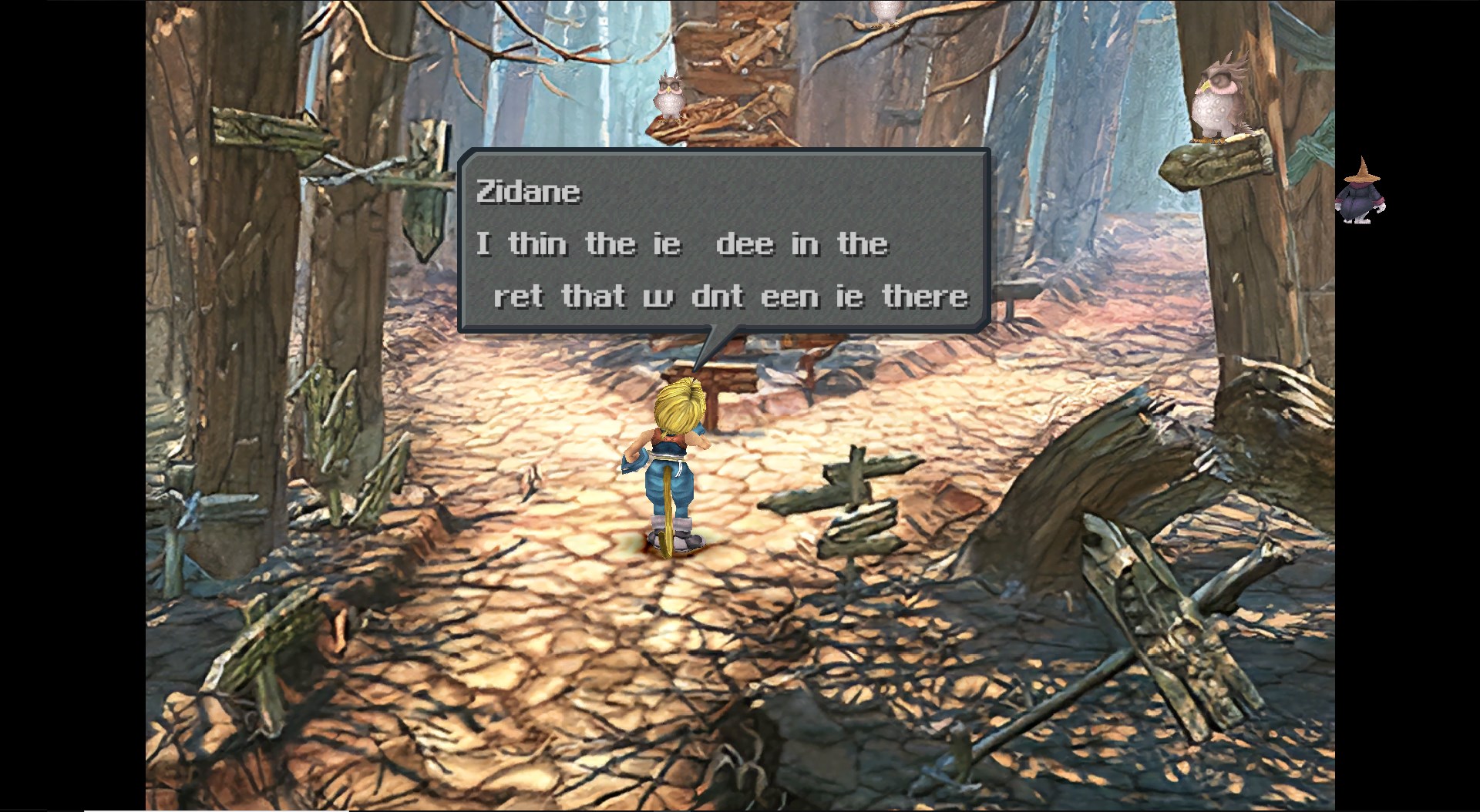
Well i got another problem. I dont know where this bug came from, but now the game has missing letters in the dialogues. Verifying my steam data didnt help. Is my save corrupted?
I also got the bug with "ZidaneZidane" and so on. I dont really know what this is causing it
Even after a clean uninstall and even after setting it to german, some letters are missing in some dialogues. Does someone has a savegame for that part so I can check that?
I'll leave this here since there are a lot of "useful information" links on the first post.
This is about altering Fenril and Carbuncle's name and description accordingly, when one of the effect-altering add-ons is equipped on Eiko, both in battle and outside of battle:
Code: ("BattleHUD.cs") [Select]
Code:
itemListDetailHUD.Content.SetActive(true); int num2 = this.PatchAbility(num); // Added line of code itemListDetailHUD.NameLabel.text = FF9TextTool.ActionAbilityName(num2); // Change num to num2 int mp = this.GetMp(aaData); bool flag2 = mp != 0; if (flag2) { itemListDetailHUD.NumberLabel.text = mp.ToString(); } else { itemListDetailHUD.NumberLabel.text = string.Empty; } bool flag3 = abilityState == BattleHUD.AbilityStatus.ABILSTAT_DISABLE; if (flag3) { itemListDetailHUD.NameLabel.color = FF9TextTool.Gray; itemListDetailHUD.NumberLabel.color = FF9TextTool.Gray; ButtonGroupState.SetButtonAnimation(itemListDetailHUD.Self, false); } else { itemListDetailHUD.NameLabel.color = FF9TextTool.White; itemListDetailHUD.NumberLabel.color = FF9TextTool.White; ButtonGroupState.SetButtonAnimation(itemListDetailHUD.Self, true); } itemListDetailHUD.Button.Help.TextKey = string.Empty; itemListDetailHUD.Button.Help.Text = FF9TextTool.ActionAbilityHelpDescription(num2); // Change num to num2
Code: ("AbilityUI.cs") [Select]
Code:
private void DisplayAADetail(Transform item, ListDataTypeBase data, int index, bool isInit) { [...] int mp = this.GetMp(FF9StateSystem.Battle.FF9Battle.aa_data[abilityListData.Id]); int num2 = this.PatchAbility(abilityListData.Id); // Add this line itemListDetailHUD.NameLabel.text = FF9TextTool.ActionAbilityName(num2); // Change abilityListData.Id to num2 itemListDetailHUD.NumberLabel.text = ((mp != 0) ? mp.ToString() : string.Empty); if (abilityListData.Type == AbilityUI.AbilityType.CantSpell) { itemListDetailHUD.NameLabel.color = FF9TextTool.Gray; itemListDetailHUD.NumberLabel.color = FF9TextTool.Gray; } else if (abilityListData.Type == AbilityUI.AbilityType.Enable) { itemListDetailHUD.NameLabel.color = FF9TextTool.White; itemListDetailHUD.NumberLabel.color = FF9TextTool.White; } itemListDetailHUD.Button.Help.Enable = true; itemListDetailHUD.Button.Help.Text = FF9TextTool.ActionAbilityHelpDescription(num2); // Change abilityListData.Id to num2 } }//*************************************************//Also copy paste the following anywhere within AbilityUI.cs//************************************************* private int PatchAbility(int id) { if (AbilityUI.AbilCarbuncle == id) { switch (FF9StateSystem.Common.FF9.party.member[this.currentPartyIndex].equip[4]) { case 227: id += 3; break; case 228: id++; break; case 229: id += 2; break; } } else { if (AbilityUI.AbilFenril == id) { byte b = FF9StateSystem.Common.FF9.party.member[this.currentPartyIndex].equip[4]; id += ((b != 222) ? 0 : 1); } } return id; } private static int AbilFenril = 66; private static int AbilCarbuncle = 68;
Now Carbuncle and Fenril's names and descriptions will match the actual effect when used, which is altered by a few add-ons. Those names and description are already within the game files so no other changes are required. This code simply unlocks these otherwise hidden descriptions.
This site uses cookies to help personalise content, tailor your experience and to keep you logged in if you register.
By continuing to use this site, you are consenting to our use of cookies.

 Why didn't i see that before lol


 , any way to delete file added on assets with UAV ?