[PSX/PC] General editor - Hades Workshop (0.50b)

  • Thread starter Thread starter Tirlititi
  • Start date Start date
Status
Not open for further replies.
Hi there, I downloaded Hades Workshop a few days ago and have been feverishly using it to modify my copy of FFIX. It's absolutely amazing, intuitive and easy-to-use so first and foremost, thanks for this amazing piece of software!

Most of it is fairly self-explanatory and I've changed most of the game to my liking but there's one thing I can't seem to get right: adding new spells and abilities to character's commands.

For example, I've altered Dagger's and Eiko's Wht Mag commands to use different spells, and moved some of Vivi's status spells (Sleep, Slow, etc) into their Wht Mag commands. I've also created some new spells (like the Aero spells and extended Water spells) and integrated them into Vivi's Blk Mag command. It all seems to work in theory, as I've added AP costs, added them properly to equipment and assigned animations and damage formulas. When playing the game, the spells show up fine in the menu. And then the problem: the spells are not present in battle when selecting the right command, and I don't know how to fix this.

I've noticed that when highlighting the new spells, their category of 'Wht Mag' or 'Blk Mag' doesn't display in the Abilities screen, so clearly the category isn't being linked to the commands, but I don't know how to fix this.

Also (sorry I'm hopeless at coding and such, so apologies for the rambling nature of this), how do you extend the capacity of a command list? Whenever I try to add more spells to a command, it says I can't add any more (I'm trying to add Watera Sword and Waterga Sword to Steiner's Swd Mag ability, and there's no more room!)

And in the same vein, how do I go about creating a new animation for Watera Sword and Waterga Sword? (since there's only one Water Sword animation).

Any help you could offer would be fantastic!
 
Hey, so I ended up figuring out how to do the party switching stuff I wanted and released an early version of my Freya Game+ mod.

Now for the next release, I have other features I need to work on, and I have some questions regarding that.

1) One thing I want to do is rework the Festival of the Hunt so that the player must actually win the game to have Freya win the Coral Ring (since they will be playing as her). I have already accomplished this by simply swapping the cutscene code for when Freya wins and Zidane wins. So if the player intentionally loses now, they get the cutscene of Zidane winning the Gil. However, what I can't figure out is how to change the dialogue for the announcers who tally the points and comment on the battle. I need to change it so that any instance of Freya's and Zidane's names is swapped since Freya is now the player character (so if the player intentionally retires, it says "Freya has retired!" instead of "Zidane has retired!"). Also, for the line where they say "Freya is leading! She's a dragon knight from Burmecia.", I need to change this to something referring to Zidane instead (something like "Zidane is leading! He's the star actor of Tantalus Troupe."). I tried exporting and importing texts and doing it that way and also changing the field scripts but I can't seem to change these lines no matter what I try.

2) In regards to changing Freya to be the exploration avatar, I already get her basic animations working easily (just porting over the ones from Cleyra and Desert Palace). However, there are two things I'm struggling with - first, the "Inactive" Animation Zidane has. I want to add an inactive animation to Freya too. I tried to just adding that line of code and adding one of Freya's animations from a cutscene, but whenever the inactive animation is called in-game, Freya's standing animation just freezes up for a few seconds (I can still move her, she just stops "breathing") and then goes back to normal. I assume the game is trying to play the animation for that duration of time but I must be missing something? And the second thing is footstep sounds, these don't seem to work for me no matter what I try.

3) I want to do a bit of model editing for some things, but some models when I export them as FBX don't open in any FBX program I have (Blender and FBX Review). However, some do (like Freya's own model). I used the same export settings in Unity Assets Manager for all of them. What is the cause of this?

EDIT: Just discovered that the reason some models don't open properly is because they're actually empty. Is there a reason for models being empty after an export here?
 
Last edited:
Hi everyone, i have a little question too...

I am currently working on CD1 (Steam version ofc) but i have something strange.

I edit Phoenix Pinion into Ether + but i got something weird : I confronted somes ennemis on Guismar's Cavern and died but.... Phoenix appears  :? :? !! (I didn't have Eiko lol)

So it seems my Ether + use Rebirth Flame mechanic, i just add 99 Ether + on my save and Phoenix comes again... when i remove all my Ether +, only get Game Over.

I don't know why this happens, i never edit script from Phoenix or something... i can't find the formula about Rebirth Flame : (No. of Phoenix Pinion/256) * 100%.

Someone have an idea about that ?  :-X

PS : One on my player record this =>

EDIT : I just add "Phenix" on Ether + abilities, that's fix the softlock... but still didn't know why that's summon Phenix.

EDIT2 : I just did another test at the beginning of the game (first zone, juste before PrisonCage, with solo Zidane). I get 99 Ether + on my inventory.... Phoenix still appears  :?

EDIT3 : I test with Memoria without my mod, give 99 Phoenix Pinion on same spot => No Phoenix appears.

But i just found the function which call Rebirth Flame ! (btl_sys on FF9 folder)

Code: [Select]
Code:
for (BTL_DATA next3 = ff9Battle.btl_list.next; next3 != null; next3 = next3.next)    {     if (btl_util.getSerialNumber(next3) - 10 <= 1)     {      if (Status.checkCurStat(next3, BattleStatus.Petrify | BattleStatus.Venom | BattleStatus.Zombie | BattleStatus.Stop))      {       break;      }      if (btl_cmd.CheckSpecificCommand(next3, BattleCommandId.SysLastPhoenix))      {       return;      }      if (ff9item.FF9Item_GetCount(249) > Comn.random8())      {       UIManager.Battle.FF9BMenu_EnableMenu(true);       btl_cmd.SetCommand(next3.cmd[0], BattleCommandId.SysLastPhoenix, 73U, btl_scrp.GetBattleID(0U), 1U);       return;      }     }    }    ff9Battle.btl_seq = 1;    UIManager.Battle.SetBattleFollowMessage(5, new object[0]);
I just edit ID item from Ether + to Phoenix Down => Works !.... but Phoenix still appears without Eiko.

I modify this line : if (btl_util.getSerialNumber(next3) - 10 <= 1) by something else like if (btl_util.getSerialNumber(next3) == 7) : Phoenix isn't coming anymore (but i am pretty sure i break Rebirth Flame for the moment...).

I didn't know where to find the Eiko death condition to trigger Rebirth Flame... still searching !
 
Last edited:
So I was able to get my fbx exports working but only if I export as .obj files. A bit strange, but I think this is fine for now as I don't need armature for what I'm doing.

However I am now running into an issue when trying to import back into the game. Basically, I have taken Sir Fratley's spear from his model (it's part of his character model as he is never seen without it, so they just made it all the one model) and made it into it's own model. For the sake of testing it, I am just replacing the Partisan weapon for Freya.

I named it all correctly as per the instructions in the guide for model importing. The texture imports into the game fine. But Hades Workshop crashes whenever I try to import the fbx for the mesh.

The resulting p0data2.bin has the new texture in-game but the model is still Partisan. Any ideas?

92tjBHt.png


EDIT: I made a inch of progress. Basically I tried importing the model with the "Import All Nodes in New Files" setting, which at least allowed the import to happen without Hades Workshop crashing...but now the game crashes if a battle is loaded while Freya has Partisan equipped. So something is going wrong.

FYI I'm using Blender as my 3D program, exporting as FBX.
 
Last edited:
Hey again,

Is anyone able to help with this? I've done everything else that I want with the mod, but still struggling on these ones I listed before.

I've basically added Aero, Aera, Aeroga, Watera, Waterga, Watera Sword and Waterga Sword to the Spell list. I've done all the integration work like assigning descriptions, damage calculations, elements, attack types and animations on the Spells tab (using the blank Void abilities under the main chunk), and I've also updated the Commands tab to integrate the new spells into Dagger's, Vivi's and Eiko's spell set. I've then altered the Stats tab to assign each ability an AP amount and sorted them to reflect the same order in the Commands tab, as well as tweaking the Inventory to make sure the characters can actually learn their new spells. Obviously, I can't add the new spells to Steiner's Swd Mag command as there is no more room.

The game starts fine and has all the tweaks I've done and when leaving Evil Forest after the introduction, I go into the menu with Zidane, Dagger, Steiner and Vivi. Equipping the right weapons allows my new spells to be seen (Dagger can now learn Aero from her standard Rod) and it all looks fine in the menu. It has the right MP cost I assigned and it is a learnable skills as it has AP which accrue after battle.

But the only issue is that when we do get into a battle, Aero does not show up in the command list, there's only Cure and Protect (the other abilities on the Rod). When highlighting 'Aero' in Dagger's Abilities tab in the Menu, usually the ability will flag up as 'Wht Mag' or 'Summon' in the upper part of the screen, but Aero displays nothing. Which I assume means the game doesn't recognise the new spell as being part of her abilities, but I don't know where I assign this in Hades workshop.

This is the main issue I'm stumbling on as I'm planning to add a few more spells to Quina's Blu Mag as well and if they don't show up in their commands properly, obviously there's little point.

On the same vein though, how do you increase a command's spell capacity? Simply because I can't even add Steiner's abilities as there's no more room in his Swd Mag command, and therefore, no way to link it to Vivi's Watera and Waterga spell in the Special tab.

And sorry again for rambling, but how do you create new Swd Mag animations? For the new Aero and Water spells, I've simply reused single-target and multi-target animations from other abilities as I'm not wanting any too extravagant. For Watera Sword and Waterga Sword, I simply want the same Swd Mag animation (Steiner running up and striking the enemy), just ending with a different Water animation from the pre-done effects. But the Spell Animations tab looks a lot more complicated than the rest of the program and I'm hopeless when it comes to coding.

Can anyone offer a hand in the right direction for any of these issues? I'd be eternally grateful!

Thanks!

Hi there, I downloaded Hades Workshop a few days ago and have been feverishly using it to modify my copy of FFIX. It's absolutely amazing, intuitive and easy-to-use so first and foremost, thanks for this amazing piece of software!

Most of it is fairly self-explanatory and I've changed most of the game to my liking but there's one thing I can't seem to get right: adding new spells and abilities to character's commands.

For example, I've altered Dagger's and Eiko's Wht Mag commands to use different spells, and moved some of Vivi's status spells (Sleep, Slow, etc) into their Wht Mag commands. I've also created some new spells (like the Aero spells and extended Water spells) and integrated them into Vivi's Blk Mag command. It all seems to work in theory, as I've added AP costs, added them properly to equipment and assigned animations and damage formulas. When playing the game, the spells show up fine in the menu. And then the problem: the spells are not present in battle when selecting the right command, and I don't know how to fix this.

I've noticed that when highlighting the new spells, their category of 'Wht Mag' or 'Blk Mag' doesn't display in the Abilities screen, so clearly the category isn't being linked to the commands, but I don't know how to fix this.

Also (sorry I'm hopeless at coding and such, so apologies for the rambling nature of this), how do you extend the capacity of a command list? Whenever I try to add more spells to a command, it says I can't add any more (I'm trying to add Watera Sword and Waterga Sword to Steiner's Swd Mag ability, and there's no more room!)

And in the same vein, how do I go about creating a new animation for Watera Sword and Waterga Sword? (since there's only one Water Sword animation).

Any help you could offer would be fantastic!
 
So I'm trying to make some changes to the third Beatrix fight, but am having some difficulties and have some questions:

1) I want to use some custom music. I've followed the dnSpy & Memoria: Add a new music to the game without replacing an existing one tutorial, but I still run into an issue where the game doesn't play my custom music on the fight, it doesn't play any music at all (this tells me at the very least that I've set up the IDs and what not correctly at least, as all other music still plays fine). In the Memoria log, I get the following info of interest:

Code: [Select]
Code:
03.08.2020 10:04:18 |W| [SoundLib] FF9SOUND_SNDEFFECTRES_SUSPEND: slot: 0 is null!03.08.2020 10:04:18 |W| [SoundLib] FF9SOUND_SNDEFFECTRES_SUSPEND: slot: 1 is null!03.08.2020 10:04:18 |E| [SoundLib] File not found AT path: Sounds/Sounds01/BGM_/music123.akb03.08.2020 10:04:19 |M| InitializeBattleText03.08.2020 10:04:19 |M| [assetInterceptor] loading from directory [C:\Program Files\Moguri Mod\StreamingAssets\]03.08.2020 10:04:20 |M| [assetInterceptor] loading from directory [C:\Program Files\Moguri Mod\StreamingAssets\]03.08.2020 10:04:20 |M| [assetInterceptor] loading from directory [C:\Program Files\Moguri Mod\StreamingAssets\]03.08.2020 10:04:24 |E| [SoundData] Sound not found: 37203.08.2020 10:04:31 |M| [GameLoopManager] RaiseQuitEvent
I was under the impression I didn't have to rename my imported .ogg "music123.akb" and that the game would do it for me when I first loaded up the track. But I've tried multiple times with no success. I tried renaming it that myself but it doesn't help. I'm kind of at a loss as to what to do at this point. Also yes I placed the music in the Moguri Mod folder since that's where it should import from. Though I also tried the normal FFIX folder for posterity.

2) I haven't looked into it too much yet but I would like to make the third Beatrix fight "winnable" (i.e she doesn't automatically use Climhazzard on you after a few turns, and you beat her by depleting her HP). Where do I find and remove this function?

3) Is it possible to give characters forced Trance at the start of a battle (similar to how Zidane, Vivi, and Steiner all have a moment like this in the original game)?

4) Is it possible to add custom dialogue windows to a battle?
 
Last edited:
For you ChikoLad :

1) Code: [Select]
Code:
03.08.2020 10:04:18 |E| [SoundLib] File not found AT path: Sounds/Sounds01/BGM_/music123.akb
It's seem that the issue, are you sure your BGM is located in StreamingAssets folder ?

When the game will use your music, it will automatically create an .akb file to be able to use it in game: you just have to create an .ogg file for it to work.

But right now, it looks like it can't find your file... Check the path in Memoria.ini to make sure it's directed to the right folder.
If you still have doubts, you can use the "Export" function in Memoria.ini and see in which folder it will export the files (which is logically the same path).

2) You need to check the Script, on Beatrix_ATB and remove this :

Code: [Select]
Code:
    if ( turncounter < 10 ) {        set turncounter++    } else {        set finishfightflag = 1    }    if ( finishfightflag && ( !( #Matching(SV_PlayerTeam[STATUS_CURRENT_B], 64) ) ) ) {        set climhazzardwaiting = 1        set #( SV_Target = SV_PlayerTeam )        Attack( 5 )        return    }
After that, you need to adjust her HP and you can remove this part too on Beatrix_Loop (if you want her "Die" animation or not... as you want !)

Code: [Select]
Code:
 if ( !endflag ) {        if ( #( SV_FunctionEnemy[HP] <=$ 10000 ) ) {            set finishfightflag = 1        }        if ( finishfightflag ) {            set SV_FunctionEnemy[HP] =$ FirstOf(SV_FunctionEnemy[MAX_HP])            set SV_FunctionEnemy[ATB] =$ FirstOf(SV_FunctionEnemy[MAX_ATB])            if ( climhazzardwaiting ) {                if ( #Matching(SV_PlayerTeam[STATUS_CURRENT_B], 64) ) {                    set climhazzardwaiting = 0                    set SV_FunctionEnemy[PREVENT_ATTACK] =$ 1                } else {                    if ( GetAttacker == SV_FunctionEnemy ) {                        if ( GetTarget && ( #( NotMatching(SV_PlayerTeam[STATUS_CURRENT_A], 257) & NotMatching(SV_PlayerTeam[STATUS_CURRENT_B], 64) ) ) ) {                            set endflag = 1                            Wait( 5 )                            if ( GetBattleState != 4 ) {                                return                            }                            RunBattleCode( 32, 0 )                            while ( GetBattleState != 1 ) {                                Wait( 1 )                            }                            set #( SV_Target = SV_FunctionEnemy )                            AttackSpecial( 7 )                            while ( IsAttacking != 0 ) {                                Wait( 1 )                            }                            RunBattleCode( 33, 1 )                            return                        }                    }                }            } else {                if ( !( #Matching(SV_PlayerTeam[STATUS_CURRENT_B], 64) ) ) {                    set SV_FunctionEnemy[PREVENT_ATTACK] =$ 1                }            }        }    }
3) Yes of course, you can make an attack which call "Trance" function. You can simply copy/paste "Trance Full" from BlackWaltz 3 for example and use his script on ATB.
After that, you need to precise the target for "Trance Full"

You can uses theses script if you want :
On Loop function, at the end (if the script already have this part.. skip)
Code: [Select]
Code:
  set #( zidane = ( SV_PlayerTeam[MODEL_TYPE] ==$ 0 ) )        set #( zidane |= ( SV_PlayerTeam[MODEL_TYPE] ==$ 1 ) )        set #( vivi = ( SV_PlayerTeam[MODEL_TYPE] ==$ 2 ) )        set #( dagger = ( SV_PlayerTeam[MODEL_TYPE] ==$ 3 ) )        set #( dagger |= ( SV_PlayerTeam[MODEL_TYPE] ==$ 4 ) )        set #( dagger |= ( SV_PlayerTeam[MODEL_TYPE] ==$ 5 ) )        set #( dagger |= ( SV_PlayerTeam[MODEL_TYPE] ==$ 6 ) )        set #( steiner = ( SV_PlayerTeam[MODEL_TYPE] ==$ 7 ) )        set #( steiner |= ( SV_PlayerTeam[MODEL_TYPE] ==$ 8 ) )        set #( quina = ( SV_PlayerTeam[MODEL_TYPE] ==$ 9 ) )        set #( eiko = ( SV_PlayerTeam[MODEL_TYPE] ==$ 10 ) )        set #( eiko |= ( SV_PlayerTeam[MODEL_TYPE] ==$ 11 ) )        set #( freya = ( SV_PlayerTeam[MODEL_TYPE] ==$ 12 ) )        set #( amarant = ( SV_PlayerTeam[MODEL_TYPE] ==$ 13 ) )        set #( marcus = ( SV_PlayerTeam[MODEL_TYPE] ==$ 15 ) )        set #( ciblagepola = ( SV_PlayerTeam[MODEL_TYPE] ==$ 16 ) )        set #( ciblagepola |= ( SV_PlayerTeam[MODEL_TYPE] ==$ 17 ) )        set #( beatrix = ( SV_PlayerTeam[MODEL_TYPE] ==$ 18 ) )
If you want to use this part, don't forget to use theses variables :
Code: [Select]
Code:
allocate 51global uint16 zidane VAR_GlobUInt16_24global uint16 vivi VAR_GlobUInt16_26global uint16 dagger VAR_GlobUInt16_28global uint16 steiner VAR_GlobUInt16_30global uint16 quina VAR_GlobUInt16_32global uint16 eiko VAR_GlobUInt16_34global uint16 freya VAR_GlobUInt16_36global uint16 amarant VAR_GlobUInt16_38global uint16 marcus VAR_GlobUInt16_40global uint16 ciblagepola VAR_GlobUInt16_42global uint16 beatrix VAR_GlobUInt16_44local uint8 tranceflag VAR_LocUInt8_46
On ATB function :

Code: [Select]
Code:
    if ( !tranceflag ) {        set tranceflag = 1        if ( #( NotMatching(SV_PlayerTeam[STATUS_CURRENT_A], 4419) & CHARACTER ) ) {  <=== Choose your CHARACTER (from variables)            set #( SV_Target = CHARACTER ) <=== Choose your CHARACTER (from variables)            Attack( 4 )  <===== Use Attack which call Trance !            return        }    }
As far as I'm concerned, you just have to take inspiration from already existing scripts... just have a look and you'll see that it's very simple ^^

4) Yes, just add some Battle Texts (just below the list of attacks and enemy groups).
You can call them by using Attack Animation (using Battle Text, for example Climhazzard from Beatrix) or using BattleDialog([INSERT ID NUMBER]) on Script.
 
Hey DV, thank you for the very detailed response! :D

For the music import issue, I definitely have my music in the right path, at least as far as I can tell. This is how the relevant info is set up in the Memoria.ini:

Code: [Select]
Code:
[Import]Enabled = 1Path = %StreamingAssets%Text = 1Audio = 1Graphics = 1Field = 0[System]StreamingAssets=C:\Program Files\Moguri Mod\StreamingAssetsEnabled=1
And this is where the song is located:

b19911b25e89af4e2dc9e1d0aee71d2c.png


I know this is correct, since I am using Moguri Mod, and Memoria is importing it's content correctly. Unless Moguri Mod is somehow incompatible with music modding, but I don't think that's the case given it comes with remastered music imports as an option in the installer.

For the other stuff you posted instructions for, I am trying to get the forced Trance working first. Right now I have gotten it as far as making Beatrix use the attack I want (just her basic Attack command for now), and then after this, the ATB charge for both Beatrix and the party gets disabled. However, things are just stuck like that and I'm having trouble figuring out why. The game also freezes every few seconds throughout.

Here is the Loop and ATB code based off your advice and the Black Waltz 3 code. Freya is the character who Beatrix should target and then Freya should turn into Trance mode.

Code: [Select]
Code:
#HW newfunction 1Function Beatrix_Loop    if ( !VAR_LocUInt8_33 ) {        set VAR_LocUInt8_33 = 1        while ( GetBattleState != 1 ) {            Wait( 1 )            set VAR_GenUInt8_206 = GetRandom        }        RunBattleCode( 35, 0 ) // Enable ATB        while ( GetBattleState != 4 ) {            Wait( 1 )        }    }    if ( !VAR_LocUInt8_30 ) {        if ( VAR_LocUInt8_31 ) {            set SV_FunctionEnemy[HP] =$ FirstOf(SV_FunctionEnemy[MAX_HP])            set SV_FunctionEnemy[ATB] =$ FirstOf(SV_FunctionEnemy[MAX_ATB])            if ( VAR_LocUInt8_38 ) {                if ( #Matching(SV_PlayerTeam[STATUS_CURRENT_B], 64) ) {                    set VAR_LocUInt8_38 = 0                    set SV_FunctionEnemy[PREVENT_ATTACK] =$ 1                } else {                    if ( GetAttacker == SV_FunctionEnemy ) {                        if ( GetTarget && ( #( NotMatching(SV_PlayerTeam[STATUS_CURRENT_A], 257) & NotMatching(SV_PlayerTeam[STATUS_CURRENT_B], 64) ) ) ) {                            set VAR_LocUInt8_30 = 1                            Wait( 5 )                            if ( GetBattleState != 4 ) {                                return                            }                            RunBattleCode( 32, 0 ) // Disable ATB                            while ( GetBattleState != 1 ) {                                Wait( 1 )                            }                            set #( SV_Target = SV_FunctionEnemy )                            AttackSpecial( 7 ) // Talk                             while ( IsAttacking != 0 ) {                                Wait( 1 )                            }                            RunBattleCode( 33, 1 ) // End Battle                            return                        }                    }                }            } else {                if ( !( #Matching(SV_PlayerTeam[STATUS_CURRENT_B], 64) ) ) {                    set SV_FunctionEnemy[PREVENT_ATTACK] =$ 1                }            }        }    }    Wait( 1 )         set #( VAR_GlobUInt16_24 = ( SV_PlayerTeam[MODEL_TYPE] ==$ 0 ) )        set #( VAR_GlobUInt16_24 |= ( SV_PlayerTeam[MODEL_TYPE] ==$ 1 ) )        set #( VAR_GlobUInt16_26 = ( SV_PlayerTeam[MODEL_TYPE] ==$ 2 ) )        set #( VAR_GlobUInt16_28 = ( SV_PlayerTeam[MODEL_TYPE] ==$ 3 ) )        set #( VAR_GlobUInt16_28 |= ( SV_PlayerTeam[MODEL_TYPE] ==$ 4 ) )        set #( VAR_GlobUInt16_28 |= ( SV_PlayerTeam[MODEL_TYPE] ==$ 5 ) )        set #( VAR_GlobUInt16_28 |= ( SV_PlayerTeam[MODEL_TYPE] ==$ 6 ) )        set #( VAR_GlobUInt16_30 = ( SV_PlayerTeam[MODEL_TYPE] ==$ 7 ) )        set #( VAR_GlobUInt16_30 |= ( SV_PlayerTeam[MODEL_TYPE] ==$ 8 ) )        set #( VAR_GlobUInt16_32 = ( SV_PlayerTeam[MODEL_TYPE] ==$ 9 ) )        set #( VAR_GlobUInt16_34 = ( SV_PlayerTeam[MODEL_TYPE] ==$ 10 ) )        set #( VAR_GlobUInt16_34 |= ( SV_PlayerTeam[MODEL_TYPE] ==$ 11 ) )        set #( VAR_GlobUInt16_36 = ( SV_PlayerTeam[MODEL_TYPE] ==$ 12 ) )        set #( VAR_GlobUInt16_38 = ( SV_PlayerTeam[MODEL_TYPE] ==$ 13 ) )        set #( VAR_GlobUInt16_40 = ( SV_PlayerTeam[MODEL_TYPE] ==$ 15 ) )        set #( VAR_GlobUInt16_42 = ( SV_PlayerTeam[MODEL_TYPE] ==$ 16 ) )    loop
Code: [Select]
Code:
#HW newfunction 5Function Beatrix_ATB    set #( VAR_LocUInt16_43 = RandomInTeam(SV_PlayerTeam) )    if ( !VAR_LocUInt8_46 ) {        set VAR_LocUInt8_46 = 1        if ( #( NotMatching(SV_PlayerTeam[STATUS_CURRENT_A], 4419) & VAR_GlobUInt16_36 ) ) {            set #( SV_Target = VAR_GlobUInt16_36 )            Attack( 0 ) // Trance Full            return        }    } if ( !VAR_LocUInt8_47 ) {        set VAR_LocUInt8_47 = 1        set #( VAR_LocUInt16_43 = ( RandomInTeam(SV_PlayerTeam) & ( ~VAR_GlobUInt16_36 ) ) )    }    set VAR_LocInt24_15 = ( VAR_LocInt24_12 & 7 )    set VAR_LocInt24_24 = GetRandom    set VAR_LocInt24_27 = 128    set VAR_LocInt8_20 = ( VAR_LocUInt8_19 - 1 )    while ( VAR_LocInt8_20 >= 0 ) {        if ( VAR_LocInt24_24 > VAR_LocInt24_27 ) {            break        }        set VAR_LocInt24_27 >>= 1        set VAR_LocInt8_20--    }    if ( VAR_LocInt8_20 == 65535 ) {        set VAR_LocInt8_20 = ( VAR_LocUInt8_19 - 1 )    }    if ( VAR_LocInt8_20 == ( VAR_LocUInt8_19 - 1 ) ) {        set VAR_LocInt24_12 = ( ( VAR_LocInt24_12 >> 3 ) & 2097151L )        set VAR_LocInt24_12 |= ( VAR_LocInt24_15 << ( VAR_LocInt8_20 * 3 ) )    } else {        if ( VAR_LocInt8_20 ) {            set VAR_LocInt24_21 = ( VAR_LocInt24_15 << ( VAR_LocInt8_20 * 3 ) )            set VAR_LocInt24_24 = ( ( 1 << ( ( VAR_LocInt8_20 + 1 ) * 3 ) ) - 1 )            set VAR_LocInt24_27 = ( ( VAR_LocInt24_24 & VAR_LocInt24_12 ) >> 3 )            set VAR_LocInt24_27 |= VAR_LocInt24_21            set VAR_LocInt24_24 ^= 16777215L            set VAR_LocInt24_12 &= VAR_LocInt24_24            set VAR_LocInt24_12 |= VAR_LocInt24_27        }    }    set VAR_LocInt8_20 = VAR_LocUInt8_19    while ( VAR_LocInt8_20 >= 0 ) {        switch 8 ( VAR_LocInt24_15 ) from 0 {        case +0:            set #( SV_Target = RandomInTeam(SV_PlayerTeam) )            break        case +1:            set #( SV_Target = RandomInTeam(SV_PlayerTeam) )            break        case +2:            set #( SV_Target = RandomInTeam(SV_PlayerTeam) )            break        case +3:            set #( SV_Target = RandomInTeam(SV_PlayerTeam) )            break        case +4:            set #( SV_Target = RandomInTeam(SV_PlayerTeam) )            break        case +5:            set #( SV_Target = RandomInTeam(SV_PlayerTeam) )            break        case +6:            set #( SV_Target = RandomInTeam(SV_PlayerTeam) )            break        case +7:            set #( SV_Target = RandomInTeam(SV_PlayerTeam) )        }        if ( VAR_LocInt24_15 >= 4 ) {            set VAR_LocInt24_24 = ( ( VAR_LocInt24_9 >> ( ( VAR_LocInt24_15 - 4 ) * 6 ) ) & 63 )        } else {            set VAR_LocInt24_24 = ( ( VAR_LocInt24_6 >> ( VAR_LocInt24_15 * 6 ) ) & 63 )        }        set VAR_LocInt24_21 = ( #SV_Target )        set VAR_LocInt24_27 = FirstOf(SV_FunctionEnemy[MP])        if ( VAR_LocInt24_21 && ( VAR_LocInt24_24 <= VAR_LocInt24_27 ) ) {            break        }        if ( VAR_LocInt8_20 <= 0 ) {            break        }        set VAR_LocInt24_15 = ( VAR_LocInt24_12 & 7 )        set VAR_LocInt24_12 = ( ( VAR_LocInt24_12 >> 3 ) & 2097151L )        set VAR_LocInt24_12 |= ( VAR_LocInt24_15 << ( ( VAR_LocUInt8_19 - 1 ) * 3 ) )        set VAR_LocInt8_20--    }    if ( VAR_LocInt24_15 >= 4 ) {        set VAR_LocUInt8_18 = ( ( VAR_LocInt24_3 >> ( ( VAR_LocInt24_15 - 4 ) * 6 ) ) & 63 )    } else {        set VAR_LocUInt8_18 = ( ( VAR_LocInt24_0 >> ( VAR_LocInt24_15 * 6 ) ) & 63 )    }    if ( ( FirstOf(SV_FunctionEnemy[HP]) - 10000 ) < ( ( FirstOf(SV_FunctionEnemy[MAX_HP]) - 10000 ) >> 1 ) ) {        set #( VAR_LocUInt16_39 = SV_FunctionEnemy )    } else {        set #( VAR_LocUInt16_39 = 0 )    }    if ( ( #VAR_LocUInt16_39 ) && ( !VAR_LocUInt8_41 ) ) {        set VAR_LocUInt8_41 = 1        set #( SV_Target = SV_FunctionEnemy )        Attack( 1 ) // Cura        return    }    Attack( VAR_LocUInt8_18 )    return
I most likely just did something really wrong here. I suspect I need to do something else to make the trance animation play, and also add another "Enable ATB" command for after.

EDIT: So I turned off the Trance code for now so I could test beating the battle by depleting Beatrix's HP. Thankfully this works like a charm with no issues. I may change the animation at the end (have her stand in her "low HP" stance and have some dialogue) at a later time and I of course have to change the cutscenes before and after the fight but that stuff will come later. :)
 
Last edited:
FFIX was updated on Steam today, giving the Steam version a smaller battle UI like the modern console versions, a fix to the Field BGM starting halfway through when returning from a battle or Tetra Master game, and "other minor bug fixes".

It has broken mods such as Moguri Mod so if anyone here is working on their own mods, it may be worth testing to make sure they work on the updated files.
 
Has anyone ever encountered this problem? Desperately needing assistance with this!

Hey again,

Is anyone able to help with this? I've done everything else that I want with the mod, but still struggling on these ones I listed before.

I've basically added Aero, Aera, Aeroga, Watera, Waterga, Watera Sword and Waterga Sword to the Spell list. I've done all the integration work like assigning descriptions, damage calculations, elements, attack types and animations on the Spells tab (using the blank Void abilities under the main chunk), and I've also updated the Commands tab to integrate the new spells into Dagger's, Vivi's and Eiko's spell set. I've then altered the Stats tab to assign each ability an AP amount and sorted them to reflect the same order in the Commands tab, as well as tweaking the Inventory to make sure the characters can actually learn their new spells. Obviously, I can't add the new spells to Steiner's Swd Mag command as there is no more room.

The game starts fine and has all the tweaks I've done and when leaving Evil Forest after the introduction, I go into the menu with Zidane, Dagger, Steiner and Vivi. Equipping the right weapons allows my new spells to be seen (Dagger can now learn Aero from her standard Rod) and it all looks fine in the menu. It has the right MP cost I assigned and it is a learnable skills as it has AP which accrue after battle.

But the only issue is that when we do get into a battle, Aero does not show up in the command list, there's only Cure and Protect (the other abilities on the Rod). When highlighting 'Aero' in Dagger's Abilities tab in the Menu, usually the ability will flag up as 'Wht Mag' or 'Summon' in the upper part of the screen, but Aero displays nothing. Which I assume means the game doesn't recognise the new spell as being part of her abilities, but I don't know where I assign this in Hades workshop.

This is the main issue I'm stumbling on as I'm planning to add a few more spells to Quina's Blu Mag as well and if they don't show up in their commands properly, obviously there's little point.

On the same vein though, how do you increase a command's spell capacity? Simply because I can't even add Steiner's abilities as there's no more room in his Swd Mag command, and therefore, no way to link it to Vivi's Watera and Waterga spell in the Special tab.

And sorry again for rambling, but how do you create new Swd Mag animations? For the new Aero and Water spells, I've simply reused single-target and multi-target animations from other abilities as I'm not wanting any too extravagant. For Watera Sword and Waterga Sword, I simply want the same Swd Mag animation (Steiner running up and striking the enemy), just ending with a different Water animation from the pre-done effects. But the Spell Animations tab looks a lot more complicated than the rest of the program and I'm hopeless when it comes to coding.

Can anyone offer a hand in the right direction for any of these issues? I'd be eternally grateful!

Thanks!
 
Hey, I'm having a weird issue in regards to the cutscene after you first enter the Desert Palace via the quicksand on the World Map.

So basically the only change I am making to this Field Script is the party calls. I already did this in a previous iteration of Freya Game+ (which has been discontinued as I found a way to make true Solo Runs possible pretty easily with all of the characters, so I am planning on releasing a mod pack for that including one for Freya - then starting work on a more expansive "DLC expansion" mod centered around Freya where I don't have to worry about creating variants of other characters and have more freedom to make whatever changes I like) and it worked fine.

However, ever since the update on Steam, every time I get to this cutscene while having ANY sort of modded p0data7.bin file, the game softlocks after Zidane asks Cid "Where are we?". Cid will walk over to Zidane and the game just gets stuck there. However, Cid does not normally do this in an unmodded game, he has more dialogue before he makes any sort of movement.

This happens even if I leave the field script for this particular scene unmodded, but just have other field scripts that are modded. However it never happens on an unmodded p0data7.bin, and doesn't happen even if other scripts like the enemy scripts in p0data2.bin are modded, so long as p0data7.bin is unmodded. I did not have this issue before the update.

Checking Memoria.log, there does seem to be some sort of error being thrown with this scene:

Code: [Select]
Code:
13.08.2020 11:45:30 |M| [AssetManager] Asset not found: FieldMaps/FBG_N38_SDPL_MAP640_SP_RRO_0/spt.tcb13.08.2020 11:45:30 |M| [AssetManager] Embeded asset not found: EmbeddedAsset/GeoTexAnimIndex/GEO_ACC_F0_FLR.csv13.08.2020 11:45:30 |M| [AssetManager] Asset not found: Models/GeoTexAnim/GEO_ACC_F0_FLR.tab13.08.2020 11:45:30 |M| [AssetManager] Embeded asset not found: EmbeddedAsset/GeoTexAnimIndex/GEO_ACC_F0_FLR.csv13.08.2020 11:45:30 |M| [AssetManager] Asset not found: Models/GeoTexAnim/GEO_ACC_F0_FLR.tab13.08.2020 11:45:30 |M| [AssetManager] Embeded asset not found: EmbeddedAsset/GeoTexAnimIndex/GEO_ACC_F0_FLR.csv13.08.2020 11:45:30 |M| [AssetManager] Asset not found: Models/GeoTexAnim/GEO_ACC_F0_FLR.tab13.08.2020 11:45:30 |M| [AssetManager] Embeded asset not found: EmbeddedAsset/GeoTexAnimIndex/GEO_ACC_F0_FLR.csv13.08.2020 11:45:30 |M| [AssetManager] Asset not found: Models/GeoTexAnim/GEO_ACC_F0_FLR.tab13.08.2020 11:45:30 |M| [AssetManager] Embeded asset not found: EmbeddedAsset/GeoTexAnimIndex/GEO_ACC_F0_FLR.csv13.08.2020 11:45:30 |M| [AssetManager] Asset not found: Models/GeoTexAnim/GEO_ACC_F0_FLR.tab13.08.2020 11:45:30 |M| [AssetManager] Embeded asset not found: EmbeddedAsset/GeoTexAnimIndex/GEO_ACC_F0_FLR.csv13.08.2020 11:45:30 |M| [AssetManager] Asset not found: Models/GeoTexAnim/GEO_ACC_F0_FLR.tab13.08.2020 11:45:30 |M| [AssetManager] Embeded asset not found: EmbeddedAsset/GeoTexAnimIndex/GEO_ACC_F0_FLR.csv13.08.2020 11:45:30 |M| [AssetManager] Asset not found: Models/GeoTexAnim/GEO_ACC_F0_FLR.tab13.08.2020 11:45:30 |M| [AssetManager] Embeded asset not found: EmbeddedAsset/GeoTexAnimIndex/GEO_ACC_F0_FLR.csv13.08.2020 11:45:30 |M| [AssetManager] Asset not found: Models/GeoTexAnim/GEO_ACC_F0_FLR.tab
I'm really confused about this as I haven't done anything with the game's assets, those are all vanilla. I am just editing scripts. I'm assuming this is what's causing the softlock somehow.

Anyone have any ideas? I'm really stumped on this and it's frustrating as otherwise this mod's development has been really smooth. I've already checked some later parts of the game that I thought would be problematic and didn't have any issues with them, this is the only one I'm having problems with.
 
Hey, back again, if anyone else is still here. :P

I figured out the issue from my last post, turns out a call for an extra animation had been added into the cutscene somehow. Either something went weird with my update download, or accidentally pasted something into the script. Either way, I got that working now.

However I have something else I am trying to figure out right now that I am stuck with.

Basically, I want to edit the Epitaph fights in Oelivert into fights where you just have a special boss fight against the mirror character.  Editing the stats and what not should be relatively easy, and I have some other things I need to do like implementing them as secret bosses in the post-game with a place to find them and a cutscene. However there are two problems right now that I want to figure out before doing anything else:

1) Actually removing the Epitaph from the fight so it's just the mirror character at the very start. At the moment, I tried simply using the "Remove" command on the Epitaph in Hades Workshop and then jumping into the game to see what would happen when I spawn the correct fight in Oelivert. However, the Epitaph was still there and they would spawn the mirror character as normal. So what else would I have to do to make the mirror character spawn at the start of the fight and to remove the Epitaph?

2) I want to create custom textures for the mirror characters to make them into "Dark/Shadow" versions of the characters. I created a quick one for Freya just to test it. However this also did not show up in-game on the mirror character and just showed the normal textures. The mirror characters have their own model IDs (indicated in Hades Workshop as "EnemyFreya", "EnemyZidane", etc) which is the one I used for my texture. I used the same process for a custom texture for the player Freya model and that one imported fine, so I'm confused what's wrong here. Am I mistaken in thinking the mirror characters use the "EnemyCharacter" models and textures at all?

I'm probably missing something super basic but any help would be appreciated.

----------

EDIT: OK ignore all of the above. Turns out I was putting the files into the wrong folder by mistake. I had a lot of stuff open and got confused.

Currently the game softlocks when it tries to load my edited fight but I think I have an idea why. So I'll see if I can figure that out.

EDIT2: OK yeah I'm a bit stuck.

The only way I can get it to load up the battle is if I remove the Mirror Freya's Init_Object calls and keep the Epitaph's, but assign it to Mirror Freya. But the problem with that is that it will load Mirror Freya's battle scripts so she can attack and what not but won't load her model. Also changing the battle scene doesn't work for some reason.

Anyone with more experience setting up the Init funcitons of a battle have any insight they can share?
 
Last edited:
Hey, don't know if anyone is still here, but I need a bit of help again with Party Management.

So I've been toying around with this a lot and figuring stuff out.

Currently I'm developing solo run mods for each character, starting with Freya since she's the easiest to solo the game with (making her best for general testing) and since she's my favourite.

I have been refining my process for how I handle this to minimise problematic areas of the game and making mods for the other characters easier since I will know what values to change. Also because I want to make it so the chosen character is the ONLY character in the party as much as the game will allow without causing issues.

So far here's a summary of what I understand of Party Management:


  • "Setting_PartyReserve" is a value used for what characters are in your reserve for party selection menus (includes current active members and inactive members). Each character has a value assigned for this, and to set multiple characters, you add their values together. For example, Zidane's value is 1, and Freya's value is 16. So if I wanted just Zidane and Freya in the party reserve, I set the value to "Setting_PartyReserve = 17".
  • If you see something like "Party( x, y )", where x and y have a number (most instances in the vanilla game will be "Party( 4, 1 )"), this is for the Party Select UI. "x" refers to the number of characters the player must select for their active party, while y refers to the characters that are locked to the active party, meaning the player must select them to continue. y uses the same values for characters as Setting_PartyReserve. So if I wanted to make Freya the locked character and also make the player only select one character, I would enter "Party( 1, 16 )".
  • "set AddParty(x)" and "RemoveParty(x)" are used to forcibly add or remove a character to/from the party whenever you want. You could tie this to anything, such as at the start of a battle, start of a field, interacting with or talking to someone, etc. Each character has an ID number for this, starting at 0 for Zidane, and going up for each character from there, such as 1 for Vivi.

So far this has worked smoothly for the most part. But right now the issue I want to address is at the start of the game in the Prima Vista Cargo Room, just after starting a new game.

Basically I've followed the rules above. I have a replaced every "AddParty(0)" with "AddParty(4)". I have made the PartyReserve only have Freya. Yet for some reason, Zidane is still in the party menu at the start of the game. Freya is there too, but from how I have coded it, it should only have Freya with no Zidane, but he's still there for some reason. This isn't a problem in itself, as I have added a "set AddParty(4)" call and a "RemoveParty" call to every enemy script so the game basically forces just Freya into the party at the start of any battle. I can also add a "RemoveParty(0)" to forcibly remove Zidane from the Party after starting a New Game. However, since there seems to be another function adding Zidane to the party after starting a new game, I want to figure out what it is and change it. It would be useful to future mods I plan to make that involve custom story scenarios.

Basically my question is, am I missing a function in regards to adding characters to the party for field scripts, or is there some unique property I need to change that adds a character to the party when starting a new game?
 
I'm running into strange issues when trying to create patches for the German PS1 version. I've verified that the base image I'm working from matches the checksums on redump, so it should be good to use.

Even making a minor edit like changing Thunder Slash's damage formula, then either creating a PPF from that change or overwriting the binary image directly will result in issues. If overwriting directly, the game will freeze on opening the equipment menu. When trying to apply the PPF patch to an exact copy of the image it was created against, PPF-o-matic warns about blocksize mismatch, and if I apply it anyway, the same freeze issue crops up. That ... probably shouldn't happen.

By contrast, doing the same to a NTSC-U image, it works just fine.

Edit: Digging into my archives, I found a version of Hades 0.40 marked specifically as "for_de", but no dice there, either. I understand that there's some differences between the versions, of course, but the description states compatibility with any language version, so something is amiss here.
 
Last edited:
I'm running into a slight issue when trying to use the randomizer. I am attempting to randomize NA PS1 ISOs. When I put in the same random seed for all four discs, with all the same options selected, I'm getting different results for each disc. For example, the seed 756029 might have the Mage Masher teach Blizzaga on Disc 1, but on Disc 2 it will teach Float, etc.

Is this intended? How can I get around this?
 
Hello i have a question.

When i open the Hades Programm and File open and choose the launcher nothing happens, and the programm dont react , anymore even i wait 15 min. But when i open Unity Asset Viewer and File open the Launcher, everything is alright. Do i am something wrong?

Edit: I reinstalled FF9 without Memoria Engine, then it works.
 
Last edited:
It's been a little while since I tried any FFIX modding but I decided to mess around with changing the character in the field again.

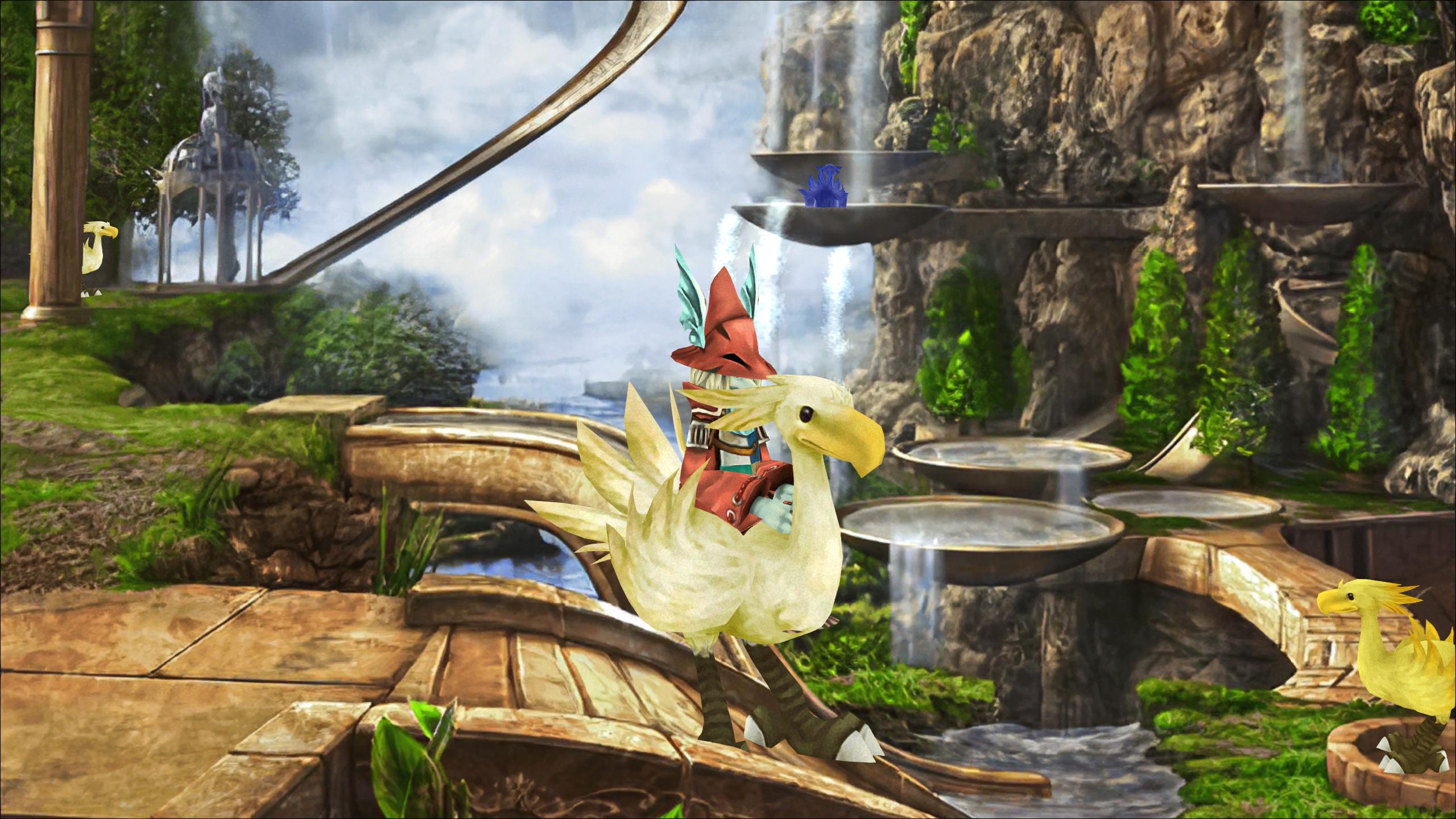
One thing I wanted to try was giving all of the characters animations for riding on Choco in locations like Chocobo's Paradise. However, for Freya, I actually want to have her sitting sideways, with her head facing the same direction as Choco's. I have a pretty good sitting animation for her, I just need to adjust the orientation of the body and head, and then maybe the coordinates slightly. Anyone know what functions I need to use to achieve that? I tried stuff like "TurnInstant" but couldn't get it to work.

Here's an image of how it looks right now. Basically I want to make her sit with her front facing Choco's right side, with her legs hanging down, and Freya's head looking to her side so she is looking at whatever is in front of Choco:

JWLUl0t.jpg
 
Bit of a long shot here, but I get this error when I try to run Hades Workshop.
The code execution cannot proceed because MSVCP140.dll was not found. Reinstalling the program may fix this problem.
I run Windows 10, 64-bit, however I used BCUninstaller (Bulk Crap Uninstaller) to remove such wonderful applications as the WordPad (Now With Ads!), the People icon, Contacts, Maps, and numerous others which I have thankfully forgotten.

Trying to reinstall the framework which google tells me contains MSVCP140.dll doesn't make Hades Workshop work, so I assume something else is required or a configuration file is broken.

If you know, could you tell me more about what Hades Workshop requires to run on Windows 10? Or should I give up and run it on a Linux machine instead?
 
Status
Not open for further replies.
Back
Top