[PSX/PC] Save Editor - Black Chocobo (v1.16)

  • Thread starter Thread starter sithlord48
  • Start date Start date
Status
Not open for further replies.
Oh I see,  so the fact that ff7 deleted my save file may have something todo with the file be1ng saved by the program not being ran as admin?

Edit: seerms to work,  yea appearently thats what the problem was,  go figure,

I just need a confirmation on one thing,  i can't increase stats beyond a level right??  i.e  I was testing the limits of this program and i can't set clouds max mp to lets say 200 while he's at lvl 7?   i've tried this and it reverted back to the original level set mp  ;p
 
Last edited:
in order to edit a characters max HP or max MP you must change the base hp or mp stat. while the max hp/mp are saved they game seams to ingore them. it instead will use the calculated values (base stat +/- materia additions).
 
You're prob better off removing the option  to change the redundant data Sith, or move it elsewhere?
 
You're prob better off removing the option  to change the redundant data Sith, or move it elsewhere?
perhaps ill add a tooltip for max hp/mp that says "this is a calculated value please change base instead"
 
Hello,

I seem to have a problem with the FF VII Steam edition.
Problem: Saves get deleted right at the start of the launcher, cloud save is turned off.

I did read that you might have to start BlackChocobo with admin rights and I did.
But it's doesn't fix the problem for me.
 
i wonder if only people with cloud saves turned off have this issue. could you please try with it enabled and report back. since thats the only major difference between the steam and 2012 version. although it sounds like the saves are failing a cloud check to get them removed in the first place. (black chocobo itself does not delete files).
 
I believe it's a version check. BC saves the files with the header from an old version (98) and "to prevent cheating" SE disabled the ability to use saves from previous games. The Launcher of the game does the version check, so I just open the launcher before I do any edits or paste the files back in the save folder after the launcher is open. Fixes the problem.

After loading a game, if you save again it will not be a problem in the future until you edit the save again, that is.
 
there is no header difference between the 98 version and the 2012 version or the steam version they are all the same .ff7 files. its all in the metadata and its timestamps/signatures.

im told there is a new file for the steam version in your save path perhaps that file now also needs editing. can someone post their steam save folder to a place i can look at it. that might help get this figured out. im also a bit confused because im told it works by most people and a few have a save issue.
 
hello there, I recently lost some progress while play the FF7 steam version, I the cloud saving wasn't connecting so I continued anyhow I had lost a couple hours of progress and decided to edit my save to at least make up the money and xp I lost, after jenova crashed a couple times I ran the game again and it had reverted to a save I had overwritten a day or more earlier, I don't wish to continue on this save as it was the one I had tested the character booster on and I was 10+ hours behind where I was in the first place, I found this thread and firstly well done on BC, its quite neat I hope the progression editing it updated so I can start back where I left off!, and secondly some publishers use separate directories when using saves on steam games

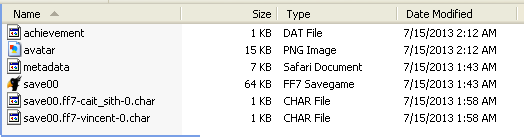
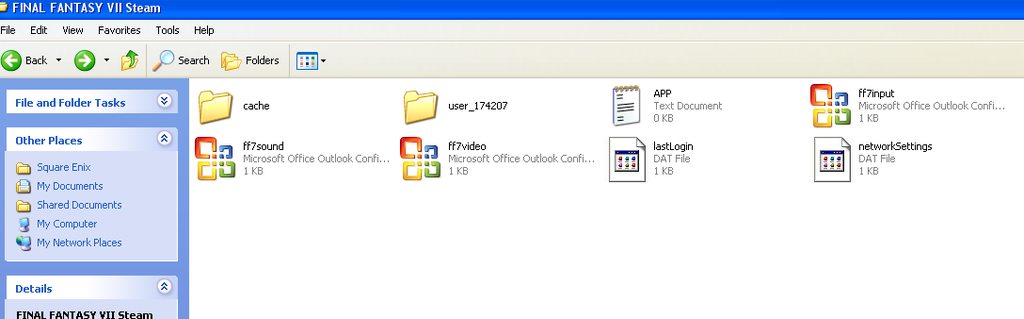
the one for the steam version of FF7 is : C:\Documents and Settings\USER\My Documents\Square Enix\FINAL FANTASY VII Steam\user_174207

and here are what the folders look like

GcCqbwwh.png


and insider the user folder

fBwAiZV.png
 
@ zelentron ,were you able to successfully edit your steam save? if did u run Black Chocobo as Admin ? and do you have cloud sync enabled?

the progression stuff is a pain , but you can get one of saves from eslava's save collection and edit it accordingly from a close point. you might have to replay some progress but there should be a close save.
 
after doing a little testing, I have come to this so far:

I have to make a cloud save to put my new save into the game (not sure if I HAVE to) . then if I try to edit the save file after I test if it will work in the game it deletes the save. I just tried to edit a save BEFORE I put it into the game, maxing materia, limit breaks, higher levels, it appears to have worked, I don't know if will work in the future, but here we are, I am wondering, how hard can I mess with this?
 
saving for steam or 2012 will should be just the same as any other save.  open the file and edit then save. if the program sees a metadata.xml file with your save its susposed to edit it accordingly, using the detected user ID from the path .

also what version of windows are you using? (seams all those with lost saves come from people using win 8 )

from my tests and others the metadata is correctly updated when its susposed to so im a bit unsure of why this is happening.
 
Last edited:
"to prevent cheating"
They don't want you to use an older, slightly advanced save. Instead, they want you to boost everything to max. SE logic.

On a more serious note, that's yet another proof that SE knows about this website and the tools it offers. For the 2012 version, they tried to prevent save editing. That worked for a bit, until sith found how to bypass it. Since the 2012 version was already bypass-able, they tried to add yet another check for the Steam version (and I guess it won't take long before sith can manage to bypass it). That's at least how I perceive it, and I may be far from the truth.
 
as far as i can tell there is no other check its the same metadata set up ..  then again i don't have the steam version or the 2012 version since neither work on linux becuase the DRM that square decided to add is not supported at this time.seams so far to be a win 8 issue we shall see when zelentron tells us what verson of windows he has. but others with that issue have all been 8 users , some other users have reported that the steam version works just fine. 

Edit: if someone (looking at you vegetta) would build r1113+ for windows it might work better w/ steam since i did find a small possible issue w/ the signing .
 
Last edited:
If other Steam games work on Linux with Wine, I'd imagine FF7 should also; they removed the SecuROM DRM when they released it on Steam; only the 2012 version still has it.
 
I'm using Windows XP 32 bit, I can now confirm that after placing a save from the save archive sith referred me to I can place a save there, but any attempt to edit the save after you have placed it will cause the save to be deleted, even if you are not connected to cloud saving, which I am not, I guess I'll make a save where I'm just high level and not too crazy, works for me : :mrgreen:
 
here try This recently built version and see if it works any better with the steam copy. btw there are some known bugs this version is a few revs older then the current svn. do not edit japanese files w/ this version it will trash your items.

please report any bugs you may find
 
Let me see if I can help you shed some light on this issue. I just found this website after downloading FF7 from Steam yesterday, love your work!
I am using Windows 7 64 bit, Cloud Saving is NOT enabled.

I was having the same issue as most. Open Black Chocobo, select my save file in My Documents, Square Enix, FINAL FANTASY VII STEAM, user_2619999.   save00.ff7

I can open and edit the save just fine, and I save it back in the exact same location with the exact same name, no problem. For the purpose of simplicity, the only thing I edited was gil, I added 10 gil to my save, that's it, and saved it back in the original location.

With my save folder open (user_2619999), I have 4 files present: achievement.dat, avatar.png, metadata.xml, and save00.ff7.
Now, again with that folder open, as soon as I click on Final Fantasy VII, it starts the launcher. As soon as the launcher appears, my save00.ff7 file gets deleted from my user folder. Completely. Nothing else changes, but the launcher deletes my saved game file from my folder.

The only way I have found around this, is to open the launcher BEFORE editing a save. If the launcher is open, THEN you open and run Black Chocobo, you can edit anything to your hearts' content. Save it with the launcher still open, then run the game. Play it or immediately save it, doesn't matter, the launcher will not delete the file once you save in game.

Hope my first post helps, if you want me to play around with some settings let me know, I'd be glad to see what I can do.
 
yes please try two things.
1 enable cloud save see if anything different happens.
2.download this copy of BC(link removed) and try with and with out cloud save enabled.
 
Last edited:
I just do it like this:

start game to main menu
edit save
load game
save
it be done.
 
Status
Not open for further replies.
Back
Top