Re: [FF7PC] [7H] Enhance...

  • Thread starter Thread starter Chrysalis
  • Start date Start date
Status
Not open for further replies.
Hi everyone. Not sure if this has been mentioned.

"Additional rows in inventory screen and command menu's."

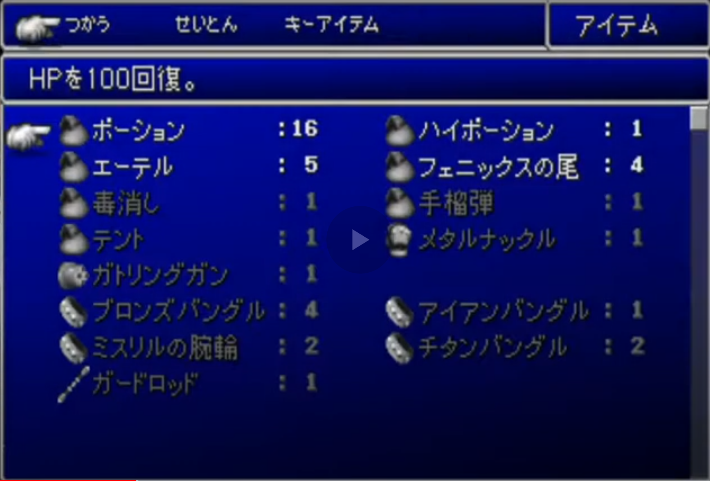
Does this mean this mod can make it so the item sub-menu will be like the original Japanese version?
 
0uyXhbU.png


If this mod doesn't do it, is there another mod that can? Thanks in advanced.

It does not make the item menu 2 columns, it decreases the gap between each row and adds extra rows, you can download the v1 file still in original post, and in the settings it has screenshots to show you the difference.
 
Hey all,

Would it be possible for ESUI to offer a selection of various fonts? I think it'd be nice to have some options. The original vanilla font would be appreciated, for example.

Would it also be possible for ESUI to come with the Buster Glare start screen that it available in the Quimm Community User Interface package? Right now, I have to have the quimm community package installed and activated just to get the Buster Glare start screen. It'd be nice not to have to.

Cheers

Hi, I dont know who made that screen, I would need the author's permission to add it to the ESUI package, but if I find out who it is and get permission I can add it.


Also I replied to someone else on the dialog boxes, choosing the stock dialog box option, will make them solid, but to make it work on the ESUI option, I will provide an option this week.
 
Hi, I dont know who made that screen, I would need the author's permission to add it to the ESUI package, but if I find out who it is and get permission I can add it.
Thank you very much, that would be much appreciated.

The name of the author isn't listed in the quimm package, unfortunately. I did a google search of "buster glare", and I found a post dating back to 2012 that mentions the mod, here on quimm. So it's pretty old. Maybe EQ2Alyza would know.

As for fonts, do you know if there are any plans for ESUI to add some options down the line? I think that would also be a nice addition.

Cheers
 
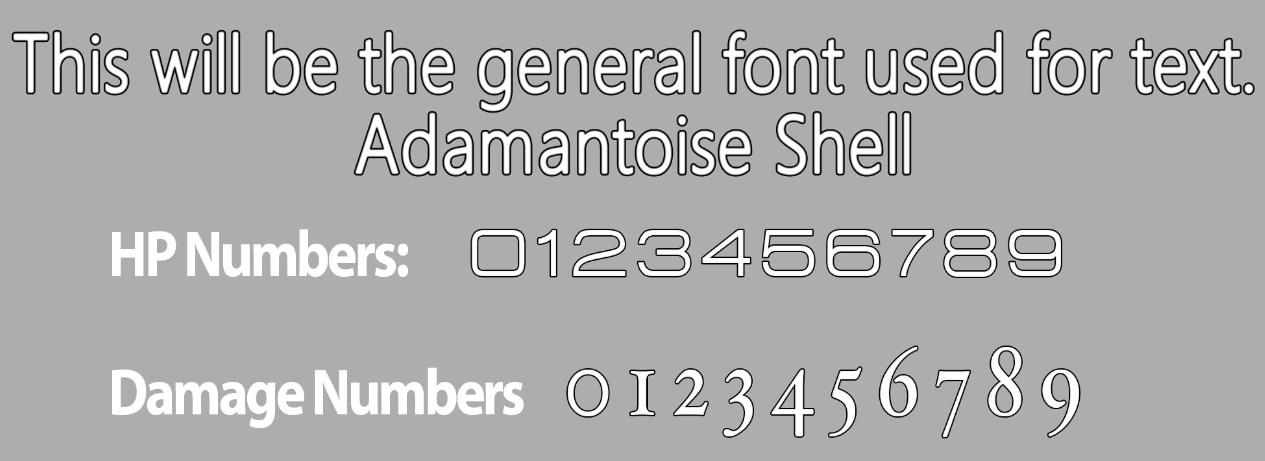
Bonez is currently working on a ESUI theme, so when he is ready to release that it will be an new option, I also am considering adding a new font as well my self, but any font I add will have the same spacing so it remains compatible with the layout.
 
This is what I'm thinking right now.
c3zklNv.png

All fonts used by Square in FFXII and especially the HUD in FFXIV
ARR.jpg

But there's no way to tell if it will look good until you actually do it.
 
Bonez is currently working on a ESUI theme, so when he is ready to release that it will be an new option, I also am considering adding a new font as well my self, but any font I add will have the same spacing so it remains compatible with the layout.
Sweet. Yeah, the fonts need to be compatible with the layout of the menus and boxes of the mod; makes sense.

This is what I'm thinking right now.
c3zklNv.png

All fonts used by Square in FFXII and especially the HUD in FFXIV
ARR.jpg

But there's no way to tell if it will look good until you actually do it.
That's cool! Looking forward to see it in action. Any idea on when it would be released?

I also think that a font that's more old-school-like, pixelated or blocky, would be welcome. I know a lot of people who would prefer the original vanilla font while prefering ESUI's UI layout.

In any case, thank you for your work on this. ESUI is part of the tripod of mods that contribute to making FF7 look much more modern, the other two being AI-upscaled backgrounds and textures, and Ninostyle's chibi models.
 
Hi guys an update on the controller addon.

After some testing on discord with Alamei, I got to the bottom of the wonder shop problems.


Short version is that there is multiple versions of the shop for different parts of the game, and I didnt apply the fix to all of them.


I have now redone the shop and the chocobo racing menu, to remove the spaces that are there in the stock game so the autosizing works properly, this should be on all of them at different parts of the game, I will release 1.07 with these fixes over the coming days.


After this build goes out there will be another build to support other UI fonts made by other developers.  Then the controller addon will work on SYW, zomiplayfont etc.
 
Last edited:
Sweet. Yeah, the fonts need to be compatible with the layout of the menus and boxes of the mod; makes sense.

That's cool! Looking forward to see it in action. Any idea on when it would be released?

I also think that a font that's more old-school-like, pixelated or blocky, would be welcome. I know a lot of people who would prefer the original vanilla font while prefering ESUI's UI layout.

In any case, thank you for your work on this. ESUI is part of the tripod of mods that contribute to making FF7 look much more modern, the other two being AI-upscaled backgrounds and textures, and Ninostyle's chibi models.

ESUI lite coming in the next catalog.


It uses zomiplay font with some ESUI layout changes (its not fully featured as some ESUI stuff needs the slimmer font).


Pics here.  Credit to Panteleimon for the font.

ESUI Lite
 
Last edited:
ESUI lite coming in the next catalog.


It uses zomiplay font with some ESUI layout changes (its not fully featured as some ESUI stuff needs the slimmer font).


Pics here.  Credit to Panteleimon for the font.

ESUI Lite
Damn, that's sweet! Thank you for this.

From your previous post, it seems like multiple fonts are coming? Will the fonts have to be added manually by yourself or will modders have the ability to add them themselves? (I don't know how open ESUI is as a mod)

In any case, this is cool, and I'm looking forward to seeing how the mod evolves over time.

P.S. Do you know if it's possible to add the original font to ESUI?
 
Providing they dont make layout changes and its just a graphical enhancement, they can be implemented the same way as the ff7 remake font was done, with a separate mod in the catalogue to be loaded on top of ESUI, so yes any developer can make a custom font as Bonez is doing and Fewtch did. :)
 
Okay, so after browsing multiple posts and troubleshooting pages I've come to the conclusion that any type of "text scrunching" or text issues with wonky spacing is caused by ESUI and issues arising from my game folder being a default steam install inside of Program Files?

Is this correct? If so, does that mean I need to change my steam install path to a non system folder, such as e:/Games?

This mod looks fantastic, but I'm sad to say that absolutely none of its features work for me, but when it's enabled, all of my text is scrunched together. All other mods work fine with my steam folder being located in Program Files. I'm new to ff7 modding but I don't understand why this mod doesn't work when all the others do.

Thanks for the great work.
 
and issues arising from my game folder being a default steam install inside of Program Files?

Is this correct? If so, does that mean I need to change my steam install path to a non system folder, such as e:/Games?
If your game install is inside a system-protected folder, all bets are off.  Until it's in a non-system folder (like E:\Games), you're on your own.
 
If your game install is inside a system-protected folder, all bets are off.  Until it's in a non-system folder (like E:\Games), you're on your own.
Since posting, I've relocated my game to E:\Games and my problem persists. ESUI is the only mod that refuses to work. I've tried many solutions from removing affected mods, restarting 7th Heaven & my PC, isolating the mod, trying different resolutions, different aspect ratios, etc. Nothing has solved the problem. I'm truly at a loss at this point.
 
Figured out my issue, and surprisingly enough I haven't seen this mentioned anywhere. There were apparently conflicts with using certain texture/ui mods because my 7H texture & mod folders weren't located in the game directory. I guess it makes sense in hindsight, but I don't recall any of the modding guides or FAQs mention that these two folders must be located in the game directory. Interesting.
 
Sorry for the lack of updates, I have added some requested changes including allowing independent control of field box transparency, as soon as it has been tested I will release the update.
 
Since posting, I've relocated my game to E:\Games and my problem persists. ESUI is the only mod that refuses to work. I've tried many solutions from removing affected mods, restarting 7th Heaven & my PC, isolating the mod, trying different resolutions, different aspect ratios, etc. Nothing has solved the problem. I'm truly at a loss at this point.

The one thing different in ESUI to most other mods, is it uses hext code injection to apply alignment adjustments to menu assets.  The characters not been correctly spaced out is a font spacing problem which in the current version of the mod is applied via hext code, you can feel free to DM me either on here or discord and I will try and diagnose the problem.
 
Hello! I'm taking my humble request to this thread.

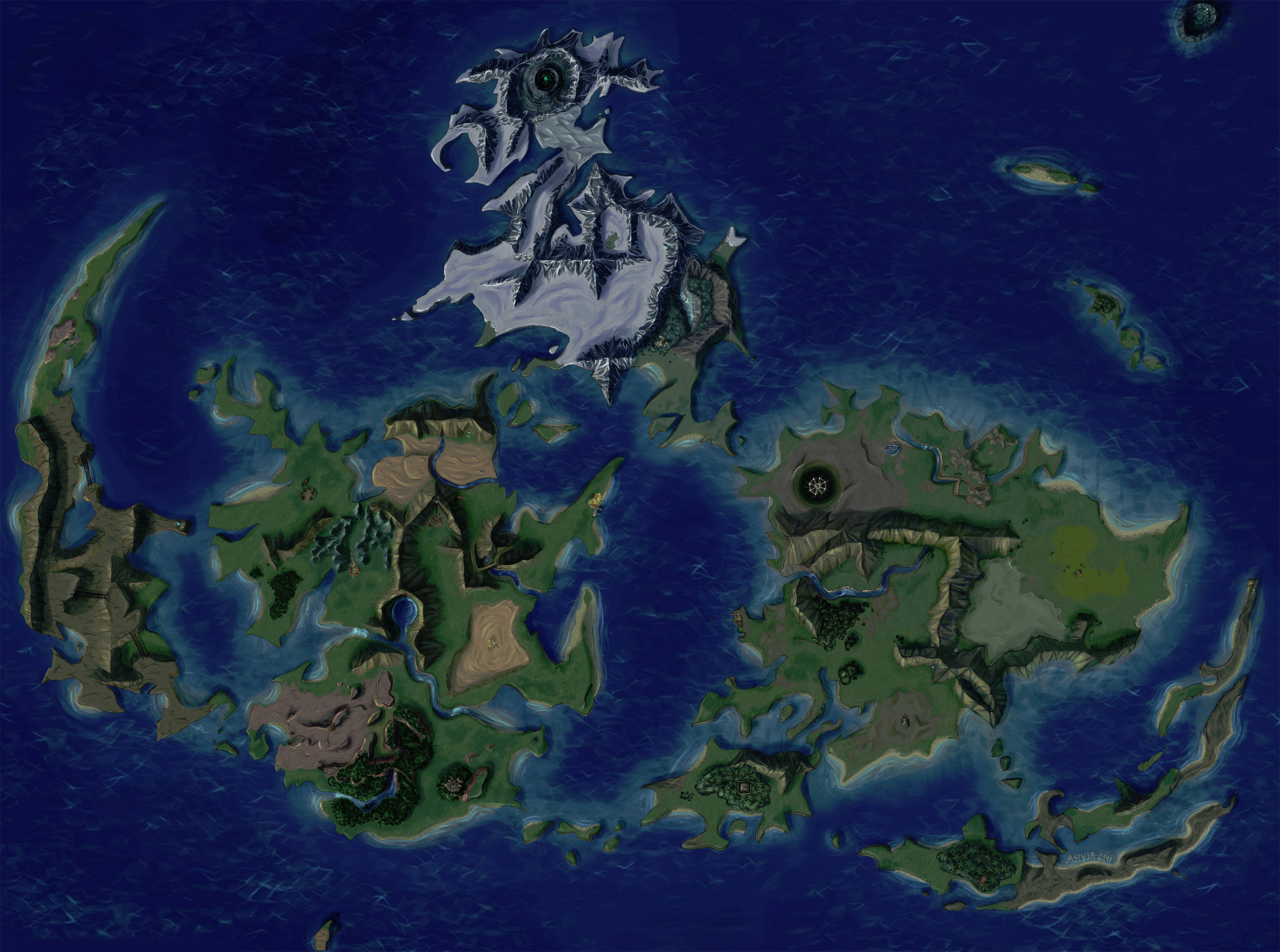
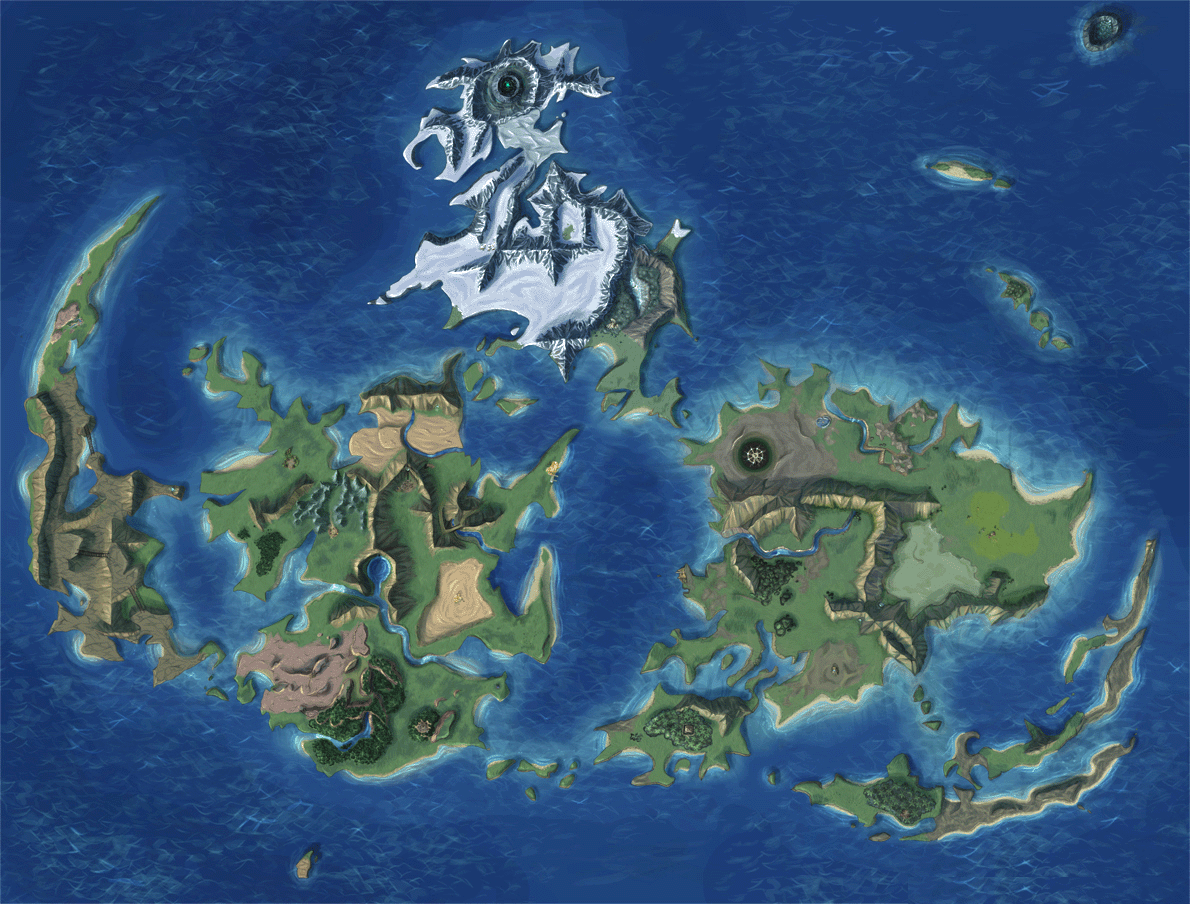
The map that's in the game (the one that pops up full screen when the player is on the overworld) is pretty crude and lacks detail. I would love it if ESUI did something about it, maybe by replacing that map with a better-looking one.

For example, this one:

But perhaps made brighter and more colorful to look like this one:

The first option is much higher in resolution, though the second one looks better overall, and shows a bit more map on the edges, for some reason.

What do you think? Would that be a good fit for ESUI?

(taken from DeviantArt)
 
I dont mind adding it if I get permission from the author on deviantart.


But in the meantime, if you use the world textures 3.0 from the qhimm catalog and pick the 3rd retexture option it will provide a improved world map.
 
Ok I have looked at the map, and compared it to other textures, there is one showstopper along with some other minor problems.


The showstopper is that the scale is not right so wouldnt be shown accurately in the game, the map is beautiful so I am prepared to try and make this work but its going to need time to edit it to fit in the game, whether thats me doing it or asking the original author to carry it out.  For this reason it will not be in the next build of ESUI which will be released soon however I am prepared to put it in a future release.


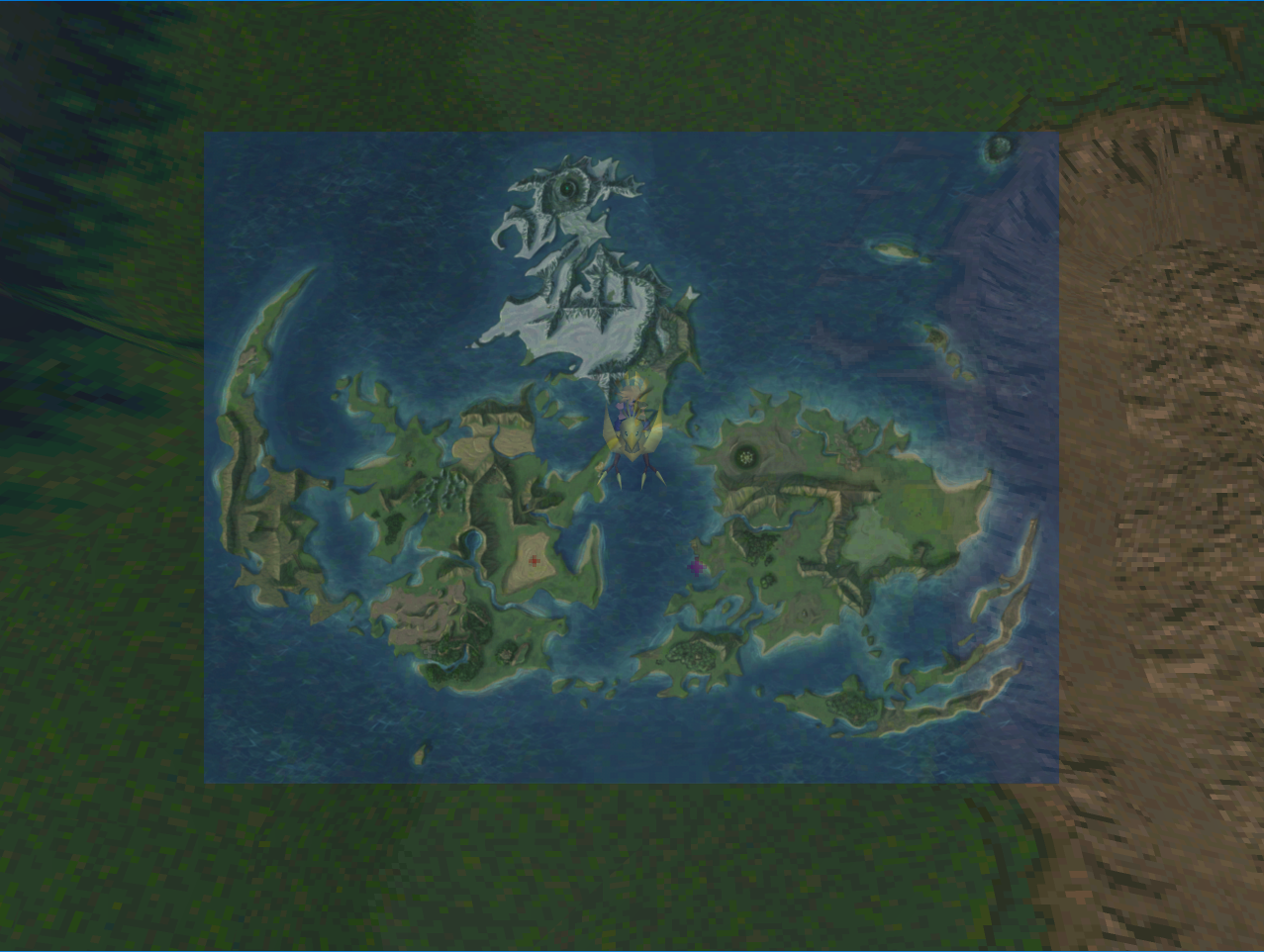
I am attaching how it looks currently.  Can see I am to the left of the desert and the dot is in the desert, there needs to be more sea either side  the map and top and bottom, plus there is no markers for key locations which I will work on adding.


Lpqh9VO.png
 
Last edited:
Ok I have looked at the map, and compared it to other textures, there is one showstopper along with some other minor problems.


The showstopper is that the scale is not right so wouldnt be shown accurately in the game, the map is beautiful so I am prepared to try and make this work but its going to need time to edit it to fit in the game, whether thats me doing it or asking the original author to carry it out.  For this reason it will not be in the next build of ESUI which will be released soon however I am prepared to put it in a future release.


I am attaching how it looks currently.  Can see I am to the left of the desert and the dot is in the desert, there needs to be more sea either side  the map and top and bottom, plus there is no markers for key locations which I will work on adding.


Lpqh9VO.png
Damn, that's a bummer.

If you intend on taking your time to make the map work, I say to you godspeed and thank you!

Do you want me to get in contact with the author of the map? I could tell her to get in contact with you so you could talk about this issue. Perhaps she'd be willing to help or contribute. Though do you have her twitter, so perhaps you don't need me as a middle-man.

Let me know!
 
Status
Not open for further replies.
Back
Top