[WIP/ALPHA REL]Battle Interface Reconstruction

  • Thread starter Thread starter Kranmer
  • Start date Start date
Status
Not open for further replies.
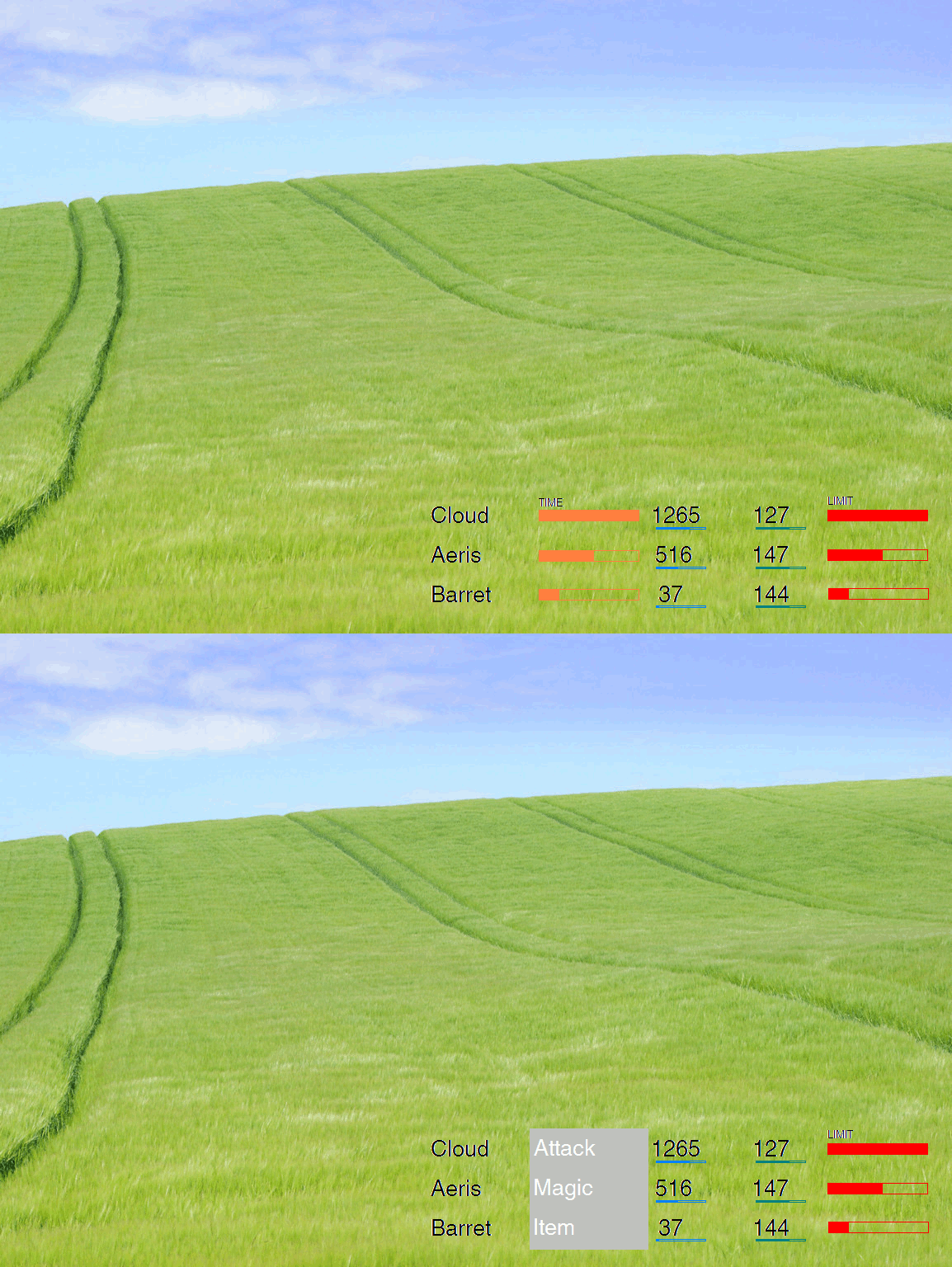
From the pics maybe its a drawing bug, but it seems if the bars are separeted by 1 pixel it looks better (the hp bar from the atb bar).
Also i love your windows.  Reminds me of FF6 (and 8 i think).
 
No it is deliberate, there is a grey line between the ATB and Limit.

IMPORTANT:


Due to the ridiculous nature of how things are ending up with all the options, corrections, conflictions and so forth (believe me, I need to be kasparov to keep track of it all), I am now ending support for the following:


  • original TA graphics.
  • Longhand versions of the normal menu.  From now on it is a choice between old graphics and new graphics with forced shorthand.  Also, 9999 option will continue to be supported.
  • old menu style.  From now on only the new non animated side menu is supported.


I have had to take this action to reduce the workload and because supporting old options just for the sake of appeasing purists is not something I find worthwhile when trying to better the game.  The game as it was, is not exactly brilliant, and sticking with such a design is counterproductive to improvement.

Team Avalanche graphics are largely being kept the same.  The following changes have so far been made:

1.  The cursor hand is smaller. 
2.  The red arrows indicating "All" is smaller.
3.  The borders are far smaller.  See above.
4.  The MP HP, LIMIT, NAME graphics are smaller and less intrusive.  With the newer interface the MP and HP are coloured.

5.  The Bars on the menu and in battle have been slightly altered to fit in with the new thinner border style

If anyone wants the original feel, they are free to use the last installer.


And since I am abandoning TA original graphics, this is what it looks like now, in progress:

4646466646464764.jpg


I will increase the limit and time boxes.

 
Last edited:
Awesome, I agree that the FF7 fat borders look horrid lol.
Looking forward to what you come up with.

2.  The red arrows indicating "All" is smaller.
You know, I remember the first time I played FF7, I had no idea what those red arrows meant haha.
I wonder if there is a better graphic we could use?
 
Nice, but I'm not that keen on the bright red line under the limit bar. Others may think it adds definition, though.
 
As much as I like the thinness of the new borders, I can't say I like the pure blackness of them. Give them some personality or something. Even two pixels thick is enough for a bit of depth.
 
Nice, but I'm not that keen on the bright red line under the limit bar. Others may think it adds definition, though.
That red line is just the inside showing through, the outside box needs expanding over it :)

As for personality of the black borders, being they are so thin, whenever I try to make it look a little more presentable the difference is poor.  I will upload the file soon and you may have a go at making it look nicer...  I don't know how much difference it will really make.

Also aali has kindly given me some code he made to create the right alignment.

http://i247.photobucket.com/albums/gg129/SeiferAlmasy2008/333333333333.jpg

http://i247.photobucket.com/albums/gg129/SeiferAlmasy2008/888888888888.jpg

and getting better with the original:

http://i247.photobucket.com/albums/gg129/SeiferAlmasy2008/99999999.jpg
 
Last edited:
Covarr has supplied me with some improved borders which I will add as an option.  For now this is the basic interface in progress:

Untitled-2-2.jpg


I will be back to this thread when installer is updated and this is ready for release.
 
How mind-bendingly difficult would it be to place the barrier gauges in callouts above the characters, adapting the "Target" cursors?

Just one way of cleaning up the interface.
 
I am not sure...  if you mean above the actual models, I have no idea.  I could not do it for sure.  Aali probably could we some rewriting.  In this original interface it doesnt really matter....  but with the newer one, it would be helpful.
 
It wouldn't involve changes to the original models, but rather to the 'Target' callouts. Let me show you what I mean:

39213_full.jpg


Don't know how easy this would be, though. You'd have to make the target indicators take three new different sources that would change as barrier statuses evolved. Not trivial...
 
and what if there arent 3 targets in a battle?  That idea is defo a no flyer... Unless you mean we alter it so that it still works with them, but I am guessing to do all that for measly barriers is indeed too much work.
 
Last edited:
Another possibility would be to display the enemies' Barrier gauges in their "target" cursors. Or their HP gauges. Not as useful or interesting as Bosola's idea, but it would still be nice if doable, IMO. I don't think it's doable, but I just wanted to throw the idea around.
 
Last edited:
Couple of thoughts:

1. I don't need to know my exact Max HP. All I really need to know is my current, though a proportion meter is quite nice too. I can usually guess the max HP values, because character HPs don't vary that massively from a 'common value' at each point in the game.
2. Time gauges aren't that important; timing moves isn't all that crucial anyway. I only really watch the time gauges as I'm waiting for anyone's turn, so you could probably lay the command menu on top of it.

So, if I find a way to put the barrier gauges somewhere else (makes sense considering they don't appear all the time), I could get something like this:

3L6dU.gif


Reactions?
 
It wouldnt be too bad except the command window ends  up much longer and you would constantly be pressing to remove it, also wouldnt fit on left.  It could be done, but I personally find the ends not justifying the means.

Kranmer might dabble with it though.  I am gonna finish off the original and the FFX one, and then we can probably add newer idea too if there is a will to do it.
 
Ah, I'd forgotten that the command window soon expands. Back to the drawing board.
 
That crap menu is really annoying, wish we could just change it to be more friendly.  But well, it doesnt look too bad anymore with small borders and how I have positioned it here...  as you will see soon enough :)
 
Just wondering why you using a grey line to separete the bars instead of using 1 or 2 transparent lines  :-o
 
Looks worse without grey line imho.  Looks nice to do it a bit more proper.  Transparent line is a tad cheap.

Feel free to edit the graphic in Photoshop or something.
 
Last edited:
I have decided to do something about the red arrows on the new interface and I think this is ok...

77.jpg
 
Last edited:
Status
Not open for further replies.
Back
Top