ESRganResizer 1.1.5 (a simple GUI for ERSgan + prefilter) (11/09/2019)

  • Thread starter Thread starter satsuki
  • Start date Start date
Status
Not open for further replies.
S

satsuki

Guest
As this soft was designed to help to start with esrgan, a better one exists here (thanks SlaughterThemAllRichtofen for telling me about it) : https://github.com/n00mkrad/cupscale
For advanced use never my soft nor cupscale is realy usefull as any advanced esrgan user will do his own processing, but to test and simple use of esrgan cupscale is realy good.


Hello, as i have cleaned the tool i use for esrgan + waifu prefilter (to share it with someone who needed it), I share it here too... may be helpfull for some of you ^^

115.PNG


esrg3.png


You need to extract the archive then follow the howto before using it (need to install cuda, python...)
You need a cuda9/10 capable gpu (nvidia gt9xx at least)
64bit windows.
The processing can take a lot of time (about 3/5s for a 640*480 picture on my gtx1060)
As ESRgan is realy gpu/ram dependant, you're going to be limited in source picture size (if too big the esrgan won't process depending en your gpu/ram)
I included a 'cpu' processing so you can use it without cuda but it will be realy slow (about 7min for a 640*480 on my core i7 8700k but on small picture it remain resonably fast)

download link : http://wowsatsuki.free.fr/ESRganResizer.1.1.5.7z
 
Last edited:
While I personally cant make much use of this; it is objectively speaking a great tool! Good work.
 
Just wanted to say thank you for the tool. It makes using ESRGAN more practical. I was hoping you implemented some kind of image splitting for when the picture doesn't fit into the available VRAM. Is that something you plan on implementing at some point ?
 
Hmm, looks like Mass Effect gets a new texture improvements.
 
Hello, I downloaded this tool, installed the pre-requisities, installed the python and processed all the scripts succesfully.
I have gtx970, windows 7 x64, 8gb ram

Yet, when I finally click on the ESRganResizer I get:

Unexpected error

Is there any way to find out what is going on? Some logs? Anything?

Thanks in advance!!
 
Can you post a screenshot ?
Have you tried to run it as adminstrator
I haven't tested it in windows 7 but it needs a 64bits os (are you on windows 64 bits or 32 bits ?)
 
Hmm, looks like Mass Effect gets a new texture improvements.
My, my, am I that famous ? :D

I'm looking into ESRGAN and Gigapixel for some more texture improvements, but for now Gigapixel has proved so much easier to use than ESRGAN that I almost only use it. Hence my question about image splitting, which would convince me to give ESRGAN a more serious try. That and the pregenerated models alsa64 shared on Discord, which make my life a lot easier.
 
Last edited:
Version 1.01 on the first message:
-Corrected a bug when you uncheck the waifu prefilter without inchecking the double step.
-Added a security so you can't launch with an empty list.
-Added a 'cpu' mod so you can test waifu + esrgan without a cuda gpu.
 
For some reason i can't get the output file when i render with Cuda.

I have RTX 2080ti with i9-9900k.
 
maybe you can try with cuda 10, don't know if cuda 9 is supported for such a new card
 
That is in fact the reason, rtx needs cuda 10 torch.

install pytorch torchvision cuda100 -c pytorch
 
Last edited:
I dont have the prog anymore because I was not able to run it.
But the screenshot would not made any benefit, it was a white tab 5x4cm with a text which stated: "Unexpected error" and that was it.

Yes, I tryed running as admin.
And yes, I have 64bit OS (Win7 x64)

Absolutely no idea on what was going on, because there were no logs to hint on the source of a problem :X

Im very sad about it, I work on Daggerfall Remaster, 2nd year, wanted to try to use this prog on some images/sprites :X

Anyway, there is this msg for you from the daggerfall forums form the user MrFlibble, who is active in this field on many forums:

Instead of copy paste, I link you there... 2nd post on that page:
https://forums.dfworkshop.net/viewtopic.php?f=14&p=23696#p23696

Be well! And Im damned :/ Suxx I cant use this tool, why o why
 
Hi there,

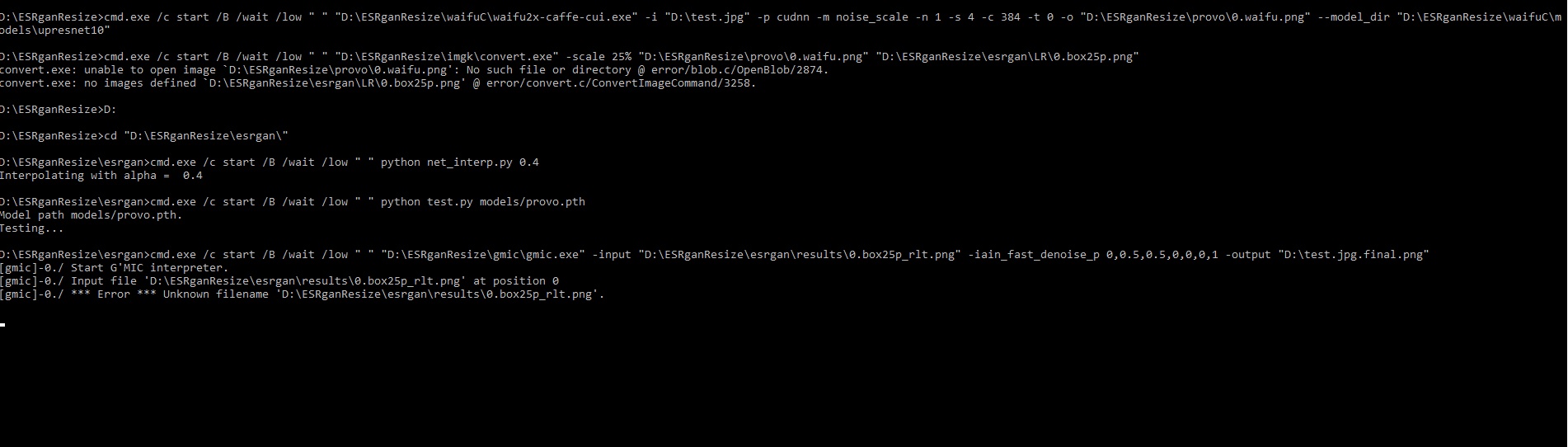
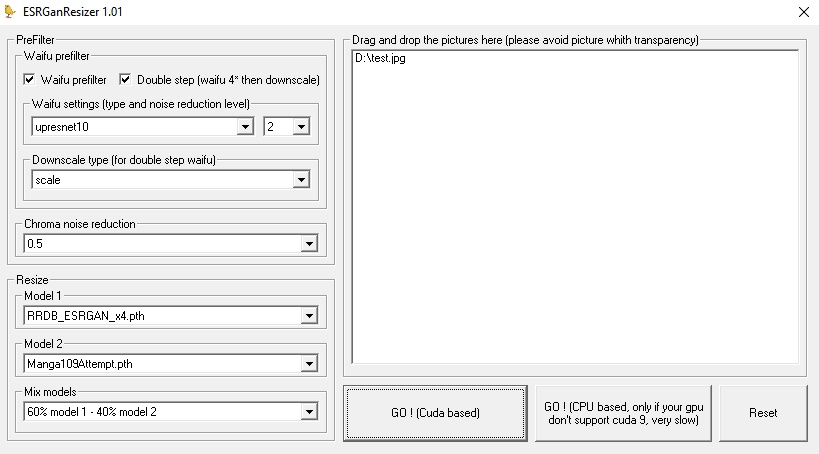
I also tried with CUDA 10.0 before. But no luck. But i can share my ESRGan GUI settings and CMD output if it's gonna help you.

CMD Output
Ek2Zh1K.jpg


ESRGAN GUI Settings:

ph1KdQd.jpg


Cheers
 
Last edited:
Seems waifu don't do its job.
Have you tried without waifu prefilter ?
 
Next version on its way :
w105.png


With this version you can use it as the current version with provided prefilters, but you'll can also set up your own prefilter commands.
It'll take me some time to do a proper setup but i'll share it asap
 
Looking forward to the next version. There are a few models for de-dithering and JPEG artifact removal that are x1 models. Do you know if you can code this support in? So far just been manually editing the .py file to have upscale=1, or making a copy of that file with equaling one and then swapping file. I think model 1 and model 2 at the moment use the same python file and there is not a way to mix an x1 and x4 file (for obvious reasons). Default should naturally be x4 as that is what the majority of models are setup to be, but there is a growing amount of x1 models I think. There are a few x2 models too that I know of.
 
I'm really looking forward to your next release.  Probably going to be using it on all of my mods. :D
 
Looking forward new release and praying it will actually work for me.
Thanks for contacting our community at Daggerfall forums :)
 
Status
Not open for further replies.
Back
Top