ESRganResizer 1.1.5 (a simple GUI for ERSgan + prefilter) (11/09/2019)

  • Thread starter Thread starter satsuki
  • Start date Start date
Status
Not open for further replies.
@themadpatter
I'll try to implement it in a easy way

@Mcindus
Maybe in a day or two, i'm realy busy ATM
 
Version 1.05 ready:
-Lots of UI change
-Added a way to use 1x,2x,4x,6x and 8x models
-Added a prefiter section so you can use your own prefilter's commands
-Added as save/load command to save and restore your own commands
-Added progress bar for easy check the processing
-Added a log file you can view in case of bugs
....
 
Great work on that update! Things work well for my different models. I seem to be able to run the GUI version of waifu2x-caffe.exe fine, but somehow not able to properly run the commands through waifu2x-caffe-cui.exe. I gotta figure out what might be blocking that for me, but then my setup should work quite well. Thank you!
 
Version 1.06 ready:
-Updated waifu2x-caffe to lastest version
-Added an option to choose cuda or cudnn engine for waifu2x-caffe
-Corrected a bug with noise level reduction with waifu command generator (thanks King of Worms)
 
1.07 ready (mostly changed things to easy errors detection):

err2.png


-Added error detection in prefilter or esrgan processing
-Added error log to esrgan so you can easily see the file witch bugs
-Modded esrgan script so if a file bugs, the processing continue with other files instead of stopping
-Changed the temporary file name to a source file name + numbers so you can easily bug hunting ^^
-If error detected in processing, the temp files aren't auto removed (as long as you don't launch another processing) so you can check the files.
 
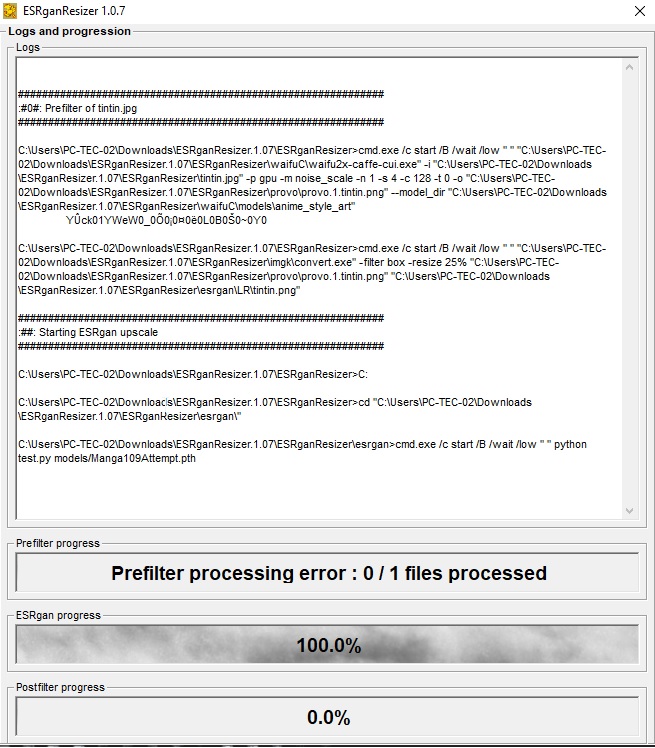
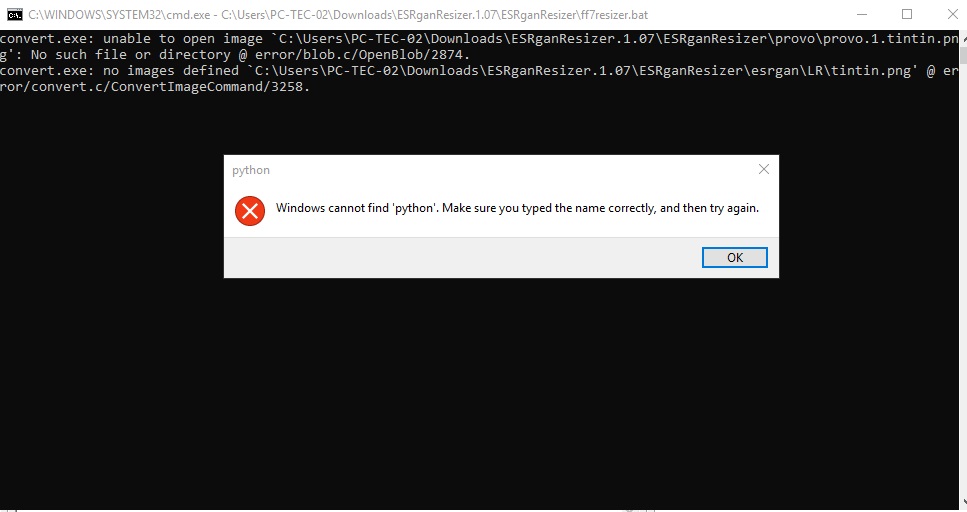
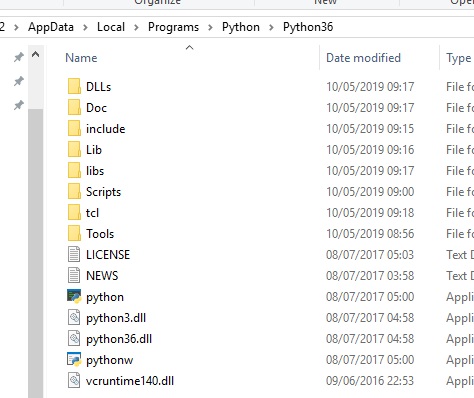
I'm getting an error message that keeps saying the program can't find Python, even though I literally installed Python. Any ideas?

y9dVfOa.jpg

vlcNLqG.jpg


uCrZUOv.jpg
 
1.08 ready:
-Corrected an overflow bug with big batch files
-Added an option to split the source file in 16 smaller pictures before esrgan processing, with this you can process big file you can't process because of gpu ram limits, but it can generate clipping ... for tests ^^
 
have you added python to system path ?
Seems like he did not. I had a same problem.

In the "how to" its stated to install the Python with default settings.
But by default, the "set as system path" option is DISABLED.
That can be confusing for Python newbies like me, also, that setting is easily missed, its not very visible.

It might be worth it, to change the description in HowTo to explicitly state to "enable system path" option.

Just a idea, hope it helps, thanks for a great prog!!!
 
i'm noticing an issue with certain image dimensions causing the tiler to create more than 16 tiles and then when the combiner goes to create the final image it fails. cropping the source image down a pixel or two in either height or width usually fixes it but its an annoying thing to do.
i've also had large batches along with image splitting causing overflows.
 
to use the split in 16 feature you need of course to have a width and height as a multiple of 16 or it won't works for exemple 800*608 will be ok but 800*600 won't
i'll do a more flexible version asap
 
Last edited:
Version 1.09 released :

Changelog
-Corrected a bug if there's special character in folders path
-Added a way better split option for use with esrgan with overlap to avoid bad assembly in final file (and you don't need to have a specific input size to get it works, only a peer number)
-Updated the howto

If you're updatding from older version please install the \runtime\Git-2.21.0-64-bit.exe file
 
I hope to use this tool for easing the use of ESRGAN to sharpen images for the purpose of deepfaking.  I know this is a FF related site but I found no other resource to try and resolve my issue.  I keep getting a "The system cannot find the file specified" error.  Any help would be appreciated.  See debug below:
#############################################################
:#0#: Prefilter of 00068.png
#############################################################

C:\ctp\ESRganResizer>cmd.exe /c start /B /wait /low " " "C:\ctp\ESRganResizer\waifuC\waifu2x-caffe-cui.exe" -i "C:\Temp\DeepFaceLabJesus\workspace\data_src\00068.png" -p cudnn -m noise -n 1 -c 128 -t 0 -o "C:\ctp\ESRganResizer\provo\provo.1.00068.png" --model_dir "C:\ctp\ESRganResizer\waifuC\models\photo"

C:\ctp\ESRganResizer>copy "C:\ctp\ESRganResizer\provo\provo.1.00068.png" "C:\ctp\ESRganResizer\esrgan\LR\00068.png"
The system cannot find the file specified.

#############################################################
#############################################################
#############################################################
:# Splitting sources files, can be long, please wait and don't close the commands files #:
#############################################################
#############################################################
#############################################################

C:\ctp\ESRganResizer>C:

C:\ctp\ESRganResizer>cd "C:\ctp\ESRganResizer\"

C:\ctp\ESRganResizer>move "C:\ctp\ESRganResizer\esrgan\LR\*.*" "C:\ctp\ESRganResizer\input\"
The filename, directory name, or volume label syntax is incorrect.

C:\ctp\ESRganResizer>cmd.exe /c start /B /wait /low " " "C:\ctp\ESRganResizer\step1_create_tiles.sh" --output-dir="C:\ctp\ESRganResizer\esrgan\LR"

#############################################################
:##: Starting ESRgan upscale
#############################################################

C:\ctp\ESRganResizer>C:

C:\ctp\ESRganResizer>cd "C:\ctp\ESRganResizer\esrgan\"

C:\ctp\ESRganResizer\esrgan>cmd.exe /c start /B /wait /low " " python test.py models/1xBC1_take2_260850.pth
Model path models/1xBC1_take2_260850.pth.
Testing...

#############################################################
:##: ESRgan upscale end
#############################################################

#############################################################
#############################################################
#############################################################
:# Merging result files, can be long, please wait and don't close the commands files #:
#############################################################
#############################################################
#############################################################

C:\ctp\ESRganResizer\esrgan>C:

C:\ctp\ESRganResizer\esrgan>cd "C:\ctp\ESRganResizer\"

C:\ctp\ESRganResizer>cmd.exe /c start /B /wait /low " " "C:\ctp\ESRganResizer\step3_assemble_tiles.sh" --input-dir="C:\ctp\ESRganResizer\esrgan\results" --input-postfix="_rlt"

C:\ctp\ESRganResizer>del /Q "C:\ctp\ESRganResizer\esrgan\results\*.*"

C:\ctp\ESRganResizer>move "C:\ctp\ESRganResizer\output\*.*" "C:\ctp\ESRganResizer\esrgan\results\"
The filename, directory name, or volume label syntax is incorrect.

#############################################################
:#0#: Postfilter of 00068.png
#############################################################

C:\ctp\ESRganResizer>copy "C:\ctp\ESRganResizer\esrgan\results\00068.png" "C:\Temp\DeepFaceLabJesus\workspace\data_src\00068.final.png"
The system cannot find the file specified.

C:\ctp\ESRganResizer>del /Q "C:\ctp\ESRganResizer\provo\*.*"

C:\ctp\ESRganResizer>del /Q "C:\ctp\ESRganResizer\esrgan\LR\*.*"

C:\ctp\ESRganResizer>del /Q "C:\ctp\ESRganResizer\esrgan\results\*.*"

C:\ctp\ESRganResizer>del /Q "C:\ctp\ESRganResizer\input\*.*"

C:\ctp\ESRganResizer>del /Q "C:\ctp\ESRganResizer\output\*.*"

#############################################################
:##: Finished
#############################################################

 
Satsuki, thanks a lot for this program, it works quite ok even on my problematic PC setup now.

Is there a way to setup the program so it doesnt add the "_Final" suffix to the new files?
Because I have to manually rename them afterwards to the original names...

Thank you :)
 
Not ATM but you can use ant renamer for exemple for batch rename in seconds
 
Status
Not open for further replies.
Back
Top